
Summary: in this tutorial, you will learn how to quickly insert data into the SQL Server table using the bulk copy function.
This tutorial begins where the import data from a CSV file into a SQL Server table tutorial left off.
To quickly insert a lot of data into the SQL Server table, you can use the bulk copy function. We’ll demonstrate how to perform a bulk data copy into the Customers table.
Perform a bulk copy of customer data #
Step 1. Download and copy the following customers.csv data into the data directory:
Download the customers.csv file
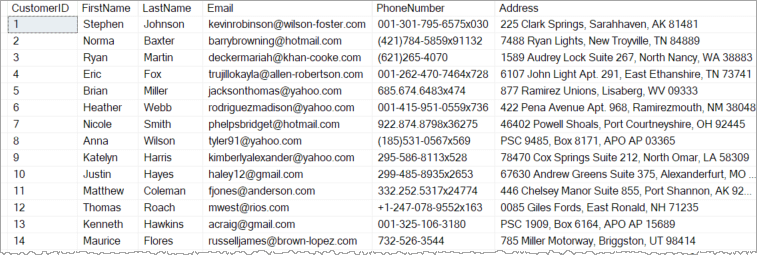
The customers.csv file includes 500 customer records, with all the columns from the Customers table including CustomerID, FirstName, LastName, Email, PhoneNumber, and Address.
Step 2. Create a new file bulk.py within the project directory:
mkdir dataStep 3. Add the following code to the bulk.py file:
from connect import create_connection
from utils import read_csv
def bulk_copy_customers(filename:str) -> bool:
customers = read_csv(filename)
if not customers:
return False
conn = create_connection()
if conn is None:
return False
with conn:
conn.bulk_copy('Customers',customers)
conn.commit()
return TrueHow it works.
First, import create_connection function from the connect module and read_csv function from the utils module:
from connect import create_connection
from utils import read_csvHere’s more information on the connect and utils modules.
Second, define a function bulk_copy_customers that accepts a CSV file name as a string and returns a boolean value indicating whether the bulk copy succeeds:
def bulk_copy_customers(filename:str) -> bool:Third, read the customer data from the CSV file specified by the filename argument, and return False if the customer file is empty:
customers = read_csv(filename)
if not customers:
return FalseFourth, create a new connection to the SQL Server by calling the create_connection function, and return False if the connection fails:
conn = create_connection()
if conn is None:
return FalseFifth, call the bulk_copy function of the Connection object to perform a bulk copy:
with conn:
conn.bulk_copy('Customers',customers)
conn.commit()The bulk_copy function accepts a table name and a list of tuples, with each tuple containing data representing a customer record.
The with statement ensures that the Connection object is managed properly so you don’t have to manually close it.
The commit() method permanently applies changes to the database. If you don’t call the commit() method, the changes won’t be saved to the database.
Finally, return True from the function to indicate that the bulk copy was successful:
return TrueStep 4. Modify the main.py module that uses the bulk_copy_customers function:
import logging, sys
from bulk import bulk_copy_customers
# config logging to console
logging.basicConfig(
stream=sys.stdout,
encoding='utf-8',
format='%(levelname)s:%(message)s',
level=logging.DEBUG
)
bulk_copy_customers('./data/customers.csv')How it works.
First, import logging and sys for logging purposes:
import logging, sysSecond, import the bulk_copy_customers function from the bulk module:
from bulk import bulk_copy_customersThird, configure the logging to output messages to the terminal:
logging.basicConfig(
stream=sys.stdout,
encoding='utf-8',
format='%(levelname)s:%(message)s',
level=logging.DEBUG
)Finally, call the bulk_copy_customers function to copy customer data from the ./data/customers.csv to the Customers table:
bulk_copy_customers('./data/customers.csv')Step 5. Open your terminal and run the main.py file:
python main.pyVerifying the bulk copy #
Step 1. Launch SQL Server Management Studio and connect to the SQL Server.
Step 2. Execute the following query that retrieves data from the Customers table:
SELECT * FROM customers;Output:
Download the project source code #
Download the project source code
Summary #
- Use the
bulk_copy()method of the Connection object to quickly load data into an SQL Server table.
Thank you for your feedback!
