
Summary: in this tutorial, you will learn how to import data from a CSV file into a table from a Python program.
This tutorial begins where the insert data into an SQL Server table from a Python program tutorial left off.
Preparing a CSV file #
Step 1. Create a new directory in the project directory called data.
Step 2. Copy the following authors.csv file that contains author data for the data directory:
The authors.csv file has three columns including first name, last name, and birth date:
First Name,Last Name,Birth Date
Robin,Calderon,1977-06-12
David,Hunter,1983-08-01
Craig,Hart,1991-12-13
...Reading data from a CSV file #
Step 1. Create a new module called utils.py.
Step 2. Define a function read_csv that reads data from a CSV file specified by a file name and returns a tuple:
import csv
def read_csv(filename:str) -> tuple:
with open(filename, 'r') as f:
reader = csv.reader(f)
next(reader) # skip the header
return [tuple(row) for row in reader]How it works.
First, open the CSV file:
with open(filename, 'r') as f:Second, the CSV file line by line:
reader = csv.reader(f)Third, skip the header:
next(reader) # skip the headerFinally, convert each line into a tuple before returning all the lines as a list of tuples.
return [tuple(row) for row in reader]Import data into a table #
Step 1. Create a new module import_author.py within the project directory:
Step 2. Define import_author_from_csv function to import data from a CSV file and insert each line into the Authors table:
from insert import insert_author
from utils import read_csv
def import_author_from_csv(filename: str) -> None:
authors = read_csv(filename)
for author in authors:
insert_author(*author)How it works.
First, import the insert function from the insert_author module and read_csv function from the utils module:
from insert import insert_author
from utils import read_csvSecond, read data from the CSV file specified by the filename using the read_csv function:
authors = read_csv(filename)The read_csv function returns a list of tuples, each containing the author’s first name, last name, and birth date.
Third, insert each author into the Authors table by calling the insert_author function:
for author in authors:
insert_author(*author)Step 3. Modify the main.py file to use the import_author_from_csv function to import data from the ./data/authors.csv into the Authors table:
import logging, sys
from import_author import import_author_from_csv
# config logging to console
logging.basicConfig(
stream=sys.stdout,
encoding='utf-8',
format='%(levelname)s:%(message)s',
level=logging.DEBUG
)
# import data from csv file
import_author_from_csv('./data/authors.csv')Step 4. Open your terminal and execute the main.py file:
python main.pyStep 5. Verify the import
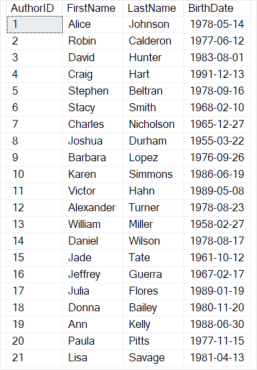
Open the SQL Server Management Studio (SSMS), connect to the SQL Server, and execute the following query:
SELECT * FROM Authors;Output:
Download the project source code #
Download the project source code
Summary #
- Use the
csvmodule to read data from a CSV file - Execute the
INSERTstatement to insert each line of the CSV file into a table.
Thank you for your feedback!
