
Summary: in this tutorial, you will learn how to use the SQL Server aliases, including column aliases and table aliases.
SQL Server column alias #
When you use the SELECT statement to query data from a table, SQL Server uses the column names as the column headings for the output. For example:
SELECT
first_name,
last_name
FROM
sales.customers
ORDER BY
first_name;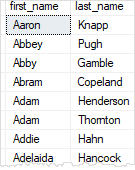
The output indicates that the SQL Server uses the first_name and last_name column names as the column headings respectively.
To obtain the full names of customers, you can concatenate the first name, space, and the last name using the concatenation + operator as shown in the following query:
SELECT
first_name + ' ' + last_name
FROM
sales.customers
ORDER BY
first_name;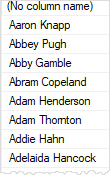
SQL Server returns the full name column as ( No column name) which is not meaningful in this case.
To assign a column or an expression a temporary name during the query execution, you use a column alias.
The following illustrates the column alias syntax:
column_name | expression AS column_aliasIn this syntax, you use the AS keyword to separate the column name or expression and the alias.
Because the AS keyword is optional, you can assign an alias to a column as follows:
column_name | expression column_aliasBack to the example above, you can rewrite the query using a column alias:
SELECT
first_name + ' ' + last_name AS full_name
FROM
sales.customers
ORDER BY
first_name;Note that if the column alias contains spaces, you need to enclose it in quotation marks, as shown in the following example:
SELECT
first_name + ' ' + last_name AS 'Full Name'
FROM
sales.customers
ORDER BY
first_name;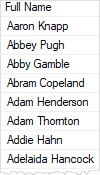
The following example shows how to assign an alias to a column:
SELECT
category_name 'Product Category'
FROM
production.categories;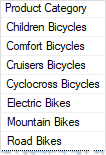
In this example, the product category column alias is much more clear than the category_name column name.
When you assign a column an alias, you can use either the column name or the column alias in the ORDER BY clause as shown in the following example:
SELECT
category_name 'Product Category'
FROM
production.categories
ORDER BY
category_name;
SELECT
category_name 'Product Category'
FROM
production.categories
ORDER BY
'Product Category';Note that SQL Server processes the ORDER BY clause after the SELECT clause, so you can use column aliases in the ORDER BY clause.
SQL Server table alias #
A table can be given an alias, which is known as a correlation name or range variable.
Similar to the column alias, you can assign a table a temporary name with or without the AS keyword:
table_name AS table_alias
table_name table_aliasFor example:
SELECT
sales.customers.customer_id,
first_name,
last_name,
order_id
FROM
sales.customers
INNER JOIN sales.orders ON sales.orders.customer_id = sales.customers.customer_id;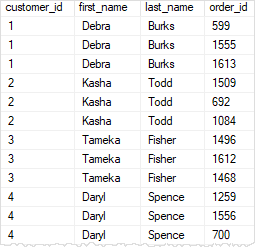
In this example, both the customers and the orders tables have a column with the same name customer_id, so you need to refer to the column using the following syntax:
table_name.column_namesuch as:
sales.custoners.customer_id
sales.orders.customer_idIf you don’t do so, the SQL server will issue an error.
The query above is quite difficult to read. Fortunately, you can improve its readability by using the table alias as follows:
SELECT
c.customer_id,
first_name,
last_name,
order_id
FROM
sales.customers c
INNER JOIN sales.orders o ON o.customer_id = c.customer_id;In this query, c is the alias for the sales.customers table and o is the alias for the sales.orders table.
When you assign an alias to a table, you must use the alias to refer to the table column. Otherwise, SQL Server will issue an error.
Summary #
- A column alias is a temporary name assigned to a column or an expression in a query’s result set.
- Use a column alias to rename the output of a column or an expression to make it more meaningful.
- A table alias is a shorthand or temporary name assigned to a table in a query.
- Use table aliases when joining multiple tables or when referencing the same table more than once in a query.
Thank you for your feedback!
