
Summary: in this tutorial, you will learn how to use the SQL Server OUTER APPLY clause to perform a left join of a table with a table-valued function or a correlated subquery.
Introduction to the SQL Server OUTER APPLY clause #
The OUTER APPLY clause allows you to perform a left join of a table with a table-valued function or a correlated subquery.
In SQL Server, a table-valued function is a user-defined function that returns multiple rows as a table.
The OUTER APPLY clause works like a LEFT JOIN clause. However, instead of joining two tables, the OUTER APPLY clause joins a table with a table-valued function or a correlated subquery.
The following shows the syntax of the OUTER APPLY clause:
SELECT
select_list
FROM
table1
OUTER APPLY table_function(table1.column) AS alias;In this syntax:
table1is the main table from which you want to join.table_functionis the table-valued function to apply to each row. Alternatively, you can use a correlated subquery.columnis the column fromtable1that will be passed as a parameter to thetable_function.aliasis the alias for the result set returned by thetable_function.
In this query, the OUTER APPLY clause will apply the table_function to each row from the table1, or execute a correlated subquery for each row from the table1.
If there are no corresponding rows from the result set of the table-valued function or correlated subquery, the OUTER APPLY clause will use NULL for “right table” to create a new row in the result set.
In practice, you should use the OUTER APPLY clauses when you cannot use LEFT JOIN clauses.
SQL Server OUTER APPLY clause examples #
Let’s take some examples of using the OUTER APPLY clause.
We’ll use the production.products and production.order_items tables from the sample database for the demonstration:
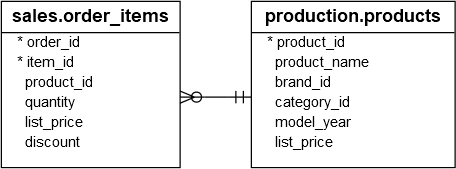
1) Using the SQL Server OUTER APPLY clause to join a table with a correlated subquery #
The following example uses the OUTER APPLY clause to join the production.products table with a correlated subquery to retrieve the product name, quantity, and discount of the products with the brand id 1 in the latest orders:
SELECT
p.product_name,
r.quantity,
r.discount
FROM
production.products p OUTER apply (
SELECT
top 1 i.*
FROM
sales.order_items i
INNER JOIN sales.orders o ON o.order_id = i.order_id
WHERE
product_id = p.product_id
ORDER BY
order_date DESC
) r
WHERE
p.brand_id = 1
ORDER BY
r.quantity;Output:
product_name | quantity | discount
-----------------------------------------------------------------------
Electra Townie Go! 8i Ladies' - 2018 | NULL | NULL
Electra Savannah 1 (20-inch) - Girl's - 2018 | NULL | NULL
Electra Sweet Ride 1 (20-inch) - Girl's - 2018 | NULL | NULL
Electra Townie Original 21D - 2018 | 1 | 0.20
Electra Townie Balloon 7i EQ - 2018 | 1 | 0.10
Electra Townie Balloon 3i EQ - 2017/2018 | 1 | 0.10
Electra Townie Balloon 8D EQ - 2016/2017/2018 | 1 | 0.07How it works.
For each row from the production.products table, the OUTER APPLY executes the following correlated subquery to retrieve the discount and quantity of the latest orders:
SELECT
TOP 1 i.*
FROM
sales.order_items i
INNER JOIN sales.orders o ON o.order_id = i.order_id
WHERE
product_id = p.product_id
ORDER BY
order_date DESC2) Using the OUTER APPLY clause to join a table with a table-valued function #
First, define a table-valued function that returns latest order items of a product specified by the product id:
CREATE FUNCTION GetLatestQuantityDiscount (@product_id INT)
RETURNS TABLE
AS RETURN (
SELECT
TOP 1 i.*
FROM
sales.order_items i
INNER JOIN sales.orders o ON o.order_id = i.order_id
WHERE
product_id = @product_id
ORDER BY
order_date DESC
);Second, use the OUTER APPLY clause with the table-valued function GetLatestQuantityDiscount to retrieve the latest quantity and discount of each product in the production.products table:
SELECT
p.product_name,
r.quantity,
r.discount
FROM
production.products p
OUTER APPLY GetLatestQuantityDiscount(p.product_id) r
WHERE
p.brand_id = 1
ORDER BY
r.quantity;It returns the same result as the query that joins with the correlated subquery above.
Summary #
- Use the
OUTER APPLYoperator to perform a left join of a table with the table-valued function or a correlated subquery.
Thank you for your feedback!
