
Summary: in this tutorial, you will learn how to use the SQL Server REPLICATE() function to replicate a string a specified number of times.
SQL Server REPLICATE() function overview #
The REPLICATE() function repeats a string a specified number of times. Its syntax is straightforward as follows:
REPLICATE(input_string, count);In this syntax:
input_stringis an expression that evaluates to a value of the character or binary type.countis the number of times that theinput_stringwill be repeated in the result string.
SQL Server REPLICATE() function examples #
Let’s take some examples of using the REPLICATE()function.
A) Using REPLICATE() function to repeat a literal string #
This example uses the REPLICATE() function to repeat the character z three times:
SELECT
REPLICATE('z',3) result;Here is the output:
result
------
zzz
(1 row affected)B) Using REPLICATE() function making columns with leading zero data #
First, create a new table named spare_parts in the production schema:
CREATE TABLE production.spare_parts (
part_id INT IDENTITY PRIMARY KEY,
part_no VARCHAR(10) NOT NULL UNIQUE,
description VARCHAR(50) NOT NULL
);Suppose the part_no must always have 10 characters. If a spare part has less than 10 characters, the application needs to pad leading zeros so that the length of the spare part always has 10 characters.
Second, insert some values into the production.spare_parts table:
INSERT INTO
production.spare_parts(part_no, description)
VALUES
('FRMTUBE','Frame Tube'),
('CHNCO','Chain Cover'),
('CRKS','Cranks');Third, select data from the production.spare_parts table, left pads zeros using the REPLICATE() function:
SELECT
part_id,
CONCAT(
REPLICATE('0', 10 - LEN(part_no)),
part_no
) part_no,
description
FROM
production.spare_parts;Here is the output:
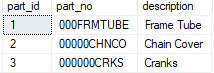
In this example:
First, use the LEN() function to calculate the number of zeros to be padded:
10 - LEN(part_no)Second, use the REPLICATE() function to replicate the necessary zeros to be padded:
REPLICATE('0', 10 - LEN(part_no)Third, use the CONCAT() function to left pad the zeros to the part no:
CONCAT(
REPLICATE('0', 10 - LEN(part_no)),
part_no
) part_noIn this tutorial, you have learned how to use the SQL Server REPLICATE() function to replicate a string a specified number of times.
Thank you for your feedback!
