
Summary: in this tutorial, you will learn how to use the SQL Server CREATE TRIGGER statement to create a new trigger.
Introduction to SQL Server CREATE TRIGGER statement #
The CREATE TRIGGER statement allows you to create a new trigger that is fired automatically whenever an event such as INSERT, DELETE, or UPDATE occurs against a table.
The following illustrates the syntax of the CREATE TRIGGER statement:
CREATE TRIGGER [schema_name.]trigger_name
ON table_name
AFTER {[INSERT],[UPDATE],[DELETE]}
[NOT FOR REPLICATION]
AS
{sql_statements}In this syntax:
- The
schema_nameis the name of the schema to which the new trigger belongs. The schema name is optional. - The
trigger_nameis the user-defined name for the new trigger. - The
table_nameis the table to which the trigger applies. - The event is listed in the
AFTERclause. The event could beINSERT,UPDATE, orDELETE. A single trigger can fire in response to one or more actions against the table. - The
NOT FOR REPLICATIONoption instructs SQL Server not to fire the trigger when data modification is made as part of a replication process. - The
sql_statementsis one or more Transact-SQL used to carry out actions once an event occurs.
“Virtual” tables for triggers: INSERTED and DELETED #
SQL Server provides two virtual tables that are available specifically for triggers called INSERTED and DELETED tables. SQL Server uses these tables to capture the data of the modified row before and after the event occurs.
The following table shows the content of the INSERTED and DELETED tables before and after each event:
| DML event | INSERTED table holds | DELETED table holds |
|---|---|---|
| INSERT | rows to be inserted | empty |
| UPDATE | new rows modified by the update | existing rows modified by the update |
| DELETE | empty | rows to be deleted |
SQL Server CREATE TRIGGER example #
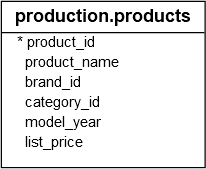
Let’s look at an example of creating a new trigger. We will use the production.products table from the sample database for the demonstration.
1) Create a table for logging the changes #
The following statement creates a table named production.product_audits to record information when an INSERT or DELETE event occurs against the production.products table:
CREATE TABLE production.product_audits(
change_id INT IDENTITY PRIMARY KEY,
product_id INT NOT NULL,
product_name VARCHAR(255) NOT NULL,
brand_id INT NOT NULL,
category_id INT NOT NULL,
model_year SMALLINT NOT NULL,
list_price DEC(10,2) NOT NULL,
updated_at DATETIME NOT NULL,
operation CHAR(3) NOT NULL,
CHECK(operation = 'INS' or operation='DEL')
);The production.product_audits table has all the columns from the production.products table. In addition, it has a few more columns to record the changes e.g., updated_at, operation, and the change_id.
2) Creating an after DML trigger #
First, to create a new trigger, you specify the name of the trigger and schema to which the trigger belongs in the CREATE TRIGGER clause:
CREATE TRIGGER production.trg_product_auditNext, you specify the name of the table, which the trigger will fire when an event occurs, in the ON clause:
ON production.productsThen, you list the one or more events which will call the trigger in the AFTER clause:
AFTER INSERT, DELETEThe body of the trigger begins with the AS keyword:
AS
BEGINAfter that, inside the body of the trigger, you set the SET NOCOUNT to ON to suppress the number of rows affected messages from being returned whenever the trigger is fired.
SET NOCOUNT ON;The trigger will insert a row into the production.product_audits table whenever a row is inserted into or deleted from the production.products table. The data for insert is fed from the INSERTED and DELETED tables via the UNION ALL operator:
INSERT INTO
production.product_audits
(
product_id,
product_name,
brand_id,
category_id,
model_year,
list_price,
updated_at,
operation
)
SELECT
i.product_id,
product_name,
brand_id,
category_id,
model_year,
i.list_price,
GETDATE(),
'INS'
FROM
inserted AS i
UNION ALL
SELECT
d.product_id,
product_name,
brand_id,
category_id,
model_year,
d.list_price,
getdate(),
'DEL'
FROM
deleted AS d;The following put all parts together:
CREATE TRIGGER production.trg_product_audit
ON production.products
AFTER INSERT, DELETE
AS
BEGIN
SET NOCOUNT ON;
INSERT INTO production.product_audits(
product_id,
product_name,
brand_id,
category_id,
model_year,
list_price,
updated_at,
operation
)
SELECT
i.product_id,
product_name,
brand_id,
category_id,
model_year,
i.list_price,
GETDATE(),
'INS'
FROM
inserted i
UNION ALL
SELECT
d.product_id,
product_name,
brand_id,
category_id,
model_year,
d.list_price,
GETDATE(),
'DEL'
FROM
deleted d;
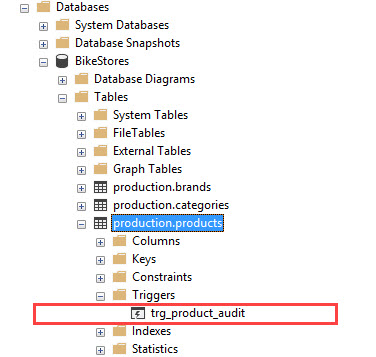
ENDFinally, you execute the whole statement to create the trigger. Once the trigger is created, you can find it under the triggers folder of the table as shown in the following picture:
3) Testing the trigger #
The following statement inserts a new row into the production.products table:
INSERT INTO production.products(
product_name,
brand_id,
category_id,
model_year,
list_price
)
VALUES (
'Test product',
1,
1,
2018,
599
);Because of the INSERT event, the production.trg_product_audit trigger of production.products table was fired.
Let’s examine the contents of the production.product_audits table:
SELECT
*
FROM
production.product_audits;Here is the output:

The following statement deletes a row from the production.products table:
DELETE FROM
production.products
WHERE
product_id = 322;As expected, the trigger was fired and inserted the deleted row into the production.product_audits table:
SELECT
*
FROM
production.product_audits;The following picture shows the output:

In this tutorial, you have learned how to create a trigger in SQL Server to respond to one or more events such as insert and delete.
Thank you for your feedback!
