Summary: in this tutorial, you’ll learn about the TypeScript types and their purposes.
What is a type in TypeScript #
In TypeScript, a type is a convenient way to refer to different properties and functions that a value has.
A value is anything you can assign to a variable e.g., a number, a string, an array, an object, and a function.
For example, see the following value:
'Hello'When you look at this value, you can say it is a string. This value has properties and methods that a string has.
For example, the 'Hello' value has a property called length that returns the number of characters:
console.log('Hello'.length); // 5It also has many methods like match(), indexOf(), and toLocaleUpperCase(). For example:
console.log('Hello'.toLocaleUpperCase()); // HELLOWhen you look at the value 'Hello' and describe it by listing the properties and methods, it would be inconvenient.
A shorter way to refer to a value is to assign it a type. In this example, you say 'Hello' is a string. Then, you know that you can use the properties and methods of a string for the value 'Hello'.
In conclusion, in TypeScript:
- a type is a label that describes the different properties and methods that a value has
- every value has a type.
Types in TypeScript #
TypeScript inherits the built-in types from JavaScript. TypeScript types are categorized into:
- Primitive types.
- Object types.
Primitive types #
The following illustrates the primitive types in TypeScript:
| Name | Description |
string | Represent text data. |
number | Represent numeric values. |
boolean | Have true and false values. |
null | Have one value: null. |
undefined | Have one value: undefined. It is the default value of an uninitialized variable. |
symbol | Represent a unique constant value. |
Object types #
Object types are functions, arrays, classes, etc. Later, you’ll learn how to create custom object types.
Purposes of types in TypeScript #
There are two main purposes of types in TypeScript:
- First, types are used by the TypeScript compiler to analyze your code for errors.
- Second, types allow you to understand what values are associated with variables.
Examples of TypeScript types #
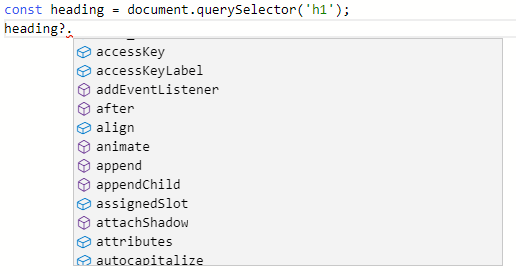
The following example uses the querySelector() method to select the <h1> element:
const heading = document.querySelector('h1');The TypeScript compiler knows that the type of heading is HTMLHeadingElement:

And it shows a list of methods for the HTMLHeadingElement type that heading can access:
If you try to access a property or method that doesn’t exist, the TypeScript compiler will show an error. For example:

Summary #
- In TypeScript, every value is associated with a type.
- A type is a label that describes the properties and methods that a value has.
- TypeScript compiler uses types to analyze your code for hunting bugs and errors.
Thank you for your feedback!
