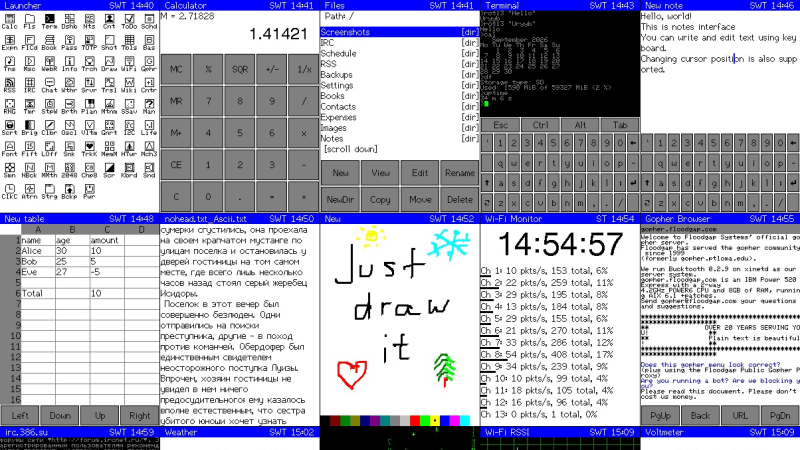
A grid of screenshots of various applications on the CYD PDA

Cheap Yellow Display Dreams Of PDA

Everybody loves the Cheap Yellow Display (CYD) ESP32 dev boards, so why not treat yours to a little PDA? That’s right: turn it into a Portable Digital Assistant and relive the glory days of Palm with this project from [sau412].

For those readers who are too young to remember, a PDA was basically a phoneless and cameraless smart-phone, and devices running Palm Corporation’s Palm OS ruled the roost for most of the 90s and early 2000s. [sau412] hasn’t written an emulator or port of Palm OS; rather he’s created his own firmware for the ESP32-based CYD that is inspired by the PDAs of yore, and has many features you’d have expected back in the day. That includes a Gopher browser, to let you check out the undying alternative to the World Wide Web. There isn’t a general-purpose web browser, but there are RSS and Wikipedia readers, and what else do you need? At least you won’t end up doomscrolling.

There are also a passel of games and a BASIC interpreter, and the usual practical things like a calendar, calculator and contact list. Everything from ebook readers to translators, all of it by [sau421]. If you’ve got a CYD kicking around, you could do worse than give it a little PDA. Using the web-based flasher, we had it up and running in five minutes or so, but without an SD card we couldn’t test all the apps.

This is hardly the first ESP32 PDA  that we’ve featured, but leaning into the CYD means it’s the simplest project to replicate.  If you’re jonesing for the original Palm OS experience on more modern hardware, Pumpkin OS can get you going on x86 or ARM.
 

Image

Building A Clamshell Writer Deck

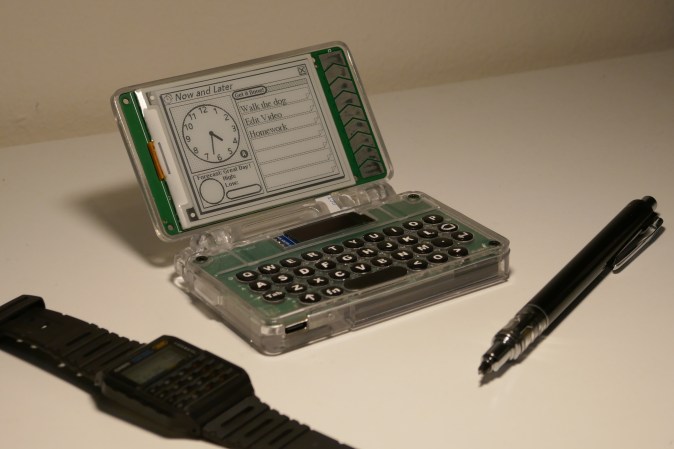
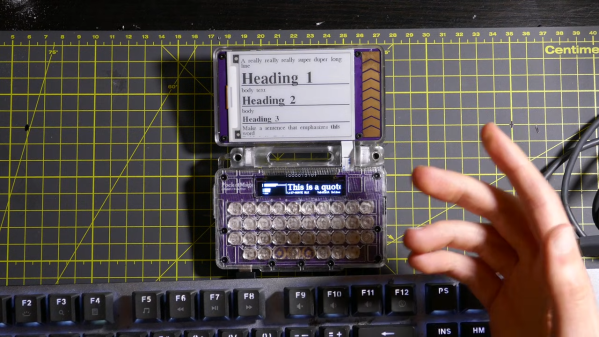
Most of us do our writing on computers these days, but the modern computing environment does present a lot of distractions. That’s let to the concept of the writer deck, a simplified device intended more specifically for word processing tasks. [Ashtf] has built a great example of the form with a modified version of the PocketMage device.

The PocketMage is a clamshell PDA device that [Ashtf] has been working on for some time. It’s powered by an ESP32, hooked up to a nice e-ink display. In its basic form, it’s not the ideal device for doing serious writing work, mostly because of its tiny keyboard. However, [Ashtf] has since added external keyboard support, which completely changes the game. With the use of a small USB C to USB A adapter, you can hook up any conventional USB keyboard that you like to best attain your maximum typing speed.

The result is a compact, simple device that lets you type away without distractions. If your latest fanfic isn’t coming along quickly enough because you keep losing focus to social media, perhaps this is a route you might like to go. [Ashtf] also included Markdown support so you can create richer documents on the device while operating in what is still fundamentally a text-only environment.

It’s neat to build custom devices that suit your own personal productivity needs. If you dig the PocketMage, you might like to check out the design files on Github. We’ve featured some other fun writer decks before, too. Video after the break.

Continue reading “Building A Clamshell Writer Deck” →

Image

An Awful 1990s PDA Delivers AI Wisdom

There was a period in the 1990s when it seemed like the personal data assistant (PDA) was going to be the device of the future. If you were lucky you could afford a Psion, a PalmPilot, or even the famous Apple Newton — but to trap the unwary there were a slew of far less capable machines competing for market share.

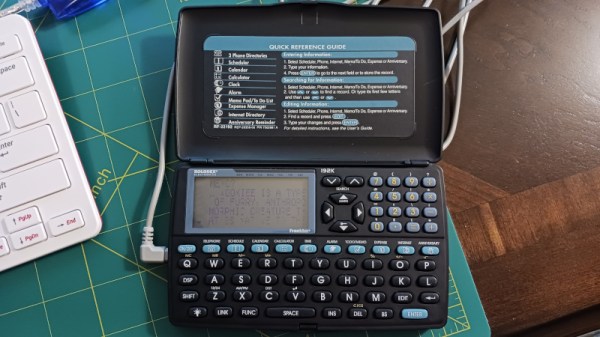
[Nick Bild] has one of these, branded Rolodex, and in a bid to make using a generative AI less alluring, he’s set it up as the interface to an LLM hosted on a Raspberry Pi 400. This hack is thus mostly a tale of reverse engineering the device’s serial protocol to free it from its Windows application.

Finding the baud rate was simple enough, but the encoding scheme was unexpectedly fiddly. Sadly the device doesn’t come with a terminal because these machines were very much single-purpose, but it does have a memo app that allows transfer of text files. This is the wildly inefficient medium through which the communication with the LLM happens, and it satisfies the requirement of making the process painful.

We see this type of PDA quite regularly in second hand shops, indeed you’ll find nearly identical devices from multiple manufacturers also sporting software such as dictionaries or a thesaurus. Back in the day they always seemed to be advertised in Sunday newspapers and aimed at older people. We’ve never got to the bottom of who the OEM was who manufactured them, or indeed cracked one apart to find the inevitable black epoxy blob processor. If we had to place a bet though, we’d guess there’s an 8051 core in there somewhere.

Continue reading “An Awful 1990s PDA Delivers AI Wisdom” →

Image

EInk PDA Revisited

In the dark ages, before iOS and Android phones became ubiquitous, there was the PDA. These handheld computers acted as simple companions to a computer and could often handle calendars, email, notes and more. Their demise was spelled by the smartphone, but the nostalgia of having a simple handheld and romanticizing about the 90’s and 2000’s is still there. Fortunately for the nostalgic among our readers, [Ashtf] decided to give us a modern take on the classic PDAs.

Continue reading “EInk PDA Revisited” →

Image

A PDA From An ESP32

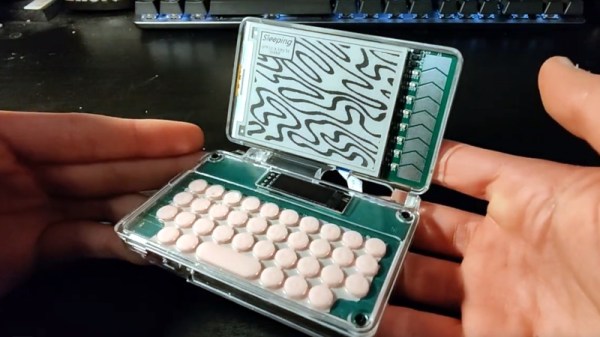
The ESP32 series of microcontrollers have been with us for quite a few years now and appeared in both Tensilica and RISC-V variants, both of which deliver an inexpensive and powerful device. It’s thus shown up in quite a few handheld computers, whether they be conference badges or standalone devices, and this is definitely a field in which these chips have more to give. We’re pleased then to see this e-ink PDA from [ashtf8], which we think raises the bar on this type of device.

At its heart is an ESP32-S3, on the back side of a QWERTY keyboard PCB, and for a display it has an e-ink screen. To get over the annoying e-ink refresh when typing text it uses a hybrid of e-ink and OLED, with a small OLED holding the current line which can be periodically sent to the e-ink. Perhaps the nicest thing about the hardware though is the clear resin printed clamshell case, and a hand-cast silicone membrane for the keyboard. That has always been a part considered difficult to produce, and here he is making one from scratch. Take a look at the video below the break.

Software-wise it has a range of apps with more promised, but even as it stands it looks useful enough to work with. If that’s not enough, then perhaps an ESP32 operating system would help.

Continue reading “A PDA From An ESP32” →

Image

Emulating The Battery Controller In An Ancient Acer PDA

[Mark B] had a problem. He’d come into possession of an Acer N30 PDA, sans batteries. He couldn’t just throw any old cells in, since the unit expected to communicate with an onboard controller chip in the original pack. What ensued was his effort to emulate the original battery controller hardware. This is classic Hackaday right here, folks.

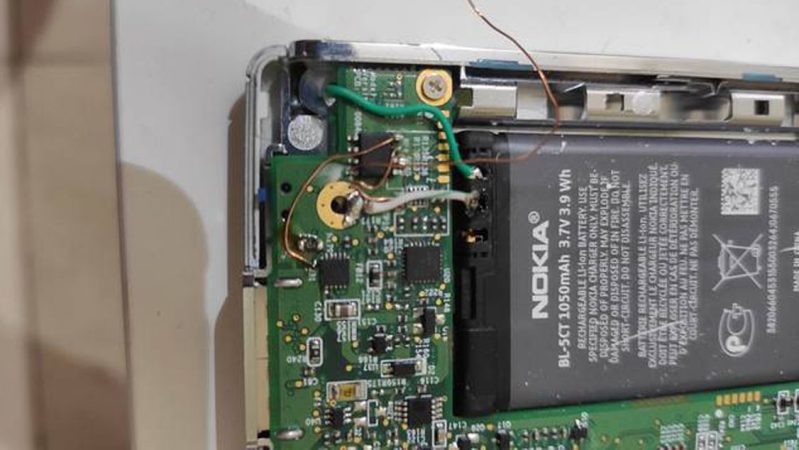
Just wiring in typical Li-Ion voltages to the PDAs battery pins wasn’t enough to make this Windows CE device happy. The device kept fleeing to sleep mode, thinking the battery was faulty or very low. Eventually, inspecting the motherboard revealed the PDA hosted a BQ24025 charger IC from Texas Instruments. [Mark] surmised it was trying to communciate with a BQ26500 “gas gauge” IC from the original battery pack. Armed with that knowledge, he then set about programming an STM32 chip to emulate its behavior. He then successfully ported the functionality over to a CH32V003 microcontroller as well. Paired with a Nokia BL-5CT battery, he had a working portable power solution for his PDA.

It’s great to see ancient hardware brought back to functionality with some good old fashioned hacking. I’d hoped to do the same with my Apple Newton before someone nicked it from my lounge room, more’s the pity. If you’re rescuing your own beleaguered battery-powered portables, don’t hesitate to let us know!

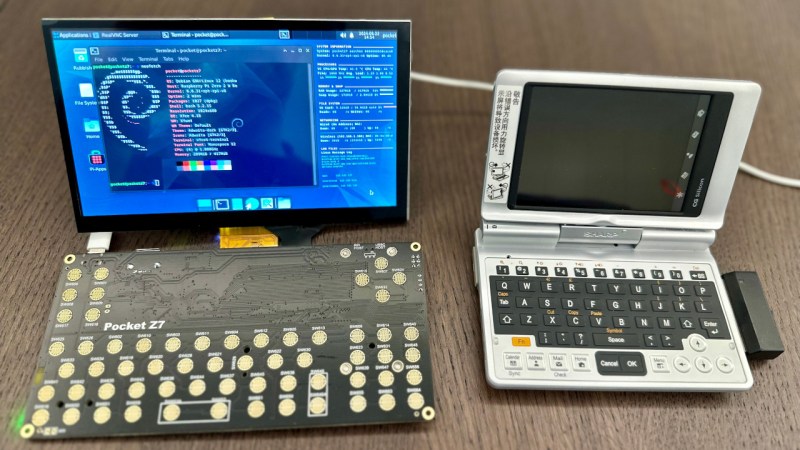
The UMPC powered up, case-less showing the black PCB, with the display standing upwards and showing a blue colour scheme desktop with a CLI terminal open. To the right of it is one of the UMPCs that served as an inspiration for this project.

Bringing The UMPCs Back With A Pi Zero

Miss PDAs and UMPCs? You wouldn’t be the only one, and it’s a joy to see someone take the future into their own hands. [Icepat]’s dream is reviving UMPCs as a concept, and he’s bringing forth a pretty convincing hardware-backed argument in form of the Pocket Z project. For the hardware design, he’s hired two engineers, [Adam Nowak] and [Marcin Turek], and the 7-inch Pocket Z7 version is coming up quite nicely!

The Hackaday.io project shows an impressive gallery of inspiration devices front and center, and with these in mind, the first version of the 7-inch UMPC sets the bar high. With a 1024×600 parallel RGB (DPI) touchscreen display, an ATMega32U4-controlled keyboard, battery-ready power circuitry, and a socketed Pi Zero for brains, this device shows a promising future for the project, and we can’t wait to see how it progresses.

While it’s not a finished project just yet, this effort brings enough inspiration all around, from past device highlights to technical choices, and it’s worth visiting it just for the sentiment alone. Looking at our own posts, UMPCs are indeed resurfacing, after a decade-long hiatus – here’s a Sidekick-like UMPC with a Raspberry Pi, that even got an impressive upgrade a year later! As for PDAs, the Sharp memory LCD and Blackberry keyboard combination has birthed a good few projects recently, and, who can forget about the last decade’s introductions to the scene.