Summary: In this tutorial, you will learn about TypeScript function types and how to use them to describe function parameters and return values.
Introduction to TypeScript function types #
A function type has two parts:
- Parameters
- Return type
When declaring a function type, you need to specify both parts with the following syntax:
(parameter: type, parameter:type,...) => typeFor example, the following shows how to declare a variable with the function type that accepts two numbers and returns a number:
let add: (x: number, y: number) => number;In this example:
- The function type accepts two arguments:
xandywith the typenumber. - The type of the return value is
numberthat follows the fat arrow (=>) appears between parameters and return type.
Note that the parameter names (x and y) are just for readability purposes. As long as the parameter types match, it is a valid function type.
Once annotating a variable with a function type, you can assign a function with the same type to the variable.
TypeScript compiler checks the number of parameters, their types, and the return type.
The following example shows how to assign a function to the add variable:
add = function (x: number, y: number) {
return x + y;
};Also, you can declare a variable and assign a function to a variable like this:
let add: (a: number, b: number) => number =
function (x: number, y: number) {
return x + y;
};In this syntax:
addis a variable.(a: number, b: number) => numberis the function type.- And the rest is the function assigned to the
addvariable.
If you assign other functions whose type doesn’t match the add variable, TypeScript will issue an error:
add = function (x: string, y: string): number {
return x.concat(y).length;
};In this example, we reassigned a function whose type doesn’t match to the add function variable.
Inferring function types #
TypeScript compiler can figure out the function type when you have the type on one side of the equation. This form of type inference is called contextual typing. For example:
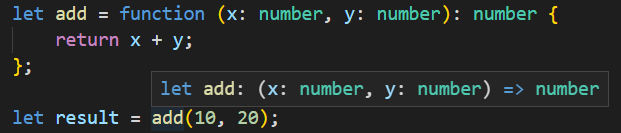
In this example, the add function will take the type (x: number, y:number) => number.
By using type inference, you can significantly reduce the amount of code with annotations.
Quiz #
TypeScript Function Types
Thank you for your feedback!
