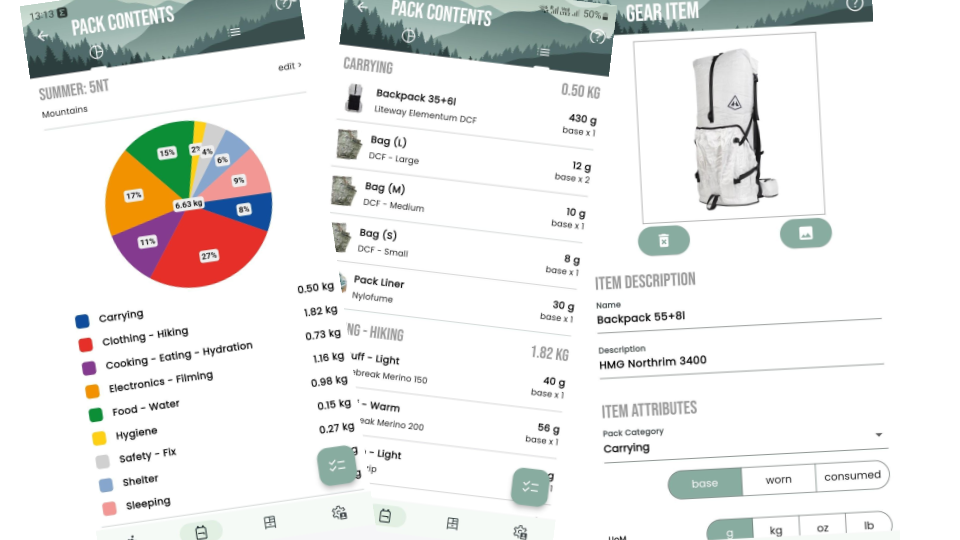
The Back in Pack ‘App’ is a mobile (iOS and Android) and web-based trip, pack and gear management application.
The App enables you to assess the gear that you carry for each of your backpacking trips: to optimise weight, tailoring gear to the appropriate conditions e.g. specific sections of a thru-hike, reducing risks and improving your on-trail performance.
Functionality
Gear locker where you store all of your gear and manage its categorisation and other attributes (weights, quantities, gear type, …). This enbles gear to be categorised and analysed consistently across packs and reduces time to maintain information.
Gear lifecycle: maintain a wishlist for planned purchases, to assess impact on weight of packs, and maintain a gear archive for disused or broken gear for historical record of packs.
Gear Type to classify each item as something carried all the time (BASE) e.g. backpack, something worn most of the time (WORN) e.g. Shorts, shirt, socks or something consumed during your hike e.g. stove gas (CONSUMED). There is much debate as to base vs. worn so beware the forums and go down the rabbit-hole at your own risk 🙂 In reducing your pack weight, you focus on reducing your base weight, knowing that you have less impact on the consumables and items worn/carried. Just be sensible: every gram matters and quickly adds up, but also that carrying an extra litre of water is an additional 1kg, so make decisions in relation to cost and benefit.
Categories to group together types of gear to assess the collective weight. E.g. Shelter, may cover your tent, stakes, groundsheet, poles or Sleep (system) may cover your quilt, sleeping pad, pillow, duvet, teddy bear, bed sheets, … Many people use a category called Big 3 to add together Shelter, Pack (Carry) and Sleep items with an aim to be as light as possible, as these tend to be the heavier items that you carry.
Packs Most people have more than one pack set-up for different hikes. For a long distance (thru) hike you are likely to change-up your gear based on the ‘section’ or terrain you are hiking. The app allows you to create as many packs as you like to be able to track these differing set-ups.
Systems for some people, who have dialled-in their gear set-ups, then systems can be created as (static) re-useable groups of gear that can be added to one or more packs. My examples are First Aid Kit, Summer cook kit, Summer sleep system, Safety/Fix kit. These rarely change but they are something that I add to many of my packs/trip set-ups.
Sharing Being able to share a link to your pack, can be useful for a virtual shakedown where people can review your gear and provide helpful (or not) suggestions. They may provide gear alternatives or where you can leave stuff at home, or perhaps may need a piece of safety equipment for a specific section. Most of the time it is used to show just how much DCF and Titanium made gear you have bought!
Offline Support: With the mobile versions of the app, your data is stored on your device as well as in the cloud, allowing you to access offline, make changes and resync when you are next connected. (There are some minor constraints around offline image manipulation).
Access the App
To access the app:
Coming soon (in beta test)

Coming soon (in test)
Account Types
The App provides three levels of account enabling additional functionality.
DAY HIKER
The intent is to keep the core functionality of the pack and gear management app, FREE for everyone to use on any or all of the platforms
Gear Locker: Store all your gear with core data attributes: descriptions, notes, quantities, links,
Gear Images: Make your lists prettier and make it easier to identify gear. Unfortunately there is a cost associated with the storage and transfer of image data back and forth – so this small subscription is to cover the additional hosting and transfer fees of this data.
Pack Analysis: by category and type with charts and lists
Tablet and Web browsers: adapts to wider screens, with split views for more convenient data views.
Offline data access: if you are travelling or no phone signal, then still access and manage your data. What else do you do in your tent of an evening??
SECTION HIKER (COMING SOON – AVAILABLE For beta testers)
For subsribers then additional functionality will be unlocked:
- Pack Images: Make your pack lists prettier and make it easier to identify gear. Unfortunately there is a cost associated with the storage and transfer of image data back and forth – so this small subscription is to cover the additional hosting and transfer fees of this data.
- Pack Lifecycle: Enable the archiving of packs, to retain a ‘static’ historical record associated with specifc trips for reference. This will be useful for peforming pack comparisons and for detailed trip planning (future functionaity).
- Purchase/Warranty attributes: Purchase prices, dates and receipts
- Pack Export as XML: Create a backup of your pack as a zip file, with core data and images
- Community gear locker (Maybe coming soon)
THRU HIKER (COMING SOON – AVAILABLE For beta testers)
For subscribers, then further functionality will be unlocked:
- Systems: Enable reusable ‘systems’ which are subsets of gear e.g. First Aid Kits or Winter Cook Kit vs. Summer Cook Kit, or Sleep System etc… which can then be included in differing packs to make contents management more simple and efficient.
- Gear Locker Export as XML: Create a backup of your entire locker with all attributes and images.
- Pack Export as PDF: Generate a PDF document (printable) to check off your gear as you pack it. Additionally you can include values and purchase receipt details of each (valuable) item for reference travel documentation, in case of lost or stolen luggage.
- Trip Planning (in development)
Future Functionality
If you have any feedback about the app or requests for further functionality (no guarantees!!) then please use the contact form.
Support the App and the Website
Subscription costs only cover data transfer and storage fees and DO NOT cover the time and effort required to develop and maintain this app, the costs of having to purchase platform specific development hardware or the required development licenses, so if you would like to make a donation to contibute to future of the App, then it would be much appreciated.
Paypal Donation Button and QR Code

Or scan the QR code with your phone
I hope you enjoy the app.
Mark.
