Controls, as their name suggests, are the buttons etc. used to control the player in DOORS.
 Overview
DOORS is supported on PC (Windows and macOS), Mobile (iOS and Android), and Console (Xbox One/Series S/Series X and PlayStation 4/5). Each platform has its own control scheme, which are listed below:
PC Controls (Windows and macOS)
These controls are for a standard QWERTY keyboard layout.
| Action | Primary | Secondary |
|---|---|---|
Walk
|
W + A S + D |
⬆ + ⬇ |
Interact
|
E | - |
Crouch
|
C | Left Ctrl or Left Shift |
Jump
|
Space | - |
Accept/Confirm
|

|
- |
Use Item
|
|
- |
Drop Item
|
X | Backspace |
Unlock Door
|
E (Hold) | - |
Switch Items
|
1 to 0 | Mouse Wheel |
Inspect Item
|

|
- |
Heartbeat Minigame
|
Q & E | &
|
Settings
|
Tab | M |
Lock Puzzle
|
Mouse | - |
Steer Minecart
|
A + D | W + S |
Admin Panel
|
` | [ |
Xbox/PlayStation Controls
These controls are for a standard Xbox or PlayStation controller. These controls are relevant for the following consoles: Xbox One, Xbox Series S/X, and PlayStation 4/5. These controls are also relevant if you're using an Xbox 360 controller, PlayStation 3 controller or any of the most Basic DirectInput/XInput controllers that are supported by Microsoft or Roblox on PC.
| Action | Button (Xbox One/Series S/X) | Button (PlayStation 4/5) |
|---|---|---|
Interact
|

|

|
Crouch
|

|

|
Accept/Confirm/Jump
|

|

|
Admin Panel
|

|

|
Use Item
|

|

|
Switch Items
|

|

|
Inspect Item
|

|

|
Settings
|

|

|
Move in Puzzle UI
|
 + +  + +  + + 
|
+ + +
|
Drop Item
|
|
|
Mobile Controls (iOS and Android)
These controls are the same as PC but on the Roblox mobile app.

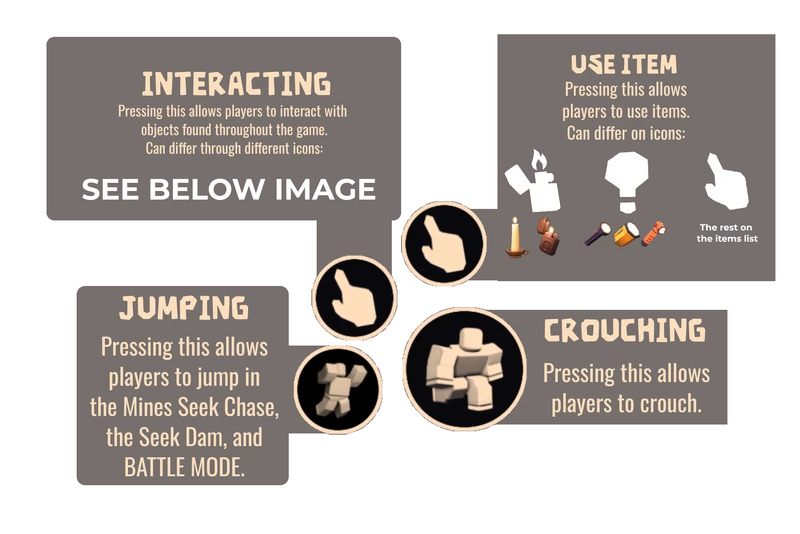
A detailed explanation of the mobile buttons at the bottom right screen.
Interacting Button Icons
 (Default/Interact) - Item pickup, Unlocking a door, Inserting a fuse in a generator, collecting Stardust, moving minecarts, solving (Library Padlocks, Circuit Breaker Puzzle, Anchors, Dam Valves), removing Giggles from another player, placing back a Mandrake into a hole in the ground, purchasing items in the Jeff Shop, opening/closing unopened containers, pulling Levers, pressing the button of the Nest Transmitter, pressing the Mines gate button
 (Inspect) - Painting interact, Eyestalk corpse interact, Groundskeeper's scythe interact, cut vines in room 90/99 with shears.
 (Hint) - Crawlways/obstacles in The Reception, and Seek chases. (HOTEL-, computer device only)
 (Hide) - Hiding Spots.
 (Loot) - Looting/unlocking unopened containers.
 (Collect) - Collecting gold.
 (Skip) - Skipping starting elevator.
 (Heal) - Bandage pickup.
 (Donate) - Donate on the Tip Jar in Jeff Shop.
 (EnterSecret) - Enter subfloors.
 (Dialogue) - Interact with El Goblino and Grampy.
 (Transport) - Moonlight Rift.
 (TransportOnce) - Starlight Rift.

 (Fire) - Light up Candle in fireplace/bonfire/oil barrel.
 (Enter) - Enter the castle door in the end of The Mines.
 (Revive) - Gifting revives to a player through a floating revive model on their corpse.
 (Exchange) - Trading gold with players in multiplayer in Jeff Shop.
Other controls
- To equip/inspect/unequip an item, press the inventory slot.
- To drop an item, hold the inventory slot.
- To move, use the Roblox joystick.
- To rotate, swipe the screen.
- To steer your minecart, drag your joystick to the left or to the right.
- To enable settings, press the gear icon on the top left of your screen.
- To enable the Admin Panel, press the panel's icon on the up left of your screen (
 )
)

Bugs

- On mobile, jumping had a delay, which makes it harder to time right. This often lead to unfair deaths. This was fixed on April 10th, 2025.
Gallery