
-
How are messages delivered?
- ➤ We will always attempt to deliver messages as requested by our members.
(To be successful, we must have a valid and current email address for the recipient.) - ➤ In most cases, messages will be available for the recipient to access forever.
-
➤ To protect the privacy of our subscribers, we currently do not provide any feedback on whether a message has been received or read.
- ✔ This is because protecting our users privacy is our #1 concern, and some of our recipients wish to maintain complete privacy in regards to whether a message has been received/read or not.
Learn even more about why we take privacy so serious...
- ➤ We will always attempt to deliver messages as requested by our members.
-
How are names on school page manually added?
- ➤ Currently our members have the option to add names, which is accessible by clicking the "add name" button found on the school page.
- ➤ Old-Friends is very thankful for the vast amount of names and information that has been added by our members over the years.
- ➤ And we continue to look to our user base for supporting our goal to help others find their long-time friends and classmates.
- ✶ Not all names listed have been registered.
-
What if a name listed on school page is incorrect?
- ➤ Some names called "alternate names" are computer generated
-
- ➧ Example: The list shows Catherine (Cathy) Smith, but your birth name is Cathy.
- ✔ So if someone searches for "Cathy Smith", they will find "Catherine Smith" also.
- Opting out of this automated setting will be allowed in the near future.
The alternate names on the *school* page are generated by a program and are designed to maximize search results.
-
Your name is listed, but you don't have an account.
-
➤ This can happen because some names on the class list come from various sources including:
- ✔ registrations
- ✔ added by visitors
- ✔ added by automatic
(computer generated) processes
- ➤ Not all names listed have been registered.
-
➤ This can happen because some names on the class list come from various sources including:
-
How to request a refund using our fully automated process?
- ➀ Log in and click on the blue button with your name in it in the upper right corner.
- ➁ Then just click on the red link
- ➂ You should receive your automated refund within one to three business days
-
How to request a refund using our manual process?
- ➤ If, for some reason, you cannot do that, let us know and we'll do it manually.
- ➤ Please allow three to five business days for this to process.
-
What if you need information on someone that is not listed?
- ➤ All the information that we have, is on the class page.
- ➤ We do not have access to any records that are not displayed.
-
➤ If you are looking for photos, stories or contact info for someone not listed,you can:
- ✔ Add their name to the list and leave them a message to discover.
(We deliver many stored messages every day). - ✔ Post this query as a Sticky Note on the page.
(Perhaps a member knows something that can help you).
- ✔ Add their name to the list and leave them a message to discover.
- ➤ If you are looking for a photo, you can try to find a yearbook (link to yearbook search tips).
- ➤ If you are looking for contact info, there are many "public records" sites online. Two that we've had some success with are:
-
➤ This is the checklist that we suggest for obtaining a yearbook:
- ✔ Amazon.com
- ✔ e-yearbook.com
- ✔ Post a "Sticky Note" on our class page, and send messages to the persons listed below (if any) to see if they will let you copy theirs.
- ✔ Call the local library to see if they have a copy that you can photocopy.
- ✔ Contact the school or district to see if they have any extra copies.
- ✔ Post a classified ad in the local newspaper.
- ✔ Check eBay and set up an ongoing notification.
- ✔ Check Ancestry.com
-
Need to reset your password:
- ➤ Soon you will be able to reset your password yourself, but at this time, use the "Contact Us" feature to request a reset.
Old Friends - Help Information page
- See all of our services.
- Use our membership services to contact students and other old-friends.
- Access to over 30,000 U.S. and Canadian high schools.
- Become a lLife-time member for an affordable one-time fee.
HELP INFORMATION
How can we help you?
Choose a topic
Select business topic
What needs correcting?
How do I ....
Select your problem topic
Select what you need to do
What do you need to know about your privacy?
Site Map
-
(items in bold are for members only)
-
❶ Home page
-
❷ School page
-
❸ Class page
- Request name removal
- Post Sticky Note
- Remove Sticky Note **
-
- ➤ by adding name to class list
- ➤ by claiming name in the class list
-
- ➤ Login/Logout
- ➤ Change password
- ➤ Edit name **
- ➤ Add/delete class membership **
- ➤ Close account / request refund
- ➤ Edit profile
- ➤ Reset password
-
- ➤ View profile
- ➤ Send message
- ➤ View messages to you
- ➤ Add missing classmate names
- ➤ Report incorrect classmate info **
- ➤ Report duplicate classmate name **
- ➤ Report classmate death
- ➤ Correct death information
- ➤ Post memories (classmates and teachers **)
- ➤ Seeking info registry (living classmates and teachers) **
- ➤ Seeking contact registry (living classmates and teachers) **
-
- ➤ Add teacher name
- ➤ Claim teacher name **
- ➤ Report incorrect teacher info **
- ➤ Report duplicate teacher name **
- ➤ Report teacher death **
- ➤ Correct teacher death information **
- ➤ Send message to teacher **
-
- ➤ Report lost ring
- ➤ Report found ring
- ➤ Claim found ring
- ➤ Edit/delete reported ring **
- ➤ Escrow service **
- ➤ Gallery **
-
- ➤ View
- ➤ Upload images
- ➤ Report uploaded images **
- ➤ Gallery **
- ➤ Yearbooks wanted registry
-
➤ Reunions
- ➧ Report upcoming reunion information
- ➧ Edit upcoming reunion information
- ➧ RSVP
- ➧ Gallery **
-
- ➤ RSVP
- ➤ View progress **
- ➤ Invite classmates **
- ➤ Tag friends **
- ➤ View videos of past online reunions **
- ➤ Gallery **
- Celebrity classmate gallery **
- Go to different class year
- Search all schools for a name **
- Privacy policy
- Terms
- Feedback **
Register / Become member
Account
Classmates
Teaching Staff (free membership for teachers)
Class Ring Lost & Found
Yearbook images
Online Mini-Reunions
About Us
-
❸ Class page
-
❷ School page
Terms of Use
In general, we ask that you
- treat others with respect
- refrain from activities that are illegal
- treat this site as a valuable resource and not do things to lessen its value.
You (and you alone) own and are legally responsible for what you post and/or upload for public viewing. While we may regulate content in the interest of improving the site, we accept no liabilty for content that you contribute.
Violations will result in a non-refundable termination of your membership.
By using this website, and by providing us with an email address, you agree to give us permission to send you certain automated email messages. We promise to keep these messages to a minimum (about 4-6 times a year), primarily to announce major new features and to alert you to other users' activity that should be of personal interest to you. Examples include when one of your classmates registers. You can opt out of future messages.
Old FriendsFrequently Asked Questions
Privacy
We respect your privacy and we are committed to safeguarding your privacy while online at Old-Friends.co (the "website"). The following discloses the information gathering and dissemination practices for the website.
Information we collect. We collect the following information in our website from our site users..
Required for membership:
- Email Address. This is used as your account identifier, to communicate with you and to verify that you have a valid email account. We do not share your email address with anyone else. Period.
- Your current and previous names. We only display your student name(s) by intention. Your current name is used only for direct communication with you. If the name that we have for you is not your student name, we will be glad to correct it.
- Password. We do not store your actual password, we only store an encrypted version. If you forget your password, a new temporary one will have to be generated.
- Postal Code (Zip code in the US). We use this to help verify your identity and may use it to notify you of things happening on Birchwood Media websites that are likely to be of interest to someone in your area, subject to our "We hate spam too" policies.
- School(s) attended and graduation year. Class lists are judged to be public domain information (public records). Many people have concerns any time their existance is revealed online. We have processes that enable you to have your name hidden from the general public, but since your school mates knew you, we do not hide names from them. For teachers and other staff, all of the above applies, but we also display the subjects you taught or the title you held, as is reported to us by visitors and members, or as you supply yourself.
- Your interest in participating in online reunions.
Optional (not required for membership):
You have the option to share more information on a voluntary and explicit basis, by typing it into forms.
-
Examples include:
- creating a profile (biography)
- uploading photos
- commenting on classmates or teachers
Some of this content is restricted to members, much of it is visible to the general public and search engines.
Announcements and other messages
We may email messages to you directly on matters concerning your acount, to notify you of messages from other users, or to otherwise enhance your experience on the website, including, but not limited to: invitations to add or view content (words, photos, etc), to participate in activities, etc.
Occasionally we email announcements to our users. You may opt out of some of these by contacting us and requesting it.
Log Files
Like most websites, we collect and store data from your browser and details of how you interact with our website, in log files.
The information in the log files includes your IP (internet protocol) address, your ISP (internet service provider, such as AOL or Verizon), the browser you used to visit our site (such as Internet Explorer or Firefox), the device and operating system (Samsung phone, iPad, Windows PC, etc), the times you viewed each page, and which pages you visited throughout our site.
This information is used for customer support purposes, and other uses,
-
including but not limited to:
- ➤ analyzing usage trends
- ➤ administer the site
- ➤ identify problems
- ➤ track visitor's movements in the aggregate
- ➤ gather broad demographic information for aggregate use
Links
This website contains links to other third party external sites.
We are not responsible for the content or privacy practices of such other sites.
We encourage our users to be aware when they leave our site and to read the privacy statements of each and every website that collects personally identifiable information.
This privacy statement applies solely to information collected by this website.
Advertisers
We may (or may not) use outside companies to display ads to support our site.
These ads usually use cookies and/or web beacons to collect data in the ad serving process and are collected by those ad companies, and we do not have access to or control of this information.
These ads will send these advertisers (such as Google, through the Google AdSense program) information including your IP address, your ISP, the browser you used to visit our website, and in some cases, whether you have Flash installed.
This is generally used for geotargeting purposes (showing New York real estate ads to someone in New York, for example) or showing certain ads based on specific sites visited (such as showing cooking ads to someone who frequents cooking sites).
*This Site is affiliated with Monumetric (dba for The Blogger Network, LLC) for the purposes of placing advertising on the Site, and Monumetric will collect and use certain data for advertising purposes. To learn more about Monumetric's data usage, click here: Publisher Advertising Privacy*
Ads that appear on our site come from platforms like: Google Adsense, Insticator, etc... Please check their websites for their respective privacy policies.
Cookies
A cookie is a tiny file that your browser stores on your computer, used by websites to remember things about you from page to page and from visit to visit.
Our site uses cookies primarily to make it convenient to login. Some of our advertisers use cookies on our website.
We have no access to (or control over) their cookies. If you wish to disable cookies, you may do so through your individual browser options, but that will affect how you are able to interact with our site and all other websites. This could include the inability to login to services or programs, such as logging into forums or accounts.
Deleting cookies does not mean you are permanently opted out of any advertising program. Unless you have settings that disallow cookies, the next time you visit a site running the advertisements, a new cookie will be added.
DoubleClick DART cookies
We also may use DART cookies for ad serving through Google's DoubleClick, which places a cookie on your computer when you are browsing the web and visit a site using DoubleClick advertising (including some Google AdSense advertisements).
This cookie is used to serve ads specific to you and your interests ("interest based targeting").
The ads served will be targeted based on your previous browsing history (For example, if you have been viewing sites about visiting Las Vegas, you may see Las Vegas hotel advertisements when viewing a non-related site, such as on a site about hockey).
DART uses "non personally identifiable information". It does NOT track personal information about you, such as your name, email address, physical address, telephone number, social security numbers, bank account numbers or credit card numbers.
You can opt-out of this ad serving on all sites using this advertising by visiting http://www.doubleclick.com/privacy/dart_adserving.aspx
Future changes:
If the need arises to change major aspects of this policy, we will attempt to contact you using your email address and notify you about the changes, allowing you to close your account or change your settings.
If, in the course of time, ownership of Old-Friends.co is transfered, the new owner must agree to continue the existing terms or to warn you of any changes.
We encourage our users to review this privacy policy frequently, as minor changes may occur from time to time.
How To
-
- ➤ If your name is missing, become a member by using the "ADD ME TO THIS CLASS" button at the top right corner of the list of classmate names.
- ➤ If your name is missing, but you don't want to become a member, add it using the "ADD MISSING NAMES" button at the top left corner of the list of classmate names.
- ➤ If someone else's name is missing, add it using the "ADD MISSING NAMES" button at the top left corner of the list of classmate names.
- ➤ If a teacher's name is missing, add it using the "ADD A TEACHER" button at the upper right corner of the list of teaching staff names.
-
- ➤ Currently the best way to change the graduating class associated with your account is to go to the home page and reselect your school and year.
-
- ➤ At this time, please use the "Something else" option at the end of the form in the "Contact Us" tab of the Help page. Write as much detailed information as you can to help us complete your request.
-
- ➤ If their name is in the class list, click on the envelope icon next to their name.
- ➤ If their name is missing, add it using the "ADD MISSING NAMES" button at the top left corner of the list of classmate names, and then click on the envelope icon next to their name.
-
- ➤ You can easily and quickly register by signing up here.
- ➤ Or you can go back to our home page, select your school and class year, and then choose the registration option towards the top part of the the class page.
- ⚹ Please contact us if you still need assistance with account registration.
-
- ➤ Please use our contact form, making sure to write exactly what type of information you need updated. We will get back to you with any details regarding the final outcome within five business days from the time we receive the original request.
- ➤ Soon we will have a user dashboard available to our members for editing their own personal information directly.
- ➤ We may require verification of information before making any final changes.
-
- ➤ Post a query on a Sticky Note.
- ➤ Send a group message to all class members (coming soon).
-
➤ Find a yearbook. This is the checklist that we suggest for obtaining a yearbook:
- ✔ Amazon.com
- ✔ e-yearbook.com
- ✔ Post a "Sticky Note" on our class page, and send a group message (coming soon) to see if someone will let you copy theirs.
- ✔ Call the local library to see if they have a copy that you can photocopy.
- ✔ Contact the school or district to see if they have any extra copies.
- ✔ Post a classified ad in the local newspaper.
- ✔ Check eBay and set up an ongoing notification.
- ✔ Check Ancestry.com ( http://search.ancestry.com/search/db.aspx?dbid=1265 )
-
- ➤ Currently the best way to find another listed classmate or staff member is to go back to our home page and select that person's school name and graduating class year. Once you are on their class page, you can press "CTRL + F" on your keyboard for PC & "Command + F" for Macs; then type the name and press enter.
- ➤ In the future, we will be adding a huge search functionality for our members that will allow you to find any other members easily.
-
- 1. Find the person on the class page for that school and year.
- 2. If your are signed into your account, you can just click on the message "envelope" icon next to the name.
- 3. Once the popup modal appears on your screen, go ahead and type your message and select send.
- ** All messages will be sent as requested with three business days.
-
Best way to send a classmate or staff member a message is to:
-
- ➤ For submitted yearbooks on our site, you can check out the yearbooks page. We also encourage you adding more pages to any yearbook.
- ** Because we are not officially affiliated with any school, please contact the school or district office for help obtaining official records. In addition, for yearbooks, see the list above.
-
- ➀ Log in and click on the blue button with your name in it in the upper right corner.
- ➁ Then just click on the red link
- ➂ You should receive your automated refund within one to three business days
-
- ➤ If, for some reason, you cannot do that, let us know and we'll do it manually.
- ➤ Please allow three to five business days for this to process.
-
- ➤ Go to your account for the fastest way to review your current information.
⚪ Add a missing name
⚪ Change class name
⚪ How to report death info
⚪ Contact someone
⚪ Create new account
⚪ Edit or correct information?
⚪ Get pictures or memories
⚪ Find someone
⚪ Send a message
⚪ Obtain a yearbook, grades or diploma
⚪ Request a refund using our fully automated process?
⚪ Request a refund using our manual process?
⚪ See my account details
Contact Us
I need help with...
Adding a missing name
If your name is missing, use the button at the top right of the class list.
If someone else's name is missing, use the button at the top left of the class list.
Contacting someone
If their name is in the class list, send them a message (envelope icon next to their name ).
).
Post a Sticky Note asking for help in contacting, in case they aren't a member yet. Try Spokeo. If their name isn't on the list yet, add it first and then leave them a message to discover. About half the messages we deliver are ones that were left in the past.
I need a yearbook (or a diploma, or other official records)
We are not officially affiliated with school, and we don't have any information that isn't on the page. See the "How To" section for suggestions for finding a yearbook. Post a query on a Sticky Note on the appropriate page.
I need info about a student
We don't have any information that isn't on the page. Please post your query on a Sticky Note on the appropriate class page.
I want to report a death
Use the "Report Death" option in the OPTIONS menu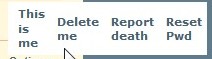 next to the name in the class list.
I want to close my account and get a refund
Log in, open your account window (click on the button in the upper right corner of the page with your name in it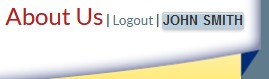 ), click on the red link.
