The upcoming version of PyScripter introduces refactoring support, including the following refactorings:
- Organize imports
- Rename (shortcut: F2)
- Extract variable
- Extract function
- Inline
The upcoming version of PyScripter introduces refactoring support, including the following refactorings:
The next version of PyScripter provides an integration with Ruff, an "extremely fast Python linter and code formatter". With the help of Ruff, PyScripter analyses your code, finds errors and provides warnings and hints. Many of the errors and warnings can be fixed automatically as shown in this short video.
Sometimes you may want to convert your python script into a self-contained executable. The best tool for this job is PyInstaller, The PyScripter External Tools can simplify the process.
First you need to install PyInstaller, using the menu Tools, Tools, Install packages with pip:
If you want to learn more about external tools, consult the help file using Help, PyScripter, External Tools and Help, PyScripter, Parameters.
PyScripter v5.2.3 is now available at Sourceforge. This is mainly a bug fix release.
PyScripter v5.2.2 is now available at Sourceforge. The main new feature is the support for Grok 3, which is one of the best Large Language Models available. The reasoning variant (grok-3-mini) is also supported.
QGIS is a widely used, free and open source, GIS software package. This is an update on how to use it with PyScripter. I have used the currently latest version for Windows (3.42) but you can adapt the instructions to other recent versions of QGIS.
Create a command file "PyScripter-QGIS.cmd" with the following content:
Save it anywhere you want and run it.
Then in the PyScripter python interpreter you can do:
*** Python 3.12.9 (main, Feb 7 2025, 14:34:44) [MSC v.1938 64 bit (AMD64)] on win32. ***
*** Remote Python engine is active ***
>>> from qgis.core import *
>>> import qgis.utils
>>> from PyQt5.QtCore import QSettings
>>>
That's it.
PyScripter v5.2.1 is now available at Sourceforge. This release brings a number of significant improvements in the areas of LLM-Assisted coding and Debugging. This is the list of the main new features and fixes:
The forthcoming version of PyScripter has a number of improvements to LLL-assisted coding:
When it comes to coding, DeepSeek is simply amazing. It is now supported both in the Chat and Assistant.
Code is presented in code boxes, and using the icons in the header, you can copy the code into the clipboard or directly into a new editor.
Markdown is now rendered perfectly:
You can now follow the reasoning behind the answers, using DeepSeek's deepseek-reasoner model or OpenAI's "o" models, such o1-mini. The reasoning is presented without cluttering the output.
- Other improvements
- The temperature LLM model parameter is exposed by the Chat UI. It is a decimal number between 0 and 2 that controls the randomness of the results (higher values leed to more random answers).
- You can now print the chat topic content.
- Syntax highlighting for about 300 programming languages is available. So you can now ask questions not just about python but also for other languages.
And don't forget the Assistant. While coding Assistant completion is available by pressing Ctrl+Alt+Space. as well as by using the editor context menu.
PyScripter has always supported conditional breakpoints. Conditional breakpoints allow you to finetune the debugging experience, by only stopping execution when certain conditions are met.
Consider the following example:
Say you are interested to know when sum becomes >= 1000. If you set a breakpoint at the 4th line of the code, it will be tedious and time consuming to reach that point. What you can do is to set a conditional breakpoint:
As you can tell from the screenshot above, the forthcoming version of PyScripter, introduces and new breakpoint property "Ignore Count". If you set the the Ignore Count to a positive integer value, then the breakpoint will be ignored a number of times equal to that value. So in the above example if you remove the condition and set the Ignore Count to 100, execution will stop when i becomes 100. When you resume execution, the breakpoint will be ignored another 100 times.
There are a few ways to set the breakpoint properties Condition and Ignore Count.
You expect code to run with debugging much slower than without. Indeed this is the case and with python, debugging can be sometimes painfully slow.
A relatively recent, low-level feature that was introduces in Python 3.12 is monitoring. Monitoring allows programmers to hook into low level events that occur during the execution of code. This is similar to tracing, which is used by debuggers, but with much greater granularity and control. It turns out that monitoring can help make faster debuggers. Much faster. The next version of PyScripter will include a new debugger that is based on monitoring for python versions 3.12+. Just to give you a taste of the speed-up you get, consider the following code:
If you set a break point at the line "f(0)" and start debugging, this is what you get with the PyScripter v5.1.4 and python 3.13.
There are a million iterations that happen before you reach the breakpoint, so this takes about 2.5 seconds. If you do the same with the forthcoming release of PyScripter you get:
This is more than x150 speed-up. The code until you reach the breakpoint, runs almost as fast as without debugging. The new debugger shines when you debug over loops or other pieces of code that it is executed repetitively. For other types of code the speedup is not as impressive.
The new release also back-ports some debugging improvements introduced in python 3.14 to python versions 3.10+. So users of these versions will experience faster debugging.
PyScripter v5.1.3 is now available at Sourceforge. Despite being a minor release it does include a number of new features and improvements:
A powerful and possibly underused feature or PyScripter is the Externa Tools. A collection of such tools is included with the installation, but you can create your own.
Virtual python environments are isolated workspaces, that allow you to install packages and test code, without messing up the main python installation. After using them for a specific purpose you can just delete them. Python ships with a module called venv, that allows you to easily create such virtual environments.
Instead of creating such environments from the command prompt you can create an external tool to do that. You can can create new external tools using Tools, Configure Tools, Add. You can then fill the information as in the image below.
If you are using Conda python distributions you can create an external tool to create conda virtual environments instead. Note though, that conda virtual environments are much more heavyweight than the venv ones.
The next release of PyScripter will add such an external tool to new installations and you can easily add it to existing installations.
One of the main limitations of Python has been its inability to make use of the multiple cores of modern CPUs, at least not easily. This is due to the infamous Global Interpreter Lock. In essence, due to the presence of the GIL, only one python thread can execute at a time,
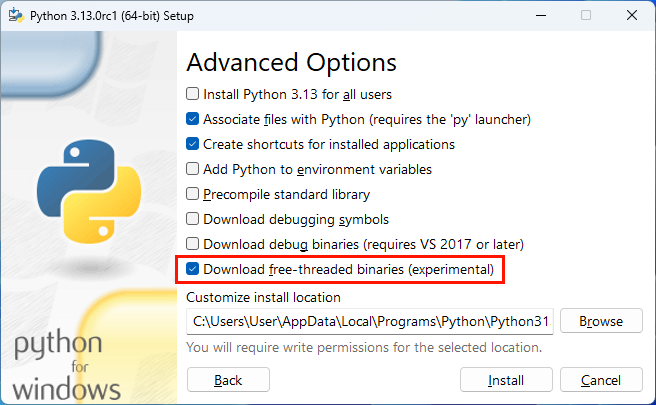
Python 3.13 has changed this and provides an experimental free-threaded (or No-GIL) version. It is included in the standard installer, but you need to select the relevant option (see below) to install it.

What you get is a another python executable called python3.13t.exe alongside python.exe. This executable runs the free-threaded version of python.
This RealPython article provides an in-depth coverage of free-threaded python and is recommended reading. .
The next version of PyScripter will include support for free-treaded Python. The Run, Python Engine submenu now includes an option to use the Free-Threaded version if is available. It also allows you to easily switch between the standard and free-threaded version.
PyScripter v5.1.0 is now available at Sourceforge. This release features very significant improvements in the PyScripter editor.
PyScripter 4.3.0 is now available at Sourceforge. This release provides support for python 12 as well as other new features, enhancements and bug fixes:
New features:
Issues addressed:
This is a solution contributed by Andreas (github user name amr). For a complete integration of PyScripter with QGIS you need two things:
@echo off :: path for OSGeo4W/QGIS set O4W=C:\OSGeo4W :: path for PyScripter set PYSC=C:\Program Files\PyScripter :: changed start procedure call "%O4W%\bin\o4w_env.bat" @echo off :: add python dir to path path %OSGEO4W_ROOT%\apps\qgis-ltr\bin;%OSGEO4W_ROOT%\apps\Python39;%PATH% set QGIS_PREFIX_PATH=%OSGEO4W_ROOT:\=/%/apps/qgis-ltr set GDAL_FILENAME_IS_UTF8=YES rem Set VSI cache to be used as buffer, see #6448 set VSI_CACHE=TRUE set VSI_CACHE_SIZE=1000000 set QT_PLUGIN_PATH=%OSGEO4W_ROOT%\apps\qgis-ltr\qtplugins;%OSGEO4W_ROOT%\apps\qt5\plugins set PYTHONPATH=%OSGEO4W_ROOT%\apps\qgis-ltr\python;%PYTHONPATH% :: start PyScripter start "PyScripter" /B "%PYSC%\PyScripter.exe" --PYTHON39 --pythondllpath=%OSGEO4W_ROOT%\apps\python39 %*
#sitecustomize.py
import os
for p in os.getenv("PATH").split(";"):
if os.path.exists(p):
os.add_dll_directory(p)
Code Completion in the editor when you are using python extension modules has always been hard, primarily because these are not implemented in python code but rather in a compiled language (typically C) and come as dynamic link libraries. PyScripter in the past the option to import such modules when code completion was requested and used introspection of the imported modules to provide code completion and general IntelliSense support.
With the implementation of the Language Server Protocol and the inclusion of the Jedi language server there is now a better option. The use of stubs described in PEP 484.
pip install PyQt5-stubs
You would use the pip external Tool for installing the stubs. Then restart the language server, using the command under the Tools menu and presto, you have near perfect code completion with PyQt5.
Many packages such as numpy come with their stubs included. For others you can in internet for stub support.
Another way to improve code completion is to add the package/module name to the list of “Special packages” in the IDE options under code completion. Jedi will load these modules and this in many cases can improve the speed and quality of code completion. This works well with the pandas library for example.
PyScripter 4.1 is now available at Sourceforge.. As discussed in an earlier blog post, the major new feature of this release is the implementation of the Language Server Protocol (LSP). Code IntelliSence is now provided by the widely used Jedi Language Server. Here follows a list of new features and bug fixes in this release:
A new release 4.1 is round the corner. Beyond bug fixes, the major new feature of this release is the implementation of the Language Server protocol.
I would like to get volunteers to try the new version before it is released to the public. You can download a registry-free installation from this link. Just unzip the file and run PyScripter.exe. It will not interfere with installed versions of PyScripter. Please report issues at the issue tracker and provide feedback at the support forum.
Modern programming editors and Integrated Development Environments (IDEs), help programmers to write better code efficiently, by providing features such as:
These features are collectively referred to as “Code IntelliSense”, a term coined by Microsoft. To provide such features editors and IDEs need to parse and analyze source code, while users are typing code. PyScripter has been doing a fine job in providing Code IntelliSense to its users by using its own python source code parsing and analysis module. However, keeping up with new python versions and the changes and new features they bring to the python grammar requires significant development resources.
A recent trend has been to move the Code IntelliSense processing out of the editors and IDEs by using external Language Servers. Microsoft has standardized the communication between IDEs and Language Servers by promoting the adoption of the Language Server Protocol (LSP). The LSP is now used by Microsoft’s Visual Studio and Visual Studio Code as well as by many commercial and free IDEs. There are numerous Language Server implementations for many programming languages, including Python.
The forthcoming version of PyScripter, in addition to the usual round of bug fixes, implements the Language Server Protocol and shifts the “Code IntelliSense” processing to external Language Servers. It also bundles the python Jedi Language Server, based on the Jedi package, that is used by many other IDEs. Although this brings few visible improvements (everything should work as before) it brings a number of advantages: