Showing posts with label Python. Show all posts

Tuesday, November 24, 2015

Buildtime Trend v0.3 is out

Visualise what's trending in your build process

Buildtime Trend Logo
I'm happy to inform you that Buildtime Trend v0.3 is released. Those of you using Buildtime Trend as a Service had a running preview of all the new features :

  • introduction of a worker queue to make processing build job logs more scalable
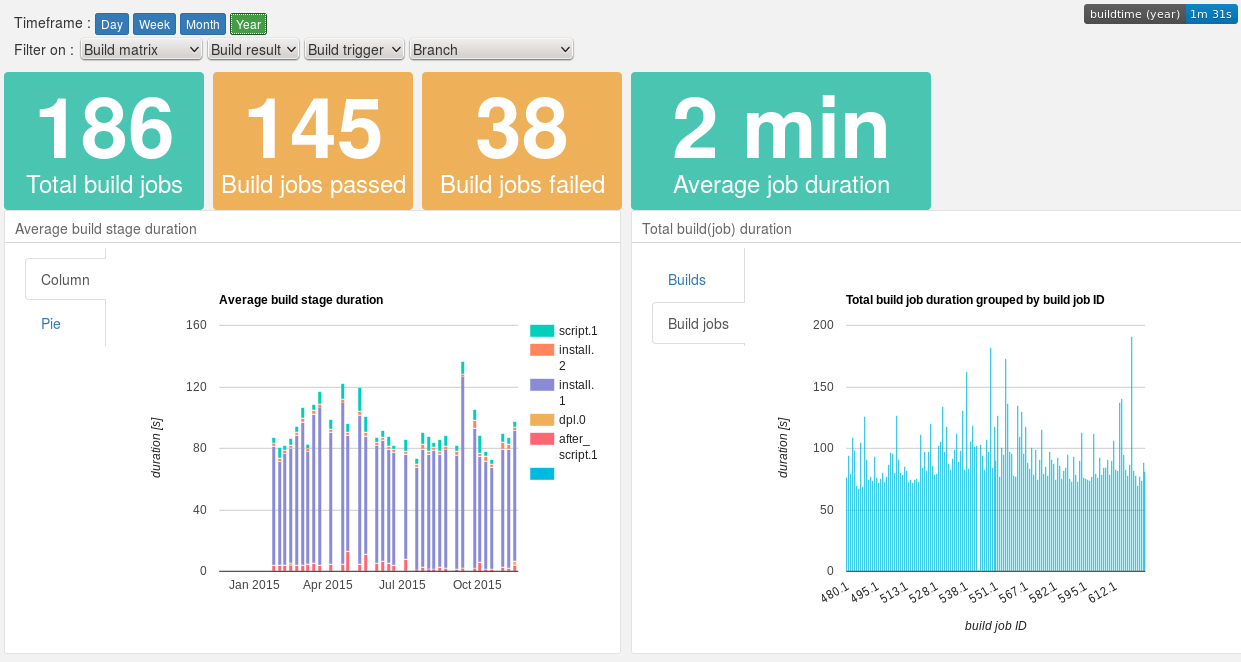
  • dashboard chart data can be filtered on build properties 
  • several new dashboard charts and layout improvements
  • enable Keen.io query caching to improve chart loading speed
  • the dashboard takes url parameters to set the refresh rate and the default settings for time interval and filter properties
  • a statistics dashboard is added to monitor usage of Buildtime Trend as a Service
Dashboard example
Dashboard example
More new features, improvements and changes can be found in the release notes and the Changelog files of the project components :
You can check out the dashboards of the projects that are already using Buildtime Trend as as Service :


Do you want to enable Buildtime Trend for your the build process of your project on Travis CI? It is easy to set up.

Buildtime Trend as a Service is currently available for free for Open Source projects, thanks to the kind people of Keen.io.

Donate

If you like Buildtime Trend, you are welcome to support the project, by making a donation. Donations will help pay for the hosting and support further development.

You can help make the project better : we welcome any kind of contributions.

Sunday, February 22, 2015

Buildtime Trend v0.2 released!

Visualise what's trending in your build process

Buildtime Trend Logo
What started as a few scripts to gain some insight in the duration of stages in a build process, has evolved into project Buildtime Trend, that generates and gathers timing data of build processes. The aggregated data is used to create charts to visualise trends of a build process.

The major new futures are the support for parsing Travis CI build log files to retrieve timing data and the introduction of the project as a service that gathers Travis CI generated timing data, hosts a dashboard with different charts and offers shield badges with different metrics.

Try it out!

The hosted service supports Open Source projects (public on GitHub) running their builds on Travis CI. Thanks to the kind people of Keen.io hosting the aggregated data, the hosted service is currently available for free for Open Source projects.
Get started! It's easy to set up in a few steps.

A bit more about Buildtime Trend

Dashboard example
Dashboard example
Buildtime Trend is an Open Source project that generates and gathers timing data of build processes. The aggregated data is used to create charts to visualise trends of the build process.
These trends can help you gain insight in your build process : which stages take most time? Which stages are stable or have a fluctuating duration? Is there a decrease or increase in average build duration over time?
With these insights you can improve the stability of your build process and make it more efficient.

The generation of timing data is done with either a client or using Buildtime Trend as a Service.
The Python based client generates custom timing tags for any shell based build process and can easily be integrated. A script processes the generated timing tags when the build is finished, and stores the results.
Buildtime Trend as a Service gets timing and build related data by parsing the logfiles of a buildprocess. Currently, Travis CI is supported. Simply trigger the service at the end of a Travis CI build and the parsing, aggregating and storing of the data is done automatically.

The aggregated build data is used to generate a dashboard with charts powered by the Keen.io API and data store.

Check out the website for more information about the project, follow us on Twitter, or subscribe to the community mailing list.

Thursday, January 01, 2015

Happy 2015!

I wish you all an exciting 2015 in good health, with a lot of fun and big achievements in your projects! Good luck and joy to all my friends who are expecting a child this year!

Reviewing 2014


Well, 2014 was quite busy. Looking at my plans for 2014 a lot more happened than I expected : I learned Python when I started a new project, visited 7 capital cities and 3 continents, did a few climbing trips and got to visit San Francisco and Yosemite again :

  • celebrated New Year in Cebu, Philipines
  • visited Malaysia (Kuala Lumpur, Melakka, ...), Singapore and Hong Kong
  • bought a Google Nexus 5
  • attended FOSDEM 2014
  • resigned as a phpMyAdmin team member, creating some more time for other projects
  • finished a first blue route at Bleau
  • coorganised an info session about Google Summer of Code at Ghent University
  • started working on a tool to generate a trend graph of a build process, my first Python experience
  • attended Newline 0x04 and talked about reducing iptables configuration complexity
  • attended LinuxTag 2014 and talked about 'Reducing iptables configuration complexity' (presentation slides)
  • Finished a 10km race (Gentse stadsloop) in less than 55 minutes
  • Visited Maker Faire Paris : A lot of interesting stuff, mainly 3D printers, but some with a twist : pancake maker, an industrial welding robot mounted with an extruder, lots of hinges, bearings and other stuff printed ready to be used : no need to assemble
  • First time to visit Paris, I finally got to see the Eifel tower, Avenue des Champs Elysées, Arc de triomphe, Le Louvre (outside), Notre Dame, La Seine, Musée d'Orsay, Musée Rodin, Montmartre and Sacré Coeur
  • Released version 0.3 of Get Back GPS
  • Participated in a climbing training in L'Argentière-La Bessée and received a certificate for lead-climbing  and multi-pitch climbing (KVB3), had a lot of fun : climbing a lot and sending several 5b's and 5c's lead-climbing, some of them on sight.
  • Visited Amsterdam, the 6th capital city I went to this year
  • performed a lead-climber's fall at Klimax II
  • did a 55km cycling trip around Ghent
  • Donated blood for the first time
  • Released the first version of Buildtime Trend, a tool to create visual trends of  a software build process, written in Python and JavaScript
  • GetBack GPS had more than 10 contributors during 1 month, most of them are translating the app
  • Ran 16km/10mi for the first time
  • Spent a weekend in Fontainebleau with Maxime, Seba and Wolf, opening some routes.
  • Went to San Francisco to attend the GSoC 10th Anniversary Reunion and spent a few days in San Francisco and did a trip to Yosemite with Madhura Jayaratne. Shared a few beers with Justin and Josh of Keen.io, talking about Open Source commit streaks and Buildtime Trend.
  • Released GetBack GPS 0.4, introducing 7 more languages.
  • Spent a long weekend climbing in Fontainebleau with Peter, Dorinne, Cécile, Stef, Aline, Senne, Nik, Chris, Andreas, Luke and Barbara, climbing several yellow and blue routes.
  • and a second blood donation
  • finished a red climbing route
  • traveled to Lisbon.
Things to do in 2015:
  • Continue working on Buildtime Trend : offer it as a service (SaaS), add more stats, support more CI environments, ... 
  • Climb as much as possible, both indoor and outdoor, with trips to France during the Easter and summer holidays, and weekend trips to Fontainebleau or one of the climbing areas in the south of Belgium.
  • Visit Open Source and related conferences : FOSDEM, LinuxTag, EuroPython, DebConf and KeenCon.
I'm looking forward to where 2015 will bring me. Looking back at 2014 it is bound to be an exciting year again.

Thursday, October 09, 2014

Custom multiseries trend using Keen.io API

The initial goal was to create a trend of event data related to the time of day or day of week when the event occured. Later on, it seemed like a good idea to display different timeframes on the same trend.

Image
The end result shows a trend, calculating an average value of a metric (buildtime duration, in this example) for all events that occured in the same time interval (day of week, in this example), for different timeframes (last week, month and year, in this example), which are displayed as different series in the same chart, to be able to compare them and visually notice an evolution or an anomally.

This trend is part of the Buildtime Trend project, you can see the code in action here.

Read on to see how it is done.
The Keen.io service and API is used to store, analyse and visualise the event data. I'd like to refer to the Keen.io tutorials on how to create a query and generate a chart.

Generate and group by time intervals


First of all, the event data has a timestamp, so in a simplified example, an event would look like this :

  { id: "1234abcd", duration: "97", timestamp: "2014-10-09T18:32:14Z"}

But to group events on time intervals, like day of week, or hour (time of day), the timestamp  has to be split into its components (thanks to Ryan Spraetz of Keen.io for the suggested workaround), for example :

  {id: "1234abcd",
    duration: "97",
    timestamp: {
      isotimestamp: "2014-10-09T18:32:14Z",
      day_of_week: 4,
      hour_24: 18,
      hour_12 : 6,
      hour_AMPM : PM,
      ... 
    }
  }


Look here for the code to split the timestamp (in Python) and a full example of a split timestamp.

A query to group events by day of week, calculating an average value of duration, for all events of the last week, would look like this :

var queryLastWeek = new Keen.Query("average", {
  eventCollection: "builds",
  timeframe: "last_week",
  targetProperty: "duration",
  groupBy: "timestamp.day_of_week"
}); 
 
Using an example from the Keen.io tutorial, you could easily create a chart with one series of data.
If timeframe is changed to 'last_month' or 'last_year', you get the same query for a longer timeframe.

Combine several queries in one chart


So now we have 3 queries : queryLastWeek, queryLastMonth and queryLastYear

Which are passed as parameters to the Keen.io client.run method, where the result of the 3 queries are merged to one array by method mergeSeries (see below). This merged array (chart_data) is passed to keen.Visualisation to draw the chart you can see at the top of this post :
var request = client.run([queryLastWeek, queryLastMonth, queryLastYear], function() {
  series_captions = ["Last week", "Last month", "Last year"];
  index_captions = ["Sun", "Mon", "Tue", "Wed", "Thu", "Fri", "Sat"];
  chart_data = mergeSeries(
    this.data,
    index_captions,
    "timestamp.day_of_week",
    series_captions
  );
  // draw chart
  window.chart = new Keen.Visualization(
    {result: chart_data},
    document.getElementById("chart_avg_buildtime_weekday"),
    {
       chartType: "columnchart",
       title: "Average buildtime per day of week",
       chartOptions: {
       vAxis: { title: "duration [s]" },
       hAxis: { title: "Day of week" }
    }
  });
});

You can find the full code here.

Merge data series

First this methods creates a multilevel array with i rows (one for each series, in this example i = 3 (week, month, year)) and j columns (one for each index value in the query, in this example j = 7 : 'Sun' to 'Sat').
Then the methods takes the Keen.io data array, with the results of all queries as a parameter, loops over the result from each query and assigns the values to the corresponding index in a multilevel array. As a result all values corresponding to 'Monday' will be in the same place in the array.
function mergeSeries(data, index_captions, value_caption, series_captions) {
  chart_data = [];
  // create and populate data array
  for (i = 0; i < index_captions.length; i++) {
    chart_data[i]={caption: index_captions[i]};
    // populate all series
    for (j = 0; j < series_captions.length; j++) {
      chart_data[i][series_captions[j]] = 0;
    }
  }
  // loop over all query result sets
  for (j = 0; j < data.length; j++) {
    timeframe_result = data[j].result;
    timeframe_caption = series_captions[j];
    // copy query data into the populated array
    for (i = 0; i < timeframe_result.length; i++) {
      index = parseInt(timeframe_result[i][value_caption])
      chart_data[index][timeframe_caption] = timeframe_result[i]["result"];
    }
  }
  return chart_data;
}

Some improvements

Some ideas to make it more efficiently:
  • A special 'groupby' parameter for timestamps as part of the Keen.io API, would avoid splitting a timestamp and storing all the components in the database
  • Currently, 3 almost identical queries are created to generate the results for the different timeframes. It would be more efficient to repeat the same query several times with only the timeframe changing. Still something to investigate.
Wednesday, March 02, 2011

My first Python script

I've started reading a Python tutorial and this is the first little script I wrote :

#!/usr/bin/env python

a="internationalization"
print a[0] + str(len(a[1:-1])) + a[-1]

a="localization"
print a[0] + str(len(a[1:-1])) + a[-1]

If it is executed, you get :

i18n
l10n

It's not much, but slightly less boring than the usual "Hello World!".
Basically, it just takes the first and last character of each word, and replaces the characters in between with the total number of characters in between. The exciting thing about it, is the sheer compactness of the syntax. In any other language a lot more code would be needed. :)

BTW : i18n and l10n are widely used numeronyms, that refer to internationalization and localization.