

Go to Windows platform Display platforms icon
Go to Windows platform Go to Mac platform Go to Android platform
TechXcelerate Python Editor icon

TechXcelerate Python Editor

0.1.1
Dev Onboard
Image 0 0 reviews
64 downloads
security security

Run Python Code Instantly on Windows without any external installation

Advertisement
Remove ads and more with Turbo
Advertisement
Remove ads and more with Turbo
Uptodown Content Team icon
Reviewed by
Uptodown Content Team
Review written by Uptodown's in-house Editorial Team using the insights provided by Nitiksh Kumar.

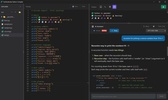
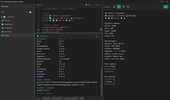
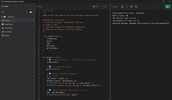
TechXcelerate Python Editor is the fastest and easiest way to write, run, and test Python code on Windows. Designed specifically for students, beginners, and educators, this tool removes the complexity of installing Python, managing environment variables, or setting up heavy IDEs.

Why Choose TechXcelerate? For many beginners, the hardest part of learning to code is just getting the software to work. With TechXcelerate Python Editor, Python is pre-packaged and ready to go. You simply download, open, and code. It is lightweight, strictly offline (except ai tool), and focuses purely on providing a smooth learning experience.

Advertisement
Remove ads and more with Turbo

🚀 Key Features:

⚡ Instant Execution: Write your code and run it immediately—no waiting, no configuring.

📦 Zero Setup Needed: Comes with a built-in Python runtime. You do not need to install Python separately on your computer.

🧠 AI Chat Support: Stuck on a concept? Use the built-in AI chat to get help and understand your code better.

🔒 Fully Offline: Your code runs locally on your machine. No internet connection is required to compile or run scripts.

🪶 Lightweight & Fast: A minimal, clean interface that runs smoothly on any Windows PC without using heavy resources.

🎓 Beginner Focused: No confusing buttons or complex menus—just a clean space to focus on your logic.

🎯 Who Is This For?

Students & Beginners: Skip the installation tutorials and start learning syntax immediately.

Teachers: A hassle-free tool for classrooms where installing software on multiple machines is difficult.

Quick Scripters: Perfect for testing small snippets of code without launching a heavy editor like VS Code.

About TechXcelerate Part of the TechXcelerate ecosystem by NTXM, this tool is built to make technology accessible, simple, and efficient for everyone.

Download today and start your Python journey in seconds!

Information about TechXcelerate Python Editor 0.1.1

Basic information

Image Developer Nitiksh Kumar
Image License Free
Image Category Tools
Image Rating Not specified
Image Languages English

Security and privacy

Image Required permissions Not applicable
Image Advertising Not specified
Image
See security and antivirus report
Image Why is this app published on Uptodown? (More information)

Download info

Image Downloads 64
Image Date Jan 9, 2026
Image File type MSI
Image Size 19.51 MB
Image SHA256 ba930e3674bf08fb5506d48c96799c9d20624769f9745e94db37c75bf90bcfc2
Advertisement
Remove ads and more with Turbo

Rate this App

Review the app
TechXcelerate Python Editor icon
Image Image Image Image Image

Comments

There are no opinions about TechXcelerate Python Editor yet. Be the first! Comment

Advertisement
Remove ads and more with Turbo
SHAREit icon
Share files between Android, Apple and a PC without an Internet connection
PictoBlox icon
Have a great time learning to code
Everyone Piano icon
Turn your keyboard into a virtual piano
FluidSIM icon
Are you into Electropneumatic?
CADe SIMU icon
Simulate electrical circuits from your PC
Mendeley icon
Manage and organize your research papers and references
Moodle icon
The most popular virutual teaching platform
iToolab UnlockGo (Android) icon
Unlock your Samsung without losing any data
SHAREit icon
Share files between Android, Apple and a PC without an Internet connection
TypingMaster icon
Learn to type with this personal tutor
Z-Library icon
Access a huge library from your desktop
PictoBlox icon
Have a great time learning to code
Everyone Piano icon
Turn your keyboard into a virtual piano
CADe SIMU icon
Simulate electrical circuits from your PC
FluidSIM icon
Are you into Electropneumatic?
Tux Typing icon
Learn typing playing with Tux