Wolfram Function Repository
Instant-use add-on functions for the Wolfram Language
Function Repository Resource:
Create forms with persistent values for cloud deployment
ResourceFunction["PersistentCloudForm"][form,store] modifies form so that it has persistent user-specific values, storing values in CloudExpression[store]. |
Deploy a simple GDPR (General Data Protection Regulation) permissions form:
| In[1]:= | ![CloudDeploy[
ResourceFunction["PersistentCloudForm"][
FormFunction[{
"Name" -> "String",
{"GDPRPermission", "I agree"} -> {"no", "yes"}},
AppearanceRules -> <|
"Title" -> "Mailing preferences", "Description" -> "Please confirm that you give permission for us to send you email"|>, If[#GDPRPermission === "yes", "Thank you, we will keep in touch.", "OK, we won't mail you."] &], "myApp"], Permissions -> "Authenticated" -> "Execute"]](https://www.wolframcloud.com/obj/resourcesystem/images/8ca/8cad718c-2573-417a-835a-e54cfbff7528/3237d0dc04427f10.png) |
| Out[1]= |  |
When a user returns to the form, its state will reflect the last values that they submitted. These values can then be changed:
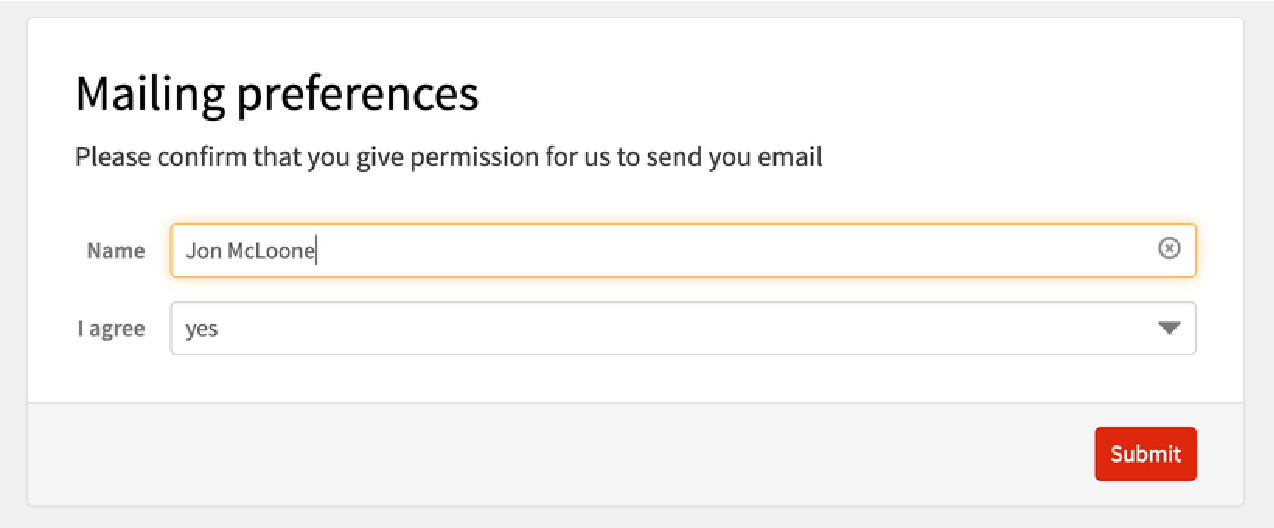
A CloudExpression is created to store the data:
| In[2]:= | ![CloudExpression["myApp"][All]](https://www.wolframcloud.com/obj/resourcesystem/images/8ca/8cad718c-2573-417a-835a-e54cfbff7528/2bb08c5dfa995e18.png) |
| Out[2]= |  |
You can look up whether user "mcloone@wolfram.com" is currently giving their permission to be sent email:
| In[3]:= | ![CloudExpression["myApp"]["mcloone@wolfram.com", "GDPRPermission"]](https://www.wolframcloud.com/obj/resourcesystem/images/8ca/8cad718c-2573-417a-835a-e54cfbff7528/41873c10e288a25c.png) |
| Out[3]= |  |
Both FormPage and FormFunction are supported. Create a simple persistent GDPR permissions form that redirects the user on completion:
| In[4]:= | ![CloudDeploy[
ResourceFunction["PersistentCloudForm"][
FormFunction[{
"Name" -> "String",
{"GDPRPermission", "I agree"} -> {"no", "yes"}},
AppearanceRules -> <|
"Title" -> "Mailing preferences", "Description" -> "PPPlease confirm that you give permission for us to send you email"|>, HTTPRedirect["http://wolfram.com"] &], "myApp"], Permissions -> "Authenticated" -> "Execute"]](https://www.wolframcloud.com/obj/resourcesystem/images/8ca/8cad718c-2573-417a-835a-e54cfbff7528/4d88765ccc9f0f4f.png) |
| Out[4]= |  |
The data is stored in a CloudExpression. Changes to the values in the CloudExpression will be seen by the user when they visit form. For example, you can pre-populate the form for a user who has not used it yet:
| In[5]:= | ![AssociateTo[CloudExpression["myApp"], "user@test.com" -> <|"Name" -> "John Doe", "GDPRPermission" -> "no"|>];](https://www.wolframcloud.com/obj/resourcesystem/images/8ca/8cad718c-2573-417a-835a-e54cfbff7528/3f69acaab4e1c965.png) |
This work is licensed under a Creative Commons Attribution 4.0 International License
