
- SureCookie Installation Guide
- Installing SureCookie Pro
- Updating SureCookie
- How to Set Up SureCookie: Onboarding Wizard Guide
- SureCookie Dashboard Overview
- Connecting Your Site to SureCookie (Scanner Setup)
- Using SureCookie on Multiple Sites
- Uninstalling SureCookie & Data Cleanup
- Preferences Settings (Menu, Branding, Analytics)
- Customizing Banner Content
- Customizing Banner Layout
- Custom CSS for Banner Styling
- How to Configure the Floating Widget
- Customizing the Preference Modal
- Controlling Where the Cookie Banner Appears
- Customizing Banner Colors (Custom Colors, WCAG)
- Customizing the Blocked Content UI
- Banner Text in the Wrong Language (WPML, Polylang, and Locales)
- Re-Consent
- Understanding SureCookie Logs
- How to Set Up Geographic Targeting
- Block Scripts Until Consent (Resource Blocking)
- Setting Up Google Consent Mode v2
- Consent Models Explained (Opt-in vs Opt-out)
- Exporting Consent Logs (PDF Proof + CSV)
- Consent & Data Settings (Duration, Retention, Renew)
- Consent Forwarding Across a Multisite Network
- Resource / Script Blocking (Add Embeds + Fixes)
- CCPA / CPRA Compliance with SureCookie
- Handling Data Requests
- Setting Up Your Business Details
- Generating a Privacy Policy Page
- Recording Consent Without Storing Visitor IP Addresses
- Generating a Cookie Policy Page
- Troubleshooting SureCookie
- Fix a Stuck or Failed Cookie Scan
- Why Some Cookies Aren’t Detected
- Banner Not Appearing: Troubleshooting
- Settings or Cookie Categories Not Saving or Loading
- Embeds Blocked After Consent (YouTube, Maps, Vimeo)
- Scanning Your Site From Your Browser
- Importing and Exporting SureCookie Settings
- Verifying Your Domain With a DNS Record
- Why reCAPTCHA Is Blocked, and How to Release It
Resource / Script Blocking (Add Embeds + Fixes)
A cookie banner asks visitors for permission. Block Scripts Until Consent is what makes that permission mean something: it holds non-essential scripts and embedded content, analytics, ad pixels, tag managers, and embeds like YouTube, Google Maps, and Vimeo, until the visitor agrees. Without it, those trackers can fire before anyone has chosen.
You’ll find it at SureCookie → Tracking Manager → Scripts and Embeds → Block Scripts Until Consent.
What Block Scripts Until Consent Does
- It prevents non-essential scripts and embeds from loading until the visitor consents.
- Each resource belongs to a consent category and loads once the visitor accepts that category. The four default categories are Essential, Functional, Analytics and Marketing, and you can add your own.
- Essential is the exception. SureCookie never holds an essential resource back, so anything in that category loads before the visitor answers, and a scanned row sitting in it reads Loads before consent rather than a blocked status.
- It covers a built-in list of supported services, plus anything your cookie scan detects on your own pages.
Turn On Blocking
- Go to SureCookie → Tracking Manager → Scripts and Embeds.
- Turn on Block Scripts Until Consent.
- Click Save.
With blocking off, your banner still asks for consent, but non-essential scripts may run before a choice is made. Turn it on for real enforcement.
Detected Resources
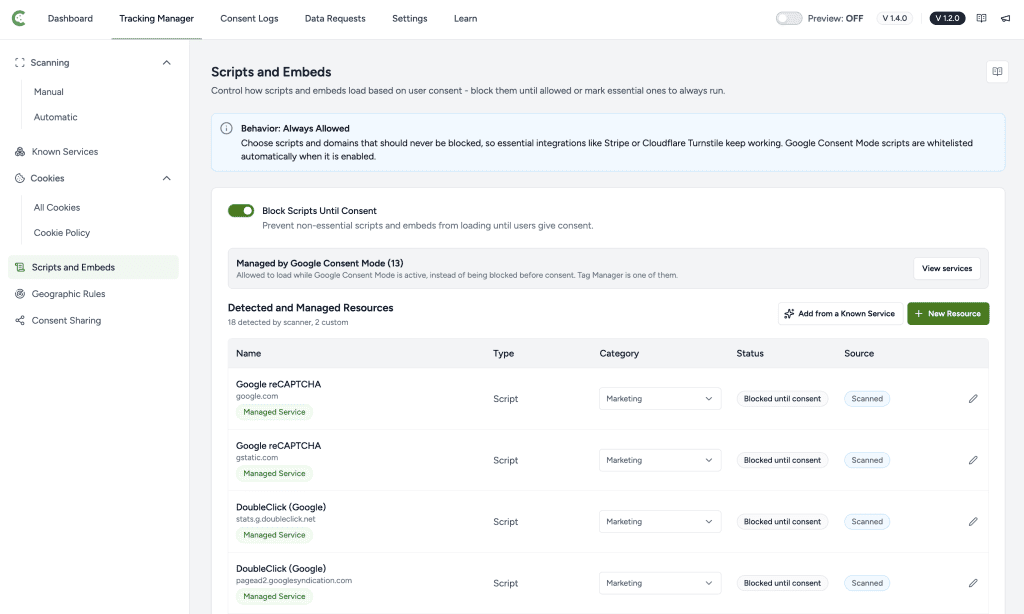
Once blocking is on, Detected and Managed Resources lists every script and embed SureCookie manages on your site, both scanner detections and rules you added. The line under the heading counts each kind, for example “18 detected by scanner, 2 custom”. The list has five columns.
- Name. The service name, with the host it loads from underneath. A row matching SureCookie’s catalog also carries a Known Service or Managed Service badge.
- Type. Script, Iframe, or Script & Iframe.
- Category. The consent category that gates the row. Change it here without opening the row.
- Status. What SureCookie does with the row: Blocked until consent, Not blocked, Whitelisted, Managed by GCM, Cannot be blocked, or Loads before consent. Every status except the first two carries a tooltip explaining why the row is not being held back.
- Source. Scanned for a scanner detection, Custom for a rule you added.
Adding Resources (YouTube, Maps, Vimeo, and More)
There are three ways a script or embed gets covered.
- A supported service. SureCookie blocks the services in its catalog as soon as blocking is on, before you run any scan, and whether or not they appear in the list below. Browse the catalog under SureCookie > Tracking Manager > Known Services.
- A scan. To get a specific script or embed as a row you can edit, scan a page it loads on. Go to SureCookie > Tracking Manager > Scanning > Manual, include that page, and run the scan. Each detection arrives with a Type, a Category and a Status.
- A rule you add. Click New Resource on this screen to open the Add Script or Embed drawer. Leave Behavior on Block until consent (recommended), enter a Name, pick a Type of Script or iFrame, enter the Domain / Host the resource loads from, such as
connect.facebook.net, and choose the Category that governs it.
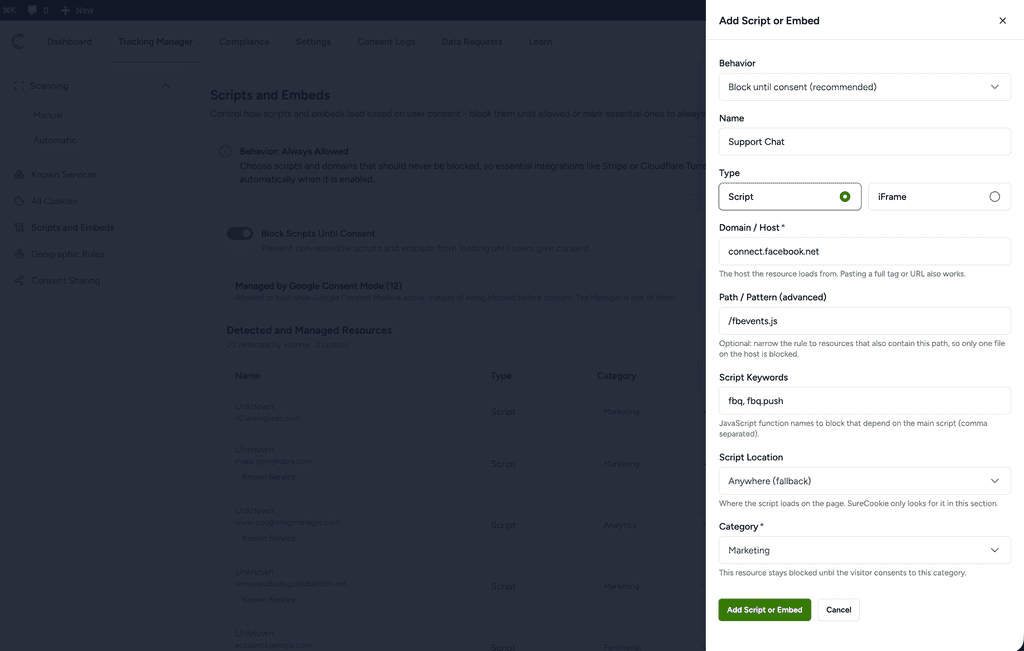
Name the host the resource loads from rather than one exact file name, and never name your own domain: a pattern matches anywhere in the address, so your own domain matches every asset on the page.
Video and map embeds load once the visitor accepts the category they sit in. In SureCookie’s catalog, YouTube, Vimeo and Google Maps are all Marketing. You can change the category on the row, and the embed then waits for that answer instead.
Allowing a Resource
Open a row with the edit icon and set its Behavior.
- Block until consent (recommended). SureCookie holds the resource until the visitor accepts its category, and Status reads Blocked until consent. This is the right choice for anything non-essential.
- Always load. SureCookie stops managing the resource, in the page and in the browser, so it loads before anyone answers the banner. A scanned row then reads Not blocked. A rule you typed reads Whitelisted, and its Category cell reads Always Allowed. Releasing a resource that sets cookies can put you in breach of GDPR, so use this deliberately.
Always load is the lever for releasing something before consent. Recategorising is not. Moving a resource to Functional, Analytics or Marketing changes which answer releases it, never whether it waits for one.
Setting a scanned row to Always load is part of the free plugin. Adding your own rule and setting it to Always load needs SureCookie Pro. In the free plugin, a rule you add can only block.
Google Consent Mode scripts are a special case: when Consent Mode is enabled, SureCookie lets Google’s scripts run and manages them through Consent Mode, so they show an explanatory note instead of a Block toggle.
Common Fixes
- An embed stays blocked after consent – It belongs to a category the visitor didn’t accept. Check its Category; the visitor must accept that category. See Embeds Blocked After Consent (YouTube, Maps, Vimeo).
- A resource isn’t in the Detected Resources list – Run a scan on the page where it loads so it’s detected. Supported services are still blocked even when they aren’t listed.
- A script still runs before consent. Confirm Block Scripts Until Consent is on, then clear your page and CDN caches so the blocked version of the page is served. Blocking rewrites the HTML your server sends, so a cached page carries an older decision.
- Blocking is on and nothing changed. The cookie banner is a master switch over all blocking. If Enable Cookie Banner is off under SureCookie > Settings > Banner > Content, nothing is held back, whatever the blocking toggle says.
- A Google script loads before consent. If the row reads Managed by GCM, that is Google Consent Mode working as designed, not a fault. SureCookie lets those tags load and sends them a denied consent signal instead of blocking the file. Open View services next to Managed by Google Consent Mode at the top of the screen to see which services it covers. To block the files outright, turn Google Consent Mode off first.
- Blocking works for some visitors and not others. In SureCookie Pro, blocking is also set per geographic rule. Open SureCookie > Tracking Manager > Geographic Rules and check the rule matching those visitors: each rule carries its own Enable Block Scripts Until Consent, and the California, USA (CCPA/CPRA) template ships with it off, because opt-out means trackers run until the visitor declines.
- A resource set to blocked still records visits. Check whether that tracker is proxied through your own domain, an option usually called something like “Avoid ad blockers”. SureCookie matches the address a resource loads from, so a script served from your own site never matches the vendor’s. Turn the proxy off in that tracker’s plugin, then rescan.
- Changes don’t take effect – Clear caches, and re-scan if you changed the page’s content.
- An embed won’t load even after accepting its category – The embed may be injected by a separate script in a different category. Make sure the visitor also accepts that category.
- Blocking works, but something stopped working. A form, an ad unit or a builder toolbar can break once blocking is on. reCAPTCHA is the common one, and moving it to another category does not release it: see Why reCAPTCHA Is Blocked, and How to Release It. For a page builder, see Page Builder Popups and Query Loops Stopped Working.
- Scripts stay blocked for logged-in staff. In SureCookie Pro, excluding a user role under SureCookie > Settings > Banner > Visibility hides the banner only. Scripts stay blocked for those visitors until Allow Tracking Scripts on Excluded Locations on that same screen is on. Leave it off unless you need it, because it lets trackers run with no banner in sight.
- A tracker your page builds in the browser is not blocked. SureCookie rewrites the HTML your server sends, and a browser-side guard parks scripts and embeds that are built after the page loads. Markup written in wholesale with
document.writereaches neither layer. That is a current limitation we have open with our development team, not something to rebuild your pages around.
Next Steps
If a tracker still fires before anyone accepts, work through Why Trackers Still Fire Before Consent, which covers each cause in order.
For step-by-step help when an embed stays blocked, see Embeds Blocked After Consent (YouTube, Maps, Vimeo). To forward consent state to Google’s tags, see Setting Up Google Consent Mode v2.
We don't respond to the article feedback, we use it to improve our support content.
