%%%%%%%%
Grab all our plugins for$4,146$749|Limited time only!
Don't Miss Out
Rox Booking
+ 12 Premium Plugins. $799 for life. No Renewals.
00 DAY
:
00 HOUR
:
00 MIN
:
00 SEC
Grab the Deal

Elementor Widgets
and Features

ElementsKit comes with a powerful suite of Elementor widgets for unlimited web design possibilities.

General Widgets

Go beyond your design limit with widgets made to expand Elementor page builder.

Advanced Widgets

Supercharged with extensive controls and features to design and accommodate versatile interactive web content.

Creative Widgets

Express your vision through dozens of Elementor creative widgets and keep viewers engaged with your content.

Special Features

Unlock your Elementor widget capabilities with forward-thinking design functionality.

Header & Footer Widgets

Packed with diverse multi-level navigation widgets for Elementor, designed to build any type of website header or footer.

Marketing Widgets

Drive more sales and get your offers noticed with Elementor’s high-converting marketing widgets.

Post Widgets

Get fully customizable widgets with a handful of settings to create a personalized blog post layout.

Form Widgets

Style your forms to match your brand, no matter which form builder plugin you use.

Social Media Widgets

Show off your social feeds and links in style with dedicated Elementor social media widgets.

Review & Testimonials Widgets

Boost credibility by showing customer or client reviews on your Elementor website.

WooCommerce Widgets

Design the most-wanted ecommerce pages with Elementor WooCommerce widgets.

Sorry, no widgets were found for your current search. Try our widget builder instead.
Want More Elementor WooCommerce Widgets?

Meet ShopEngine -
Ultimate WooCommerce Addon

Product Price

Product Upsells

Add to Cart

Product Additional Information

Product SKU

Product Tabs

Product Categories

Product Tags

Product Review

Related Product

Product Excerpt

Product Share

Empty Cart Message

Cart Table

Cart Total

Return to Shop Button

Archive Title

Archive Products

Archive Description

Coupon Form

Checkout Payment

Checkout Review Order

Checkout Form Additional

Checkout Form Billing

Checkout Form Login

Checkout Form Shipping

Shipping Methods

Form Additional

Form Shipping

Order Details

Address Details

Account Dashboard

Account Downloads

Account Billing Address

Account Shipping Address

Account Address

Account Logout

My Account Orders

Account Details

Elementor Custom Widget Builder

Still Looking for Your Desired Elementor Widget?

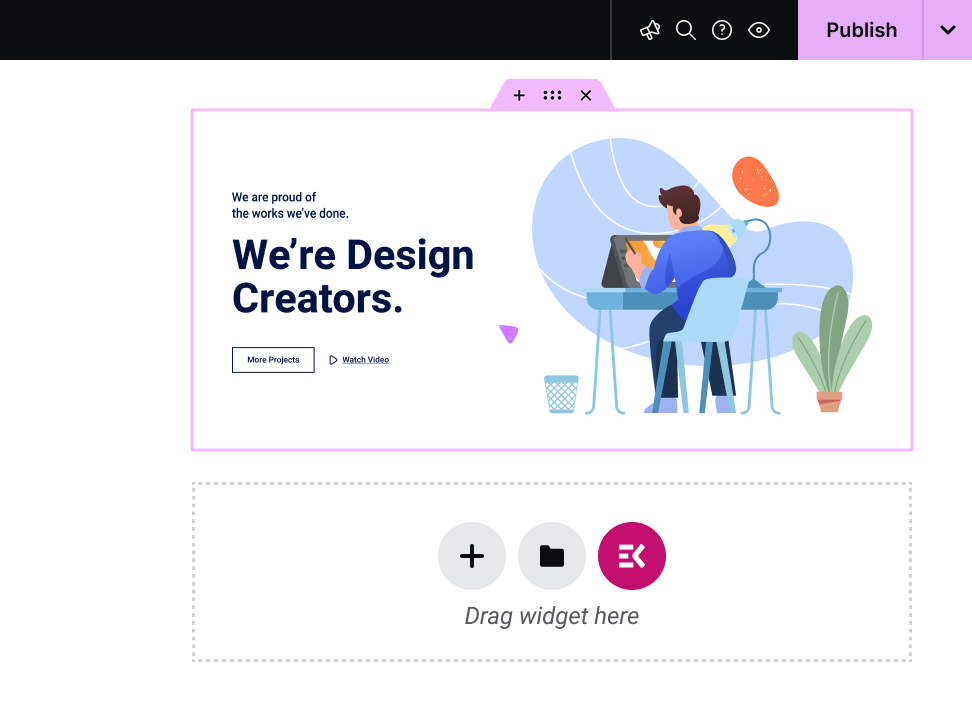
ElementsKit facilitates a drag & drop Elementor custom widget builder. No coding needed, use multipurpose, super-functional hooks to create your own customized widget to get a personalized experience.

Image
Image
Image
Image

What Are Elementor Widgets?

Elementor widgets are the drag-and-drop building blocks that make up every page you design in Elementor. Headings, pricing tables, testimonial sliders, contact forms, image galleries, each one is a widget. Drag it onto the page, configure it, and publish.

Elementor ships with a solid set of core widgets. But addon plugins like ElementsKit extend that library with hundreds of advanced, specialized widgets that Elementor's native set doesn't cover.

Image

Why ElementsKit Widgets?

117+ advanced widgets & modules. Don’t just look at numbers! Look for what potentials the widgets cover for expanding Elementor capabilities. For example, with the ElemntsKit Advanced Slider or Carousel widget, you can build any type of carousel for your websites.

ElementsKit supports from basic content blocks to advanced interactive elements like Advanced Toggle, Image Morphing, Breadcrumb, Pricing Table Content TIcker, Social Feeds, and a full Mega Menu Builder.

ElementsKit's free version includes widgets that competitors lock behind their paywalls. Build real, professional pages without spending a dollar and upgrade only when you need to.

ElementsKit loads only the assets for widgets actively used on a page. More widgets don't mean a slower site.

ElementsKit also includes a Header & Footer Builder, Conditional Content, Cross-Domain Copy Paste, Advanced Parallax, and more. It's a complete Elementor toolkit, not just a widget pack.

Image

Elementor Widgets for Different Types of Users

Mega Menu Builder, Header & Footer Builder, Portfolio, Pricing Table, Advanced Tabs, and Cross-Domain Copy Paste. Build fast, reuse across client sites, bill more.

Team Member, Testimonial, Contact Form, Business Hours, and Google Map. Seven widgets that handle 80% of a conversion-ready business homepage.

Product Carousel, Product Grid, WooCommerce Category List, Mini Cart, and Countdown Timer. Widgets that display inventory and drive sales.

Post Grid, Post Carousel, Table of Contents, Social Share, Advanced Heading, and Fancy Text. Make content look as good as it reads.

Widget Builder, Conditional Content, Nav Menu, Advanced Parallax, Image Hotspot, and Scroll Reveal. Full control. No code required.

Image

Frequently
Asked Questions

Yes! ElementsKit has a free version available on WordPress.org that includes a solid selection of widgets and features. The Pro version unlocks the full widget library, advanced modules like the Mega Menu Builder and Conditional Content, and deeper styling controls. You can start free and upgrade when your project demands it.

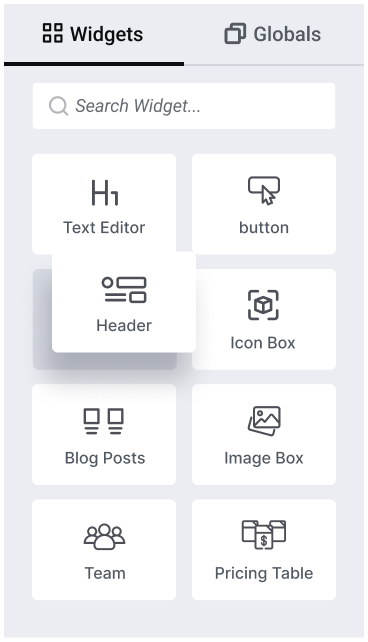
Make sure that, Elementor page builder is installed & activate. Open any page, click Edit with Elementor, then in the left sidebar, you will see a all widget of Elementor and other third-party Elementor addon like ElementsKit. Find your needed one and drag onto your canvas, use the Content tab to populate it, the Style tab to match your brand, and the Advanced tab for spacing and animation. Hit Publish or Update and you're done.

Elementor ships with around 40 core widgets covering the fundamentals: headings, images, buttons, forms, and basic content layouts. ElementsKit adds 117+ additional widgets on top of those, covering advanced interactions, WooCommerce elements, marketing tools, and creative design components that Elementor's native library doesn't include. You use both together inside the same Elementor editor.

Not with ElementsKit. The plugin uses modular asset loading, meaning it only loads the CSS and JavaScript for widgets that are actually present on a given page. A page using three widgets loads three widgets' worth of assets, not 117. Your page speed and Core Web Vitals are protected.

No. ElementsKit works with the free version of Elementor. You don't need Elementor Pro to access ElementsKit's widget library. Elementor Pro adds its own separate set of Pro widgets and theme-building features; ElementsKit works alongside both the free and Pro versions of Elementor.

ElementsKit currently includes 117+ widgets spanning general content, advanced layout, creative design, and WooCommerce categories. The library is actively updated, and new widgets are added based on user requests and emerging design trends.

Yes. ElementsKit installs as a standard WordPress plugin and extends Elementor without touching your existing pages or theme. Widgets you've already built stay intact. You simply gain access to new tools from the moment you activate the plugin.

If you deactivate ElementsKit, any widgets from ElementsKit that are placed on your pages will stop rendering until the plugin is reactivated. Your content isn't deleted, it's stored in the database. Reactivating the plugin restores everything immediately.

ElementsKit is compatible with all well-coded WordPress themes, including popular options like Astra, Hello Elementor, GeneratePress, OceanWP, and Kadence. If your theme supports Elementor, it supports ElementsKit.

Yes. Between the widget library, the Header & Footer Builder, the Mega Menu Builder, and the ready-made templates, ElementsKit gives you everything needed to design a complete website from homepage to footer, without leaving Elementor or installing additional plugins.

ElementsKit has detailed documentation at wpmet.com/doc/elementskit/ covering every widget with step-by-step setup guides. For direct support, free users can access the community support forum, and Pro users get priority ticket-based support from the ElementsKit team.

Make sure that, Elementor page builder is installed & activate. Open any page, click Edit with Elementor, then in the left sidebar, you will see a all widget of Elementor and other third-party Elementor addon like ElementsKit. Find your needed one and drag onto your canvas, use the Content tab to populate it, the Style tab to match your brand, and the Advanced tab for spacing and animation. Hit Publish or Update and you're done.

Template FAQ’s

Elementor Templates FAQs:

Have more questions on ElementsKit templates?
Reach our  Support Team.

Elementor ships with around 40 core widgets covering the fundamentals: headings, images, buttons, forms, and basic content layouts. ElementsKit adds 114+ additional widgets on top of those, covering advanced interactions, WooCommerce elements, marketing tools, and creative design components that Elementor's native library doesn't include. You use both together inside the same Elementor editor.

Yes! ElementsKit has a free version available on WordPress.org that includes a solid selection of widgets and features. The Pro version unlocks the full widget library, advanced modules like the Mega Menu Builder and Conditional Content, and deeper styling controls. You can start free and upgrade when your project demands it.

Not with ElementsKit. The plugin uses modular asset loading, meaning it only loads the CSS and JavaScript for widgets that are actually present on a given page. A page using three widgets loads three widgets' worth of assets, not 114. Your page speed and Core Web Vitals are protected.

No. ElementsKit works with the free version of Elementor. You don't need Elementor Pro to access ElementsKit's widget library. Elementor Pro adds its own separate set of Pro widgets and theme-building features; ElementsKit works alongside both the free and Pro versions of Elementor.

ElementsKit currently includes 114+ widgets spanning general content, advanced layout, creative design, and WooCommerce categories. The library is actively updated, and new widgets are added based on user requests and emerging design trends.

Yes. ElementsKit installs as a standard WordPress plugin and extends Elementor without touching your existing pages or theme. Widgets you've already built stay intact. You simply gain access to new tools from the moment you activate the plugin.

widgets from ElementsKit that are placed on your pages will stop rendering until the plugin is reactivated. Your content isn't deleted, it's stored in the database. Reactivating the plugin restores everything immediately.

ElementsKit is compatible with all well-coded WordPress themes, including popular options like Astra, Hello Elementor, GeneratePress, OceanWP, and Kadence. If your theme supports Elementor, it supports ElementsKit.

Yes. Between the widget library, the Header & Footer Builder, the Mega Menu Builder, and the ready-made templates, ElementsKit gives you everything needed to design a complete website from homepage to footer, without leaving Elementor or installing additional plugins.

ElementsKit has detailed documentation at wpmet.com/doc/elementskit/ covering every widget with step-by-step setup guides. For direct support, free users can access the community support forum, and Pro users get priority ticket-based support from the ElementsKit team.

Make sure that, Elementor page builder is installed & activate. Open any page, click Edit with Elementor, then in the left sidebar, you will see a all widget of Elementor and other third-party Elementor addon like ElementsKit. Find your needed one and drag onto your canvas, use the Content tab to populate it, the Style tab to match your brand, and the Advanced tab for spacing and animation. Hit Publish or Update and you're done.