🚀 Supercharge your YouTube channel's growth with AI.
Try YTGrowAI FreeNumPy arange(): How to Build Evenly Spaced Ranges

I asked np.arange for the values between 2.23 and 2.24 in steps of 0.005, and it handed back three of them, the last one printing as the upper limit I had just excluded. A reader on Stack Overflow hit the same wall, writing that he expected the output to go up to but not include the stop point. I ran that call and every sample below on NumPy 2.5.3 with each element printed as its exact value, so what follows is the rule behind the count rather than a warning to be careful.
What np.arange returns and how its arguments map to an interval
np.arange returns a NumPy array of evenly spaced values, and its arguments describe an interval instead of a count. You hand it a start, a stop, and a step, and it walks from the start while the stop is still ahead of it.
The shortest form takes one number and begins at zero.
import numpy as np

a = np.arange(5)
print(a)
print("dtype:", a.dtype, "| shape:", a.shape)
print("type:", type(a).__name__)
Evenly spaced means something slightly different for the two argument types. Integer arguments produce exact neighbours, so the distance between any two adjacent values is the step you asked for. Float arguments produce the nearest representable doubles to that spacing, which is where every surprise in this article comes from.
What comes back is an ndarray with a dtype and a shape, which is what separates it from the built-in range. Every array operation you already use, from slicing to broadcasting, works on a range built this way, and the NumPy module guide covers the object itself if you are new to it.
What you need before the first call
The samples here ran on Python 3.14.7 with NumPy 2.5.3, installed from the current PyPI wheel into a fresh virtual environment with no version pin. Check your own pair before comparing output, because two of the behaviours below changed after NumPy 1.20.
import sys
import numpy as np

print("python", sys.version.split()[0])
print("numpy ", np.__version__)
Four pieces of the call decide the result, and only the first two are required.
| Argument | What it decides | Default |
|---|---|---|
| start | the first value, included in the output | 0 |
| stop | the end of the interval, excluded, with one float-step exception | required |
| step | the distance between neighbours, and it may be negative | 1 |
| dtype | the type of the output array, inferred when you leave it out | inferred |
How to build a range with np.arange
The calls below move from the shortest form to the ones you reach for once a float step is in play. Each block is a script I ran on this machine, followed by the output it printed.
Add the stop and the step
Three arguments read as start, stop, step, which is the same order Python’s range uses and the reason the two are easy to mix up.
import numpy as np

print("arange(2, 10)     ->", np.arange(2, 10))
print("arange(1, 10, 2)  ->", np.arange(1, 10, 2))
print("arange(10, 1, -2) ->", np.arange(10, 1, -2))
A negative step walks down instead of up, and the stop stays excluded on the way down too.
The stop is excluded until a float step says otherwise
NumPy’s parameter reference states that the interval does not include the stop, then adds the exception in the next sentence: when step is not an integer, floating point round-off can change the length of the result. That exception is the whole surprise, and it stays invisible while you read the default printed form of an array.
import numpy as np

a = np.arange(2, 10)
print("a       ->", a)
print("a[-1]   ->", a[-1])
print("10 in a ->", 10 in a)
print("len(a)  ->", len(a), "= (10 - 2) values")
Eight values came back from a start of 2 to a stop of 10, and the membership test on the stop returned false. I checked that directly rather than trusting the printed count, because the count is the number this whole article is about.
Printing each element as its exact value is what made the behaviour legible to me, since the default display rounds to a friendly few decimals and hides the difference.
import numpy as np

a = np.arange(0, 1, 0.1)
print("len(arange(0, 1, 0.1)) =", len(a))
for i, x in enumerate(a):
    print(f"  [{i}] {repr(x)}")
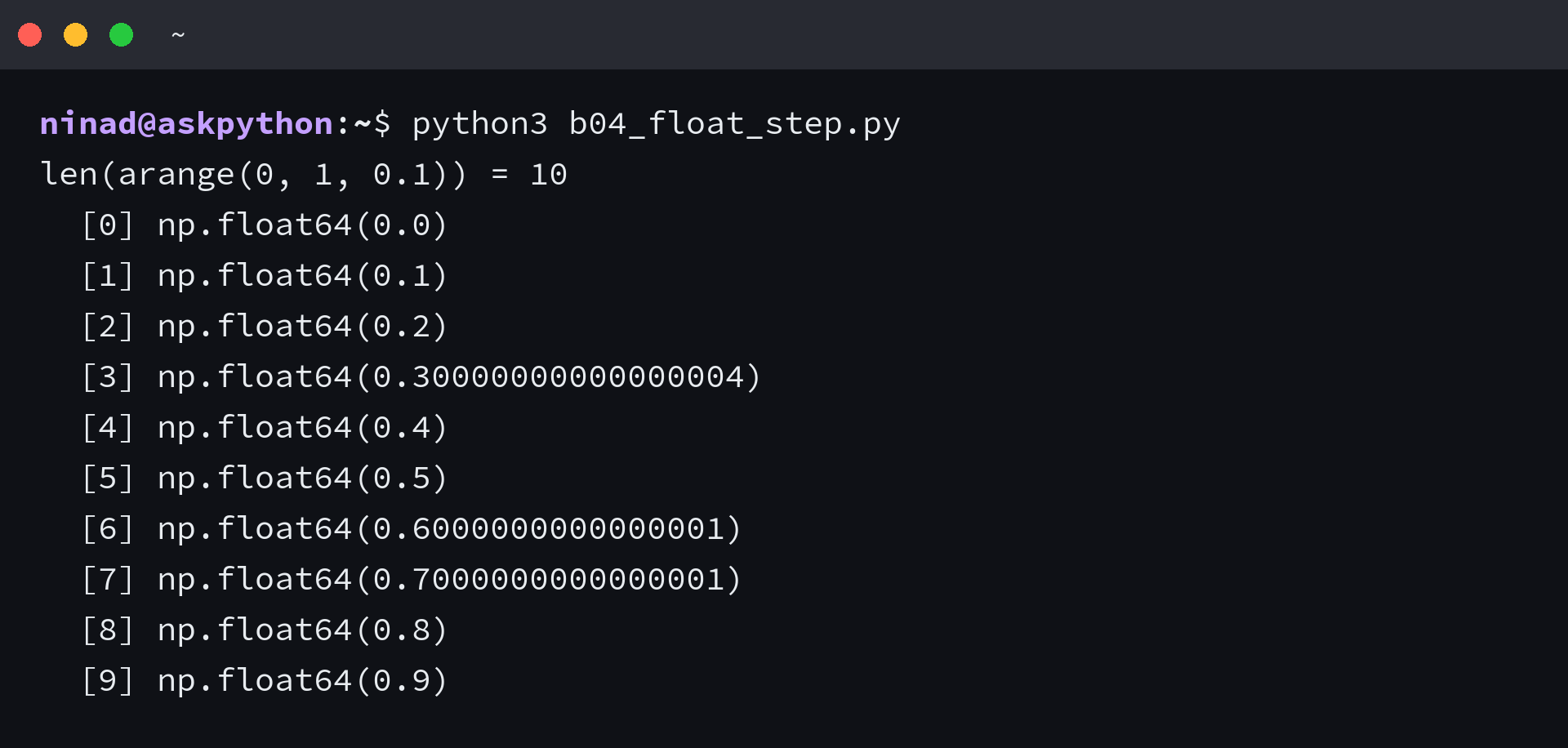
That third element is where the display stops telling the truth about the array, because it holds 0.30000000000000004 while the printed form rounds it to 0.3. The literal 0.3 is not in the array.
The boundary is where the count changes. I asked for the half-open interval from 0.1 up to 0.4 and got four values, with the last one bit-identical to the stop.
import numpy as np

a = np.arange(0.1, 0.4, 0.1)
print("len:", len(a))
print([repr(x) for x in a])
b = np.arange(0.1, 0.6, 0.1)
print("len:", len(b))
print([repr(x) for x in b])
The hex view of that last element matches the literal 0.4 exactly, while the element before it sits one unit in the last place above 0.3. The interval closed a value late in one place and a value early in the other, and both cases come from the same rounding.
That reader’s 0.005 step is the same rounding seen from the other side. The third value is not the stop, it is the next representable double below it, and the default display rounds it up to the limit.
import numpy as np

print("The report from a reader on Stack Overflow, reproduced here:")
a = np.arange(2.23, 2.24, 0.005)
print("np.arange(2.23, 2.24, 0.005) ->", [repr(x) for x in a])
print("expected by the caller         -> 2.23, 2.235 (stop excluded)")
print("len:", len(a))

b = np.arange(0.1, 0.4, 0.1)
print()
print("np.arange(0.1, 0.4, 0.1) ->", [repr(x) for x in b], "len", len(b))
print("the stop 0.4 is inside the array:", bool((b == 0.4).any()))
print("0.3 is not, though the display shows it:", 0.3 in list(b))
So the rule is arithmetic rather than mysterious: the length is the ceiling of the interval divided by the step, and the last element can land on either side of the stop depending on how that division rounds.
Choose the dtype and know what it costs
Leave dtype out and NumPy infers it from the arguments, which usually means the default integer or float width rather than the smallest type that would hold the values.
import numpy as np

print("arange(3)                 ->", np.arange(3).dtype)
print("arange(3, dtype=float)    ->", np.arange(3, dtype=float).dtype)
print("arange(0, 1, 0.5)         ->", np.arange(0, 1, 0.5).dtype)
print("arange(5, dtype=np.int8)  ->", np.arange(5, dtype=np.int8).dtype)
print("arange(5, dtype='float32')->", np.arange(5, dtype="float32").dtype)
Memory follows the dtype, because the array stores one fixed-width number per element. A million-element range costs eight times more as int64 than as int8, which is worth knowing before you build a coordinate grid of ten million points, and the same choice applies to the arrays you create with np.zeros.
import numpy as np

n = 1_000_000
for dtype in ("int64", "int32", "int16", "int8"):
    arr = np.arange(n, dtype=dtype)
    print(f"{dtype:6s} {arr.nbytes / 1e6:5.1f} MB  last={arr[-1]}")
| dtype | Bytes per element | One million elements |
|---|---|---|
| int64 | 8 | 8.0 MB |
| int32 | 4 | 4.0 MB |
| int16 | 2 | 2.0 MB |
| int8 | 1 | 1.0 MB |
The last two rows of that run are a warning of their own. A million values do not fit in int16 or int8, and the array still came back, wrapping to 16959 and 63.
Empty output from a range that cannot advance
A range that cannot move in the direction of its step returns an empty array instead of raising.
import numpy as np

print("arange(0)         ->", np.arange(0), "| len", len(np.arange(0)))
print("arange(5, 1)      ->", np.arange(5, 1), "| len", len(np.arange(5, 1)))
print("arange(-3)        ->", np.arange(-3), "| len", len(np.arange(-3)))
print("arange(0, 10, -1) ->", np.arange(0, 10, -1), "| len", len(np.arange(0, 10, -1)))
The result is still an ndarray with a dtype and a shape, so a later call to max or an index of zero fails a long way from the line that produced it. Check the length where you build the range.
Build a grid and index into it
The common next step is to reshape the flat range into a grid and then use it as coordinates or as positional indices.
import numpy as np

grid = np.arange(12).reshape(3, 4)
print(grid)
print("shape          :", grid.shape)
print("row 1          :", grid[1])
print("column 2       :", grid[:, 2])
print("sum per row    :", grid.sum(axis=1))
print("values > 6     :", grid[grid > 6])
Slicing, strided slices, and boolean masks all work on the result, which is the practical reason to build a range with arange rather than with a Python list.
import numpy as np

print("A. Slicing and reversing an arange array")
a = np.arange(10)
print("a           :", a)
print("a[3:7]      :", a[3:7])
print("a[::-1]     :", a[::-1])
print("a[::3]      :", a[::3])
print("a[a % 2 == 0]:", a[a % 2 == 0])

print()
print("B. Indexing by position, not by value")
print("a[[1, 4, 9]]:", a[[1, 4, 9]])

print()
print("C. A coordinate grid built from two aranges")
ys = np.arange(3)
xs = np.arange(3)
gx, gy = np.meshgrid(xs, ys)
print("x coords:\n", gx)
print("y coords:\n", gy)
print("shape of the grid:", gx.shape)
The boolean mask selects by value and the list of indices selects by position, and both come back as new arrays rather than views into the range.
arange or linspace: choose by what you can specify
The choice between the two functions is not about which one is better behaved. It is about which quantity you already know: the spacing between values, or the number of values you need.
linspace takes a count as its argument, which lets it promise an exact length and put both endpoints inside the output. arange takes a step instead.
import numpy as np

print("arange(0, 1, 0.1)                  ->", len(np.arange(0, 1, 0.1)), "values, stops before 1.0")
print("linspace(0, 1, 10)                 ->", len(np.linspace(0, 1, 10)), "values, ends at", np.linspace(0, 1, 10)[-1])
print("linspace(0, 1, 11)                 ->", len(np.linspace(0, 1, 11)), "values, ends at", np.linspace(0, 1, 11)[-1])
print("linspace(0, 1, 5, endpoint=False)  ->", np.linspace(0, 1, 5, endpoint=False))
I ran both calls across the same interval to see how the counts compare, and the difference lands exactly where you would expect it. Asking arange for a 0.1 step up to 1.0 gives ten values and stops at 0.9, while linspace asked for ten values ends on 1.0.
When the endpoint has to be inside the output, linspace is the shorter path, because excluding it changes the step it computes. When the spacing is the thing you care about, arange states it directly.
| What you know | Use | Why |
|---|---|---|
| the spacing you want | arange | the step is an argument, and the length follows from the interval |
| the number of values you need | linspace | num is an argument, and the step is derived from the interval |
| both endpoints must be present | linspace | endpoint defaults to true, and arange excludes the stop |
| integer values with arbitrary precision | range, or arange with dtype=object | arange stores fixed-width integers |
Edge cases that change the output
Four inputs break that story, and each fails in a different place: at the call, at the dtype, at the comparison, and at the addition. I ran into all four while building the samples for this article, and only the first one announces itself.
A step of zero
Zero spacing cannot advance, and NumPy stops the call rather than looping.
import numpy as np

cases = [
    ("step of zero", lambda: np.arange(0, 5, 0)),
    ("string input", lambda: np.arange("2", 8)),
    ("int8 out of range", lambda: np.arange(200, 260, dtype=np.int8)),
]
for label, call in cases:
    try:
        call()
        print(f"{label:20s} -> no error")
    except Exception as exc:
        print(f"{label:20s} -> {type(exc).__name__}")
        print(f"{'':22s}{exc}")
The string case fails for the same reason a list would: the dtype of the input has no meaning as a number. I expected the int8 call to wrap the way the million-element array wrapped, and this one raised instead, which is the difference between a value that is out of range for the dtype and a value that overflows after the fact.
A dtype that cannot hold the values
NumPy’s warning for arange says the step it actually applies is measured in the output dtype rather than in the Python numbers you passed. An integer dtype therefore collapses a fractional step to zero.
import numpy as np

print("A. An int dtype collapses the step the docs measure")
print("np.arange(0, 5, 0.5, dtype=np.int_)  ->", np.arange(0, 5, 0.5, dtype=np.int_))
print("np.arange(-3, 3, 0.5, dtype=np.int_) ->", np.arange(-3, 3, 0.5, dtype=np.int_))

print()
print("B. int32/int64 are fixed width, Python ints are not")
power, modulo = 40, 10000
x1 = [(n ** power) % modulo for n in range(8)]
x2 = [(n ** power) % modulo for n in np.arange(8)]
print("range(8)      ->", x1)
print("np.arange(8)  ->", x2)
print("equal:", x1 == x2)

print()
print("C. What the same computation needs to stay exact")
x3 = [(n ** power) % modulo for n in np.arange(8, dtype=object)]
print("arange(8, dtype=object) ->", x3)
print("equal to range():", x1 == x3)
The same fixed width changes large-integer arithmetic, because range keeps Python integers of arbitrary size and arange does not. Asking for dtype=object is the one way to keep the exact integer values inside an array.
Comparing arange output to a literal
A float table built with arange does not contain the decimal values you would compare against, so membership tests fail on values that look present.
import numpy as np

bins = np.arange(0.1, 1.0, 0.1)
print("len(bins) =", len(bins))
for i in (1, 2, 3):
    print(f"  bins[{i}] = {repr(bins[i])}")

probe = 0.3
print("probe            :", probe)
print("bins[2] == probe :", bins[2] == probe)
print("probe in bins    :", bool((bins == probe).any()))
print("searchsorted     :", np.searchsorted(bins, probe))
print("any isclose      :", bool(np.isclose(bins, probe).any()))
![Terminal output showing bins[2] equal to 0.30000000000000004 and the equality comparison returning False while searchsorted and isclose still find the value](https://www.askpython.com/wp-content/uploads/2026/09/shot_arange_lookup.png)
The index you want is still there, so reach for searchsorted or isclose instead of equality when the table came from a float step. If you only need to bound the values afterwards, np.clip does that without touching the table.
A start much larger than the step
Once start sits far enough above step, the addition rounds to the same float every time and the array fills with copies of the start value.
import numpy as np

print("A. start much larger than step, as the NumPy warning describes")
small = np.arange(0, 5, 0.5)
print("np.arange(0, 5, 0.5)         ->", small)
big = np.arange(1e8, 1e8 + 0.5, 0.1)
print("np.arange(1e8, 1e8 + 0.5, 0.1) ->", big, "len", len(big))
print("the requested step was 0.1, the visible step is 0.0")

print()
print("B. The same interval handled by linspace")
print("np.linspace(1e8, 1e8 + 0.5, 6) ->", np.linspace(1e8, 1e8 + 0.5, 6))

print()
print("C. A step that cannot change the value")
print("np.arange(1.0, 1.0000000000000002, 1e-17) len:", len(np.arange(1.0, 1.0000000000000002, 1e-17)))
print("np.arange(0, 1e-16, 1e-17)              len:", len(np.arange(0, 1e-16, 1e-17)))
That last case is the one NumPy’s own warning recommends linspace for, because linspace computes each value from the interval rather than by accumulating a step.
What you have now
You can predict how many values an arange call returns from the interval and the step, and you can see when the last element has landed on the wrong side of the stop.
- The stop is excluded, except when a non-integer step rounds the length of the output.
- The length is the ceiling of the interval divided by the step.
- Elements come from start plus an integer multiple of step, so a float result rarely equals the decimal you compare it with.
- A count you must hit exactly is a linspace argument, not an arange one.
If you were adding half a step to your stop to get the last value you wanted, linspace with an explicit count is the shorter repair. I would keep the check for the length next to the call that builds the range, because the arithmetic that decides it is not the arithmetic most people have in mind when they write the arguments.
FAQ
What does np.arange do in numpy?
It returns an ndarray of evenly spaced values across a half-open interval that runs from start up to but not including stop, using step as the distance between neighbours.
Is the stop value included in np.arange?
No, with one exception. NumPy’s parameter reference notes that when step is not an integer, floating point round-off can change the length of the output, so the last element can land on the stop value.
Should I use arange or linspace for float steps?
Use linspace when you know how many values you need or both endpoints must be present. Use arange when you know the spacing you want, and check the length of the result before you index into it.
How many values does np.arange(0, 1, 0.1) return?
Ten, from 0.0 up to 0.9, and the third value is stored as 0.30000000000000004 rather than 0.3.