🚀 Supercharge your YouTube channel's growth with AI.
Try YTGrowAI FreePySpark Tutorial: Run Your First Local Job


PySpark runs your Python twice, once in the driver that builds the job and once in a worker that executes it. The two have to be the same interpreter. I installed PySpark 4.2.0 into a clean virtual environment, ran one pipeline from a CSV on disk to a parquet directory, then broke the startup in the two ways that raise an error before a single row is read.
What actually runs when you start a PySpark job
A PySpark job is three pieces that have to agree with each other. The script you wrote runs in the driver, the functions you hand to the DataFrame API run in a worker, and both of them talk to a JVM that hosts the scheduler and the SQL engine.
| Piece | What runs there | What it needs |
|---|---|---|
| Driver | your script, the job graph, the SparkSession | the pyspark package and a Python interpreter |
| JVM | scheduler, SQL optimizer, shuffle storage | a JDK found through JAVA_HOME |
| Worker | the functions you pass to filter, select, and agg | the same Python minor version as the driver |
The driver and the worker are separate processes, so Spark compares their Python versions before it runs anything. The JVM is found through an environment variable rather than through the path, which is why a working java command on the same machine proves nothing.
What you need before the first session
The list is short, and each missing item produces a different error rather than a different symptom.
- Python 3.9 or newer on both sides. Setting PYSPARK_PYTHON to the interpreter that launched the script is the reliable way to keep the worker on the same minor version as the driver.
- A JDK. Spark reads JAVA_HOME, so an installation that is on the path but not in that variable is invisible to it.
- The pyspark package from pip. Local mode needs no separate Spark download and no Hadoop installation.
- Memory for the driver, which asks for 1 GB by default, plus room for a shuffle on a file that outgrows it.
- A session built with master set to local, so nothing goes looking for a cluster.
A question on Stack Overflow about a clean PySpark install that still raises an error on a simple program is what this list prevents. The two interpreter lines at the top of every script below close it.
Starting a session and reading a CSV
A local session is one builder call with three settings, and I set the interpreter lines above it so the worker starts on the Python that launched the script.
import os
import sys

os.environ["PYSPARK_PYTHON"] = sys.executable
os.environ["PYSPARK_DRIVER_PYTHON"] = sys.executable
os.environ["SPARK_LOCAL_IP"] = "127.0.0.1"

from pyspark.sql import SparkSession

spark = (
    SparkSession.builder.appName("first-session")
    .master("local[1]")
    .config("spark.ui.enabled", "false")
    .config("spark.ui.showConsoleProgress", "false")
    .config("spark.sql.shuffle.partitions", "2")
    .getOrCreate()
)
spark.sparkContext.setLogLevel("ERROR")

print("spark version :", spark.version)
print("python driver :", sys.version.split()[0])

rides = spark.createDataFrame(
    [
        (1, "dock", 4.5, 12),
        (2, "dock", 3.0, 7),
        (3, "airport", 9.25, 21),
        (4, "airport", 8.0, 5),
    ],
    ["trip_id", "zone", "fare", "minutes"],
)

rides.printSchema()
rides.show()
print("rows:", rides.count())

spark.stop()
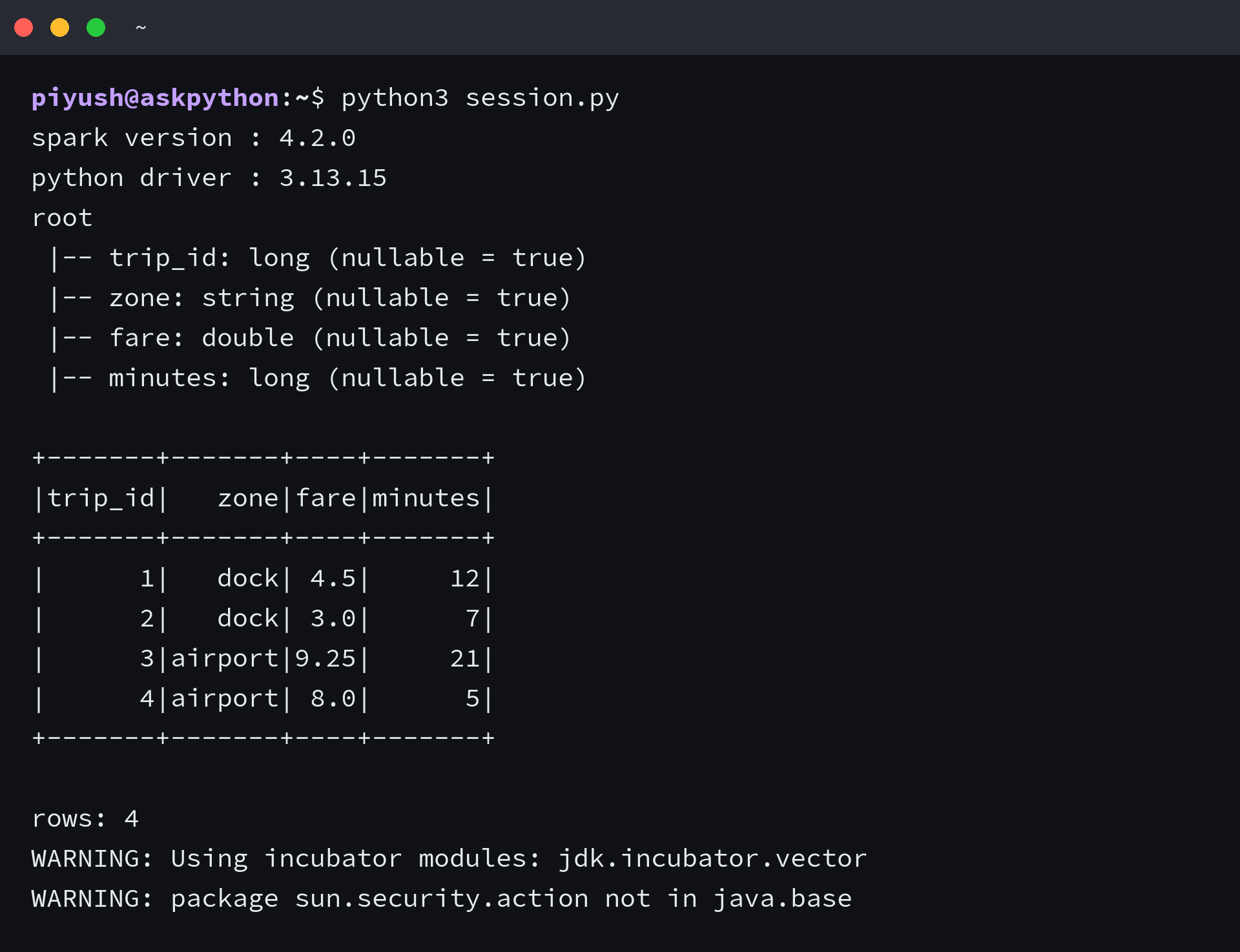
I print the version pair first, because it answers the question the two startup errors are asking. The schema underneath it shows the inferred types, with the whole-number column arriving as long rather than as int.
Inference reads the file to guess, so one unparsable value changes the column’s type for every row. A file with 10 and 20.5 and n/a in the same column comes back as string, and the two numbers stop being addable, which is the drift a format that stores its own types avoids.
Filtering and grouping a DataFrame
Printing a DataFrame shows the plan rather than the data, and the plan does not move until an action asks for a result.
import os
import sys

os.environ["PYSPARK_PYTHON"] = sys.executable
os.environ["PYSPARK_DRIVER_PYTHON"] = sys.executable
os.environ["SPARK_LOCAL_IP"] = "127.0.0.1"

from pathlib import Path

from pyspark.sql import SparkSession, functions as F

spark = (
    SparkSession.builder.appName("csv-pipeline")
    .master("local[1]")
    .config("spark.ui.enabled", "false")
    .config("spark.ui.showConsoleProgress", "false")
    .config("spark.sql.shuffle.partitions", "2")
    .getOrCreate()
)
spark.sparkContext.setLogLevel("ERROR")

data = Path("trips.csv")
data.write_text(
    "trip_id,zone,fare,minutes\n"
    "1,dock,4.50,12\n"
    "2,dock,3.00,7\n"
    "3,airport,9.25,21\n"
    "4,airport,8.00,5\n"
    "5,dock,5.75,16\n"
)

trips = spark.read.csv(str(data), header=True, inferSchema=True)

print("plan is lazy, nothing has been read yet:")
print(trips)

summary = (
    trips.filter(F.col("minutes") > 6)
    .groupBy("zone")
    .agg(
        F.count("*").alias("trips"),
        F.round(F.avg("fare"), 2).alias("avg_fare"),
        F.max("minutes").alias("longest"),
    )
    .orderBy(F.desc("trips"))
)

summary.show()
print("partition count:", summary.rdd.getNumPartitions())

spark.stop()
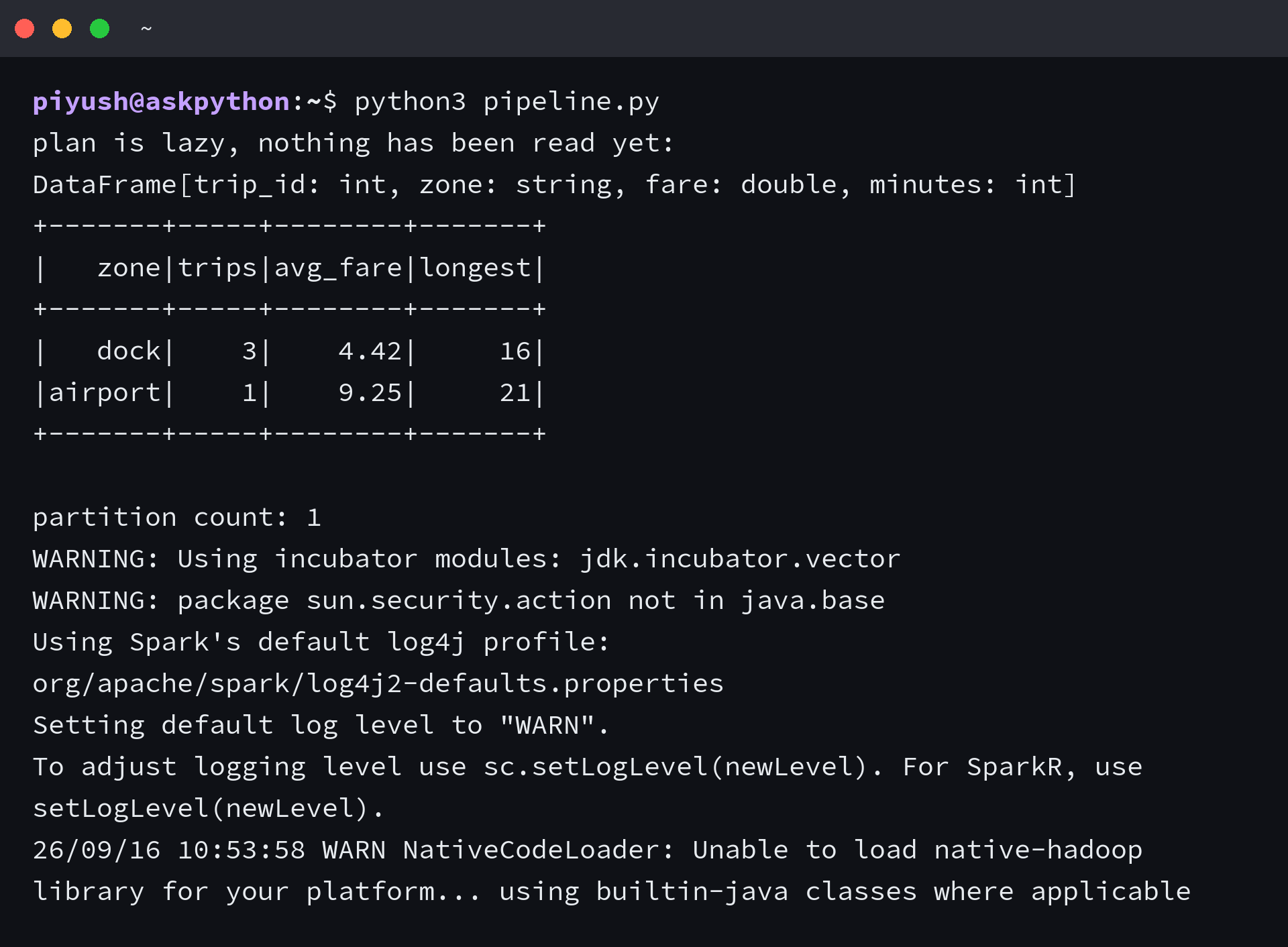
| zone | trips | avg_fare | longest |
|---|---|---|---|
| dock | 3 | 4.42 | 16 |
| airport | 1 | 9.25 | 21 |
I checked the printed count against the input instead of trusting the shape of the table. The filter dropped one airport trip and left the rest, so a filter that reads the wrong column still produces a table that looks reasonable.
The partition count of 1 comes from a file small enough to sit in a single split, and that number grows with the input and sets how many tasks a shuffle runs. It is the first thing to look at when a job runs slower than the data suggests.
Writing the result out
A Spark write produces a directory rather than a file, the directory is what the read path points at afterwards, and that is the habit to unlearn from writing a single CSV file.
import os
import sys

os.environ["PYSPARK_PYTHON"] = sys.executable
os.environ["PYSPARK_DRIVER_PYTHON"] = sys.executable
os.environ["SPARK_LOCAL_IP"] = "127.0.0.1"

import shutil
from pathlib import Path

from pyspark.sql import SparkSession

spark = (
    SparkSession.builder.appName("write-out")
    .master("local[1]")
    .config("spark.ui.enabled", "false")
    .config("spark.ui.showConsoleProgress", "false")
    .config("spark.sql.shuffle.partitions", "2")
    .getOrCreate()
)
spark.sparkContext.setLogLevel("ERROR")

out = Path("out")
shutil.rmtree(out, ignore_errors=True)

Path("trips.csv").write_text(
    "trip_id,zone,fare,minutes\n"
    "1,dock,4.50,12\n"
    "2,dock,3.00,7\n"
    "3,airport,9.25,21\n"
    "4,airport,8.00,5\n"
    "5,dock,5.75,16\n"
)

trips = spark.read.csv("trips.csv", header=True, inferSchema=True)
trips.write.mode("overwrite").parquet(str(out / "trips.parquet"))

written = sorted(p.name for p in (out / "trips.parquet").iterdir())
print("what parquet actually wrote:")
for name in written:
    print("  ", name)

back = spark.read.parquet(str(out / "trips.parquet"))
print("rows after the round trip:", back.count())
back.orderBy("trip_id").show(3)

spark.stop()
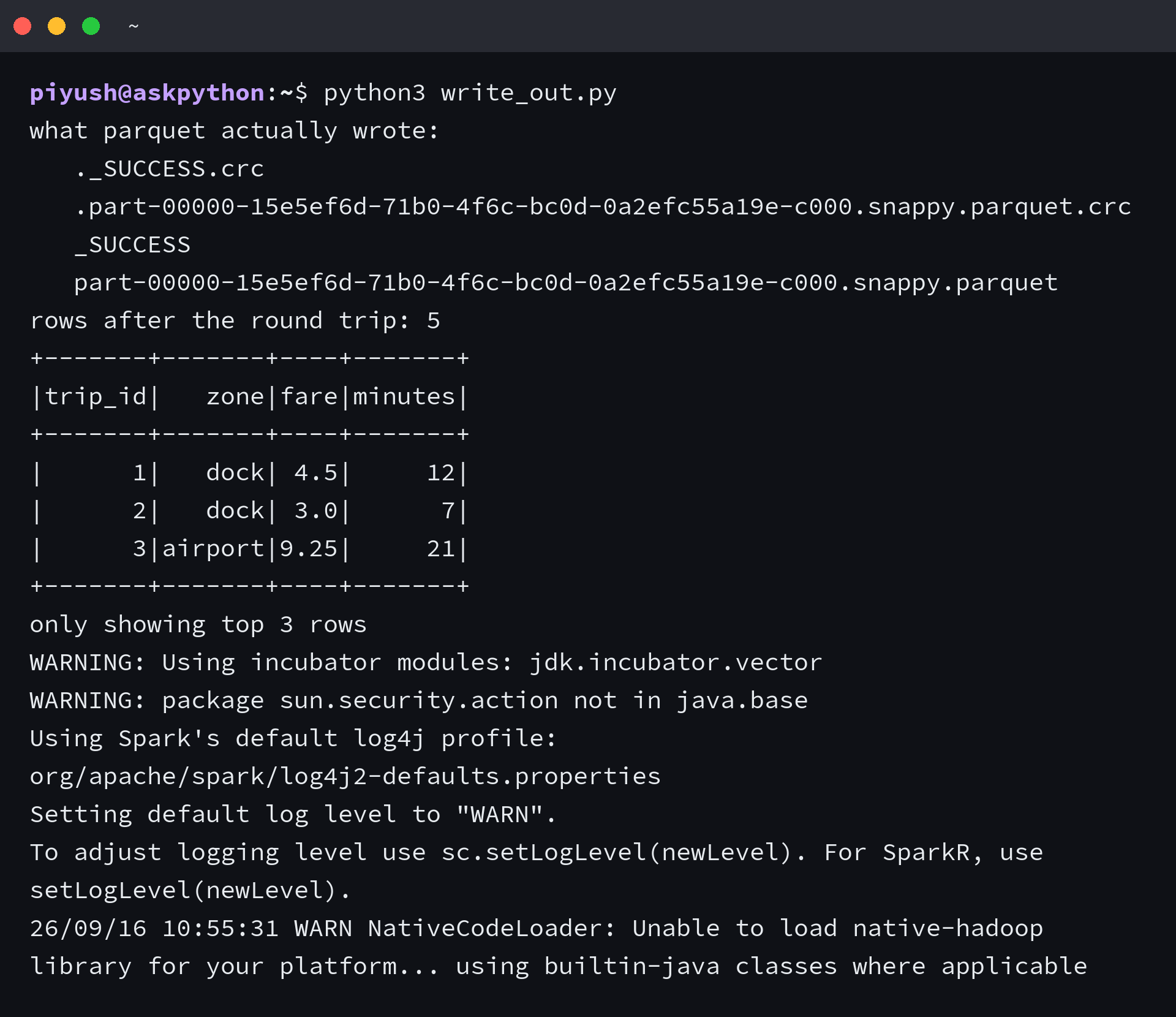
I listed the output directory and found four entries for one dataset, a part file, a success marker, and a checksum beside each of them. The part file carries a generated name, so no downstream script should try to guess it.
The success marker is written when the job finishes, which makes it the thing to check for. A directory without one is a write that stopped partway, and the part files inside it can still look complete.
The two failures that arrive before any data problem
I reproduced both by pointing the worker at a different interpreter and JAVA_HOME at a directory that does not exist. Both arrive while the session is starting, and the bracket near the end of each trace carries the cause.
import os
import subprocess
import sys
from pathlib import Path

HERE = Path(__file__).parent
BASE = Path(sys.executable)

# 1. the worker is a different interpreter than the driver
probe = HERE / "worker_version.py"
probe.write_text(
    "from pyspark.sql import SparkSession\n"
    "spark = SparkSession.builder.master('local[1]').config('spark.ui.enabled','false').getOrCreate()\n"
    "spark.sparkContext.setLogLevel('ERROR')\n"
    "spark.createDataFrame([(1,)], ['n']).count()\n"
)
env = dict(os.environ)
env["SPARK_LOCAL_IP"] = "127.0.0.1"
env["PYSPARK_DRIVER_PYTHON"] = str(BASE)
env["PYSPARK_PYTHON"] = "/usr/bin/python3"
run = subprocess.run([str(BASE), str(probe)], env=env, capture_output=True, text=True, timeout=300)
print("worker set to a different interpreter, exit code", run.returncode)
for line in (run.stdout + run.stderr).splitlines():
    if "MISMATCH" in line or "different version" in line:
        print("  ", line.strip())
        break

# 2. JAVA_HOME pointing at nothing
env2 = dict(os.environ)
env2["JAVA_HOME"] = "/opt/java-that-is-not-installed"
env2["SPARK_LOCAL_IP"] = "127.0.0.1"
env2["PYSPARK_PYTHON"] = str(BASE)
env2["PYSPARK_DRIVER_PYTHON"] = str(BASE)
run2 = subprocess.run([str(BASE), str(probe)], env=env2, capture_output=True, text=True, timeout=300)
print("JAVA_HOME pointing at nothing, exit code", run2.returncode)
for line in (run2.stdout + run2.stderr).splitlines():
    if "Java gateway" in line or "JAVA_GATEWAY" in line:
        print("  ", line.strip())
        break

probe.unlink()
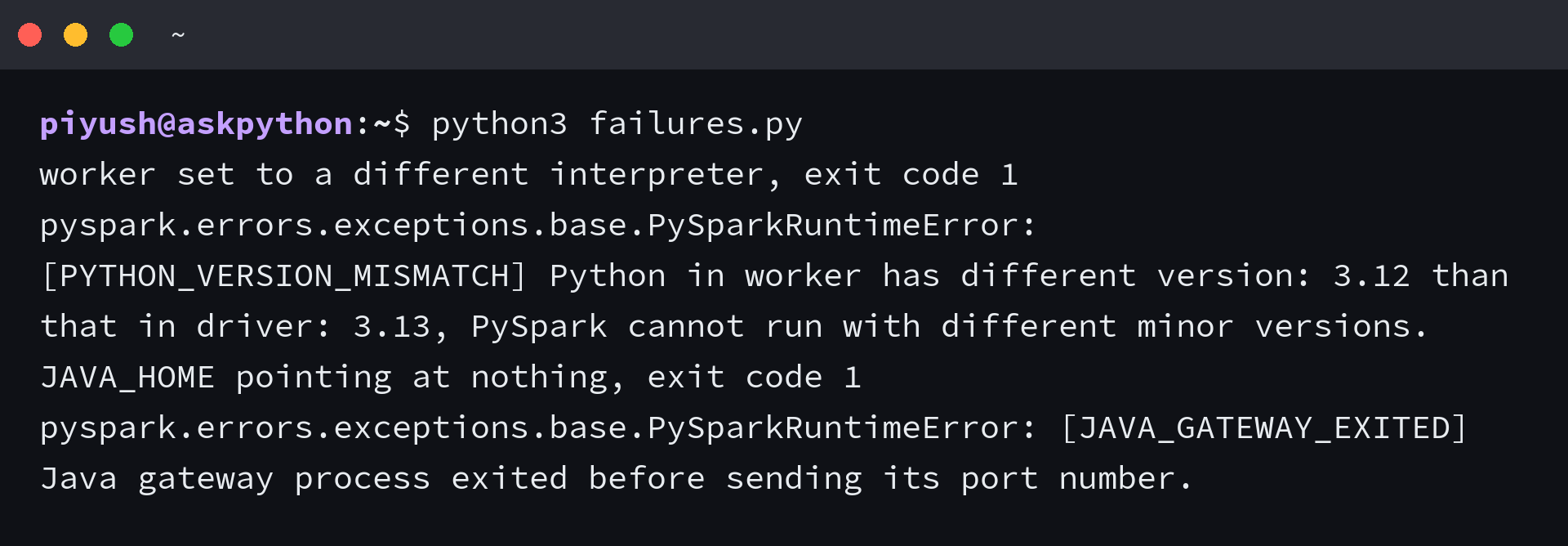
| Message | What it means | What to do |
|---|---|---|
| [PYTHON_VERSION_MISMATCH] Python in worker has different version 3.12 than that in driver 3.13 | the worker resolved to a different interpreter than the driver | set PYSPARK_PYTHON to sys.executable before the session is built |
| [JAVA_GATEWAY_EXITED] Java gateway process exited before sending its port number | the JVM never started, usually because JAVA_HOME points at nothing | point JAVA_HOME at an installed JDK and confirm it with java -version |
The first message compares two version numbers and refuses to continue, which is the whole point of it. Setting the worker interpreter to the one running the script is the entire fix, and it is why the scripts above set it before the session is built.
The second one runs the other direction. Spark looks for its JVM through JAVA_HOME, so a machine where java -version prints a version can still hand the session nothing, and the traceback will show a Python file rather than the missing JDK.
The setting that decides whether this job can leave your laptop
Local mode runs the driver and the workers inside one process tree on one machine, which is enough to prove the code and says nothing about how it behaves once partitions are spread across machines. Treat a local run as a correctness check rather than a capacity test.
import os
import sys

os.environ["PYSPARK_PYTHON"] = sys.executable
os.environ["PYSPARK_DRIVER_PYTHON"] = sys.executable
os.environ["SPARK_LOCAL_IP"] = "127.0.0.1"

from pathlib import Path

from pyspark.sql import SparkSession

spark = (
    SparkSession.builder.appName("check")
    .master("local[1]")
    .config("spark.ui.enabled", "false")
    .config("spark.ui.showConsoleProgress", "false")
    .config("spark.sql.shuffle.partitions", "2")
    .getOrCreate()
)
spark.sparkContext.setLogLevel("ERROR")

Path("mixed.csv").write_text("amount,label\n10,alpha\n20.5,beta\nn/a,gamma\n")
mixed = spark.read.csv("mixed.csv", header=True, inferSchema=True)
mixed.printSchema()
print("rows read:", mixed.count())

print("shuffle partitions setting:", spark.conf.get("spark.sql.shuffle.partitions"))
print("partitions on a small range:", spark.range(0, 5).rdd.getNumPartitions())

spark.stop()
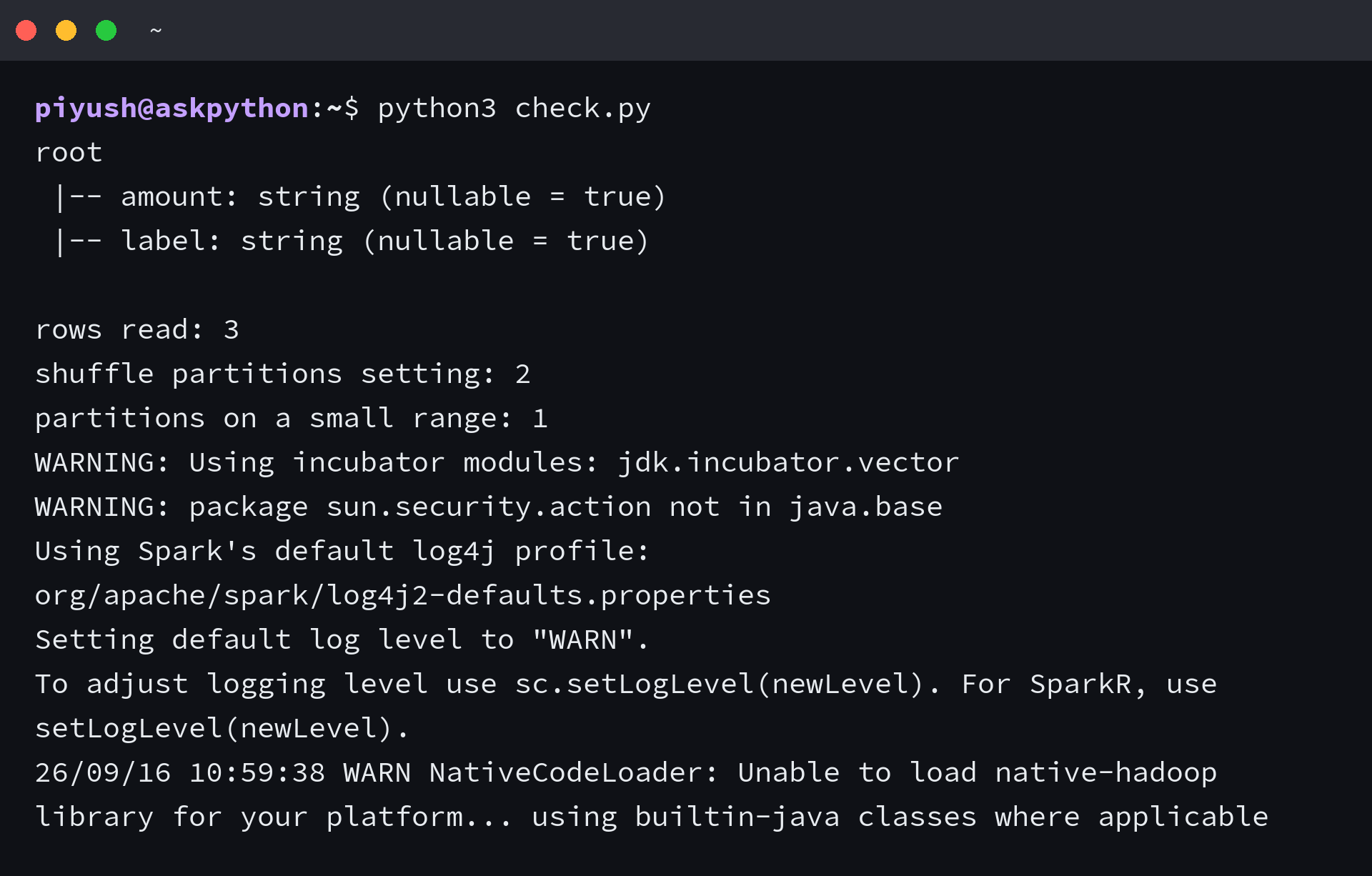
That output closes the loop on the two earlier sections, and it is the check to run before moving a script to a cluster. The shuffle setting reports the 2 the session was built with, so the small range lands in a single partition, and the mixed column comes back as string with all three values intact.
These habits make the difference between a script that runs locally and one that runs anywhere:
- Build the session in one helper function, so local and cluster differ in a single argument.
- Read the input through the same reader whether the path is local or a cloud URI.
- Keep transformation code away from anything that opens a file on the driver.
- Set the shuffle partition count from the size of the data rather than leaving the default 200 in place.
- Run the script on a small file and a large one before trusting either result.
The argument that changes between the two environments is master, and every other line on this page stays as it is. Getting the first job green on one machine is what turns the cluster run into a deployment step instead of a rewrite.
Questions about PySpark
Do I need Hadoop installed to run PySpark locally?
No. Local mode uses the Java libraries bundled inside the pyspark package, so a JDK and the package are the whole requirement. Hadoop is only needed when the job reads from HDFS or runs on a YARN cluster.
Why does PySpark need Java?
The scheduler, the SQL optimizer, and the shuffle engine are JVM code. Python drives them through a gateway, which is why Spark reads JAVA_HOME and why a missing JDK stops the session before any Python runs.
What is PySpark used for?
It runs the SQL and DataFrame work you would otherwise do in pandas or a warehouse, but across data that does not fit on one machine. The same script runs on one laptop and on a cluster, and only the master setting changes.
Is PySpark hard to learn if I already know pandas?
The transformation verbs carry over and the execution model does not. pandas runs each line as you write it, while a DataFrame holds a plan until an action asks for rows, so a line that looks like work may do nothing at all.
Can I use PySpark without a cluster?
Yes, and the block above runs that way. A local session reuses the same scheduler and SQL engine on one machine, so the code is portable even though the speed is not.
How do I stop a SparkSession?
Call spark.stop() at the end of the script. The session keeps background threads and a JVM alive otherwise, and an interactive shell that never stops one will hold the port that the next session wants.