
Turn every website visit into a lead, subscriber or sale
12 trigger types • 30+ targeting rules • A/B testing on every paid plan
⭐⭐⭐⭐⭐ 4.7/5 on G2
Plans from $29/mo • Free plan available • No credit card required
Over 600,000 Websites Trust Hello Bar:


Since 2012
The smarter, easier & better popup builder to earn more customers, subscribers and leads
The best website popups for media companies, agencies, thought leaders, e-commerce stores, and professional service firms
Increasing Revenue For Media & Blogs
Highly targeted website popups for turning visitors
into loyal readers
Hello Bar’s targeting features to personalize messaging on pages, behaviors and content.
Media sites and blogs can use Hello Bar’s built-in monetization features to drive more revenue.
Insert Calls To Action directly within articles and content to create loyal readers or earn affiliate revenue.
Hello Bar’s Popup builder includes 100s of templates so you can create beautiful and on-brand website popups.
Earn and Keep More Clients
Generate client leads and better serve existing clients
Hello Bar was co-created by Neil Patel, who used Hello Bar units to build one of the world’s fastest growing agencies.
Serviced option means the Hello Bar team will set up and optimize the client website popups.
Resell Hello Bar to clients and earn additional revenue while helping drive greater success for clients.
Built in reports and analytics are easy to download and share with clients to share progress and success.
Convert More Visitors Into Customers
Easy and beautiful website popups for e-commerce
conversion
Hello Bar’s popup builder makes it easy to create, design and launch high engaging e-commerce popups.
Recover abandoned carts with specific e-commerce popups to drive higher engagements.
Gamified popup templates create urgency and drive sales, e-mail sign ups and more.
One of the highest ROI positive marketing channels you can add to your website and marketing plan.
Drive More & Better Leads
High converting website popups for lawyers, financial advisors and more
Hello Bar pays for itself quickly through helping professional service companies accelerate their leads.
Our popup builder is the easy to use and provides specific templates for professional services firms
Our done for you service can help you design, launch and optimize Hello Bar for even more leads.
Co-built with Neil Patel. A/B testing on every plan (not locked behind an upgrade)
Use Cases
Engage Your Visitors. Grow Faster.
Turn visitors into customers. Build deeper relationships with your audiences. Capture more leads. Grow your business faster.






Differentiators
The Popup Builder That Drives Growth
Best in class targeting
Drive crazy good conversion rates through the best targeting options in the market.
Massive average ROI
Website popups drive massive ROI for companies of all kinds and sizes.
Average ROI
Easy to integrate
Built in integrations with your favorite CRM, ESP, and so much more…
Easy to set up and use
Set up in minutes and manage and optimize with ease.
Accelerate time to value
A/B Testing on Every Plan: Test headlines, offers and designs. Built into every tier. Implement directly in CMS.
GDPR Compliant
Built to comply with GDPR and other privacy standards to give you and your team peace of mind.

Starts free • Grows with you • Plans from $29/month • A/B testing included from Growth

Capabilities
Convert 83% More Of Your Visitors
The simplest way to convert more of your visitors into leads, subscribers and buyers.
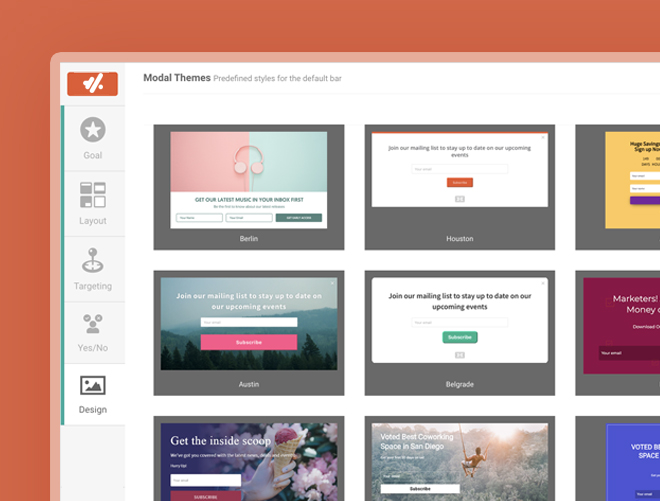
Easy to create
Beautiful & Effective Pop Ups
One of the easiest to use Popup Builders as ranked by G2 Crowd.
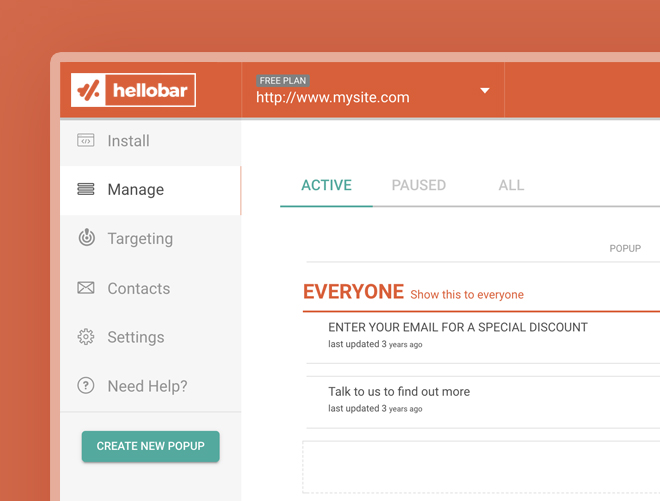
Simple to Optimize
Built in Optimizations
Advanced optimization features such as A/B testing is built right in and included in all plans.
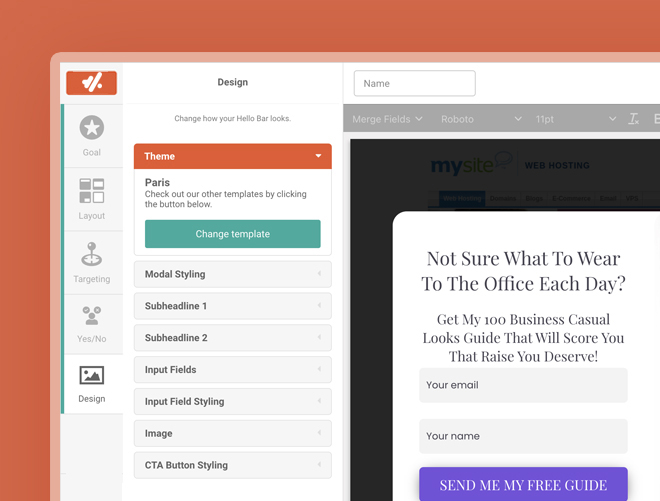
Effective Targeting
Targeting & Personalization
Some of the best targeting features of any popup builder.
Integrations
Becomes part of your current workflow
Our website popups can be directly integrated into your current workflow with direct integrations with some of the top website builders, CRMs, ESPs and more. And, we are a premier partner of Zapier to create even more flexibility.
Zapier
Hubspot
Klaviyo
MailerLite
Shopify
Slack
Duda
Salesforce
WordPress

BigCommerce

Learn
Why website popups can help you grow faster
A proven, affordable and simple way to get more of your website visitors to take action.
-

-
Best Email Subject Lines: Tips to Create Yours and 25 Great Examples

Ryan Bettencourt
-

-
35 Lead Magnet Ideas and Examples to Convert Visitors Into Leads
Ryan Bettencourt
-

-
What is B2B Lead Generation? Strategies & Tools
Ryan Bettencourt

-

-
14 Signup Form Examples to Inspire Your Next Website Design
Mansi
-

-
6 Best Exit Intent Popup Examples With Proven Results
Mansi
-

-
25 Proven Methods on How to Increase Website Traffic and Get Leads
Ryan Bettencourt

-
-
12 Welcome Email Examples That Convert (Organized by the 4 Types of Welcome Emails)
Ryan Bettencourt
-

-
What Is a Popup? Definition, Types, Triggers and Best Practices
Ryan Bettencourt
-

-
Content Promotion: 13 Strategies That Actually Drive Traffic in 2026
Ryan Bettencourt
-

-
Popup vs Inline Form: Which One Captures More Emails?
Mansi
-

-
Email List Building with Popups: The Complete 2026 Guide
Mansi
-

-
Email Collection: 17 Best Practices to Exponentially Grow Your Email List
Ryan Bettencourt
FAQs
Find answers to the most frequently asked questions about Hello Bar, including popups, banners, lead generation, visitor targeting, integrations, pricing, A/B testing, and conversion optimization.
Hello Bar is an easy-to-use website conversion tool that helps you turn more visitors into subscribers, leads, and customers. Add popups, announcement bars, sliders, page takeovers, and forms to your website in minutes—without needing a developer. Whether you’re growing an email list, promoting offers, or increasing sales, Hello Bar gives you the tools to engage visitors at the right moment.
Yes. Hello Bar includes targeting and triggering options that let you show the right message to the right audience. Display campaigns based on factors like page URL, traffic source, device type, visitor behavior, and timing to create more personalized experiences and improve conversions.
No. Hello Bar is built to be lightweight and designed to minimize any impact on your site’s performance. Campaigns load efficiently and only appear when their display conditions are met, helping ensure a smooth experience for both you and your visitors.
Yes. Depending on your plan, you can manage multiple websites from a single Hello Bar account. This makes it easy for businesses, agencies, and marketers to oversee campaigns across several brands, domains, or client sites from one place.
Yes. Hello Bar works seamlessly with Shopify, making it easy for ecommerce brands to capture email subscribers, announce promotions, reduce cart abandonment, and drive more sales. Create targeted campaigns for first-time visitors, returning shoppers, or customers arriving from specific marketing channels—all without touching your store’s code. Whether you’re running a flash sale or building your email list, Hello Bar helps Shopify merchants convert more traffic into revenue.
Yes. Most customers can install Hello Bar in just a few minutes by adding a single line of code or connecting through supported website platforms. Once installed, you can launch campaigns immediately using our visual editor—no coding or technical expertise required.
Yes. Hello Bar includes professionally designed templates for common marketing goals, including email capture, announcements, promotions, discounts, lead generation, and more. Simply choose a template, customize it to match your brand, and publish it in minutes.
Absolutely. Hello Bar campaigns are responsive and designed to work across desktop, tablet, and mobile devices. You can also customize how campaigns appear on different screen sizes to create the best experience for every visitor.
Hello Bar offers customer support and self-service resources to help you get the most from the platform. Our team is available to answer questions, troubleshoot issues, and provide guidance, while our help center offers tutorials and documentation to help you launch campaigns with confidence.
Hello Bar helped pioneer the website popup category and was one of the first widely adopted popup tools on the market. Co-founded by entrepreneur and SEO expert Neil Patel, Hello Bar has been helping businesses capture leads, grow email lists, and increase conversions for more than a decade. As one of the original names in website conversion software, we’ve never stopped evolving. Today, Hello Bar continues to introduce new features, improve performance, and expand its capabilities to help businesses connect with visitors more effectively. Thousands of brands trust Hello Bar because it combines proven results, ease of use, and a commitment to continuous innovation.
Yes. Hello Bar includes features to help website owners support their privacy and compliance requirements, including GDPR considerations for businesses operating in the European Union. You remain in control of the data you collect, and Hello Bar provides tools that can be incorporated into your existing privacy and consent workflows. As with any marketing technology, we recommend working with your legal team to ensure your implementation meets your organization’s specific compliance obligations.
Yes. Hello Bar offers pricing options for everyone—from solo creators and small businesses to growing ecommerce brands and larger organizations. Whether you’re just getting started or managing millions of monthly visitors, there’s a plan designed to fit your goals and budget. You can start small and upgrade as your business grows, ensuring you only pay for the features and traffic volume you need.
Most customers are up and running in less than 10 minutes. Installing Hello Bar only requires adding a small snippet of code (or connecting your website platform), and our intuitive campaign builder makes it easy to create your first popup, bar, or slider in just a few clicks. You can go from signup to collecting leads before your next coffee break.
Absolutely. A/B testing is one of the easiest and most cost-effective ways to improve your conversion rates, and Hello Bar makes it simple. Test different headlines, offers, designs, calls-to-action, and display rules to discover what resonates most with your audience. Instead of redesigning your website or hiring an expensive CRO agency, Hello Bar gives you an affordable way to continuously optimize your site and increase results over time.
Many email marketing platforms offer basic popup builders, but they’re typically designed as an add-on to support email collection. Hello Bar was built specifically for website conversion optimization. With Hello Bar, you get advanced targeting, behavioral triggers, A/B testing, multi-step campaigns, detailed analytics, and integrations designed to help you convert more visitors—not just collect more email addresses. If your website is an important source of leads and revenue, Hello Bar gives you the flexibility and tools to optimize every interaction.

“The key to growing a business is to get the 99% of website visitors that don’t take an action to take an action. Hello Bar is the easiest way to do that. I have used it in all my businesses.”
Neil Patel
Digital Marketing Expert • Co-built Hellobar