Why and how the Austrian Military moved to LibreOffice (Part 2)
Bundesheer logo

This is the second part of our interview with the Bundesheer (see here for the first).

At the LibreOffice Conference 2025, you showcased the new LibreOffice features sponsored by the Austrian Armed Forces. How did that come about?

From the very beginning, we clearly recognised the need to further develop LibreOffice. Before finalising our plans, we also examined how we could continue to develop the product. Ultimately, we issued a Europe-wide, open call for proposals to secure both support and development capacity for LibreOffice. The way we selected the product enhancements stemmed in part from this preliminary study, because we had identified specific import capabilities and compatibility requirements.

That’s one major aspect: improving interoperability in line with our needs. The other focus was on improving LibreOffice based on ongoing user feedback and feedback regarding collaboration with external organizations. One example of this was the “Notes” bar in Impress. In the past, users had to edit notes in a separate notes view.

We were told very early on that users wanted to be able to do this directly within the slide editing view. This is a very well-known enhancement that we sponsored, which – I think – works very well. In addition, there are many other details, such as scrolling through presentations with the mouse wheel. Previously, you had to keep switching back and forth to the slide overview view to scroll. Now all of this is possible right from within the slide, which simply makes it easier to use and also increases acceptance because users expect it.

I could list many more extensions. We’re not the only ones contributing a great deal to LibreOffice – we see ourselves as part of the community, and we’re happy when the community uses our contributions and when others contribute their own, which we’re of course very happy to use as well. That’s what makes the project so attractive and successful.
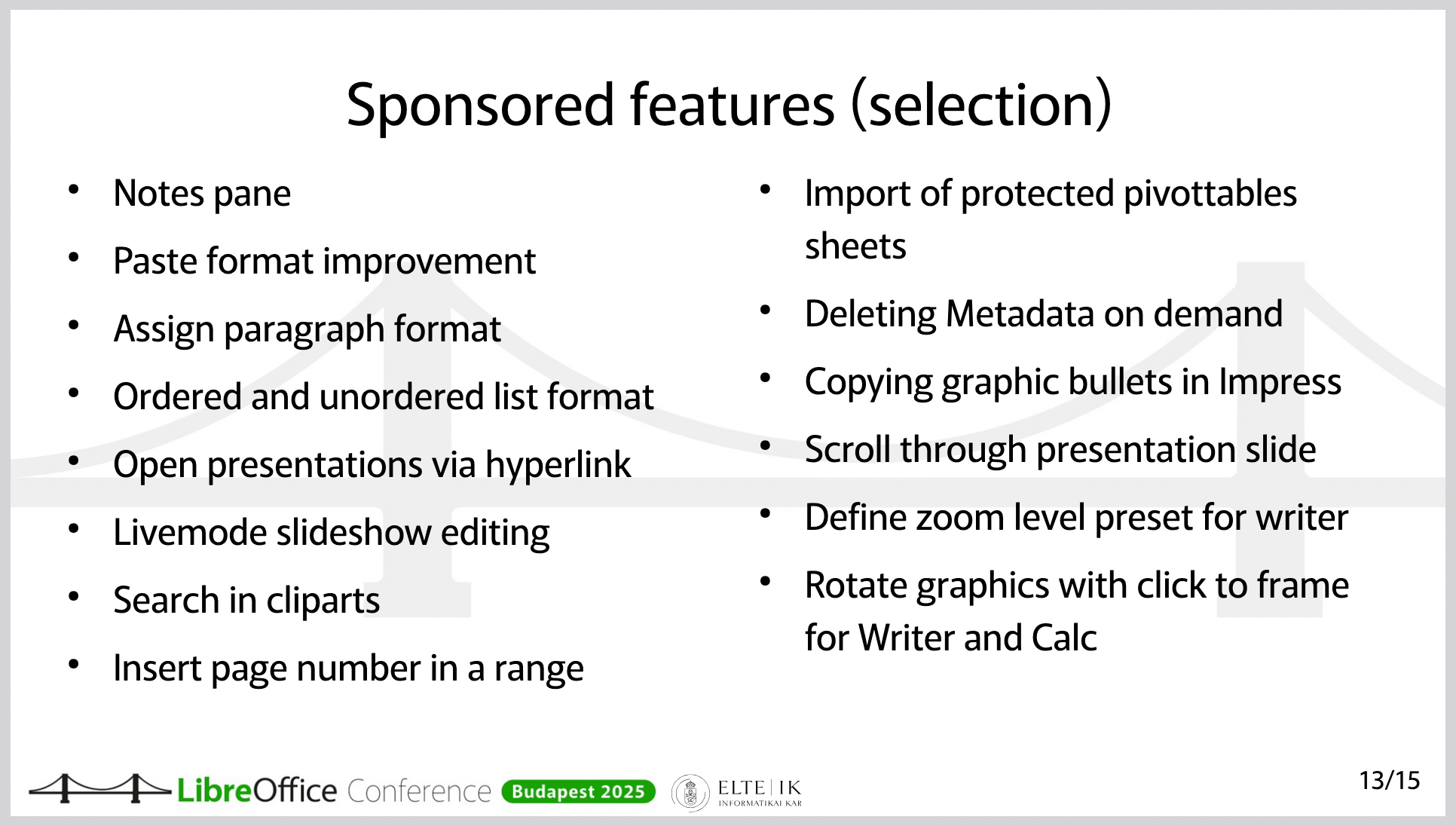
Slide from presentation, showing features added to LibreOffice
Features and improvements in LibreOffice, sponsored by the Austrian Military (this is a slide from a presentation at the LibreOffice Conference 2025)

Have you also developed external extensions?

We’ve developed extensions for internal use, but there are also several publicly available extensions. One of them integrates our own help page, since we provide targeted help within our internal systems.

On a much larger scale, there’s an extension hosted on GitHub that covers military-tactical symbols. It’s available as open source software, so anyone can use it. This is actually an extension that, although it’s still in “release candidate” status, already works well. The extension is, of course, also suitable for collaboration with other armies. Its functionality is unique. To my knowledge, it’s not available anywhere else.

Do you also use the Open Document Format internally?

Yes – one of the advantages of LibreOffice is that the format is ISO-standardised and truly open. You get the best functionality in LibreOffice when you use ODF. We use ODF throughout. It’s clear that our external partners don’t do this to the same extent. This is where LibreOffice benefits from its ability to handle (read and edit) Office Open XML (OOXML) documents as well.

LibreOffice doesn’t have a built-in email client. How did you handle this issue during the migration?

The Austrian Armed Forces protect the Austrian population; to make this possible, we need, for example, systems that function independently of external parties. We have a large number of systems based on open source solutions and many solutions that are platform-independent. This includes the email system.

Therefore, we didn’t have to replace Outlook or Microsoft Exchange.

At the LibreOffice Conference, you emphasised that the migration was never about saving on licensing costs. The migration was driven by other reasons, correct?

The switch to LibreOffice in the Austrian Armed Forces stems from the necessity that we must be able to function even when nothing else is working. In other words, we cannot rely on public infrastructure. We cannot rely on our data being processed in another data center.

Therefore, the top priority in this transition – unlike 20 years ago, when people very often considered switching to a free office suite or Linux in the workplace for cost reasons – was digital sovereignty.

As for the costs: It was clear to us from the start that we would have to invest in the product in order to gain the additional functionality we needed and to improve interoperability.

Would you like to say a few words about the foundation – that is, The Document Foundation?

Why did we choose LibreOffice in the first place – after all, there are alternative products? LibreOffice isn’t the only solution. First, LibreOffice uses ODF, the open and standardised file format. That’s very important. Second, LibreOffice is truly fully open source software – it’s not a product that just has an open source “core.” There’s no risk of having to pay for variable enterprise features.

And the fact that this is the case is very closely tied to the foundation of LibreOffice, namely The Document Foundation. The way this open source project is implemented and anchored through the foundation – that’s an important guarantee and a key factor in its reliability for us.

Another point is that there is an ecosystem. There are several companies that offer the services we need. Using open source doesn’t just mean using free software – for us, it means we need maintenance, support, the ability to further develop the software, addressing security vulnerabilities, and secure software deployment. All of this comes with a very mature software product that is constantly being developed. That was a key factor in our decision.

What advice would you give to others who are also planning to switch to LibreOffice and open source?

First: There’s a vast amount of information available within the community. It’s important to familiarise yourself with the product. How does LibreOffice work? How does Bugzilla work? Where can I find issues that might not be working but are of interest to me? Where can I find roadmaps for new features, release notes, and so on?

Second: It’s absolutely crucial to properly prepare and fund the resources for a project like this. IT managers have gotten used to rolling out new Office versions without much effort.

However, switching from one office suite to another is actually a massive migration project. This should not be underestimated. It’s not just a matter of installing the software; it requires change management, people to provide support, test the software, and work on new features. It requires the support of service providers. All of this must be prepared in advance. And that’s what sets it apart from previous new office suite releases. You’ll need a project team for this – migration isn’t something you can just do on the side. So, you’ll need proper project organisation and agile change management. How can I provide my users with the necessary knowledge based on their needs? What communication channels do I have to keep my users informed and stay in touch with them?

We – the Austrian Armed Forces – have already received many inquiries about the transition, and we have shared our experiences with numerous organisations. We would be delighted to help build a LibreOffice community for government and enterprise organisations in order to accelerate the collaborative development of LibreOffice.

To that end, I invite you to contact us at libreoffice@bmlv.gv.at.
Why and how the Austrian Military moved to LibreOffice (Part 1)

Bundesheer logo

Many government departments around the world are moving away from vendor lock-in by tech giants, and switching to free and open source software like LibreOffice. This helps with privacy, security, and digital sovereignty. One such example is the Austrian Military (Bundesheer), which has moved 16,000 PCs from Microsoft Office to LibreOffice. We talked to them, to find out why and how they did it…

When did all of this start? When were the first decisions made?

It began in 2020, with the trend toward running software increasingly in the cloud and less on-premises on devices within companies. At that time, we examined what guarantees existed for running software – specifically Microsoft Office – directly in the workplace without any cloud connection. So the review and preparation began in 2020.

In late 2022 and early 2023, the decision was made to switch to LibreOffice. The goals were to ensure that data never leaves the company and that the Office applications can be used without external dependencies.

Who made the decision?

The decision was structured in such a way that our “corporate leadership” – that is, the Federal Ministry of Defence – could decide, based on the information compiled regarding future software development and cloud dependencies, that we would switch to LibreOffice.

It was actually decided by the Federal Minister’s cabinet and the relevant departments – so at the very top.

Did you create a “timeline” at the beginning – something like “Y should happen by X” and so on?

After we received the assignment, we carried out the planning to determine how the transition could take place and what needed to happen. The plan included, from an early stage, that we would guide our users to LibreOffice in a timely manner, partly by installing LibreOffice at the user’s request. That is, we made it available, and the users who wanted it could have it installed.

We saw very high adoption rates – not 100%, but about half.

Half of 16,000?

Yes. And the next step we planned was to make its use mandatory, because it’s crucial not only to announce that something new is coming but also to require its use so that people have to start working with the tool early on. Of course, switching from an Office suite that’s been used in the company for over 30 years to a completely new product – even if it looks similar but behaves differently – requires practice.

That’s why we specifically made the use of LibreOffice mandatory in selected services. And we did this as early as 2023, so that users could get familiar with it well in advance. This gave users time to tailor the transition to their own needs and prepare for it, and we didn’t just flip the switch all at once with a “big bang.” The change was announced over the course of several years.

Finally, in December 2024, the use of LibreOffice became mandatory for internal collaboration. This meant we actually provided several years of preparation time to make this transition as smooth as possible.

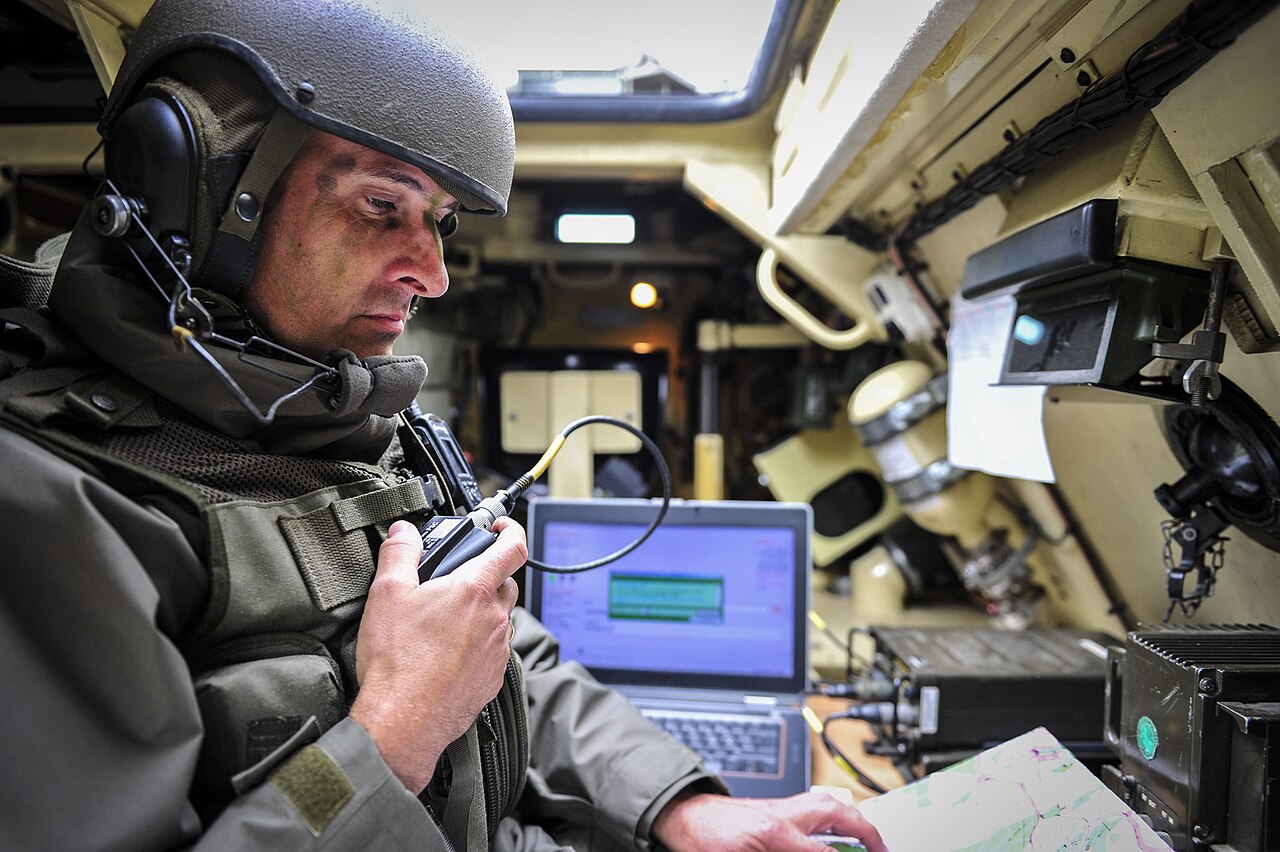
Austrian officer in a tank
(Photo credits: Bundesheer Fotos, CC BY-NC-SA 2.0)

So many people switched to LibreOffice voluntarily from the start, without being forced to. Was there a lot of resistance? Did you customise the user interface?

The 8,000 users mentioned installed the product to see what was coming. That doesn’t mean that all 8,000 of them immediately started using LibreOffice. But it was a good indicator for us to gauge the mood. If 200 people install it, that’s different from when there are so many.

Early on, before we mandated its use, we provided extensive e-learning modules and videos – including what we call “fast tracks” for the individual modules. With these, it was possible to learn the most important changes for Writer, Calc, Impress, and Base within 15 minutes, so users wouldn’t fall into the typical pitfalls. Anyone who invests those 15 minutes will find it much easier to use the software.

We gave users the opportunity to prepare and view these courses and videos on their own at a time of their choosing.

Another important point: We’ve learned that we need to quickly address individual users’ questions – such as those regarding unfamiliar workarounds or missing features – for the benefit of the broader community.

That’s why we specifically looked for suitable communication channels, and we then agreed to publish a so-called “Tip of the Week” about once a week on a very specific, clearly defined topic. And this “Tip of the Week” appears every Monday on the intranet with a current topic. That means anyone who opens their browser on Monday will see the “Tip of the Week.”

It explains topics we covered the previous week. When we release a new version, there’s a “Tip of the Week” featuring the latest features. When we roll out new functions and enhancements – some of which are sponsored by the Austrian Armed Forces – we highlight them in the “Tip of the Week.”

But we also cover usability topics – for example, how to enable the menu bar even when the tabbed interface is selected. How to use presentations across multiple screens, and so on and so forth. We’ve been doing these “Tips of the Week” for two years now, and they’ve been very well received. It’s a great communication tool for us.

Next week we’ll post Part 2 of the interview, looking at the features and improvements in LibreOffice that the Austrian Military sponsored, and tips for future migrations. Stay tuned…

The characteristics of a truly open document standard format

A truly open document format requires free public availability, royalty-free standards, and no usage restrictions.

Organizations like the Open Knowledge Foundation and the European Union use several core rules to guarantee long-term data access, system independence, and freedom from single-vendor control.

Core Openness Criteria

  • Public Specification: The complete format rules are published and easy for anyone to access.
  • Royalty-Free: Patents or licensing fees cannot block developers from building compatible software.
  • No Discrimination: Anyone can use the format for any purpose without needing special permission.
  • Independent Control: A transparent, non-profit standards body manages future updates.

Recognized Frameworks

  • The Open Definition: Specifies exact legal and technical terms for open works.
  • European Interoperability Framework (EIF): Requires governments to use truly open formats for public documents.

Comparison of ODF and OOXML

When evaluated against the strict criteria for open formats, Open Document Format (ODF) and Office Open XML (OOXML) take fundamentally different approaches.

While both are recognized as official ISO standards, ODF fully satisfies the open standard criteria by design, whereas OOXML features structural and legal complexities that often limit true open implementation.

Comparison Table

Criterion

Open Document Format (ODF)

Office Open XML (OOXML)

Public Specification

Fully Transparent. Concise, streamlined specifications built using a simplified RelaxNG XML schema

Highly Complex. Over 6,000 pages of specifications containing fragmented legacy behaviors.

Royalty-Free Status

Unconditional. Managed under standard royalty-free parameters for universal software design.

Conditional. Covered under a non-revocable patent promise rather than a traditional license.

No Discrimination

Complete. Equal implementation across open-source and proprietary suites.

Functional Barriers. Biased toward Windows-centric legacy and platform-specific behaviors.

Independent Control

Vendor-Neutral. Managed entirely by OASIS

Vendor-Influenced. Maintained via ISO, but the structural core remains tightly bound to Microsoft.

Key Openness Differences

Public Specification & Transparency

  • ODF: Conceived from the beginning to be a modern, clean XML specification. “ODF is the only openly available standard, published fully in a document that is freely available and easy to comprehend”, as noted by GranneBlog: https://blog.granneman.com/2009/02/06/odf-compared-constrasted-with-ooxml/
  • OOXML: Designed primarily to map Microsoft Office’s old binary data into XML. It is split into Strict and Transitional variants. “Transitional is everything else: a vast catalogue of compatibility features, deprecated elements, platform-specific behaviours, and references to undocumented quirks of Microsoft Office versions from the 1990s.”, as noted by the TDF Blog: https://blog.documentfoundation.org/blog/2026/06/02/a-standard-in-name-only/

Legal & Intellectual Property Rules

  • ODF: Utilizes a standard open-source framework. Anyone can implement ODF in a project without fearing intellectual property or patent litigation.
  • OOXML: Relies on the Microsoft Open Specification Promise (OSP): https://en.wikipedia.org/wiki/Microsoft_Open_Specification_Promise. The OSP is a unilateral covenant not to sue, but it only covers developers to the extent that they precisely mirror the specification. Any implementation-defined deviations or edge cases may leave developers legally unprotected.

Technical Discrimination & System Control

  • ODF: Avoids hardware-specific dependencies, ensuring that independent applications (like LibreOffice or Apache OpenOffice) can render the data uniformly.
  • OOXML: Contains platform-specific elements tied closely to the Windows OS ecosystem. Because Microsoft Office has traditionally produced Transitional OOXML by default, third-party platforms encounter massive conversion obstacles when interpreting legacy binary elements or proprietary formatting definitions embedded within the file structure.

INTERESTING REFERENCE: the Italian definition

The document Linee guida su acquisizione e riuso di software per le pubbliche amministrazioni (Guidelines on the procurement and reuse of software for public administrations), published by AgID in 2021, define an open format in the glossary as follows (translated from Italian):

Open (data) format. This is a public, versioned data format that is comprehensively documented and has no implementation constraints. An open format is one recognised by a standardisation body and maintained collaboratively by several organisations that provide competing implementations, through a transparent process. The format must remain consistent with the declared version.

The guidelines are not an interpretive gloss issued alongside the statute. They are adopted in implementation of articles 68 and 69 of the Codice dell’Amministrazione Digitale, under express delegations contained in the statute itself. They also supersede the earlier AgID circular 63/2013 on the same comparative assessment.

The definition of formato aperto (open format) is therefore not a recommendation that happens to be well drafted. It is the operative legal definition for Italian public administration, and it acquires that force through the statute rather than in spite of it.

LibreOffice project and community recap: July 2026

Monthly recap banner

Here’s our summary of updates, events and activities in the LibreOffice project in the last four weeks – click the links to learn more…

  • We had one update in July: LibreOffice 26.2.5, the fifth maintenance update to the LibreOffice 26.2 branch.

LibreOffice 26.2 banner

  • We also said a big welcome to our new TDF members! Members – more formally known as the “Board of Trustees” – are a crucial part of The Document Foundation, the non-profit entity behind LibreOffice. They are people from across the globe who contribute time, effort and skills, whether on a voluntary or paid basis.

Welcome banner, with people celebrating

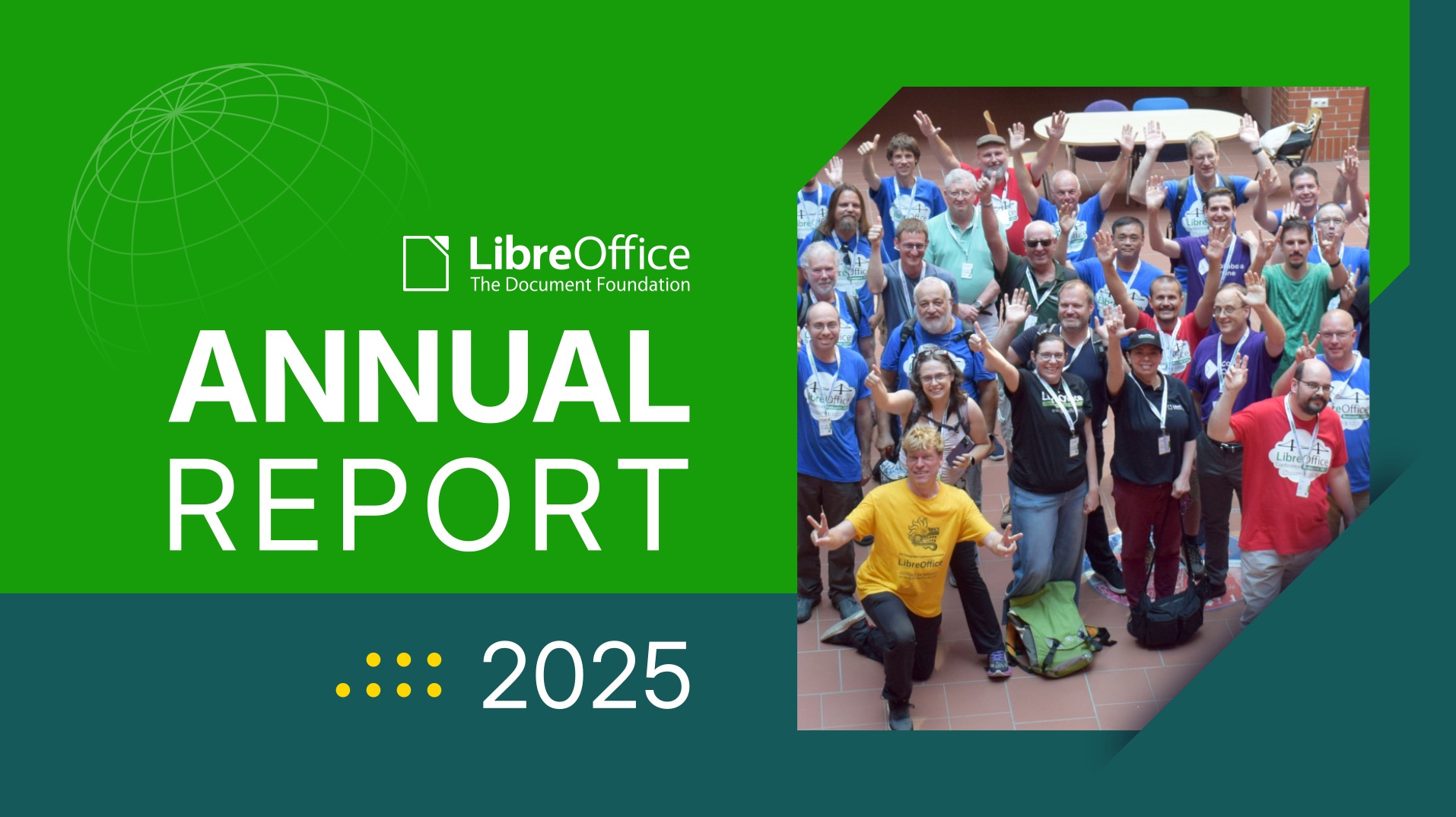
  • Then there was another section from the TDF Annual Report 2025, Policy and Digital Sovereignty. This section looks at Germany’s IT Planning Council committing to ODF, the approval of ODF 1.4, and public migrations to LibreOffice.

German state moving 30,000 PCs to LibreOffice

OOXML demo

  • Back to the software itself: we posted the LibreOffice State of the Project (July 2025 – June 2026), based on data from July 1, 2025, to June 30, 2026, extracted from the LibreOffice dashboard and the Matomo repository. This is full of statistics describing the health of the project and the community.

State of the project banner

Annual Report banner, with group photo from LibreOffice Conference 2025

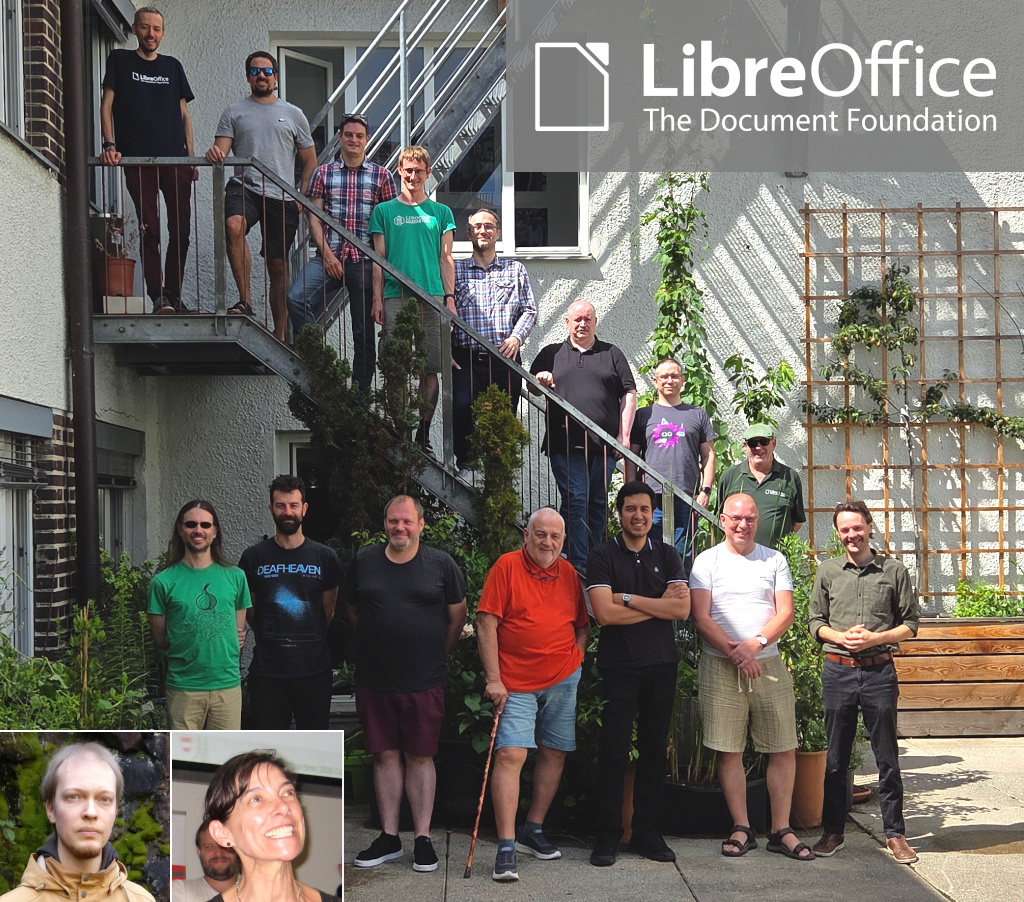
TDF team photo

Photos of clocks

Like what we do? Support LibreOffice with a donation – or join our community and help to make LibreOffice even better! Also keep in touch – follow us on Mastodon, Bluesky, Reddit and Facebook.

CISA Publishes Open Source Security Guidance: Verifiability Is the Difference

Image

On 30 July 2026, the United States Cybersecurity and Infrastructure Security Agency published Open Source Software: Security Principles and Practices, a 31-page guidance document for federal civilian agencies. It is available at no cost and marked TLP:CLEAR, meaning it may be shared without restriction.

The document is addressed to US federal agencies, and it fulfils obligations under two executive orders on federal cybersecurity. It covers four areas: using open source solutions, contributing to open source projects, producing open source software, and evaluating open source artificial intelligence models. The observations below concern the first three.

Its analytical content is not jurisdiction-specific, and public administrations elsewhere — including in Europe — will find that it articulates, in the vocabulary of risk management, several positions that the open source community has been arguing for two decades.

What the guidance actually says

The central claim is more precise than the headlines suggest. CISA does not assert that open source software is more secure than proprietary software. It states that OSS is “no more or less risky than other software,” and locates the difference elsewhere: with open source, an organisation can assess code quality and security directly, rather than relying solely on vendor assurances.

This is a claim about verifiability, not about defect rates. It is also the more defensible claim, and the more consequential one for procurement. An agency evaluating proprietary software is evaluating a vendor’s statement about its own product. An agency evaluating open source software is evaluating the product.

The guidance draws the corollary explicitly. Among the benefits it lists for federal agencies is reduced vendor lock-in: open standards and modifiable code, CISA writes, protect agencies from “proprietary dependency traps.” A national cybersecurity authority has placed lock-in inside a security document rather than a competition-policy one. That is a meaningful shift in where this argument is permitted to live.

The C4 Framework

The most practically useful part of the guidance is Appendix A, which sets out the C4 Framework for assessing whether an open source project is trustworthy. Its premise is that, because contributors may be pseudonymous and are bound by no delivery obligation, trustworthiness cannot be assessed from who produced the software. It must be assessed from how the software was produced — which open source development makes visible in a way that closed development does not.

C4 groups the evidence into four categories:

  • Codebase — commit recency, known vulnerabilities, dependency currency.
  • Community — number of maintainers, institutional structure, whether the project sits within a foundation.
  • Conduct — whether there is a vulnerability disclosure policy, whether code review is required, whether maintainers merge their own commits, the licence, the code of conduct.
  • Configuration — whether defaults are secure, and what hardening the software supports.

The framework is applied in five steps: identify measurable criteria, determine risk tolerance and weight the criteria, collect observations (with automated tooling where available), evaluate against each criterion, and compare the result to the tolerance.

We would encourage public administrations to apply this framework to LibreOffice. Every category can be answered from public evidence: a continuous commit history since 2010, a published security policy and disclosure process, mandatory peer review, an OSI-approved licence, a documented code of conduct, and a governance structure — The Document Foundation, a German Stiftung with an elected Board of Directors — that is a matter of public record rather than of assertion.

We would encourage administrations to apply the same framework to every candidate solution, including proprietary ones, and to note which questions can be answered and which cannot.

Contributing, and the support question

The guidance also addresses a question that public administrations regularly raise about open source adoption: who is responsible for fixes. CISA’s answer is that no single entity is obliged to provide them, and that agencies should therefore plan accordingly — assigning internal staff, contracting third parties, or both — while following two principles in dealing with upstream projects: collaborate rather than demand, and push fixes upstream.

This is a fair description of how the LibreOffice ecosystem works. Support, long-term maintenance, and custom development are provided by certified developers and certified migration professionals, whose contributions return to the shared codebase and benefit every other deployment. The guidance is right that this requires organisations to plan for it. It is also right that the resulting improvements are shared rather than captured.

CISA further notes that where a project becomes unmaintained, an organisation may as a last resort take over a fork. This option has no equivalent in proprietary software, where end of support arrives on the supplier’s schedule and offers no remedy at all.

A note on scope

ImageThe document does not name any product. CISA states explicitly that it does not endorse commercial entities, products, or services, and nothing in the guidance should be read as an assessment of any particular software. What it provides is a set of criteria. The observation that LibreOffice satisfies them is ours, and rests on evidence that anyone may check.

Open Source Software: Security Principles and Practices is available from CISA: https://www.cisa.gov/resources-tools/resources/open-source-software-security-principles-and-practices

CISA’s announcement: https://www.cisa.gov/news-events/news/cisa-guide-helps-federal-agencies-securely-and-effectively-use-open-source-software

New LibreOffice extension: Impress Remote

Impress Remote extension logo

LibreOffice extensions are optional, third-party addons for the suite, that add extra functionality. Bora Yarkın has been working on a new extension for LibreOffice Impress, so let’s hear from him about it…

Tell us about it!

The extension lets you control a LibreOffice Impress presentation from your phone or any other device with a modern web browser.

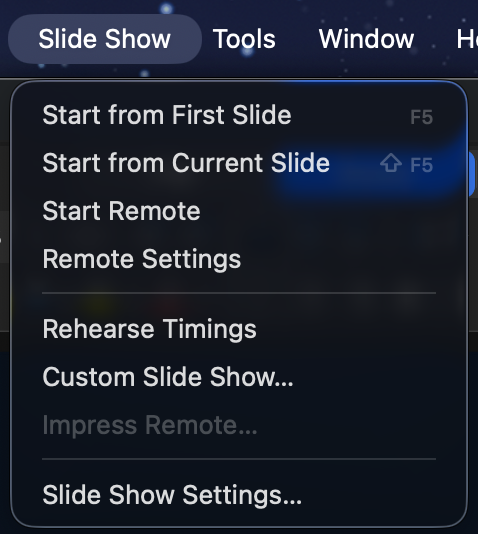
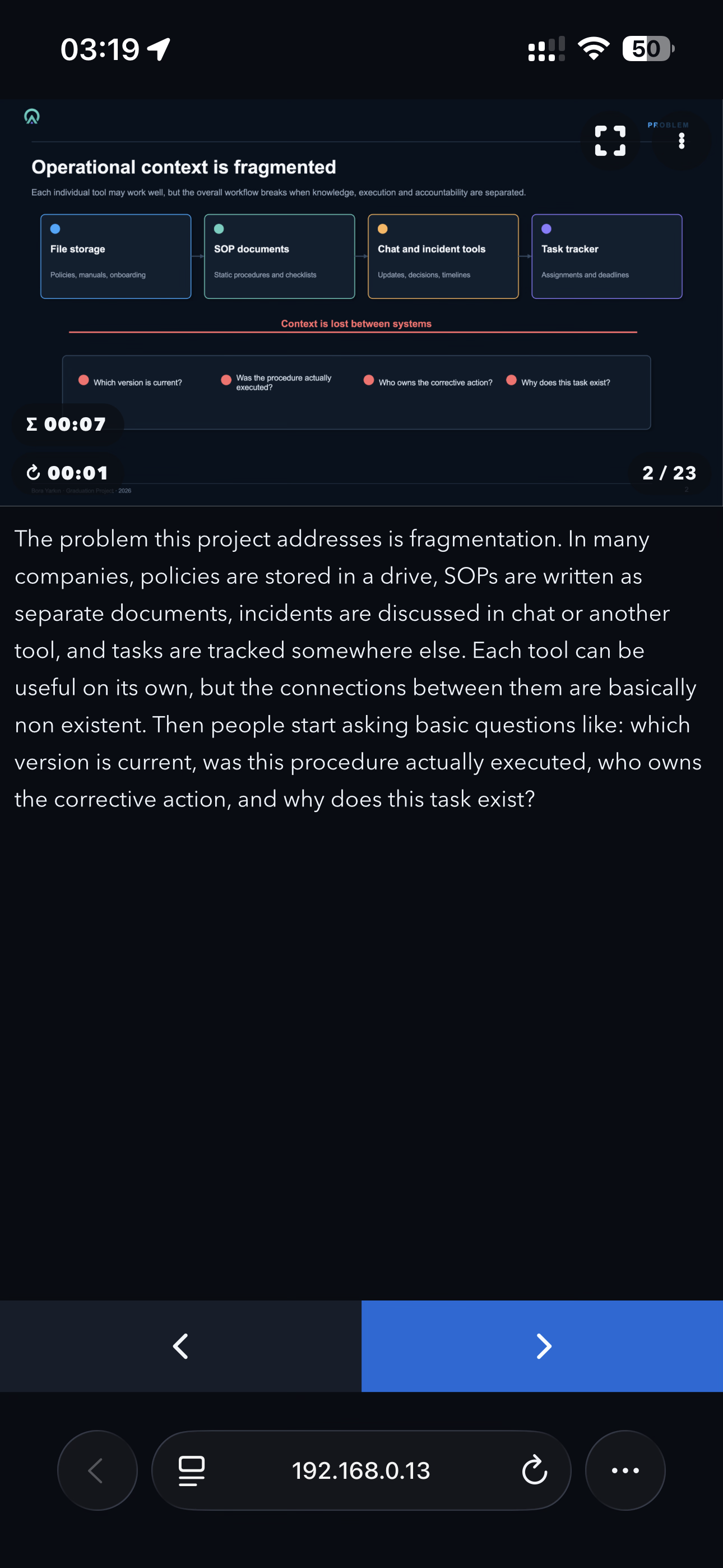
When you start the remote, LibreOffice displays a QR code. Scan it with your phone and the presentation starts from the first slide. The phone interface then shows the current slide, presenter notes, elapsed time and navigation controls.

I tried to make the process as simple as possible: no separate mobile application and no manual pairing codes.

The remote can be opened from the Slide Show menu in LibreOffice’s top application menu bar—the menu alongside File, Edit, View and the other main menus.

This should not be confused with the Slide Show tab inside LibreOffice’s Tabbed user interface. LibreOffice’s UNO extension API does not currently let me add commands to that built-in tab. When using the Tabbed interface, the remote commands are therefore available under the Extensions tab instead.

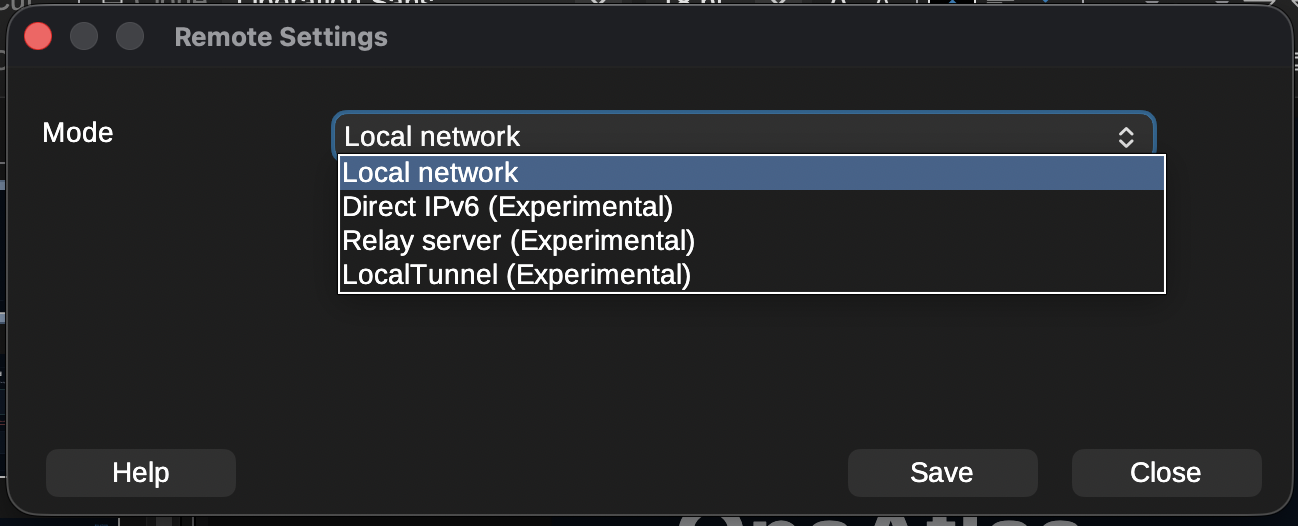
The extension currently provides several connection modes:

  • Local network: The phone connects directly to the computer running LibreOffice through its local IPv4 address. This is the main mode and the one I have tested most thoroughly.
  • Direct IPv6: Works similarly, but uses an IPv6 connection. It is still marked experimental because my home internet connection is currently the only IPv6 network I can properly test with.
  • Relay server: A small Python service that can be hosted on Linux or Windows. It is useful when the phone and computer are on different networks or when direct connections are blocked by carrier-grade NAT, firewalls or other network restrictions. It also supports multiple connections, so an organisation can host one relay server on its own infrastructure.
  • LocalTunnel: An experimental fallback that creates an outbound connection through the LocalTunnel service. I consider this a last-resort option when the other connection methods are unavailable.

The compatible relay-server package is bundled with the extension. It can be downloaded or extracted directly from the Remote Settings window by selecting “Get Relay Server”. The package includes the required documentation and setup instructions.

To install the extension, download the .oxt file from the LibreOffice Extensions website or GitHub and open it with LibreOffice. It can also be installed manually through Tools > Extensions. After installation, restart LibreOffice if requested.

The extension includes translations for more than 100 languages and automatically follows LibreOffice’s interface language. English and Turkish are the two languages I have personally checked. Many of the other translations were created with ChatGPT, so I cannot guarantee their quality and would be very grateful for corrections from native speakers.

Screenshot of Impress Remote

Why did you create it, and what was the process like?

The original inspiration came from Apple Keynote.

When Keynote is installed on both a Mac and an iPhone, the phone can be used to control the presentation while also displaying presenter notes. That feature completely changed the way I give presentations.

Over time, my slides became more professional and less text-heavy. Instead of putting everything on the slide, I started using the presenter notes almost like a teleprompter, with the text I actually planned to say. This helped move the audience’s attention away from reading the screen and back towards me.

That workflow worked perfectly for a long time, but I never really liked Keynote itself. I could not get used to its interface, and Apple’s decision to introduce paid features was the final reason for me to start looking for an alternative.

There were already several possible solutions, but none of them really worked for me.

LibreOffice previously had its own Impress Remote mobile application, but it has not been maintained for a long time and is no longer practical on many current devices and systems.

Browser-based presentation platforms can offer remote-control features, but I did not want my main presentation workflow to depend on an online service. They also do not offer the same flexibility as a full desktop office suite.

Microsoft Office was another possible option, but I am not a fan of Microsoft’s current direction, particularly the increasing integration of Copilot throughout its products.

OnlyOffice Desktop Editors is a good alternative and I used it for a while, but I encountered several bugs and eventually needed features it did not provide.

That brought me to LibreOffice, which I now find more useful and capable than the other office suites I tried. The only thing missing was the remote-presenter experience I had become dependent on with Keynote.

So I decided to build it myself.

I work mainly in IT and I am familiar with programming, but I would not describe myself as an advanced software developer. Before starting this project, I knew almost nothing about LibreOffice’s UNO API.

I began with ChatGPT. I defined the architecture, features, user interface and constraints myself—including requirements such as localisation being mandatory—and used AI to help me understand UNO and implement the code. The result turned out much better than I expected.

The extension was originally only a personal project. The first version was very basic; the web interface did not even have a back button. I had no intention of publishing it. Once it started working reliably, however, I realised that other LibreOffice users might want the same experience. I decided to take the project more seriously and turn it into a complete extension rather than something that only worked on my own computer.

That meant adding a more polished phone interface, connection settings, QR-code generation, IPv6 support, the relay server, LocalTunnel support, localisation, documentation, error handling and packaging.

Publishing it on the LibreOffice Extensions website was much easier than I expected. I created an account, created the project page, entered the information, uploaded the package and submitted it. After roughly a day of review, the extension was available publicly.

Screenshot of Impress Remote

How can people help with testing and further development?

The source code and issue tracker are available on GitHub. The repository includes templates for bug reports, feature requests and pull requests.

My main development and testing setup is macOS with an iPhone. I have also tested the extension on Windows and Linux, but those tests were performed under less-than-ideal conditions, including virtual machines, Remote Desktop sessions and a headless Windows Server installation.

Because of that, testing on real Windows and Linux desktop systems would be especially useful.

The areas where community help would be most valuable are:

  • Testing different LibreOffice versions
  • Testing Windows, Linux and different macOS versions
  • Testing Android devices and different mobile browsers
  • Testing IPv6 connections between genuinely separate networks
  • Testing the relay server in real-world and organisational environments
  • Testing unusual firewall, VPN, NAT and carrier network configurations
  • Reviewing and correcting translations
  • Improving the documentation
  • Reporting bugs and suggesting features
  • Contributing fixes through pull requests

The local IPv4 mode has been tested extensively across different local networks, internet providers and VPN configurations. The IPv6, relay-server and LocalTunnel modes need broader community testing before I would consider them fully proven.

When reporting a connection problem, including the operating system, LibreOffice version, browser, phone type, selected connection mode and basic network configuration would help enormously.

The project started because I wanted this functionality for myself. Now I would like to make it reliable enough that other LibreOffice users and organisations can confidently use it for their own presentations.

Screenshot of Impress Remote

Privacy Preference Center