Does this issue occur when all extensions are disabled?: Yes
- VS Code Version: 1.58.0
- OS Version: Arch Linux x86_64 5.12.15-arch1-1
Steps to Reproduce:
- Open the VSCode interactive playground.
- Scroll down to the JavaScript Type Checking section.
Description:
The walkthrough section currently advises setting "javascript.implicitProjectConfig.checkJs": true to get TS checks in JavaScript files.

The property's been deprecated in favour of "js/ts.implicitProjectConfig.checkJs": true.
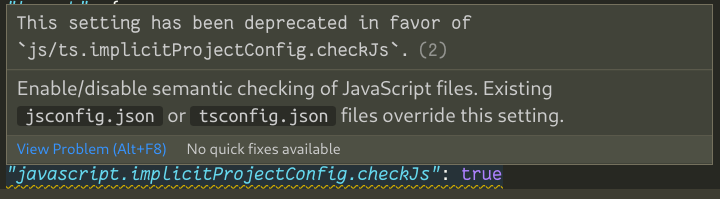
The walkthrough should be updated to reflect the same.


Does this issue occur when all extensions are disabled?: Yes
Steps to Reproduce:
Description:
The walkthrough section currently advises setting
"javascript.implicitProjectConfig.checkJs": trueto get TS checks in JavaScript files.The property's been deprecated in favour of
"js/ts.implicitProjectConfig.checkJs": true.The walkthrough should be updated to reflect the same.