Image

The Agony Of Packaging Linux Apps

One of the great things of Linux as an ecosystem is that there is so much choice. Yet this is also its greatest weakness, as unlike on MacOS and Windows this means that simple questions often do not have a simple answer. The topic of distributing software is one of these vexing topics that never really goes away, with [Noam Lewis], as author of the Fresh editor, recently expressing their frustrations on this topic.

This is a familiar topic that we have covered before, mostly in the context of cross-platform installers. Whereas on MacOS and Windows you just pick any of a handful of standard installer frameworks that do roughly the same thing, on Linux you are dealing with a dizzying number of package managers, including distro-specific ones, NPM, Homebrew, Rust crates, third party repositories like Arch Linux’s AUR or stray APT repositories for Debian, and of course AppImage and Flatpak along with a host of other options.

After going through the entire list with help from the Fresh community, [Noam] ended up creating packages for all of them, and has a lot of thoughts. Since Fresh is a TUI-based editor, something like Flatpack is not a really good fit, while AppImage is just very slow due to mounting the image, which is annoying.

Overall, distro-specific solutions are just unpleasant in general, as they mean repeating the same work over and over, even if you can even get into a distribution channel. Ultimately the solution that [Noam] ended up at was to have a static binary with the musl runtime, along with an integrated updater, which is a solution that should be quite familiar for Windows users. Yet even if it fails some kind of purity test for certain Linux users, is it really a bad solution if it works for users of the software?

Image

Linux Fu: Heads Or Tails For VPN

If you’ve done much networking, you surely know the frustration of trying to connect to something, say a Raspberry Pi, that lives behind your consumer router. There are a number of solutions for this, ranging from opening ports on your router along with dynamic DNS. Or, you can operate a VPN server on your network. Modern Linux has a facility called Wireguard that lets you create secure network tunnels very easily, but it is a little difficult to set up. But there are tools like Tailscale that can do most of the work for you. There’s only one problem: Tailscale is sorta-kinda free, but not really. But it turns out, you can build your own Tailscale network, and it is easier than you might imagine.

In all fairness, Tailscale’s free tier is good and recently got even more generous, allowing unlimited nodes and up to six users. That’s plenty for most hackers. However, as we’ve seen before, what they can give they can also take away. Besides, there are some extra services you still have to pay for if you want them, but overall, the free tier is more than enough for most people.

On the other hand, no matter how great the free tier may be, some people don’t want to run things on other people’s hardware. Or you need that 7th user. Or you need paywalled features. No worries. Headscale is a self-hosted service that can do nearly everything the cloud portion of Tailscale does, and if you have a place to host it, you can be your own Tailscale server.

For the client side? That’s the best part. Headscale works seamlessly with the existing Tailscale clients. You simply have to point them to your server instead of the defaults.

Continue reading “Linux Fu: Heads Or Tails For VPN”

Image

This Filesystem Is Born To Fail

Sandboxing a Linux process usually means spending a lot of effort deciding what it isn’t allowed to see. You might put it in a mount namespace, bind-mount a few directories into place, hide some others, add a chroot, and generally construct a carefully restricted version of the filesystem. But a new Linux kernel feature is about to change all of that. Instead of carefully hiding most of the filesystem, why not just take the filesystem away?

That’s essentially the idea behind FailFS, a tiny pseudo-filesystem expected to land in Linux 7.3. As the name suggests, it doesn’t do very much. In fact, that’s the point: every operation that reaches FailFS returns EOPNOTSUPP, meaning “operation not supported.”

The interesting bit is what happens when a process uses FailFS as its root or current working directory. At that point, normal pathname lookup essentially ceases to work. Absolute paths fail. Absolute symbolic links fail. Relative paths using the normal current-directory mechanism fail. If the application tries to open /etc/passwd, there simply isn’t a useful /etc to find.

Continue reading “This Filesystem Is Born To Fail”

Image

Compile Here, Run Everywhere: Crosstool-Ng

In a recent post, I mentioned that I wanted to build some tools for a stripped-down Linux running on a 3D printer with a MIPS CPU. I had two options: build a toolchain to cross-compile, or use Zig, which, in theory, has built-in toolchains for MIPS. I had to jump through hoops to get Zig to work, and I did mention Crosstool-Ng, so you might wonder why I didn’t start there. Turns out, it had its own set of hoops to work through.

Continue reading “Compile Here, Run Everywhere: Crosstool-Ng”

Image

Tired Of Xargs?

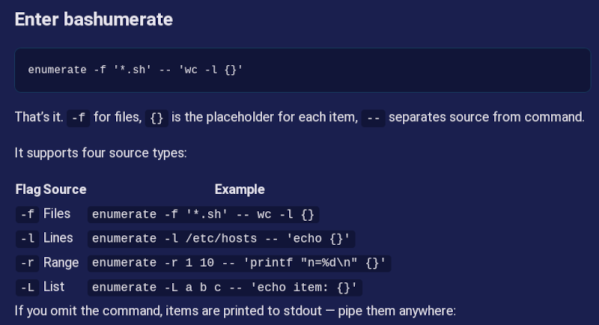
What if you want to do something in Linux for a lot of files? [Numerator] was tired of using xarg and other ways to handle this job and created bashumerate.

Some examples in the post of the “other ways” include:

find . -name '*.log' | xargs rm
find . -name '*.sh' -exec wc -l {} \;

You can, also, use a for loop, and if you are a programmer at heart, you may well do this:

for f in *.txt; do
  wc -l "$f"
done

Bashumerate handles all of the common cases in one tool and uses the same syntax for multiple kids of enumerations.

Continue reading “Tired Of Xargs?”

Image

Putting Some Zig In A Linux-Based 3D Printer

Having Linux on so many devices is both a blessing and a curse. Sure, it is great that you can hack on things and modify them or even totally repurpose them. But it also means you have a fleet of Linux devices you have to manage and keep track of.

My current “main” 3D printer is a Flashforge AD5X: a nice, cheap machine that does four colors with the purge/exchange method. It sort of runs Klipper. I say sort of because Flashforge has Klipper running on a Linux host in the box, but it is massively crippled and modified. I’m sure it works for most folks. I’m also sure that if you know nothing about Linux, Klipper, or 3D printing, the experience is probably better thanks to all the cloud point-and-click interfaces. But, of course, I check none of those boxes.

I’ve had the printer for probably a year or more. Almost immediately, I put a “mod” on the printer to give it a more true Klipper interface and gave me things like shell access. There are several that I think will do this, but I used Zmod, which doesn’t totally replace the printer’s firmware; it just sort of patches it and extends it. You can easily bypass or even remove it and go back to the stock printer, although I would not want to.

In my case, the issue was a printer, but the same idea might apply to any embedded Linux system, from a router to a thermostat. Sure, it runs Linux, but is it Linux you can change?

The Problem

Image
The AD5X runs Linux… sort of.

The Flashforge firmware and Zmod both will run on the AD5X’s little sister, the AD5M. However, the AD5M has a significantly less capable processor board than the AD5X. That means that Linux on the boxes is very stripped down. From Flashforge’s point of view, no one should be in the Linux OS anyway, and the author of Zmod probably figures every byte used is a byte taken away from the user or other advanced Zmod features.

It may seem like a first-world problem, but there were two things that irked me about the printer’s Linux. There was no less or more command for poking around files. There was also only vi as an editor. I did a few hacks to make myself happy. I wrote a pager in shell script, for example. I would try to remember to use my desktop emacs and tramp to edit files on the box. But it was a shame that there were some very basic tools lacking. Besides that, even the tools that were there like ls lacked help commands in case you want some strange option you can’t remember.

No Install

To save space, the printer doesn’t really have programs like ls, cat, and grep. Instead, it has a single busybox executable. This is common on small systems. You get one copy of the libraries and a single executable that will do all the work you need. You can invoke, for example, grep by running “busybox grep” or, if you make a symlink to busybox named grep, the user may never realize that you don’t really have grep installed.

However, busybox has to be built. You can’t easily install packages to it. So I couldn’t just run some package manager and install less or anything else. My plan was to produce a new busybox package myself to supply at least the missing commands and maybe some of the more basic ones, too. How hard could it be?

Continue reading “Putting Some Zig In A Linux-Based 3D Printer”

Image

Linux Fu: The Local Phonebook

I’ll admit it: I miss the simplicity of /etc/hosts. There was something elegant about it. You wanted laserprinter to mean 192.168.1.40, so you opened a text file and wrote:

192.168.1.40 laserprinter

Done. No cloud account, no discovery daemon, no dashboard with material-themed icons. Just a name and an address. The trouble, of course, is that /etc/hosts is only simple when you have one machine. The moment you have a desktop, a laptop, a Raspberry Pi, a NAS, a test box, and a phone or two, every little network change becomes a tiny distributed-database problem. Which copy of /etc/hosts is authoritative? Did you update the laptop? What about the machine you only boot once a month?

One Solution

Modern LANs solved this with mDNS, using Avahi on Linux. It resolves addresses that end in .local. Instead of asking a central DNS server “who is thing.local?”, a machine sends a multicast query on the local network: “who has thing.local?” The device that owns the name answers. This is why your Linux box named spock and usually be reached as spock.local on your LAN.

There are limits. mDNS is link-local; it is meant for the local LAN, not the whole Internet and shouldn’t route across subnets. Each device is supposed to publish its own name. That works fine when the device cooperates. But what about devices that do not publish mDNS? Or little embedded things that barely even have an IP address?

That is where I wanted the best of both worlds: keep a small authoritative /etc/hosts file on one Linux box, but publish selected entries onto the LAN using mDNS.

Continue reading “Linux Fu: The Local Phonebook”