

A String in Java is an object used to store a sequence of characters enclosed in double quotes. It uses UTF-16 encoding and provides methods for handling text data.
- Each character in a string is stored using 16-bit Unicode (UTF-16) encoding.
- Strings are immutable, meaning their value cannot be changed after creation.
- Java provides a rich API for manipulation, comparison, and concatenation of strings.
Example:
String name = "Geeks";
String num = "1234";
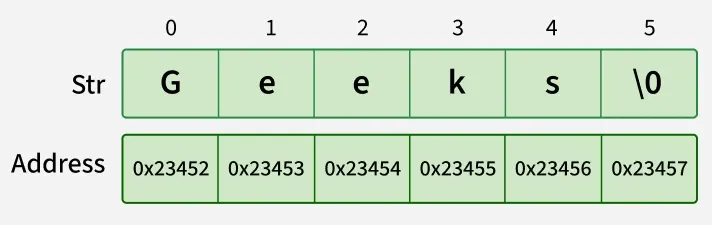
Note: The diagram conceptually shows the sequence of characters in a string, not its actual JVM memory layout. Since Java 9, Java uses Compact Strings (byte[] with a coder field), and the JVM does not expose object memory addresses.
public class Geeks {

    // Main Function
    public static void main(String args[])
    {

        // creating Java string using a new keyword
        String str = new String("Geeks");

        System.out.println(str);
    }
}
Output
Geeks
Explanation: The program creates a String object containing "Geeks" using the new keyword and prints it using System.out.println().
Ways Of Creating a Java String
There are two ways to create a string in Java:
1. String literal (Static Memory)
To make Java more memory efficient (because no new objects are created if it exists already in the string constant pool). Java stores string literals in the String Pool. If the same literal already exists in the pool, Java can reuse the existing String object.
Example:
String str = “GeeksforGeeks”;
2. Using new keyword (Heap Memory)
Using the new keyword creates a new object in heap memory, even if the same string already exists in the pool.
- One object is created in the heap memory
- The string literal is stored in the string pool (if not already present)
- The reference variable points to the heap object, not the pool
Example:
String str = new String (“GeeksforGeeks”);
Interfaces and Classes in Strings in Java
CharSequence Interface
The CharSequence interface represents a sequence of characters in Java. It provides common methods such as length(), charAt(), subSequence(), and toString() for working with character data.
Classes that implement CharSequence include:
- String: An immutable class whose contents cannot be modified after creation; any change results in a new String object.
- StringBuffer: A mutable and thread-safe class used for string manipulation in multithreaded environments.
- StringBuilder: A mutable and non-thread-safe class that provides faster string manipulation in single-threaded applications.
- StringTokenizer: A utility class used to break a string into smaller tokens based on specified delimiters.
Immutable String in Java
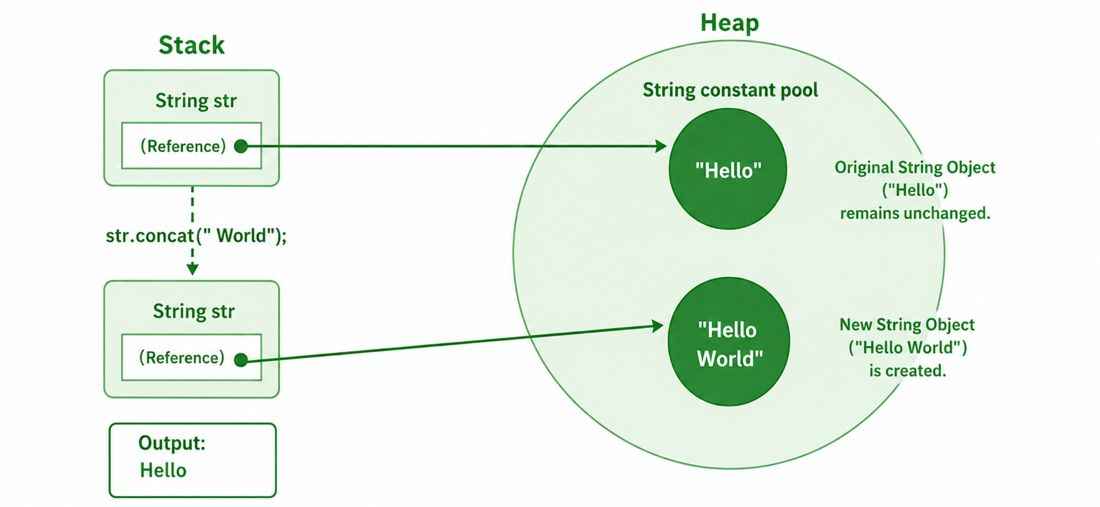
In Java, string objects are immutable. Immutable simply means unmodifiable or unchangeable. Once a string object is created its data or state can't be changed but a new string object is created.
public class GFG{

    public static void main(String[] args) {

        String str = "Hello";

        str.concat(" World");

        System.out.println(str);
    }
}
Output
Hello
Explanation: In the above example, the String.concat() does not modify the original String object. When str.concat(" World") is executed:
- A new String object "Hello World" is created.
- The original String "Hello" remains unchanged.
- Since the new object is not assigned to any variable, it is discarded.
How Strings are Stored in Java Memory
String literal
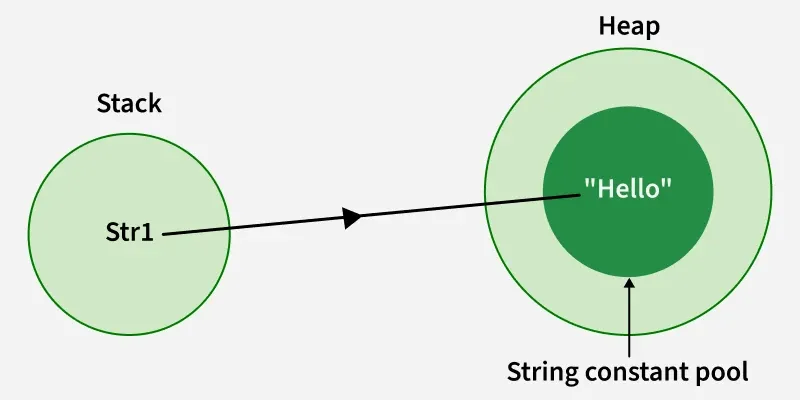
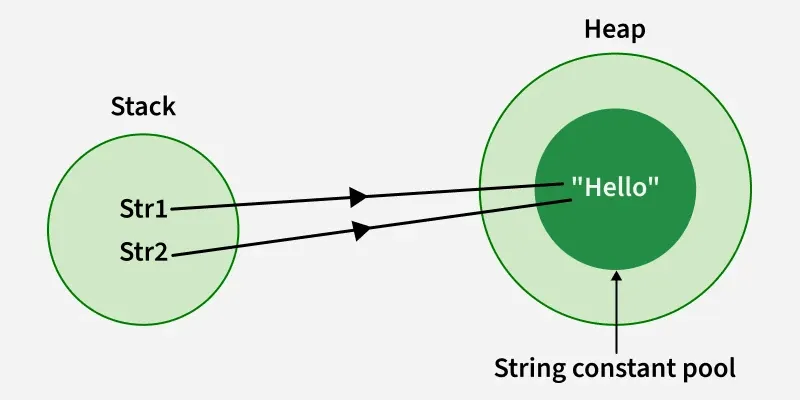
When a String is created using a string literal, the corresponding String object is stored in the String Pool, which is part of the heap. The reference variable refers to that pooled String object.
Example 1: Using String literals to assigning char sequence value.
String str1 = "Hello";
Example 2: When we initialize the same char sequence using string literals.
String str1 = "Hello";
String str2 = "Hello";
Using new Keyword
Strings can also be created using the new keyword, which allocates a new object in heap memory. However, the string literal inside it is still stored in the String Constant Pool (if not already present).
Example 1: Using new keyword to assign a char sequence to a String object.
String str1 = new String("John"); String str2 = new String("Deo");
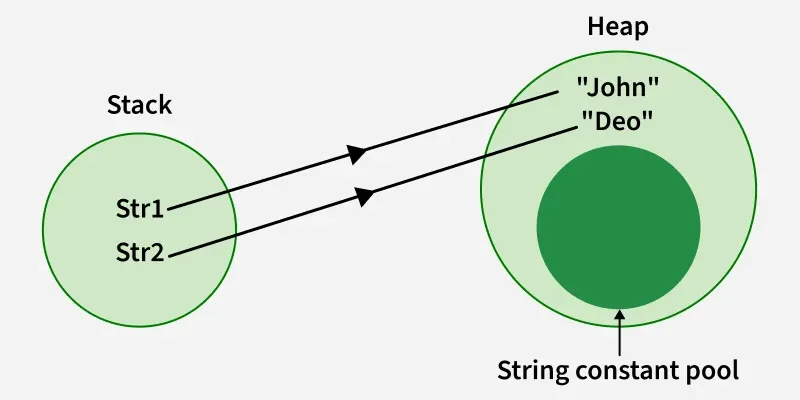
The intern() method returns the canonical String reference from the String Pool. If an equal String is not already present in the pool, it is added to the pool; otherwise, the existing pooled String reference is returned.
Example 2: Using .intern() to add a string object in string constant pool.
// this will add the string to string constant pool.
String internedString = demoString.intern();
When a String is created using a string literal, the corresponding String object is stored in the String Pool. When new String() is used, a separate String object is created on the heap, while the string literal passed to the constructor is stored in the String Pool if it is not already present. The intern() method returns the corresponding canonical String reference from the String Pool.
String Pool Migration from PermGen to the Normal Heap
Before Java 7, the String Pool was stored in the PermGen area. From Java 7 onward, the String Pool is stored in the heap.
- This allowed the String Pool to be managed as part of heap memory.
- It reduced the limitations associated with the old PermGen-based implementation.
- The Garbage Collector can manage pooled strings as heap objects.
For example:
String demoString = new String("Bhubaneswar");
Let us have a look at the concept with a Java program and visualize the actual JVM memory structure:
class Geeks
 {
    public static void main(String args[])
    {

      	// Declaring Strings using String literals
        String s1 = "TAT";
        String s2 = "TAT";

        // Declaring Strings using new keyword
        String s3 = new String("TAT");
        String s4 = new String("TAT");

        // Printing all the Strings
        System.out.println(s1);
        System.out.println(s2);
        System.out.println(s3);
        System.out.println(s4);
    }
 }
Output
TAT
TAT
TAT
TAT
Explanation: s1 and s2 use the same String literal, so they can refer to the same String Pool object. s3 and s4 are created using new, so each represents a separate String object on the heap. All four variables contain the same text, "TAT".
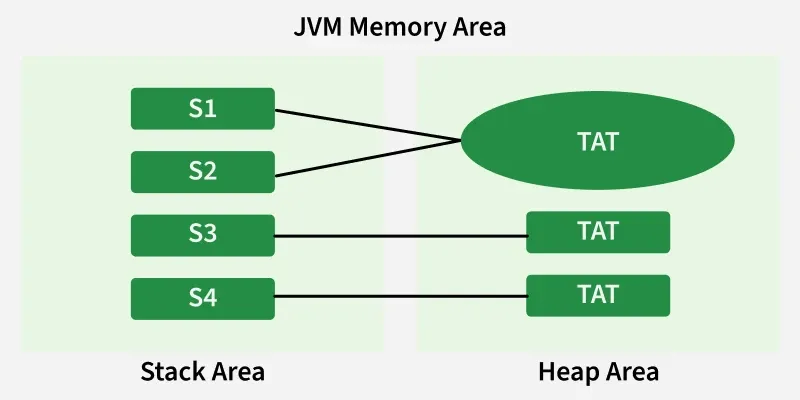
Note: All objects in Java are stored in a heap. The reference variable is to the object stored in the stack area or they can be contained in other objects which puts them in the heap area also.
