Summary: In this tutorial, you’ll learn how to convert a value of one data type to another using the PostgreSQL CAST() function and operator.
PostgreSQL Cast Overview #
To convert a value of one data type to another, you use the CAST() function or cast operator (::).
Here’s the syntax of the CAST() function:
CAST(value AS target_type);In this syntax:
- First, specify the
valueto cast. - Second, provide the target data type (
target_type) to which you want to convert thevalue.
The CAST() function returns the value to cast to the target type.
If the cast fails, the CAST() function issues an error.
To make it more convenient, PostgreSQL offers the cast operator (::), which is more concise than the CAST function:
value::target_typeThe cast operator (::) casts the value to the target type or raises an error if it fails.
Casting a String to an Integer #
The following statement uses the CAST() function to convert a string to an integer:
SELECT
CAST('10' AS INT) result;Output:
result
--------
10Similarly, you can convert the string ’10’ to an integer using the cast operator:
SELECT
'10'::INT result;The following query issues an error because the CAST() function cannot convert the string ’10x’ to an integer:
SELECT
CAST('10x' AS INT) result;Output:
ERROR: invalid input syntax for type integer: "10x"Casting a String to a Double #
The following example uses the CAST() function to cast a string to a double:
SELECT
CAST('9.99' AS DOUBLE PRECISION) result;Output:
result
--------
9.99Here’s how you use the cast operator(::):
SELECT
'9.99'::DOUBLE PRECISION result;Casting a String to a Boolean #
The following example uses the CAST() function to cast strings to boolean values:
SELECT
CAST('true' AS BOOLEAN),
CAST('false' AS BOOLEAN),
CAST('T' AS BOOLEAN),
CAST('F' AS BOOLEAN);Output:
bool | bool | bool | bool
------+------+------+------
t | f | t | fCast operator:
SELECT
'true'::bool,
'false'::bool,
'T'::bool,
'F'::bool;Casting a String to a Date #
The following example uses the CAST() to convert a string to a date:
SELECT
CAST('2025-02-14' AS DATE),
CAST('14-Feb-2025' AS DATE);Output:
date | date
------------+------------
2025-02-14 | 2025-02-14SELECT
'2025-02-14'::DATE,
'14-Feb-2025'::DATE;Output:
date | date
------------+------------
2025-02-14 | 2025-02-14In these examples, the CAST() function and operator convert the string '2025-02-14' and '14-Feb-2025' to dates.
Casting a String to an Interval #
The following example uses the CAST function or operator to cast a string to an interval:
SELECT
CAST('2 hours 30 minutes' AS INTERVAL) result;Output:
result
----------
02:30:00SELECT '2 hours 30 minutes'::INTERVAL;Output:
interval
----------
02:30:00Casting a Timestamp to a Date #
The following statement uses the CAST() function to cast a timestamp to a date:
SELECT
CAST(TIMESTAMP '2025-02-14 12:30:45' AS DATE);Output:
date
------------
2025-02-14SELECT TIMESTAMP '2025-02-14 12:30:45'::DATE;Output:
date
------------
2025-02-14Casting an Interval to Text #
The following statement uses the CAST() function to cast an interval to a date:
SELECT
CAST(INTERVAL '7 days' AS TEXT) result;Output:
result
--------
7 daysCasting a Double Precision to an Integer #
The following statement uses the CAST() function to cast a double precision to an integer:
SELECT
CAST(9.99 AS INT);Output:
int4
------
10Casting an Array to a String #
The following example uses the CAST() function to cast an array to text:
SELECT
CAST('{10, 20, 30}' AS TEXT);Output:
text
--------------
{10, 20, 30}Casting a String to an Array #
The following example uses the CAST() function to cast an array to text:
SELECT CAST('{10,20,30}' AS INT[]) result;Output:
result
------------
{10,20,30}SELECT
'{10,20,30}'::INT[] result;Output:
result
------------
{10,20,30}Using PostgreSQL CAST Function with Table Data #
We’ll use the products table from the inventory table:
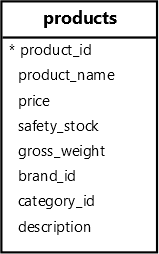
The following example uses the CAST function to cast a string to a number:
SELECT
product_name,
CAST((REGEXP_MATCH(product_name, '\d+')) [1] AS INT) number
FROM
products;Output:
product_name | number
----------------------------+--------
Samsung Galaxy S24 | 24
Apple iPhone 15 | 15
Huawei Mate 60 | 60
Xiaomi Mi 14 | 14
Sony Xperia 1 VI | 1
Samsung Galaxy Z Fold 5 | 5
...How it works
- First, extract the first occurrence of a number from the product name using the
REGEXP_MATCHfunction. - Second, use the
CASTfunction to cast a string to an integer.
Multiple Casting #
The following query extracts the product price from an XML fragment and converts it to the decimal:
SELECT
(
xpath(
'/product/price/text()',
XMLPARSE(
CONTENT '<product> <name>Smartphone</name> <price>999.99</price> </product>'
)
)
) [1]::TEXT::DEC price;Output:
price
--------
999.99How it Works
- The
xpathfunction extracts a text from the price element of theXMLfragment. It returns an array{999.99}. [1]returns the first element of the result array999.99. The data is anXMLvalue.::TEXTcasts theXMLvalue to a value ofTEXT.::DECcasts the value ofTEXTtoXMLvalue.
Notice that you cannot cast type XML to numeric directly. The following statement will issue an error:
SELECT
(
xpath(
'/product/price/text()',
XMLPARSE(
CONTENT '<product> <name>Smartphone</name> <price>999.99</price> </product>'
)
)
) [1]::DEC price;Error:
ERROR: cannot cast type xml to numericImplicit Casting #
PostgreSQL can sometimes automatically cast a value to a specific one without requiring the CAST function or operator. For example:
SELECT
1 + '2' result;Output:
result
--------
3In this example, PostgreSQL automatically converts the string '2' to an integer and adds it to the number 1.
Custom casts #
You can create your cast for custom types using the CREATE CAST statement.
Here’s the basic syntax of the CREATE CAST statement:
CREATE CAST (source_type AS target_type)
WITH
FUNCTION function_name (arguments) AS IMPLICITLet’s see the following example.
First, create a composite type that holds product data:
CREATE TYPE product_info AS (name TEXT, price DEC);Second, create a function that converts a value of JSONB to product_info:
CREATE FUNCTION jsonb_to_product_info(data JSONB)
RETURNS product_info
AS
$$
SELECT
(data->>'name')::TEXT,
(data->>'price')::DEC;
$$
LANGUAGE SQL IMMUTABLE;Third, create a custom cast to convert a JSONB to product_info using the jsonb_to_product_info function:
CREATE CAST (JSONB AS product_info)
WITH
FUNCTION jsonb_to_product_info (JSONB) AS IMPLICIT;In this statement:
WITH FUNCTION jsonb_to_product_info(JSONB): Specifies the functionjsonb_to_product_infoto use for the cast.AS IMPLICIT: Allows PostgreSQL to castJSONBvalues when needed automatically.
Fourth, create a table called product_prices:
CREATE TABLE product_prices (
id INT GENERATED ALWAYS AS IDENTITY PRIMARY KEY,
data JSONB
);Fifth, insert some rows into the product_prices table:
INSERT INTO
product_prices (data)
VALUES
('{"name": "Smartphone", "price": 999.99}'),
('{"name": "Smartwatch", "price": 699.49}')
RETURNING
data;Output:
data
-----------------------------------------
{"name": "Smartphone", "price": 999.99}
{"name": "Smartwatch", "price": 699.49}Sixth, retrieve the data from the product_prices table and cast it to the product_info:
SELECT
data::product_info
FROM
product_prices;Output:
data
---------------------
(Smartphone,999.99)
(Smartwatch,699.49)Summary #
- Use the
CAST(value AS type)function orvalue::typeoperator to explicitly cast the value to another of a different type. - Use the
CREATE CASTstatement to create a custom cast.
Thank you for your feedback!
