
Summary: in this tutorial, you’ll learn how to use the SQL INTERSECT operator to find common rows between two queries.
Introduction to SQL INTERSECT operator #
The INTERSECT operator finds the common rows of the result sets of two SELECT statements.
Here’s the syntax of the INTERSECT operator:
SELECT
column1,
column2
FROM
table1
INTERSECT
SELECT
column1,
column2
FROM
table2;In this syntax, you place the INTERSECT operator between two queries. The INTERSECT operator returns only the rows that appear in the two result sets.
The INTERSECT operator follows these rules:
- Same number of columns: the two
SELECTstatements must have the same number of columns. - Compatible data types: The corresponding columns in the
SELECTstatements must have compatible types. - Column names: The column names of the second query will decide the column names of the final result set.
- Sorting rows: to sort the rows in the final result set, you use an
ORDER BYclause in the second query. - Query execution: The
INTERSECTstatement executes eachSELECTstatement independently and finds the common rows.
Like the UNION operator, the INTERSECT operator removes duplicate rows from the final result set.
SQL INTERSECT operator example #
Suppose we have two tables A and B:
Table A:
| id |
|---|
| 1 |
| 2 |
| 3 |
Table B:
| id |
|---|
| 2 |
| 3 |
| 4 |
The following statement uses the INTERSECT operator to find the common rows of the queries that retrieve data from tables A and B:
SELECT
id
FROM
a
INTERSECT
SELECT
id
FROM
b
ORDER BY
id;Output:
id
----
2
3The following picture illustrates how the INTERSECT operator works in this example:
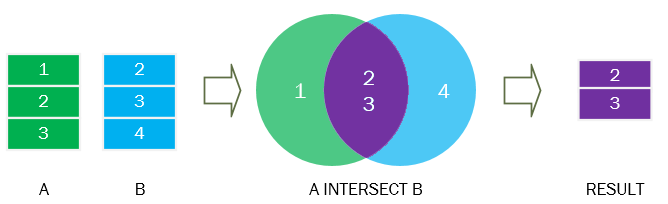
The purple section is the intersection of the green and blue result sets.
Practical examples of SQL INTERSECT operator #
First, create a new table called candidates to store the candidate data:
CREATE TABLE candidates (
candidate_id INT PRIMARY KEY,
first_name VARCHAR(255) NOT NULL,
last_name VARCHAR(255) NOT NULL
);Second, insert three rows into the candidates table:
INSERT INTO
candidates (candidate_id, first_name, last_name)
VALUES
(1, 'Neena', 'Kochhar'),
(2, 'Alexander', 'Hunold'),
(3, 'Peter', 'Thiel');Third, use the INTERSECT operator to compare rows from the candidates and employees tables:
SELECT
first_name,
last_name
FROM
candidates
INTERSECT
SELECT
first_name,
last_name
FROM
employees
ORDER BY
first_name,
last_name;Output:
first_name | last_name
------------+-----------
Alexander | Hunold
Neena | KochharThe output indicates that Alexander Hunold and Neena Kochhar appear on both candidates and employees tables.
Summary #
- Use the
INTERSECToperator to find common rows of two result sets. - The
INTERSECToperator removes duplicate rows from the final result set.
Quiz #
SQL INTERSECT
Databases #
- PostgreSQL INTERSECT Operator
- MySQL INTERSECT Operator
- MariaDB INTERSECT operator
- SQLite INTERSECT Operator
- Db2 INTERSECT Operator
- Oracle INTERSECT Operator
- SQL Server INTERSECT Operator
Thank you for your feedback!
