
Search the Community
Showing results for tags 'esp'.
Found 8 results
-
Version 1.2.6
411 downloads
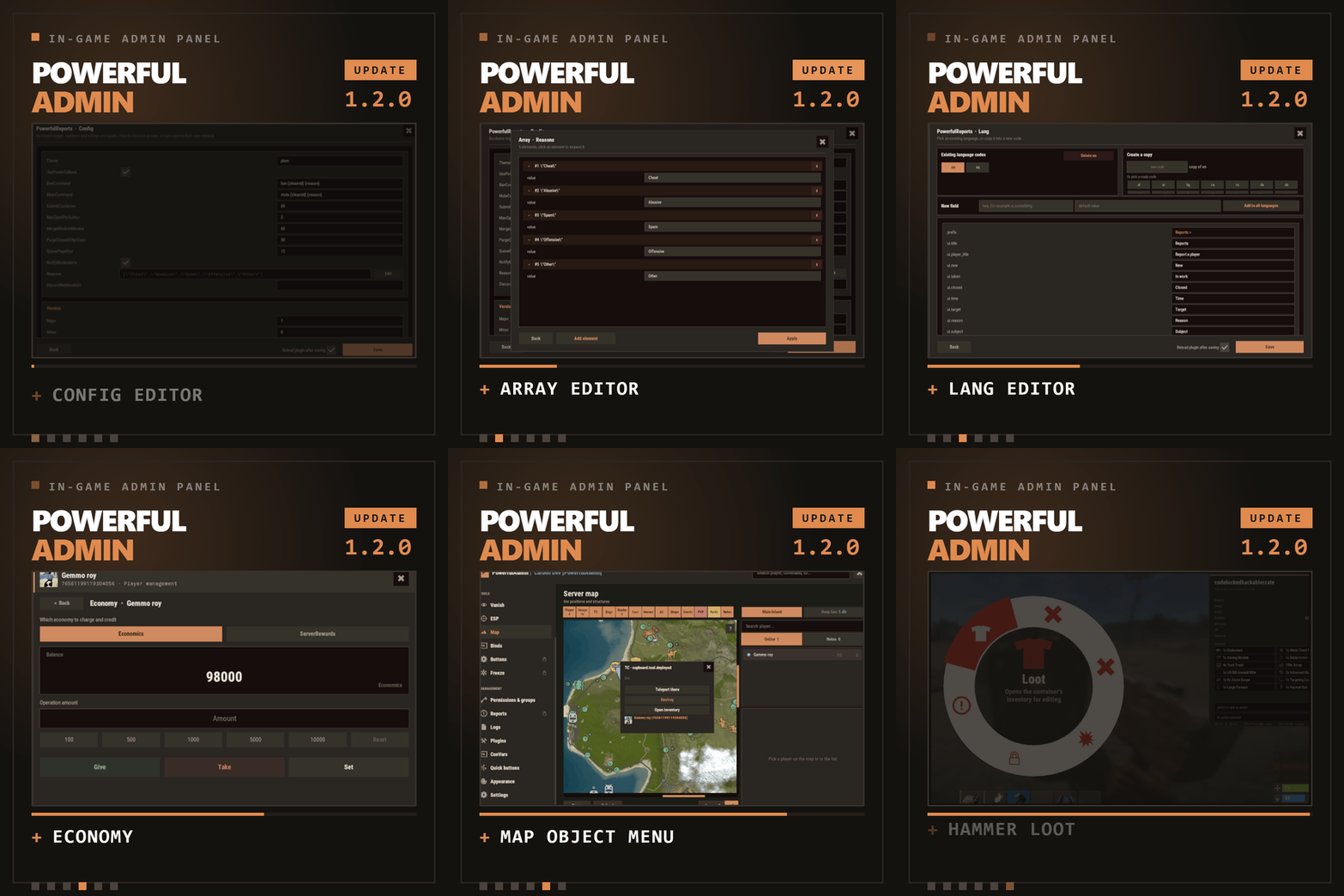
In-game admin panel Oxide & Carbon Our Discord Everything you open RCON for, without leaving the game. PowerfulAdmin is an admin panel that lives inside Rust. Fourteen pages in the sidebar cover players, permissions, plugins, the live console, ConVars, a working server map and your own buttons. Four more tools work out in the world, on whatever you happen to be looking at. Every page and every action has a permission of its own, so a junior moderator gets what you hand them and nothing else. /padmin opens it. After that it is point and click, or a key you bound yourself. 00 New in 1.2.0 Five things this version adds Config editor Open any plugin from the Plugins page and edit its config as a form. Booleans become switches, numbers and strings become fields, an object becomes a group, an array opens in its own window. Save writes the file and can reload the plugin for you. Lang editor The same form for language files. Copy the open language into a new code to start a translation, delete one you no longer need, or add a key and push it into every localization at once. Map objects Cupboards, bags and stashes on the map used to be dots. Click one and a menu opens with the owners and their avatars, a teleport, a remote inventory, and a destroy behind a confirmation. Economy If you run Economics, ServerRewards or IQEconomic, the player card shows the balance and lets you add to it, take from it or set it. Reading and changing are separate permissions. Hammer & hints The hammer edits container contents instead of only listing them, its action menu moved to a radial you open by holding E, and its HUD can be dragged. Tooltips were added across the sidebar, the actions and the toggles. 01 The sidebar Fourteen pages, plus whatever docks in The panel reopens on the page you left. Add-ons appear in the same sidebar, use the same permission system and follow the theme the admin picked. Dashboard Live console Players Vanish ESP Server map Binds Permissions Logs Plugins ConVars Quick buttons Appearance Settings Bans DLC Freeze DLC Whitelist DLC Your own sections land here too, through the API at the bottom of this page 02 Out in the world Walk up to it and deal with it Most moderation starts with you standing in front of a base, a player or a locked crate, not in a menu. Four tools cover that, and none of them asks the admin to install anything on their client. Vanish You leave the world properly: networking, colliders, entity queries and the game's own AI target list. NPCs stop shooting and forget you were standing there. Radiation, cold, wetness, hunger, thirst and drowning stop touching you, and everything is restored the way it was when you switch Vanish off. A silhouette for other admins, auto vanish on connect, opening locks and noclip riding along are all optional, and each has a permission. Admin hammer Hold a hammer, look at anything, and the HUD reads out the owner, position, health, upkeep, power, who is authorized, the code lock codes and what is in the container. Hold E to pick an action from the radial menu, then Shift+LMB runs it: delete, delete with gibs, delete the whole linked structure, edit the container contents, or on a hackable crate unlock it now and set its timer to any value you type. Inspect Look at a player and act on them without typing a name. E opens their inventory, RMB opens their full card. A hint on screen keeps telling you which key does what. Server ESP The server draws it with the engine's own debug draw and sends it only to admins who hold the permission. Players and sleepers carry their name, HP and held item. Loot, boxes, cupboards, bags, traps, stashes, NPCs, scientists, turrets and vehicles each get their own colour. You set the radius, the opacity and the text size, and enemy, team and admin are coloured apart. 03 The player card One card per player, awake or asleep A searchable, paginated roster of everyone the server has ever seen. The card holds the SteamID, live status, current session and total playtime, total Rust hours from the Steam API, groups, first and last seen, the balance if you run an economy plugin, and the IP behind a permission of its own. Under that sit the actions. Heal Kill Strip Kick Ban Freeze Mute Teleport Inventory Spectate Give Blueprints Modifiers Vitals Permissions Notes Show on map Each of these has its own permission Give is a cart, not a single item. Search the item list, stack up what you want, edit any quantity by clicking the number, then send the lot. Vitals reads the real limits off the prefab, so a raised max HP or a frozen metabolism survives death, respawn, reconnect and wipe. 04 The map The server map, drawn inside the panel The island and the Deep Sea, with zoom. Layers go on one at a time, so you look at what you came for and nothing else. Layers Players, sleepers, cupboards, bags, stashes, cars, horses, air, shops, events and map notes. Cars, boats, submarines, trains, horses and player helicopters each have their own icon and an arrow showing where they are heading. The cargo ship, the cargo plane and the chinook are on the map with the rest. Click an object Cupboards, bags and stashes open a menu that names the owners and shows their Steam avatars. From there you can teleport to it, open its inventory from where you are standing, or destroy it behind a confirmation. Each of the three actions has a separate permission, so a moderator can be allowed to look without being allowed to delete. Heat PVP and raid heat build up from kills that actually happened and explosive damage that actually landed, over a window you set. It shows where the server is loud right now rather than guessing. Side panel A player search next to the map, and a card for whoever you picked with the same actions as the full player card. Hold Shift and place a map note to teleport straight to it. 05 Server control The parts you used to need RCON for Live console Server output as it happens, filtered by category, with a command line and history. It can be switched off entirely for everyone in Settings. Permissions Every permission on the server, grouped under the plugin that owns it. Toggle per user or per group, create and delete groups, set a parent group, and search across thousands of entries. PowerfulAdmin's own permissions can be locked so nobody edits them from inside the panel. Plugins Load, unload and reload anything on the server, then open its config and language files as a form and edit them without touching the filesystem. Editing is a separate permission from reloading, so an admin can restart a plugin without being able to rewrite it. ConVars Edit the server ConVars that matter, grouped and searchable. The panel keeps them in its own cfg file and applies them again on boot, so a restart does not quietly undo your work. Logs Commands, chat, joins, leaves, errors and warnings, colour coded and capped at a number you choose. Companion plugins write into the same log through the API. 06 Make it yours Bend it to how your team works Quick buttons Your own console commands as buttons, each with an icon, a colour, an optional confirmation and a permission of its own. You decide where a button shows up: the player card, the map, the dashboard or the floating widget. Binds Ready bind lines for the panel, Vanish, god mode, noclip, ESP, the hammer, inspect and the map. Type the key you want, select the generated line, Ctrl+C, paste into F1. One key toggles both ways. Appearance Three themes, Rust, Midnight and Plum, chosen per admin. Fonts are picked per slot, the window can be dragged, and the ESP text size is adjustable. Fonts without Cyrillic are marked in the picker. Notifications Panel messages go through Notify or NCP if you have either installed, or through chat, or nowhere at all. You pick the provider in Settings and the add-ons follow it. Storage SQLite by default, and it needs no setup. MySQL is there for networks that share data between servers, JSON for people who prefer files. Moving between them is one click in Settings and the data comes along. Discord An optional companion plugin ships in the same archive. Two way chat relay, feeds for bans, actions and errors, a bot with a live status line, and roles that decide who may run commands from Discord. It is set up in game, not in a config file. 07 Permissions Twenty seven of them, and that is the point A trial moderator can be given Vanish, the player card and nothing else. A head admin gets the lot. The panel greys out what an admin cannot reach instead of hiding it, so nobody has to guess why a page is missing. powerfuladmin.use Open the panel at all powerfuladmin.players Player page and player cards powerfuladmin.map Map page powerfuladmin.map.teleport Teleport to an object on the map powerfuladmin.map.loot Open an object's inventory from the map powerfuladmin.map.remove Destroy an object from the map powerfuladmin.esp ESP page and the overlay itself powerfuladmin.vanish Vanish powerfuladmin.vanish.unlock Open locked doors and boxes while vanished powerfuladmin.hammer Admin hammer powerfuladmin.hammer.codes See code lock codes in the hammer HUD powerfuladmin.hammer.loot Edit container contents with the hammer powerfuladmin.plugins Plugin page, load and reload powerfuladmin.plugins.edit Edit plugin configs and language files powerfuladmin.economy See a player's balance powerfuladmin.economy.edit Change a player's balance powerfuladmin.console Live console page powerfuladmin.perms Permission manager powerfuladmin.logs Logs page powerfuladmin.convars ConVar editor powerfuladmin.quickbuttons Create and edit quick buttons powerfuladmin.settings Settings, storage and Discord powerfuladmin.godmode God mode toggle powerfuladmin.noclip Noclip toggle powerfuladmin.viewip Reveal player IP addresses powerfuladmin.candisablevitals Edit player vitals and metabolism powerfuladmin.countableondashboard Counts toward the admins online figure On top of that, every action in the player card carries powerfuladmin.player.NAME, and every quick button you create carries powerfuladmin.quickbtn.NAME. You do not have to grant them one by one on day one: pa.setup <steamid or name> in the server console hands a player the whole set at once. 08 Commands One in chat, three in console There is nothing else to memorise. The console ones exist mainly so you can bind them to keys. /padmin Open the panel pa.open <page> Open the panel straight on a page, for example pa.open map pa.toggle <feature> Flip vanish, god, noclip, ESP, hammer or inspect. Called without a value it toggles, so one key does both directions pa.setup <steamid|name> Grant the full permission set to a player, once, on install Install 1 Drop the plugin into your scripts folder. It loads and writes a clean config on its own. Oxide and Carbon both work. 2 Run pa.setup with your name or steamid once in the server console. 3 Type /padmin in game. You are in. 4 Optional, later, in Settings: switch to MySQL, connect Discord, add a Steam API key for Rust hours, and copy your binds out of the Binds page. 09 Add-ons Bans, Freeze and Whitelist, sold separately Three companion plugins drop into the sidebar and share the card, the permissions and the storage backend. They are extras rather than missing pieces: everything above this line works without them. PowerfulBans Timed and permanent bans in their own database, reason templates, per role duration caps, ban history and login enforcement. Runs standalone too. PowerfulFreeze Freeze a player where they stand while you talk to them, from the card, the map or the world, with live countdowns and three freeze modes. PowerfulWhitelist Closed server whitelisting with JSON, SQLite or MySQL storage and its own standalone commands. 10 Before you buy The questions that actually get asked Will it lag my server? It is built not to. Objects are pooled and buffers reused, only the element that changed repaints instead of the whole panel, saves are debounced, state is cached behind signatures, and ESP, inspect and the map run on intervals you can tune. Nothing runs for an admin who is not looking at it. Is the ESP a cheat? There is no client mod involved. The server draws it through the engine's own debug draw and sends it only to admins holding powerfuladmin.esp. Take the permission away and it stops existing for that admin. Can a junior moderator abuse it? Only as far as you let them. Every page has a permission, every action in the player card has one, every quick button you make has one, and the plugin's own permissions can be locked so they cannot be edited from inside the panel. Do I need a database? No. SQLite is the default and needs no configuration. MySQL is there for networks that want shared data, JSON for people who like plain files, and moving between them is one click in Settings. Do I have to set up Discord or a Steam API key? Neither. Discord is optional and configured in game when you want it. The Steam key only fills in the total Rust hours figure on player cards. Without it that one line reads n/a and nothing else changes. Can I manage players who are offline? Yes. Teleport to a sleeper, heal them, strip them, edit the inventory, mute, change permissions. Only the actions that need a live connection are disabled while a player is away. Oxide or Carbon? Both. On Carbon the panel's internal commands are protected on top of that, so nothing outside the panel can call them, while the public ones stay open for your binds. What language does it speak? English and Russian out of the box, and every string lives in a language file. Adding another locale is a translation rather than a code change, and you can now do it from inside the panel. I write plugins. Can I hook into it? Yes, and the section below shows how. 11 For developers Your plugin, inside the panel Any plugin can register its own sidebar section and draw inside the panel, in the player's language and in whichever theme the admin picked. Bans, Freeze and Whitelist are built on this same public API, so it gets exercised on every release. [PluginReference] private Plugin PowerfulAdmin; var definition = new Dictionary<string, object> { ["id"] = "mystats", ["icon"] = "assets/icons/star.png", ["category"] = "nav.cat.tools", ["permission"] = "myplugin.view", ["title"] = (Func<BasePlayer, string>)(p => "My Stats"), ["hint"] = (Func<BasePlayer, string>)(p => "Kills, deaths, playtime"), ["open"] = (Action<BasePlayer>)OpenSection, ["cardRows"] = (Func<string, List<string[]>>)CardRows, ["settings"] = (Action<BasePlayer, CuiElementContainer, string, int>)DrawSettings, ["settingsHeight"] = (Func<BasePlayer, int>)(p => 180), ["popupActions"] = new Dictionary<string, Action<BasePlayer, ulong, string>> { ["ban"] = OnBan } }; PowerfulAdmin.Call("API_AddSection", definition); Only id is required. Every other key is optional, and the permission is registered for you if no plugin has claimed it yet. Read API_SectionContext on every render to get the parent layer, the body size, the padding, the player's language and the full theme palette, because the admin can switch themes while your page is open. API_AddSection(def) Register or replace a section API_RemoveSection(id) Unregister, call it in Unload API_OpenSection(player, id) Send a player to your section API_SectionContext(player) Geometry, language and palette for rendering API_ReopenPanel(player) Reopen the panel where it was API_RefreshPlayerCard(steamId) Repaint a player card after your data changes API_RefreshSettings(player) Repaint the settings page after saving a value API_Notify(player, message, isError) Notify through the admin's chosen provider API_Log(message, category) Write a line into the Logs page API_KnownPlayers() Every player the server has seen API_RustHours(steamId) Total Rust playtime from the Steam API, cached Support, updates and feature requests Bugs get fixed and requests get read. LR Development Discord$39.99- 14 comments
- 12 reviews
-
- 5
-

-

-
- #admin
- #adminpanel
- (and 14 more)
-
Version 1.0.0
13 downloads
APAdminWH is a fully customizable wallhack tool with a sleek in-game UI. Designed for server administrators, it provides powerful visualization features to monitor player activity, including sleepers, with complete control over what and how information is displayed — all from a user-friendly menu. Key Features 1. Intuitive UI Floating button (WH) with support for custom icons (PNG) or simple text label. Full-featured admin menu — no need to type commands. 2. Real-Time Visual Options Toggle wallhack and sleeper visibility. 1. Customizable HUD elements: Player names + distance + health Eye direction lines 3D player boxes 2. Adjustable settings: Update interval: 0.1–15 seconds Visibility distance: 50–1000 meters Eye line length 3. Player Search “Player Search” - button next to the settings button in the main menu Panel with a list of players within the search radius (10–100 m, default 50 m) Periodic update: the list refreshes every N seconds (configurable in the UI) Pinning: clicking on a player row pins/unpins them. Pinned players stay at the top of the list WH filter: if there are pinned players, WH shows only them. If none are pinned — shows all within PlayerDistance Purpose of pinning: distant players disappear from the list; pinned players remain visible without needing to get closer 4. UI Settings Search Radius — radius for the player list (10–100 m), default 50 Refresh Interval — how often the list updates while the search panel is open (seconds) 5. Color Customization Separate colors for active players and sleepers. Built-in presets: White, Cyan, Yellow, Red, Green Admin Commands /aw — Toggle wallhack on/off /aws — Toggle sleeper tracking /awmenu — Open in-game UI menu Config: { "Colors": { "AccentColor": "0.2 0.6 0.8 1", "ButtonHoverColor": "0.2 0.2 0.2 0.95", "MainColor": "0.1 0.1 0.1 0.95", "PanelButtonColor": "0.15 0.15 0.15 0.95", "TextColor": "0.969 0.922 0.882 1" }, "OpenButton": { "AnchorMax": "1 0", "AnchorMin": "1 0", "Color": "0.969 0.922 0.882 0.03137255", "ImageName": "ICON_WH.png", "OffsetMax": "-209.73345 97.84776", "OffsetMin": "-235.733765 71.84754", "UseImage": true }, "Panel": { "AnchorMax": "0.97 0.85", "AnchorMin": "0.71 0.31", "ShowCursorWhenOpen": true }, "Version": { "Major": 0, "Minor": 0, "Patch": 1 } } Setup Instructions Place APAdminWH.cs into your oxide/plugins/ folder. Upload the desired icon image (e.g., ICON_WH.png) to oxide/data/APAdminWH/. Reload or start the server — the config and UI will be created automatically. Grant the permission: oxide.grant user <steamID> apadminwh.use$12.00 -
Version 1.9.6
300 downloads
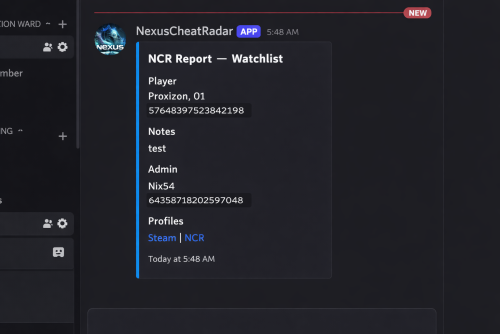
DISCORD WEBSITE RCON RCON is a separate product — NCR works completely standalone without it. What it actually does No anticheat plugin can go unmonitored and be 100% accurate, they have and will always need admin verification .. as cheats get more advanced detection must adapt , it wont happen automatically but the morre advanced cheats can sometimes slide right through so we update as we find and never share what we know NCR runs quietly in the background on your server. It watches player behaviour across 9 detection categories, builds a risk profile for every player it sees, and sends a Discord alert with all the relevant info when something looks off. You get the data, you make the call. What makes it different from a normal anticheat plugin is the network layer. Every server running NCR is connected. When someone who's already been flagged or banned somewhere else joins your server, you find out immediately on join — before they've done anything. 9 behavioural detection systems running in the background Risk profiles that persist across disconnects, wipes, and server changes Cross-server intelligence — flagged players carry their history to your server Discord alerts with full context so you can make an informed call Free web portal — public player lookup + private server owner dashboard Admin report panel for submitting and managing reports in-game F7 Cheat Report intercept , so you can see with ease what players are reporting suspected cheaters remember every server is diffrent and your config must be adjusted to suit your server (there may at times be features that are set in a test setting so check thresholds and adjust as needed ) For the full cross-server experience — shared violation history, network bans, IP cross-referencing, and join intelligence — enable the Web section in config. The web portal is completely free. Detection Systems Every system can be toggled on or off individually. Tuning is always required — every server is different. What works on a 2x will not work on vanilla, and a high-pop server needs different thresholds again. The config is built with this in mind, but expect to spend some time adjusting values to your environment. ESP / Wallhack — Tracks how often a player is locking onto targets through walls and structures they can't actually see. Runs continuously, not just during fights. Aimbot — Looks for snap patterns and alignment that just don't happen with a mouse. Compares across multiple engagements before flagging anything. No-Recoil — Checks recoil compensation per weapon over sustained fire. Accounts for attachments, ping, and burst patterns so legit players don't get caught. Speed Hack — Catches movement beyond server limits. SkillTree speed bonuses, vehicle movement, and dismount frames are all handled to keep noise low. Wall Loot — Detects looting through player-built walls. Only fires when the blocking geometry is player-owned — world crates and terrain never trigger it. Freecam / Debug Cam — Catches anyone using spectator or debug camera modes while still alive in the game world. NoClip / Fly — Flags movement through solid geometry or flying without a valid surface. Teleport plugins are accounted for automatically. Strafe / Backpedal — Picks up on movement bot behaviour — perfectly timed strafes and backpedal speeds that aren't physically possible. Privilege Escalation — Watches for players trying to run admin commands they don't have access to, or attempting to grab permissions at runtime. Risk Profiles Every player gets a risk profile the first time NCR sees them. It builds up over time — each detection type contributes its own score into an overall risk level. Scores decay naturally so one old incident doesn't follow someone forever, but a pattern absolutely will. Leaving and rejoining doesn't reset anything. The profile lives on the network, not on your server. Per-category scoring with individual probability weights Scores decay over time — isolated old incidents fade Steam data pulled on every join — VAC bans, game bans, account age, library size ServerArmour cross-referenced automatically Watchlist for players you want to keep an eye on — whitelist for players you've cleared Discord Alerts When something gets flagged you get a full embed in Discord — not just "player X did something suspicious." You get the player's name, Steam ID, current risk level, exactly what was detected and at what confidence, their IP with country and VPN/proxy flags, and a link to their Steam profile. There's a button to share the violation to the network and one to dismiss it. Nothing ever goes to the public network without you clicking the button. Everything stays private to your server unless you choose to share it. You can set up a separate webhook channel for each detection type — ESP, Aimbot, No-Recoil, Speed, WallLoot, Freecam, NoClip, Strafe, Privilege, Bans, Join Reports, and Toxic Reports. NCR Web Portal Free — no extra subscription needed. Public lookup — no account needed Anyone can search a Steam ID and see that player's risk score, violation history, ban status, VAC history, account age, name aliases, and which NCR servers they've shown up on. There's a live feed showing recent bans and violations across the network as they happen. Server owner dashboard — Steam login, no passwords All your linked servers with live online/offline status Live player list — who's on your server vs. other NCR servers right now Recent violations, ban history, and IP intelligence per server Detection charts and full player lookup with network-wide history Team management — add admins and mods with their own Steam logins, granular permissions per role, fully separate from Oxide permissions To unlock the full network experience — shared history, network bans, IP cross-referencing, and join alerts for flagged players — enable the Web section in config and link your server. Set Enabled: true under Web, then grab your server key from the config file and enter it in the portal after signing in with Steam. Nexus RCON Nexus RCON Pro is a separate web-based console panel that connects to your Rust servers over RCON. It's built to work alongside NCR but is completely optional — NCR has no dependency on it and works fine without it. If you do run both together, RCON gets a dedicated NCR tab that gets detections in real time and lets you act on them — ban, dismiss, share to network — without leaving the panel. Live RCON console per server in the browser Dedicated NCR tab — real-time detections, one-click actions Player list, Permissions, ban management, plugin list Multi-server support from a single dashboard — no software to install Nexus RCON is a separate subscription. NCR works completely independently — you don't need it to use any of NCR's features. In-Game Report Panel There's a built-in admin UI for submitting and managing reports directly from inside Rust. Open it with /ncr.report or via the radar strip button. Report type selection and player search by name or Steam ID Reports logged to the network database and forwarded to your Discord There is leveled permissions control what each admin/moderator role can submit Admin Commands /ncrToggle the radar HUD overlay /ncr.lookupFull player history, risk profile, and Steam data /ncr.riskPer-category risk score breakdown /ncr.incidentsLast 8 detections on a specific player /ncr.historyFull violation history for a player /ncr.watch / .unwatchAdd or remove a player from the watchlist /ncr.watchlistView everyone currently on the watchlist /ncr.statsServer-wide detection stats and top risk scores /ncr.resetClear a player's risk score and local history /ncr.ban / .unbanIssue or lift a ban with Discord embed and network log /ncr.webshareManually push a violation to the public network /ncr.reportOpen the admin report panel /ncr.testSend a test alert to Discord ncr.link / ncr.unlinkLink or unlink your server from the web portal (console) Main permission: nexuscheatradar.admin Report panel: .report.mod .report.admin .report.kick .report.tempban .report.serverban .report.networkban Getting Started Takes about 5 minutes. Drop NexusCheatRadar.cs into oxide/plugins/ Start the server — config generates at oxide/config/NexusCheatRadar.json Add your Discord webhook URLs and Steam Web API key. Set Enabled: true under the Web section Grant the permission: oxide.grant group admin nexuscheatradar.admin Reload: oxide.reload NexusCheatRadar Go to the web portal, head to the Servers tab, and click Setting Up a New Server. Copy your server key from the config file and paste it in, then sign in with Steam — it will link to your account automatically Test your Discord: /ncr.test Works With Oxide / uMod and Carbon Rust (PC) — no required dependencies False positive handling built in for SkillTree, Backpacks, RaidableBases, Kits, KitController, ServerKits, and teleport plugins ━━━━━━━━━━━━━━━━━━━━━━━━━━━━━━━━━━━━━━━━━━━━━━━ ◈ TROUBLESHOOTING ━━━━━━━━━━━━━━━━━━━━━━━━━━━━━━━━━━━━━━━━━━━━━━━ No Discord alerts arriving? » Check webhook URLs are correctly pasted — no trailing spaces » Confirm Discord.Enabled is true in config » Make sure the detection module is enabled » Run ncr.testmode <steamid> true to simulate Too many false positives? » Raise threshold values in ESP, Aimbot, or NoRecoil config sections » Increase shot/sample count requirements before alerts fire » Whitelist high-ping players by SteamID » Enable SuppressStrafeForSkillTree if using skill tree plugins Radar or UI not showing? » Grant nexuscheatradar.admin permission via Oxide » Toggle with /ncr.radar — requires admin flag or the permission node » Verify it loaded: oxide.reload NexusCheatRadar Plugin fails to load? » Delete the config file — NCR will regenerate it cleanly on next load » Check oxide/logs for the specific error line » Confirm you're on a compatible Oxide/uMod build » Set AutoNormalizeConfigLists to true ━━━━━━━━━━━━━━━━━━━━━━━━━━━━━━━━━━━━━━━━━━━━━━━ https://nexuscheatradar-6yt.pages.dev ━━━━━━━━━━━━━━━━━━━━━━━━━━━━━━━━━━━━━━━━━━━━━━━$19.99 -

Version 1.1.4
398 downloads
This is a simple tool to help you catch ESPer's. Unlike methods in the past requiring cheaters to fall for traps, this one will be watching without having to give them any bait! This plugin is still in "beta" and is offered at a reduced price for a limited time. Since 1.0.12, the embed now includes a radar image to show violations (red line): The above embed shows the culprit, with quick links to Steam, Battlemetrics, and ServerArmour. Along with each violation that caused the trigger, the consist of the violation id, the time it happened, and steamid and distance from the culprit. It is highly recommended to use along with ADR, although not required, but can easily eliminate false positives by having the option to watch the player from the demo. Commands /testesp - this will send a test embed to your configured webhook. Permissions espdetection.ignore Ignores specific players who are granted this permission. Config options explanation General Max distance to check The maximum to check if the player is ESPing. (default 150 outside, 100 inside) Check Interval How often should a player be checked (default 1 second) Ignore Players Idle Ignore players that haven't changed position (default 15 seconds) Only track players with active weapons Track players that have equipped weapons only. (default true) Auto Demo Record (only applicable if Auto Demo Record is installed) Record Length How long should the triggered recording be (default 10 minutes) Discord Webhook Where the logs & ADR recordings should be sent to Webhook Title Title of the embed Violations Probability % Which % probability should trigger a Discord embed and ADR recording. (default 40%) Samples How many samples should be kept in memory, to calculate the probability (default 20) Weapon Specific Configs These change characteristics of weapons Weapon Shortname Max distance to check This overrides the general setting for the weapon only Track if set to false, a player will be ignored if he has this weapon equipped. (default true) Attachment Specific Configs These change characteristics of attachments Attachment Shortname Add distance while aiming As the name suggests, it adds extra distance to the previous configs, useful for when aiming with an 8x or 16x Track if set to false, a player will be ignored if he has this weapon equipped. (default true) NOTE: if you are using ADR, a good command to use when reviewing the demos are `debug.culling 1`$25.00 -
Version 2.2.1
247 downloads
AdminESP - Lightweight Admin ESP for Rust Servers AdminESP gives server administrators a powerful real-time player tracking tool with minimal impact on server performance. See player positions, health, names, sleep status, and view direction - all rendered through the game's built-in DDraw system with a fully customizable settings menu Key Features Real-time player ESP with names, health bars, bounding boxes, and view direction lines Track specific players by selecting them from the built-in player list with avatar display Filter players by status: All, Online, or Sleepers Fully customizable settings through an intuitive in-game UI panel Editable numeric fields - type values directly or adjust with +/- buttons Complete English and Russian localization out of the box Per-player settings saved between sessions Permission-based access control Developer API for integration with other plugins Performance AdminESP is built with server performance as a top priority. Unlike traditional ESP plugins, it uses direct JSON generation instead of standard CUI classes, eliminating unnecessary memory allocations. The ESP rendering engine only runs when active, produces minimal network traffic, and leverages object pooling and string caching throughout. Designed to run smoothly on high-population servers with 300+ players. # Configuration: { "Privilege of using the ESP": "adminesp.use", "UI customization": { "Enable display of UI for the player": true, "AnchorMin Position": "0 0.025", "AnchorMax Position": "0.05 0.053" }, "Display player avatars": true, "Enable prefix in messages": true, "Configuration version": { "Major": 2, "Minor": 0, "Patch": 0 } } Privilages: # Chat and console commands: # API: private bool API_HasActive(ulong userID) - Does the player have ESP enabled return true/false private void API_EspActivate(BasePlayer player) - Force ESP to turn on private void API_EspDeactivate(BasePlayer player) - Force Disable ESP #HOOKS object CanChangedESP(BasePlayer player, bool activated) - Called before ESP is enabled/disabled, returning any value other than null will prevent the player from activating/deactivating ESP void OnEspActivated(BasePlayer player) -Notification about player's ESP enabled void OnEspDeactivated(BasePlayer player) - Notification about player's ESP being disabled # LANG: { "UI.ESP.Title": "ESP Settings", "UI.Button.Title": "ESP", "UI.Sleepers.Title": "Sleepers:", "UI.Sleepers.Description": "Display sleeping players", "UI.Distance.Title": "Distance:", "UI.Distance.Description": "Display distance", "UI.Update.Title": "Update:", "UI.Update.Description": "Update frequency", "UI.Admins.Title": "Admins:", "UI.Admins.Description": "Display administrators", "UI.Names.Title": "Names:", "UI.Names.Description": "Display names", "UI.Boxes.Title": "Boxes:", "UI.Boxes.Description": "Display player boxes", "UI.ViewLine.Title": "View Line:", "UI.ViewLine.Description": "Display player view line", "UI.LineLength.Title": "Line Length:", "UI.LineLength.Description": "Player view line length", "UI.Button.Off": "OFF", "UI.Button.On": "ON", "MSG.OFF": "ESP has been disabled", "MSG.ON": "ESP has been enabled", "MSG.Prefix": "<color=orange>[Admin ESP]:</color> ", "MSG.Permission": "You do not have access to this command", "UI.Msg.Help": "ESP Settings:\n/ae settings UpdateTime {0} - data update frequency (0.15 sec)\n/ae settings PlayerDistance {1} - max display distance (200 meters)\n/ae settings ShowAdmins {2} - display admins (true/false)\n/ae settings DrawNames {3} - display player names (true/false)\n/ae settings DrawBoxes {4} - display player boxes (true/false)\n/ae settings DrawEyeLine {5} - display player view line (true/false)\n/ae settings Sleeping {6} - display sleeping players (true/false)\n/ae settings EyeLineDistance {7} - player view line length (20 meters)", "DDRAW.Sleep": "Sleep", "DDRAW.Health": "Health:", "UI.Description.Bottom": "Powered by OxideBro 2025", "UI.SelectedPlayer.Title": "Selected player:", "UI.Buttons.All": "All", "UI.Buttons.Online": "Online", "UI.Buttons.Sleep": "Sleepers", "UI.Buttons.Enabled": "You have <color=green>enabled</color> the display of players in the world", "UI.Buttons.Disabled": "You have <color=red>disabled</color> the display of players in the world" }$15.00 -
Version 1.0.2
20 downloads
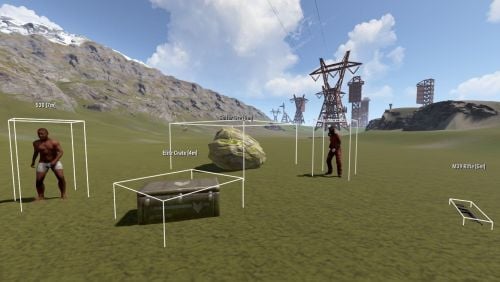
AdminUltimateVision is a high-performance ESP tool designed for Rust server administrators to monitor entities in real-time. Key Features Entity Tracking: Players, NPCs, Wildlife, Loot Containers, Dropped Items, Ores, and Corpses. Intuitive UI: Compact, non-obstructive interface with toggleable categories. Customization: Adjustable render distance (50m–500m), 3D wireframe boxes, and real-time distance labels. Optimization: Highly efficient update system to ensure minimal server impact. Commands /atool or /avision: Opens the main interface.$1.99 -

Version 1.0.6
16 downloads
My Beacon is small beacon plugin that shows your items across map to you ModulerCars needs to be edited to become players car on a Garage lift. rest On first mount . Each beacon has its own permission to use. Current Beacons Available: Minicopters Teammates Horses Last Death submarines Boats Modulercars Drones Config { "ArrowHeadSize": 3.0, "ArrowHeight": 25.0, "ArrowHeightFromGround": 3.0, "Colors": { "GridDayColor": "blue", "GridNightColor": "yellow", "NameDayColor": { "a": 1.0, "b": 1.0, "g": 0.0, "grayscale": 0.114, "maxColorComponent": 1.0, "r": 0.0 }, "NameNightColor": { "a": 1.0, "b": 1.0, "g": 1.0, "grayscale": 1.0, "maxColorComponent": 1.0, "r": 1.0 } }, "DisplayTime": 30.0, "NightEndTime": 9, "NightStartTime": 20, "TextSize": 18 } Commands /mymini - Shows all minicopters that you have /myteam - Shows current teammates /mydeath - Show last death location /myhorse - Show all horses belonging to you /myboat - Show all boats belonging to you /mysub - Show all Subs belonging to you /myvehicle - shows all Cars belonging to you /mydrone - shows all Drones beloning to you Future Beacons Train Carts$1.50 -
.thumb.png.a3d3e339fba405c49dc8ac0ef3ac6446.png)
Version 1.0.0
34 downloads
Plugin shows the locations of mines in the Rust game to players on leave for a certain period of time. This helps players pool resources around them more quickly and efficiently. Properties Players can see the mines for a certain period of time. Marking of mines with different colors according to their location (Sulfur, Metal and Stone). The configuration file allows server owners to customize the plugin's features. Players will not be able to reuse the command during the specified cool-down period. Multilingual support of the plug-in and availability of language files. Permissions orelocations.show - authorization to use the plugin Configuration you can set the the configuration file { "CooldownTime": 300.0, "DisplayDuration": 30.0, "MaxDistance": 500.0 }$2.00





.thumb.jpg.7a35071bd372a1c2c6329cfd476cab3f.jpg)
