Search the Community
Showing results for tags 'hunt'.
Found 5 results
-
Version 2.0.0
50 downloads
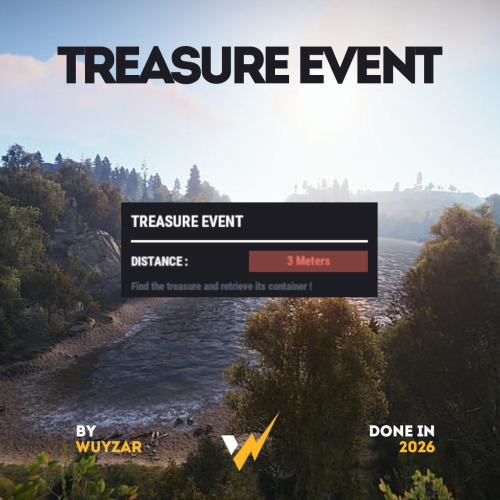
TreasureEvent.cs Description : - This plugin offers a complete treasure hunt event system for your Rust server, with real-time distance tracking and customizable loot rewards. Settings : - HUD colors - Event duration (in F1 commands) - Server message (true/false) - Items (customize everything you want in the treasure, even the skins of the items) Server message = true (you need the ServerMessage.cs plugin, https://codefling.com/plugins/server-message) Server message = false (these messages will appear in the global chat, replacing the UI) F1 Commands : - t.start <x> <z> <time> (the treasure appear in a specific location) - t.stop Permissions : - ownerid <steamID/user> WuyZar's Discord : https://discord.gg/NVwRcQwGwh$11.50 -

Version 1.0.3
105 downloads
Bring the iconic "Clue Scroll" experience from Old School RuneScape directly into Rust! Treasure Trails adds a dynamic, multi-stage reward system that encourages players to explore the map, engage in diverse activities, and hunt for high-tier loot through a series of challenging tasks. How It Works Discovery: Players find Clue Scrolls as rare drops from loot sources (barrels & crates), and can effortlessly be added to shops, custom loot plugins etc. The Hunt: Each scroll contains a specific task. Upon completion, the player is granted the next "step" in the trail. The Reward: After completing a set number of steps, the player receives a Reward Casket. Opening a casket grants customizable loot and can even trigger server commands. Key Features Fully Customizable Steps: Server owners have total control. Design unique tasks for every step of the trail to fit your server's theme. Dynamic Loot Tables: Reward your players with rare items, blueprints, or currency. Command Integration: Caskets aren't just for items—run any console command upon opening (e.g., granting VIP ranks, economic rewards, server rewards, item perk rewards etc). Immersive Experience: Keeps players moving across the map and interacting with the world in ways they normally wouldn't. Every trail is a unique journey. Players will encounter several distinct types of challenges, each requiring a different set of skills to overcome. Players are given a list of specific clothing or armor pieces they must equip. Once dressed correctly, they must locate and speak to a specific NPC to receive their next step. The scroll displays a static image of a location or a hand-drawn style map with a red X. These clues only appear if the corresponding monument or landmark exists on your current map seed. Navigate to the exact spot marked on the image to progress. A scrambled name or phrase appears on the scroll. Solve the anagram to figure out which NPC the clue is referring to, then find and speak with them. A direct question regarding Rust lore, game mechanics, or server-specific trivia. Input or provide the correct answer through the clue interface to unlock the next stage. A cryptic poem or mysterious description of an NPC. Use logic and map knowledge to deduce who the riddle describes and track them down. The clue provides a specific set of world coordinates or grid references. Players must use their map and compass to reach the exact location. These commands require the treasuretrails.admin permission to be assigned. Type: Console Command: tt.giveclue <target> Description: Gives a clue scroll to the specified target. Type: Chat Command: tt.next Description: Skips the current clue step. Type: Chat Command: tt.rewards Description: Generates a reward cache. Type: Chat Command: tt.showcoordinates Description: Shows nearby coordinates that the coordinate clues can use. Type: Chat Command: tt.addnpc <profile> Description: Adds an Npc with the specified profile at the player's current location (case sensitive). Type: Chat Command: tt.addmonumentnpc <profile> Description: Adds an Npc with the specified profile at the player's location, and register their position to the closest monument. These Npcs will automatically spawn at this monument at the same relative position if it exists on the map. Type: Chat Command: tt.map.pos Description: Prints the closes monument, the player's local position to that monument, and the monument's custom name (if it's a custom monument). Type: Chat Command: tt.shownpcs Description: Shows all Treasure Trail registered Npcs on the map. Permissions - treasuretrail.admin - required to run administrative commands. - treasuretrail.loot - required to find treasure trail clues from loot sources such as crates, barrels etc.$24.99- 5 comments
-
- 2
-

-

-
- #scavenger
- #hunt
- (and 9 more)
-
Version 1.0.14
3,168 downloads
Skill Tree: XP Event is a plugin that creates an event that will randomly select a task, providing players with bonus XP for performing the task while the event is running. Events are started automatically on interval (default every 30 minutes), and will select 1 of 38 tasks for the event. This could be chopping down trees, skinning animals, killing scientists or looting crates. The plugin will also roll a random duration for the event to run for, and a random bonus to the XP (all of which is configurable). Additional XP gained with this plugin will stack with xp bonuses from Skill Tree. The stacking works in the following order: Default xp value is calculated. Skill Tree will check if Skill Tree: XP Event is loaded, and will ask for any bonuses if applicable Skill Tree continues on with its additional modifiers (other plugins, permission overrides, rested xp etc) This event will provide an incentive for players to engage with content on your server that they might otherwise avoid. SkillTreeXPEvent.use - required for players to participate in the events. SkillTreeXPEvent.admin - required to use the below commands if running them from player console. Console command: startxpevent <optional: task> Description: This command will manually start an XP event. If the task is not specified, it will roll the event randomly. Running this command resets the interval timer. Console command: stopxpevent Description: This command ends the current xp event. Chat command: stemoveui Description: Brings up an interface to reposition the UI. NodeHit NodeHitFinal TreeHit TreeHitFinal SkinHit SkinHitFinal CollectWildEntities CollectWildBerries CollectWildHemp CollectWildPumpkin CollectWildPotato CollectWildCorn CollectMushrooms CollectOreNodes CollectGrownEntities CollectGrownBerries CollectGrownHemp CollectGrownCorn CollectGrownPotato CollectGrownPumpkin SkinWolfFinal SkinBearFinal SkinChickenFinal SkinBoarFinal SkinStagFinal SkinPolarBearFinal SkinTigerFinal SkinPantherFinal SkinCrocodileFinal CatchAnyFish KillScientist KillTunnelDweller KillUnderwaterDweller KillAnyAnimal KillBear KillStag KillBoar KillChicken KillWolf KillPolarBear KillTiger KillPanther KillCrocodile LootCrate BreakBarrel BreakRoadSign SwipeCard All$11.99- 48 comments
- 4 reviews
-
- 2
-
-
-
- #skilltree
- #event
- (and 4 more)
-

Version 1.13.12
342 downloads
Event which idea was taken from halloween's and easter's hunting. As in original game we collect candies or eggs, that in this case we are catching fishes for which we are getting points. Amount of points are dependent on the type of fish or item we catch. It depens exacly on number of "Bait" that every type of fish has e.g. Sardine has Bait 3 so we get 3 points. Permission To assign a permission, use 'oxide.grant <user or group> <name or steam id>' fishingevent.admin - Allow to using commands. Commands This plugin provides both chat and console commands using the same syntax. When using a command in chat, prefix it with a forward slash: `/`. startfe - starts the countdown to the start of the fishing event. stopfe - Ends the event immediately, without giving away any prizes. finishfe - Ends the event immediately, with giving away any prizes. configfe - Opens the configuration UI panel Configuration Language Default English FIle { "noOneStart": "Wow, no one played so no one won.", "bestPlayer": "{0} is the top fisherman who has caught {1} fish and {2} points collected.", "playerStats": "You placed {0} of {1} with caught {2} fish and {3} points collected.", "rewardMessage": "You received {0}x {1} as an award!", "timeMessageToEvent": "<color=#326de3>Fishing Event</color>: The fishing event starts in {0} minutes." } Hooks void OnFishingEventStartCountdown() - Call when starts counting down to the start of the fishing event. void OnFishingEventStarted() - Call when the fishing event begins. void OnFishingEventEnded() - Call when the fishing event is over. void OnFishingEventUIClosed() - Call when UI disappears from players screen.(Five seconds after fishing event is over) Credits @STIVI Plugin tester and release help. @Flammable Plugin originator and tester. @Billy Joe Thanks for your UI Tool(I hate it but i love it)$15.00 -
Version 1.2.5
214 downloads
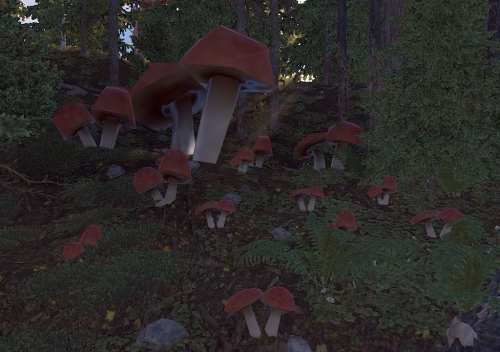
Your players still roof camping? Start mushroom Event, let them start fighting for the title of the best mushroom picker and win prizes for the first three places. Permission To assign a permission, use 'oxide.grant <user or group> <name or steam id>' mushroomevent.admin - Allow to using commands. Commands This plugin provides both chat and console commands using the same syntax. When using a command in chat, prefix it with a forward slash: `/`. startme - starts the countdown to the start of the mushroom event. stopme - Ends the event immediately, without giving away any prizes. finishme - Ends the event immediately, with giving away any prizes. configme - Opens the configuration UI panel Configuration Language Default English FIle { "noOneStart": "Wow, no one played so no one won.", "bestPlayer": "{0} is the best mushroom picker with {1} mushrooms.", "playerStats": "You placed {0} of {1} with gather {2} mushrooms.", "rewardMessage": "You received {0}x {1} as an award!", "timeMessageToEvent": "<color=#326de3>Mushroom Event</color>: The mushroom event starts in {0} minutes." } Hooks void OnMushroomEventStartCountdown() - Call when starts counting down to the start of the fishing event. void OnMushroomEventStarted() - Call when the fishing event begins. void OnMushroomEventEnded() - Call when the fishing event is over. void OnMushroomEventUIClosed() - Call when UI disappears from players screen.(Five seconds after fishing event is over) Credits @Billy Joe Thanks for your UI Tool(I hate it but i love it still)$15.00