Search the Community
Showing results for tags 'javascript'.
Found 5 results
-
Version 3.2.0
14 downloads
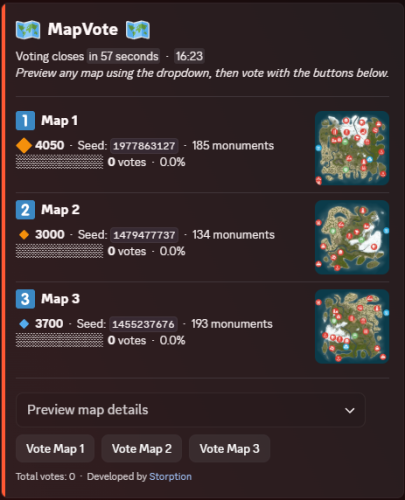
Map Vote Bot MapVote is a self-hosted Discord bot that lets your Rust community vote on the next wipe map. Built for server owners who want a clean, reliable voting system. What's New in v3.2.0 Custom Map Generation — Generate brand-new maps on demand via RustMaps' custom map generation API, using a saved config you've built on RustMaps' website. Available both for wipe schedule auto-pick and for manually creating a vote. Requires a RustMaps Premium (or higher) subscription. Customizable size icons — Set your own Small/Medium/Large emoji and the size cutoffs that define them, applied consistently across every vote message, result, search, and preview. Clearer monument breakdowns — Monument lists are now grouped into categories (Military & Endgame, Loot tiers, Ocean, Safe Zones, Resources, and more) instead of one long list. Features - Persistent admin dashboard with tabbed navigation (Overview, Vote, Automation, History, Settings) - Live vote tracking with animated progress bars - 2–5 maps per vote - Standard maps (any size/seed), custom RustMaps.com maps, and brand-new generated maps - Custom map generation via RustMaps' saved configs — for wipe schedule auto-pick and manual vote creation alike (requires a RustMaps Premium or higher subscription) - Detailed map info — biomes, islands, rivers, monuments (grouped by category), and more - Automatic winner determination with random or runoff tie-breaking - Customizable size icons and thresholds for how maps are labeled Small/Medium/Large - Wipe schedule automation — weekly, biweekly, and monthly (by Nth weekday or last weekday) - Auto-pick maps from RustMaps based on size, biome, terrain, and monument filters - Per-vote voter role gating — restrict who can vote per session - Live vote editing without ending the vote - Paginated vote history with winner links, vote counts, and win-rate stats - Vote and dashboard message recovery on deletion - 24-hour advance reminder when a scheduled wipe has no maps set - All votes and config stored in SQLite — nothing is lost on restart - Full multi-guild support Commands /setup Create or move the admin dashboard to a channel /search Browse RustMaps with filters — size range, biomes, terrain, monuments (available to all members) Restricting Access /setup requires Administrator by default. You can grant it to specific roles without giving them full admin — go to Server Settings > Integrations > MapVote and configure per-command role access. /search is available to all members by default and can be restricted the same way. Requirements Node.js 24+ Discord bot token RustMaps.com API key Setup Download and extract the files Run npm install Fill in your TKN & RUSTMAPS_API_KEY in the .env file (Optional — only if generating custom maps under an organization's RustMaps account rather than your personal one in the .env) RUSTMAPS_ORG_ID=OptionalOrgIdHere Run npm start Use /setup #your-admin-channel to create the dashboard Need help? Join the support server: Click Here Updating Stop the bot Delete the src/ folder Copy in the new src/ folder and overwrite package.json, CHANGELOG, and README.md files Delete the node_modules/ folder and package-lock.json file Run npm install Start the bot (npm start) Your .env and db/ files are not touched — all settings and data are preserved.$40.00 -
Version 1.0.3
80 downloads
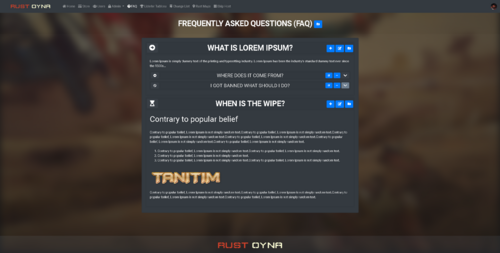
This addon will add FAQ and Rules Page for your Ember based website. (Actually you can use it for anything...) Dependencies Ember (Required): https://www.gmodstore.com/market/view/5620 Features Create, delete, edit Entries Create, delete, edit Categories Adding images - videos - embed codes of YouTube etc.. Customizable Font Awesome Icons Rich Text Editor Future Plans Just let us know whatever u want to see with FAQ Page How to? You just need to drag - drop / copy - paste the Better FAQ & Rules Page for Ember module to your Ember Modules folder, that is all, it will work. We have to verify your profile. After you purchase it, you just need to find me on DM, just send me a message, I will help you ASAP. Discord: Miu#3686 / glasiore#0085 Installation To complete installation, you should go to this address; https://site.com/admin/faq/setup/24-01-2021$50.00 -
Version 2.9.1
81 downloads
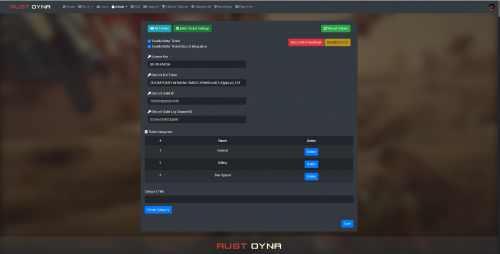
Better Ticket for Ember is a support tickets module with Discord integration for Ember script. With this module, your players will be able to create tickets. You can answer each ticket, delete the tickets, manage the tickets, change the server type, change the status. Also you can add Discord integration between this module and your Discord server. Each activity will be sent to your Discord channel and to ticket creator player's DM box. Features Ticket page. Ticket creation. Answering tickets. Discord integration. (Logging ticket creation, answers from players. Also players with Discord verified profiles will get a direct message about the ticket.) Category creation for tickets. Your servers will be listed under Manage Ticket - Server Installation Place the BetterTicket folder into Ember's modules folder. Go to your website, Go to Better Ticket Settings, Enter your License Key (You can get your licence key after purchasing the module. Send me a message after you buy it.) Enter your Discord Bot Token (If you want to use Discord Integration.) Enter your Discord Guild ID (If you want to use Discord Integration.) Enber your Discord Guild Log Channel ID (If you want to use Discord Integration) Click on SAVE button. Click on "Install Better Ticket v(current version)" It will be installed after all of these steps. Here is a video about it:$60.00 -
Version 2.1.4
123 downloads
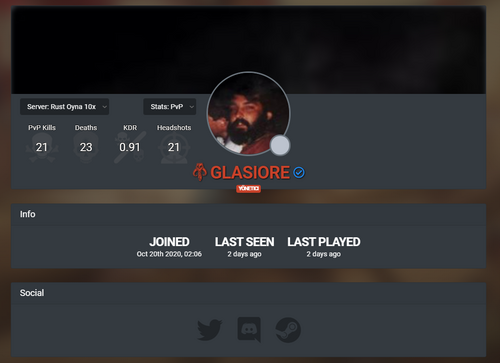
This addon will make user profiles somewhere better than default for your Ember based website. Dependencies Ember (Required) https://www.gmodstore.com/market/view/5620 PlayerRanks (Required for In-game stats on profile) https://codefling.com/file/14-playerranks/ Features Social Links Commenting Profile Customization In-game Statistics (multiple servers supported) Owned Products Credit Transfer Future Plans Profile music. Customizable follow/unfollow and notification system for every actions. (we waiting for ember update.) Clan(team) system Clan statistics And more.. How to? You just need to drag - drop / copy - paste the Better Profile for Ember module to your Ember Modules folder, that is all, it will work. We have to verify your profile. After you purchase it, you just need to find me on DM, just send me a message, I will help you ASAP. Discord: Miu#3686 / glasiore#0085 Installation To complate installation, you should go to these addresses; If you just bought Better Profile for Ember you should do all steps, If you are updating it, you should only do the Step 2 and 3. Step 1: https://youtsite.com/admin/betterprofile/setupdb-20210117-1337 Step 2: https://youtsite.com/admin/betterprofile/setup/social Step 3: https://youtsite.com/admin/betterprofile/setup/20-01-2021 Step 4: https://youtsite.com/admin/betterprofile/setup/23-01-2021 Future Plans We are planning to add emojis, gifs, image, video link support soon. We are waiting for Ember updates.$60.00 -
Version 1.0.0
25 downloads
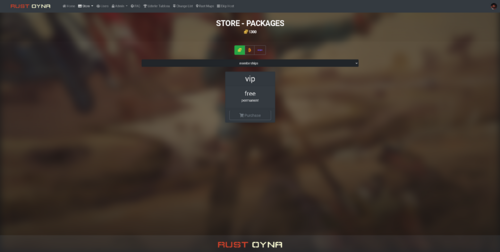
This addon adds category support to your Ember Shop. Ember does not support categories on shop currently and with this module, you can add categories for each package of each server you have. This is not a module, this is an addon. Installation is different than module installation. It is easy. You will be able to add categories to your Ember store packages. You can select store package category from: site.com/admin/packages/packagenumber Under site.com.com/admin/servers you can add categories to your servers. Multiple server supported. Dependencies Ember (Required) https://www.gmodstore.com/market/view/5620 Installation 1: Upload the BetterStore.zip to your host. 2: Unzip the Better Store zip file to Ember Installation Folder (Main Directory). 3: Go to this link (edit it with your website name before using it!!!) = https://site.com/api/betterStoreSetup Installation is done. If you need further help, just send me a message.$25.00