Search the Community
Showing results for tags 'windowed ui'.
Found 3 results
-
Version 1.0.0
13 downloads
UltimateLeaderboard Theme V4 is a complete visual theme for UltimateLeaderboard, designed in a dark Rust-inspired UI style. It features compact statistic cards, redesigned leaderboard tables, reward banners, an improved search layout, custom hit-rate visuals, and a consistent design across both included templates. The V1 template is designed to integrate with the V4 Windowed Theme for ServerPanel INCLUDED TEMPLATES • V1 / Windowed — designed to integrate with the V4 Windowed Theme for ServerPanel. • Fullscreen — a standalone full-screen version using the same visual style. DYNAMIC HIT VISUALIZATION The Hit Distribution section includes three visual progression stages. The displayed character set automatically changes based on the player’s total hit count, visually reflecting their progress - from a basic survivor to higher-tier equipment. Hit count ranges can be configured in the UltimateLeaderboard configuration. PACKAGE CONTENTS • Ready-to-use UltimateLeaderboard templates • All required UI images and icons • Theme configuration file • English language file • UIX_REQUIRED_CHANGES_EN.md — exact required changes for UltimateLeaderboard.cs IMPORTANT UltimateLeaderboard is NOT included and must be purchased separately Ultimate Leaderboard A few small edits to the original UltimateLeaderboard.cs file are required for the theme layout to render correctly. The package includes a step-by-step guide with the exact replacement code for UltimateLeaderboard v1.5.55. No original plugin source code is included or redistributed with this theme. INSTALLATION 1. Install UltimateLeaderboard v1.5.55. 2. Open UIX_REQUIRED_CHANGES_EN.md and apply the listed changes to your original UltimateLeaderboard.cs. 3. Copy the included configuration, template, language, and image files to their corresponding Carbon/Oxide folders. 4. Reload the plugin. COMPATIBILITY Designed for UltimateLeaderboard v1.5.55. The V1 template is visually compatible with the V4 Windowed Theme for ServerPanel, allowing you to maintain a consistent UI style across your server menus. Updates and support are included. Support is available through Discord and Codefling private messages. Discord: Simil3x$6.99 -
Version 1.0.3
18 downloads
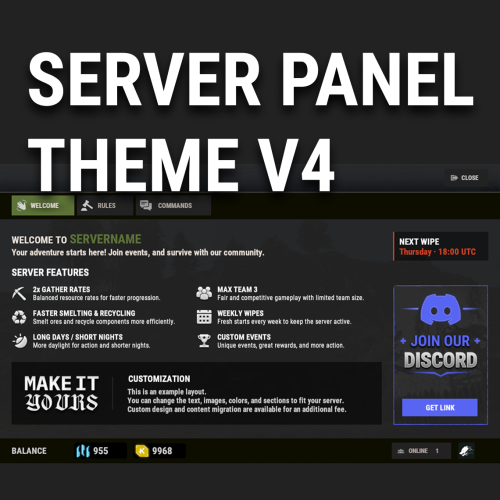
V4 Windowed Theme for Server Panel Like the V4 layout but don’t want it to cover the entire screen? V4 Windowed Theme transforms the familiar Server Panel V4 experience into a compact, polished window that keeps the game visible in the background. This is more than a simple resize or recolor. The theme features a reworked Rust-inspired color palette, redesigned UI elements, improved visual consistency, and matching styling for ServerPanelPopUps. Key Features Compact windowed V4 layout Keeps gameplay visible behind the interface Reworked Rust-inspired visuals Matching Server Panel and PopUps design Ready-to-use preconfigured content Fully editable through the in-game Server Panel editor Optimized for different resolutions and UI scale settings Compatible with both Oxide and Carbon No coding required Video Project 3.mp4 Requirements Server Panel by Mevent is required and is not included with this theme. ServerPanelPopUps is supplied with Server Panel. Installation Note: Before installing the theme, make a backup of your existing Server Panel settings and data. The installation requires replacing the current Server Panel files. Install Server Panel on your server. Run /sp.install and select the V4 template. Upload the files from the downloaded archive to your server, preserving the included folder structure and replacing the existing files. Reload or restart both ServerPanel and ServerPanelPopUps. Updates and support are included. Support is available through Discord and Codefling private messages. Contact me: Discord: Simil3x Telegram: @Simil3x_dm$16.99 -
Version 1.0.0
22 downloads
Kits Theme V4 Windowed Kits Theme V4 is a complete visual theme for the Kits plugin by Mevent, designed in a dark Rust-inspired UI style. The theme replaces the default kit display with compact horizontal cards, clearly separated availability states, and convenient navigation. Players can quickly see each kit’s purpose, claim conditions, remaining uses, cooldown, or purchase price. Both included layouts use the same visual style and kit card design. INCLUDED VERSIONS • ServerPanel / V4 Windowed — designed to integrate with the V4 Windowed Theme for ServerPanel. • Standalone / Windowed — an independent 800×480 Kits window that can be used without ServerPanel. INFORMATIVE KIT CARDS Each kit card can display: • A custom kit image • Kit name and short description • Remaining claims • Purchase price • Active cooldown timer • Kit claim button • Separate contents preview button The interface clearly distinguishes between the main kit states: • CLAIM — the kit is available • PURCHASE — the kit must be purchased • COOLDOWN — the kit is temporarily unavailable • UNAVAILABLE — the kit cannot currently be claimed • VIEW CONTENTS — opens a preview of the items inside the kit CATEGORIES AND NAVIGATION Kits are organized into compact category tabs at the top of the window. The interface includes: • A separate ALL category • Custom kit categories • Horizontal category scrolling • Vertical kit card scrolling • Two-column card layout • Automatic handling of additional kits inside the scroll area UNAVAILABLE REASON MODAL When a player cannot claim a kit, the interface opens a separate modal window explaining the reason. It can display messages for missing permissions, active cooldowns, exhausted claim limits, insufficient funds, insufficient inventory space, and other restrictions supported by the Kits plugin. LOCAL IMAGES All theme images are included in the package and configured to work through Offline Image Mode. The interface does not require Imgur or another external image host. This helps prevent missing images, download errors, and third-party rate limits. INCLUDED KIT EXAMPLES The package includes an example data file with several preconfigured kits: • Medical • Starter • Food • Discord Reward • Promoter Reward • Bronze VIP • Silver VIP • Gold VIP Each example includes its own image, title, short description, and demonstration settings. They can be used as a foundation for creating your own kits. PACKAGE CONTENTS • Ready-to-use Kits configuration with both interface versions • Example data file with preconfigured kits • English language file • All required UI images and kit artwork • Guide containing the exact required changes for Kits.cs IMPORTANT The Kits plugin is not included and must be purchased separately from Mevent. A few small edits to the original Kits.cs file are required for some elements of the theme to render and function correctly. The original plugin source code is not included or redistributed with this theme. The package contains only the configuration, data, language file, images, and a guide describing the required changes. Always create a backup of your existing Kits files before installation. INSTALLATION Install the supported version of the Kits plugin. Create a backup Open the included modification guide and apply the listed changes to your original Kits.cs file. Copy the included configuration, language, and image files to their corresponding Carbon or Oxide directories. Use the included data/Kits/Kits.json only for a new installation, or manually transfer the required examples into your existing data file. Replacing an existing file will overwrite your previously configured kits. Reload the plugin: c.reload Kits — Carbon o.reload Kits — Oxide COMPATIBILITY Designed for Kits v2.4.4. Compatible with Carbon and Oxide. The ServerPanel version is visually compatible with the V4 Windowed Theme for ServerPanel, while the standalone version can be used independently. Support is available through Codefling private messages and Discord. Discord: Simil3x$6.99