All Activity
Past hour
-
That will work as long as the new device isn't smaller.
-
Just an follow-up in this thread, which fits my needs better: https://forums.unraid.net/topic/199012-not-possible-to-add-a-second-internal-boot-device-after-already-configuring-internal-boot/#findComment-1635923
-
Hey guys, i want to archive basically the same: I have boot and cache/appdata on 1x 1TB nvme with internal boot. My MB has one SATA port free and i have an spare 1TB SSD, which i want to add to the (boot cache/appdata) pool for redundancy, sure without data loss. First, i wanted to replace the nvme with 2x sata SSDs, but because my MB just have 4x SATA ports, i have abadoned this idea, Details are here: https://forums.unraid.net/topic/199489-internal-boot-change-device/#findComment-1635856 So the OP has a smaler drive he wanted to add it's a bit different than my goal. I have the same size ssd's (nvme & sata each ~1 TB with ~400 GB capacity used). @JorgeB Can you please confirm that my plan: shutdown Add new drive to unraid hardware boot stop array set slots on cache to 2 add new drive start array Does this work without data loss!? Thank you
-
wll joined the community
-
Click on the word diagnostics which is a link to the instructions. It is standard in this forum to underline links.
-
Hi Jorge! Thanks for your reply. I'm noob and don't know how to get the diags you want. Can you help me get those? Thanks a lot!
Today
-
Marlyn joined the community
-
Meine Firewall kann 2,5 und mein PC auch. Der managed Switch nicht, aber ich könnte einen unmanaged 2,5 davor schalten oder den Server und meinen PC direkt an der 4 Port Firewall betreiben... Würd sich also in Grenzen halten... Anderseits ist die Datenhoheit jetzt eh auf dem Server und ich generiere gar nicht mehr so viele große Daten, die 2,5 rechtfertigen würden. Wäre mehr ne Spielerei glaube ich.
-
Vielen Dank für das ausführliche Feedback! Die beiden Punkte nehme ich auf jeden Fall mit auf: Stündliche Retention (--keep-hourly) Gezieltes manuelles Löschen einzelner Archive/Backups über die Weboberfläche Gerade die Möglichkeit, einzelne Archive manuell zu entfernen, ist für solche Fälle wie bei deiner Typ-ID-Umbenennung sinnvoll. Dafür sollte man nicht extra auf das Terminal ausweichen müssen. Auch den Bereich Restore-Tests und deren Planung werde ich noch einmal grundlegend überarbeiten. Die aktuelle Planung ist tatsächlich noch nicht optimal und einige der Punkte sind mir bei meinen eigenen Tests ebenfalls schon aufgefallen. Neben einer detaillierteren Zeitplanung – beispielsweise mit Wochentag und Uhrzeit – möchte ich dabei auch mögliche Überschneidungen mit regulären Backup-Jobs berücksichtigen. Bei der Planung sollte geprüft bzw. darauf hingewiesen werden, wenn ein Restore-Test zeitlich zu nah an einem geplanten Backup liegt. Falls ein Restore-Test zum Zeitpunkt eines geplanten Backup-Jobs noch läuft, sollte der Backup-Job nicht einfach parallel gestartet werden. Denkbar wäre, diesen Lauf zu überspringen und das auch entsprechend in der History bzw. über die Benachrichtigungen zu melden, z. B. „Backup übersprungen – Restore-Test läuft noch“. Gerade bei größeren Repositories und höheren Test-Leveln kann die Laufzeit schließlich erheblich sein. Das sollte die Planung entsprechend berücksichtigen. Die bereits angesprochene etwas versteckte Einstellung für den erlaubten Restore-Pfad gehört ebenfalls zu den Punkten, bei denen ich die Bedienung noch verbessern möchte. Du brauchst übrigens keinen GitHub-Account dafür. Solches Feedback hier im Forum ist genauso hilfreich – ich übernehme die entsprechenden Punkte dann in die weitere Planung bzw. in GitHub. Vielen Dank fürs Testen und für die konkreten Rückmeldungen!
-
Since I update to Unraid 7.3.2 my Intel iGPU stopped working I tried everything and no dice. Anyone has any suggestions?
-
FCP doesn't "confirm" anything, it just looks at the syslog for any lines with the phrase 'out of memory' and triggers the alert.
-
Thanks. I undid some rclone tweaks and it's stable now - no crashes for over 3 days so closing
-
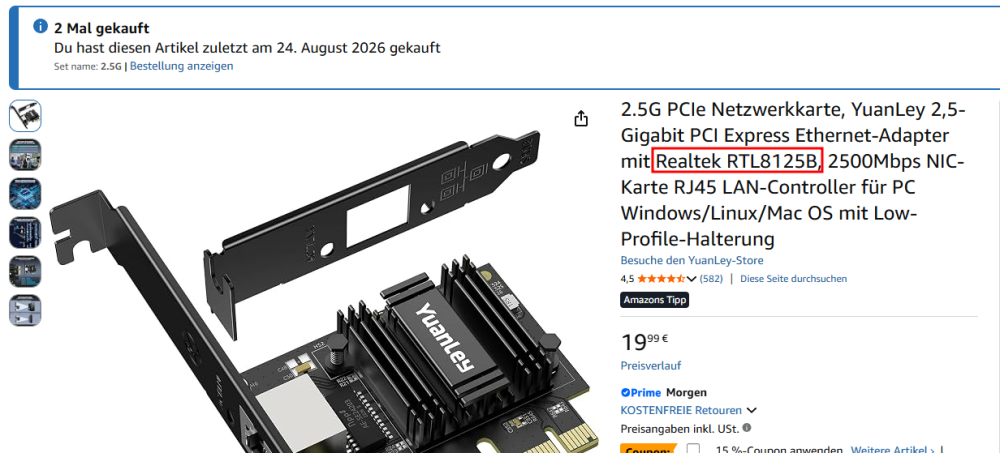
beispielsweise hier, wichtig ist der Controller, der ist (mit aspm enabled) sehr sparsam und zuverlässig https://www.amazon.de/dp/B0F13BQ7MG?ref=ppx_yo2ov_dt_b_fed_asin_title&th=1 nur wenn andere Teilnehmer (und Infrastruktur) auch darauf ausgelegt sind und das nutzen würden ...
-
Kann ich nachvollziehen. Was ich von meinen Tests her sehen konnte, funktioniert das meiste ja auch schon super. Bisher sind mir nur Kleinigkeiten aufgefallen was Bedienerfreundlichkeit angeht, was keine prio hat, wie die recht versteckte Option für den Restore-Test-Pfad. Eine genauere Job Planung für die Tests wäre dennoch in meinen Augen sinnvoll. Aktuell sag ich geplant, stell nen Intervall ein das Level, drücke Speichern und ein Klick auf "Jetzt Testen" entscheidet dann an welchem Tag und welche Uhrzeit der Test läuft. Ist so nicht gerade ideal keinen wirklichen Einfluß auf die Ausführungszeit zu haben. Dass so ein Test je nach größe des Repos und je nach Quelle auch schnell mal sehr lange dauern kann ist mir bewußt. Ein Hinweis dazu gibt es ja auch bereits, schonmal gut. Dennoch müßte man irgendwie dem User eine Option geben es detailierter konfigurieren zu können. 2 Kleinigkeiten hätte ich an dieser Stelle noch: für die Zeitplanung sowie Retention eine stündliche Option -H, --keep-hourly wäre super und ein Möglichkeit gezielt von Hand einzelne Backups aus einem Repo löschen zu können wäre noch toll. Durch meine Tests und durch die Typ-ID Umbenennung hatte ich in dem betreffenden Repo dann 3 Archive die angezeigt wurden aber nur 2 ausgelesen wurden. Löschen konnte ich über das WEB-UI das unter anderer "Typ-ID" erstellte Backup dann nicht und mußte übers Terminal ran. Einen Github Account um Feature Requests einzureichen besitze ich nicht, sonst hätte ich das bereits getan, deswegen an dieser Stelle. und vielen Dank nochmal für dieses Projekt.
-
Welche 2.5G PCIe Karte bietet sich für das Board an? Ich überlege gerade, ob ich mir das Upgrade mal gönnen sollte...
-
I’ve recently been going through my servers and network, updating, checking, improving, and securing the overall setup. My main Unraid server has been running for many years, and during that time quite a lot has changed in Unraid itself. While reviewing the configuration, ChatGPT and I noticed that some of my Docker networking settings were still based on older Unraid defaults and recommendations. My backup server is much newer and has a cleaner configuration, so we compared both systems and went through the relevant Docker and network settings. We found several older configuration choices that were no longer necessary with Unraid 7.3.2 and changed them to match the current recommended setup. One of the more noticeable differences appeared to be related to “Host access to custom networks.” As I understand it, this introduced an additional networking layer that was no longer needed in my setup. After removing that extra layer and simplifying the Docker networking configuration, the responsiveness of the Unraid GUI improved noticeably. The main server now feels just as responsive as my newer, cleanly configured backup server. It was a good reminder that a server which has been upgraded through many Unraid versions can still carry configuration choices that made sense years ago, but are no longer necessary or optimal today.
-
@bastl Du kannst gerne auch Feature-Wünsche als GitHub-Issue einreichen: https://github.com/borgforge/borg-backup-ui/issues Leider habe ich noch nicht alles berücksichtigt. Das Projekt ist ursprünglich aus Shell-Skripten entstanden, wurde später auf Python umgestellt und schließlich zu diesem Plugin weiterentwickelt. Aktuell arbeite ich daran, einen Designfehler zu beheben: Die Jobs haben bisher keine dauerhafte, eindeutige ID. Damit hängt auch das von dir gemeldete Problem mit der Type-ID zusammen. Die Type-ID wird derzeit für mehrere Zwecke verwendet. Wenn man sie ändert, kann es zu Problemen bei der Darstellung im Dashboard und der Zuordnung von Daten zum jeweiligen Job kommen. Künftig soll deshalb eine feste Job-ID für die eindeutige Zuordnung sorgen, während Jobname und Archivpräfix weiterhin änderbar bleiben. Diese Korrektur hat momentan die höchste Priorität, da sie die gesamte Anwendung betrifft.
-
Tested the new 2.48, it now produces files that playback correctly on vlc using both qsv and vaapi. I guess this was just broken on nightly. you can roll back the forced idr and keyframe change.
-
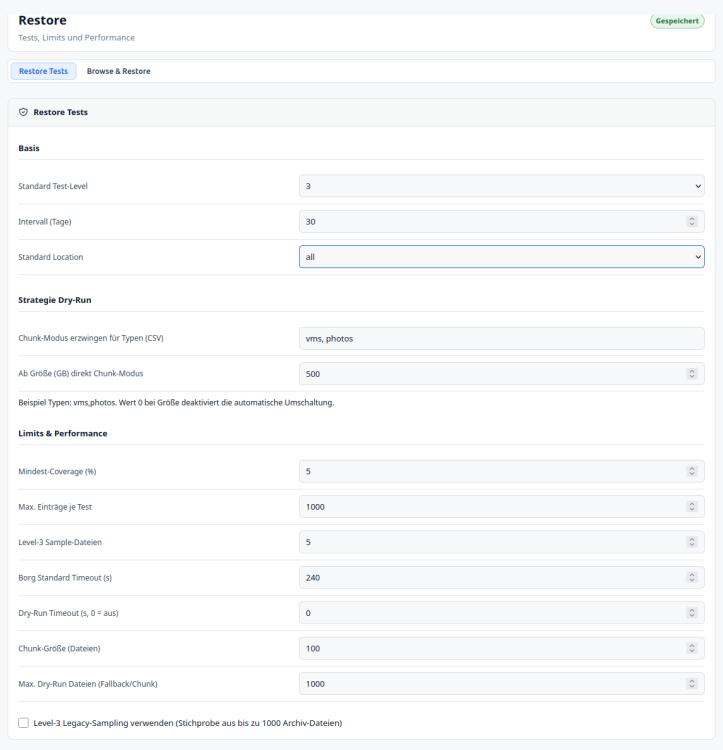
Hallo bastl, Alle Restore Test Einstellungen sind diese hier: Im Basis Bereich kann man den Intervall festlegen leider keine bestimmten Tag. Dann das Test Level und welche Location alle getestet werden sollen. Man muss hier etwas probieren weil Test z.b auf einem SSH Storage lange dauern können Level 2 und 3 würden Daten vom SSH Storage herunterladen. Die anderen Parameter beinflussen die Testabdeckung. z.B. 5 % oder maximal 1000 Files. Also wenn die 5% mehr als 1000 Files sind werde nur maximal 1000 Files geprüft. Level 3 Sample Dateien also richtiger restore mit Checksummen vergleich gibt an viele Dateien wiederherstellt und geprüft werden sollen. Wie gesagt hier muss man mit den Einstellungen etwas spielen wie lange so ein Test dauert. Leider gilt dieses zur Zeit noch Global also für alle Restore Tests gleich. Nachtrag: Bei den automatischen Restore-Tests ist ein Fehler aufgefallen: Die Einstellung „Geplant“ speichert zwar das Testintervall, legt aber keinen Cron-Eintrag an. Wenn noch kein entsprechender Zeitplan vorhanden ist, werden fällige Tests deshalb nicht automatisch gestartet. Die Tests lassen sich weiterhin manuell ausführen. Der Fehler ist unter GitHub-Issue #493 erfasst
-
whiely joined the community
-
Hallo zusammen. Kurze Frage: Wo finde ich denn die Einstellungen um die Restore Jobs zu planen? Unter Restore-Tests finde ich nur ob geplant, Intervall und das Level, was ich konfigurieren kann, nicht welchen Tag des Monats oä. Der Hinweis "Die zentrale Steuerung erfolgt in Planung & Policy pro Job. Diese Seite führt den fälligen Plan aus und zeigt die Ergebnisse." hilft leider auch nicht viel, da unter den Job Einstellungen selbst nichts von Restore Test zu finden ist. Bin ich blind, läuft der Task dann automatisch nach dem Backup wenn das Intervall überschritten wurde, oder ist das noch noch nicht implementiert. Danke
-
I do think that Unraid themselves should clear this up in General. What happens to plugins once the developer abandons it? Or the project itself is abandoned? With the "opening" of the Appstore lately by them and the daily avalanche of Vibe-coded/helped containers and the certainly uncurated nature of them (one day we'll have an issue, I bet on it.....)
-
Borg Backup UI 2026.09.07.0935 – Directory permissions fix This version fixes a plugin installation and update issue: older packages could change shared Unraid system-directory permissions from 755 to 775, including /, /etc and /usr. This could also prevent SSH public-key login. The corrected package preserves existing directory permissions and ownership. A before/after installation test on Unraid 7.4.0 Beta 2 confirmed unchanged values for all twelve inspected paths, immediately after installation and without a reboot. If an earlier version has already changed your permissions: On the tested system, a normal Unraid reboot restored the original permissions. Borg Backup UI remained installed and was running afterwards. Please check the permissions after rebooting. The update itself does not automatically repair permissions that were changed previously. Recovery instructions are included in both the German and English user manuals, under 13.6 – Directory Permissions Changed After Plugin Installation. Recovery by reboot was confirmed on Unraid 7.4.0 Beta 2. Details and test results: [Issue #484](https://github.com/borgforge/borg-backup-ui/issues/484).
-
Borg Backup UI 2026.09.07.0935 – Korrektur der Verzeichnisrechte Diese Version behebt einen Fehler bei der Plugin-Installation und bei Updates: Ältere Pakete konnten die Rechte gemeinsamer Unraid-Systemverzeichnisse von 755 auf 775 ändern. Betroffen waren unter anderem /, /etc und /usr. Dadurch konnte auch die Anmeldung mit einem SSH-Schlüssel beeinträchtigt werden. Das korrigierte Paket lässt die vorhandenen Verzeichnisrechte und Eigentümer unverändert. Der Vorher-/Nachher-Test auf Unraid 7.4.0 Beta 2 hat das für alle zwölf geprüften Pfade bestätigt – direkt nach der Installation, ohne Neustart. Falls die Rechte durch eine frühere Version bereits verändert wurden: Auf dem getesteten System stellte ein normaler Unraid-Neustart die ursprünglichen Rechte wieder her. Borg Backup UI konnte installiert bleiben und lief danach weiter. Bitte die Rechte nach dem Neustart kontrollieren. Das Update selbst nimmt keine automatische Reparatur bereits veränderter Rechte vor. Eine Anleitung ist im deutschen und englischen Benutzerhandbuch unter 13.6 – Verzeichnisrechte nach einer Plugin-Installation verändert enthalten. Die Wiederherstellung per Neustart wurde auf Unraid 7.4.0 Beta 2 bestätigt. Details und Testergebnisse: [Issue #484](https://github.com/borgforge/borg-backup-ui/issues/484).
-
it looks like plex process is already started, thus its unable to run, from your log: 2026-09-07 08:09:06,437 DEBG 'start-script' stderr output: Plex Media Server is already running. Will not start... 2026-09-07 08:09:06,484 DEBG 'start-script' stdout output: [info] Plex Media Server stopped Are you sure oyu dont have another plex container running in host mode?, if so stop it, if not then try a reboot of your server to ensure all rogue processes are stopped
-
The external LSI 9207-8e HBA is detected on PCIe, but it fails during driver initialization: doorbell handshake int failed baseget_ioc_facts: handshake failed This failure occurs on two consecutive boots. Since the HBA never initializes, Unraid cannot discover any disks in the external shelf.
-
The diagnostics show two separate problems. Samba was still trying to access the old Time Machine share, but its directory under /mnt/user no longer existed. This caused the repeated “No such file or directory” errors. The replacement share exists and appears to be configured correctly. However, the diagnostics were collected before the Mac tried to use it, so they do not show the new failure. Remove the old destination from Time Machine and disconnect the old SMB mount. Then connect to the replacement share and select it again. Confirm that Finder can create and delete a small test file on the share before starting another backup. If it still fails, please provide: - The exact macOS version - The complete Time Machine error - The approximate time of the attempt - New diagnostics collected immediately afterward There is also a separate issue. The cache NVMe is repeatedly reporting critical medium read errors at one fixed location. SMART still reports PASSED, but the drive has recorded a media error. Copy any unique cache data to another device before running a scrub or stress test. I recommend replacing that NVMe. The replacement Time Machine share is stored on disk1, so the NVMe is not currently in its data path.
-
The diagnostics point to the CPU mode. Every captured Windows attempt uses Emulated (QEMU64). The current test uses a Windows 11 25H2 ISO. qemu64 exposes a limited, older CPU feature set, although your physical Ryzen CPU supports the instructions required by current Windows versions. Stop the VM and change only CPU Mode to Host Passthrough. Keep Q35-9.2, OVMF TPM, the virtual disk, and the same Microsoft ISO unchanged. Then start the VM and press a key at the optical-media prompt. If setup still resets with Host Passthrough, please post new diagnostics collected after that attempt and before Force Stop.