
Radio Atlas
48étoilesExplorez les radios en direct sur un globe rotatif et écoutez-les avec les commandes multimédias d’Omarchy.
Akshar Patel - Widgets
L’OS malléable à l’ère des agents.Laissez-vous guider par vos envies pour chaque modification, réglage ou difficulté.
Configurer Linux était autrefois une corvée : difficile à déboguer, avec trop de choix déroutants dès le départ. Omarchy résout tout cela avec une installation éclair, des agents pour diagnostiquer les problèmes et d’excellents réglages par défaut. Vous obtenez un système complet, fonctionnel et superbe dès le premier démarrage.
Oma vient d’omakase, le choix du chef : le chef choisit les plats, mais vous pouvez toujours en renvoyer un. Omarchy vous offre une base soignée que vous pouvez ensuite vous approprier.
Ce n’est pas parfait… pour l’instant. Mais nous pouvons désormais tout réparer.
Laissez l’enthousiasme vous gagner.
Soyez opérationnel en seulement 35 secondes sur les machines les plus rapides, et en moins de deux minutes sur la majorité des ordinateurs.
Écrivez l’ISO sur une clé USB et répondez à cinq questions. Vous obtenez un bureau prêt à l’emploi.
Moins d’une minute de la clé USB au bureau. Vérifier le fichier : SHA-256, signature.
Tout Omarchy dans une machine virtuelle, pour vous faire une première idée.
Mac avec Apple Silicon, Windows 10 et 11.Sous Linux, passez par l’ISO.
Le manuel explique aussi le double démarrage avec Windows et les installations sans intervention.
Pas besoin d’une nouvelle machine pour essayer Omarchy. Mais si vous en achetez une, les portables d’aujourd’hui sont formidables.
Envie de nouveauté ? Des portables comme les derniers Dell XPS font d’excellentes machines Omarchy, et notre équipe Core aide à assurer la compatibilité du matériel récent.
Rencontrez l’équipeOffrez une seconde vie à votre ancien Mac Intel. Omarchy apporte un bureau moderne au matériel que vous aimez déjà.
Compatibilité MacMême un ThinkPad X220 de 2011 avec 2 Go de RAM peut faire tourner Omarchy sans être à l’étroit. Votre ancien PC a peut-être encore beaucoup à offrir.
Voir ce vieux PC à l’œuvreDes milliers de plugins communautaires sont disponibles pour Omarchy. Vous ne trouvez pas votre bonheur ? Confiez le travail à votre agent, puis partagez le résultat.
Explorez les radios en direct sur un globe rotatif et écoutez-les avec les commandes multimédias d’Omarchy.
Akshar Patel - Widgets
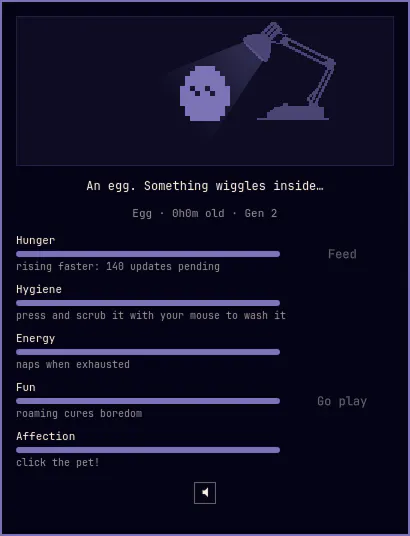
Un animal de compagnie de bureau en 1 bit dans votre barre, dans l’esprit des modèles de 1997 : nourrissez-le, nettoyez-le, câlinez-le et laissez-le parcourir votre écran et grimper sur vos fenêtres. Il éclot, grandit et évolue selon les soins reçus.
SLcode777 - Other
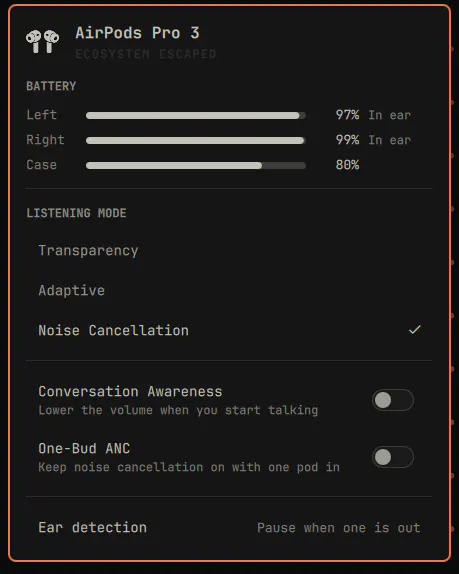
Les AirPods dans la barre Omarchy : batterie de chaque écouteur et du boîtier, mode d’écoute, niveau de bruit adaptatif, détection des conversations, réduction de bruit avec un seul écouteur et détection du port.
GM - Hardware
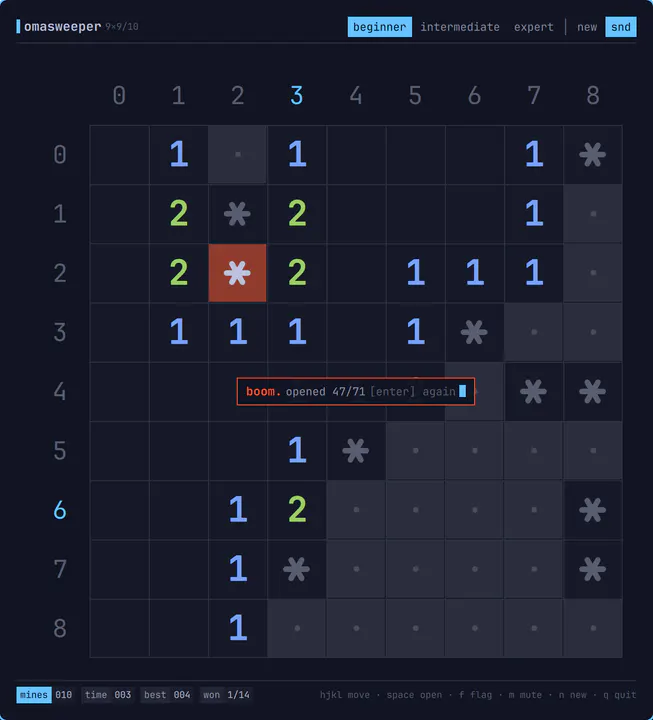
Un démineur pour omarchy-shell au style TUI : grille de caractères, repères en base 36, chiffres ANSI et barre d’état. Il s’ouvre dans une fenêtre en mosaïque, se joue entièrement au clavier avec les déplacements de Vim, émet des sons 8 bits et se décharge à la fermeture. Lancez-le avec : omarchy-sh
Jankees - Widgets
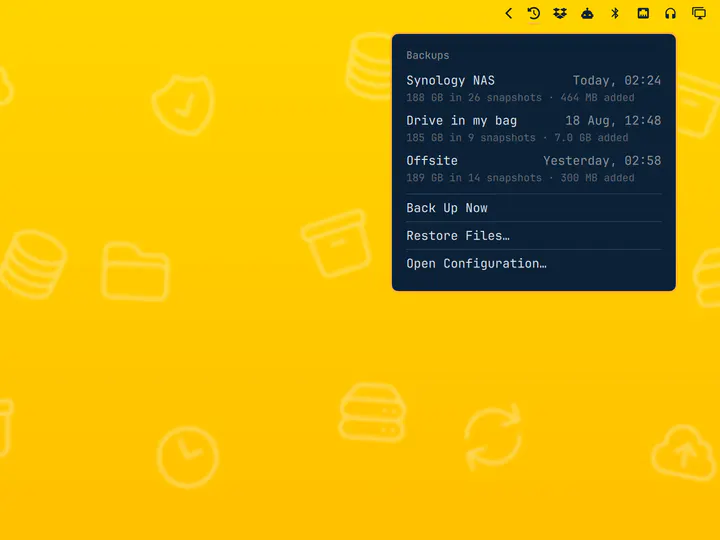
Sauvegardes restic planifiées avec sélection de destination et exploration des instantanés
Jankees - System
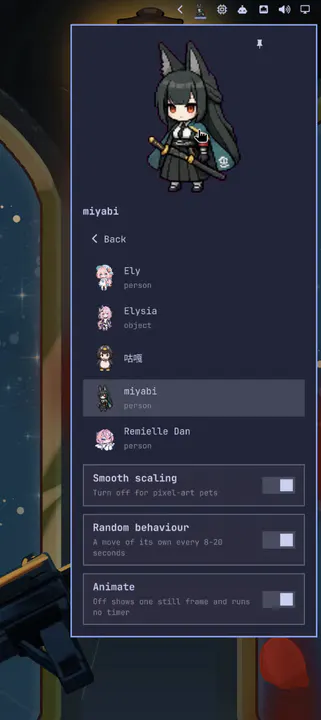
Un compagnon animé Codex Pets dans la barre : il bouge de manière aléatoire, regarde votre curseur et peut être épinglé sur le bureau.
Raiden-MeixElysia - Widgets
Votre agent doit se sentir chez lui sur votre ordinateur. Omarchy lui fournit les outils et compétences pour vous aider à comprendre, réparer et façonner tout le système.
Au premier démarrage, Omarchy vous invite à choisir un agent par défaut. Sélectionnez votre préféré, connectez-vous et mettez-le au travail sur votre ordinateur.
Lorsqu’une application plante, cliquez sur la notification pour envoyer votre agent enquêter. Il peut examiner le vidage mémoire, diagnostiquer le problème et vous aider à signaler le bug.
Omarchy fournit des compétences pour aider votre agent à créer des applications, plugins et thèmes. Décrivez ce que vous voulez, essayez sa création et partagez-la avec tout le monde.
Un thème transforme tout le système d’un coup : terminal, barre, notifications, fond d’écran. Choisissez-en un et ce site l’adopte aussi. Ou appuyez sur T pour les parcourir.
Les outils que vous connaissez, configurés pour fonctionner ensemble. Apportez vos projets, choisissez vos favoris et commencez à créer.
Neovim est l’éditeur par défaut. VSCode, Cursor, Zed, Sublime Text, Helix, Vim et Emacs sont prêts à installer. Choisissez votre préféré et faites-en l’éditeur par défaut du système.
Choisissez votre éditeurInstallez Ruby on Rails, Laravel, Node.js et bien d’autres environnements de développement depuis le menu Omarchy. Mise gère les versions des langages pour que chaque projet dispose de ce dont il a besoin.
Configurez votre environnementFoot est le terminal par défaut, rapide et léger. Vous préférez Alacritty, Ghostty ou Kitty ? Les quatre sont intégrés et changer de terminal par défaut conserve les mêmes raccourcis clavier.
Choisissez votre terminalÉgalement disponibles : Herdr, Tmux, Docker, Lazygit, et les meilleurs outils shell.
Omarchy est prêt pour Steam, RetroArch et tout un univers de jeux. Les pilotes graphiques et leurs réglages, y compris NVIDIA sur le matériel compatible, sont pris en charge pendant l’installation.

Votre bibliothèque de jeux PC, à sa place sous Linux. Steam et Proton ouvrent à Omarchy un immense univers de jeux modernes.

Retrouvez les classiques avec un ensemble complet de cœurs d’émulation et le superbe filtre CRT Royale, déjà configuré pour un rendu rétro.

Construisez, explorez et créez votre propre monde. Installez Minecraft directement depuis le menu Jeux d’Omarchy et laissez libre cours à votre imagination.
Également disponibles : Battle.net, Lutris, Heroic, Moonlight, GeForce NOW, et Xbox Cloud Gaming.
Gardez les applications Windows dont vous avez besoin, directement dans Omarchy. Notre machine virtuelle Windows 11 accueille Microsoft Office en version native et les autres programmes dont vous ne pouvez pas vous passer.

Choisissez Install > Windows dans le menu Omarchy. La virtualisation matérielle offre des performances CPU proches du natif pour Office et le travail quotidien, avec un presse-papiers partagé et un dossier pour transférer des fichiers entre Windows et Linux.
Utilisez une licence Windows 11 Pro valable pour une machine virtuelle. Exécutez omarchy windows key pour récupérer la clé d’origine de votre machine (uniquement avec les licences Pro, pas Home).
Cette configuration n’offre ni accélération GPU ni accès direct au GPU. Elle convient parfaitement aux documents, tableurs et applications de travail propres à Windows, mais n’est pas destinée aux jeux ni aux tâches graphiques exigeantes.
Dons, téléchargements et contributions : tout participe à cet élan.
| Yesterday | 9 158 |
|---|---|
| Last week | 75 071 |
| Last month | 242 851 |
Ce qu’ils ont publié sur X après l’avoir installé.
Les publications sont présentées dans leur langue d’origine.
 Alex Finn@AlexFinn · Aug 28
If you use AI, you need to switch to Omarchy immediatelyIt is an AI first, open source operating system by @dhh and it has skyrocketed my productivityIn this video I cover how to use it, how to install it, and why I'm having more fun using computers than I ever have before:

 Ojisan Kaichou@OjisanKaichou · Aug 28
After 3 days I am confident in saying that Omarchy Quattro is the absolute best operating system I have ever used, hands down. Better than MacOS. Better than Ubuntu. Way better than Windows. I never knew how much I wanted a tiling window manager until now. I never knew how slow everything else is until now. I didn't know that computing could be as easy and enjoyable today as it was back in the Commodore 64 era. It strikes the perfect balance between "it just works" and "it works if you put in the effort." MacOS is the former, other Linux distros are the latter. The AI integration with Omarchy makes it easy to customize and fix any problems along the way with minimum friction and frustration. Doing everything with keyboard commands takes me back to the Windows 3 era when Windows was fun and not an evil overlord.But I do know that I have only scratched the surface of what Omarchy has to offer. The future looks bright!

 Simon Høiberg@SimonHoiberg · Sep 1
I'm officially installing Omarchy everywhere. This OS is just so good and it just doesn't stop growing on me 🤌Please create Omarchy Android, @dhh. I want to go all-in!

 Greg Gauthier@gmgauthier1967 · Aug 30
I will say this much about Omarchy: I haven't seen this kind of popular energy around an OPERATING SYSTEM, since Windows 95. This definitely has that "Where Do You Want To Go, Today?" feel to it. https://www.youtube.com/watch?v=wRdl1BjTG7c
 Hybrid 🏃🏾@markfenner · Aug 21
I’ve been running Ubuntu on my second machine for over a decade.After seeing another breakdown of Omarchy, this time from @NetworkChuck, I’m fully making the switch today.He changed the entire desktop theme in seconds, used an AI agent to build a Quickshell plugin, handed a crashed process to the agent for diagnosis, ran games through Proton, and launched a Windows VM when Linux wasn’t enough.Omarchy isn’t just Arch with a nice desktop.It starts with Arch, Hyprland, Quickshell, and a keyboard-first workflow, then gives you an environment you can continue reshaping around how you work (the linux boys calls this ricing).The operating system can become another surface your agents can help you modify.Ubuntu had a great run.Omarchy loading…

 Janis Ozolins@OzolinsJanis · Aug 28
I'm enjoying the last dance with Mac OS. It's been beautiful 15+ years. But I can't resist this passion and energy around Omarchy. I've never seen myself running Linux, as a non-dev, but times have changed.As a vibe-coding fanatic for the past year, it’s a no-brainer to switch to an OS where agents are first-class citizens and where customizing the OS is natural, unlike in Mac where it’s a bit of an uphill battle.
 typecraft@typecraft_dev · Aug 29
FWIW no one paid me to make a video about omarchy. I actually love it

 IroncladDev@IroncladDev · Sep 4
Omarchy unintentionally gave birth to a new design system that doesn't just follow the standardized UI patterns on mainstream operating systems, and it's beautiful
 Lars Jansen@oldstackjournal · Sep 1
I finally looked into Omarchy and I can see why dev twitter is suddenly obsessed with it.It’s basically Arch with somebody else making all the hard/endless decisions for you.Hyprland. Terminal first. Keyboard driven. Neovim. Plain config files. Very little “click through six settings panels and hope for the best”This style of OS makes a lot of sense now with ai. An agent can read the config, edit the config, install the package , restart he service, inspect the logs and change the workflow.Which is weird because the future of ai computing might end up looking a lot like the old way of using computers: files, terminals, scripts, text and a machine you can actually understand.
 Karl Løland@etroll · Sep 1
Using Omarchy for a week now, and needed the ability to mirror my screen to and AppleTV at the office (and home) for some presentation. Within ~30 mins, a plugin that can mirror screen and windows from Omarchy was created. The malleable computer from @dhh is the future happening in front of our eyes.https://github.com/ETroll/omarchy-airplay

 Anush Elangovan@AnushElangovan · Sep 5
35s Omarchy install on my Halo laptop. Great work @dhh . This is now my daily driver. Still getting used to the short cuts but the best Linux desktop to date (close to my custom Gentoo build that ofcourse took a few weeks to dial in😝)

 Micah Bias@bias_micah · Aug 30
Installed Omarchy. I don’t think I’m going back to windows for my personal daily driver. About an hour getting used to the tile navigation, and I’m hooked. So far, everything I’ve needed to install has been a few keystrokes away, and it all just works. This is wonderful.

 Fredi Machado@fredimachado · Sep 6
I'm having so much fun with Omarchy. I'm having that sense of childlike wonder with this thing. I love it! I even built a dead-simple IRC client (Omairc) for it, because why not? Thanks @dhh !! #omarchy

 Dmitrii Kovanikov@ChShersh · Sep 6
I've been using Omarchy for a week, and here's my full honest review.It's an OS that made me excited about computers again.I was planning to play with it for only a couple of hours. But I find myself spending more and more time using it. It's so pleasant to use that I don't want to go back.Omarchy is a chef's special. And you can say that all the ingredients, like Arch, Hyprland, OpenCode, etc., existed long before, so you could always make it for yourself (not really true; people have built some things specifically for Omarchy from scratch). But someone spending so much time and resources to package everything nicely makes a big difference.The fact that a fully working Omarchy setup is just a couple of minutes away makes a big difference. I can literally install it while I'm brewing my coffee and simply start using it immediately.It just works ™️And then I can spend all the time in the world tinkering with it because it's such a nice experience.You can notice that Omarchy is built by a person who cares about a product. It's not just tech supremacism. Every minor detail matters, and every papercut is taken seriously.As it should be.Even an innocent tiny thing like "pressing an arrow or backspace key moves the cursor a little bit faster" makes a big difference for me. I do feel like the computer matches my speed of thinking and working.Omarchy is not perfect. I had a minor issue with copy/paste keybindings with multiple language layouts (there's an open PR to address that already, and my agent fixed it for me locally). Terminal and browser windows take several noticeable seconds to start on my old laptop in a power-saving mode. My agent broke my theme once when I was trying to be too experimental with it (but then it easily reverted it to a working state).But honestly, this is nothing compared to how bad Windows and macOS can be in areas that matter.Omarchy will get better. Substantial resources are put into it, and I trust the @DHH vision to make it even better.My biggest genie wish for now is having a better file browser, e.g. a TUI version of Total Commander or Far Manager style. But I've already seen someone working on a similar thing, so I have high hopes.I just can't believe my oldest and least powerful laptop in my home is the machine I'm the most excited to use.

 Ravi Vasavan@ravivasavan · Sep 6
Installed Omarchy on my PC, went as far as wiping any traces of Windows from it. It truly is opinionated and I love that agents are considered native, setting it up has been fun and plugging in all of my go-to's were super easy. Hats off to @dhh and all involved.
 Elvinas Predkelis@predkelis · Jul 2
All right, Omarchy is quite something. It's been a while back since I've last used Linux as a daily driver. But Omarchy is a breeze - snappy, intuitive and a joy to use.Some personal tweaks here and there, adding Ghostty and it's a dream machine. Thank you @dhh 🙏
 l0gicgate@l0gicgate · Aug 30
I was using Manjaro and almost everything was broken in the distro. Omarchy just works out of the box and is more polished than other distros out there. Also wanted hyprland already setup for me. Been mainlining it for 425 days now. Love it.
 David@D_av_id_ · Aug 31
Posting this from Omarchy Quattro on my 2012 Mac Mini1. I love it 2. Omarchy runs circles around macOS itself on this machine, which had become entirely unusable
 Brodie Robertson@BrodieOnLinux · Aug 31
It is funny to me how much mental energy is being spent trying to find vulnerabilities in Omarchy as a dunk on the project inadvertently making it way more secure than it would have been if left alone.
 The Lunduke Journal@LundukeJournal · Aug 24
I see a lot of activists attacking Omarchy Linux for getting $8 Million in donations to fund its new Foundation.“Omarchy is compromised!”, they exclaim. “It’s for billionaires… it’s not for the people! It’s Oligarchy Linux.”This is, quite frankly, retarded.Who funds Fedora? IBM (and their multi-billion dollar subsidiary, Red Hat).Who funds the Linux kernel? Microsoft, Meta, Amazon, IBM, and a bunch of other Billion dollar corporations (often run by billionaires). All directly funding and controlling a quarter billion dollar per year trade organization.If “Omarchy is compromised… it’s Oligarchy Linux!”… then so is Fedora. And absolutely every system which uses the Linux kernel. Without exception.Yet we see this “3 generations of inbreeding” level of stupid being spouted all across Mastodon.

Omarchy Core donne le cap, l’équipe Sécurité protège votre système, Design façonne son apparence et son utilisation, et les Rangers aident les autres à trouver leur chemin.


Les milliardaires, simples millionnaires et entreprises qui financent l’essentiel du développement, de la maintenance et de la diffusion d’Omarchy.
Retrouvez des personnes qui aiment les ordinateurs autant que vous. Partagez des plugins, présentez vos projets et accueillez les nouveaux venus dans la communauté.

· San Donà di Piave

· Bengaluru

· Providence

· 東京都

· Budapest


· Seoul, South Korea


· Newcastle upon Tyne

· Ìbàdàn

· Atlanta

· Miami

· Miami

Pas de rencontre dans votre ville ? Lancez la vôtre.
Donnez des instructions à votre agent et retrouvez ceux qui font de même.
Discussions, entraide et partage de projets avec des milliers d’Omarchs, chaque jour.
Rejoindre le serveurDes rencontres Omarchy s’organisent partout dans le monde. Trouvez-en une près de chez vous ou lancez la vôtre.
Trouver une rencontreSignalez des problèmes, corrigez des bugs et proposez des fonctionnalités.
Contribuer sur GitHubFinancez les personnes et les projets qui améliorent Omarchy pour tous.
Devenir mécène


