
799 startups launched 9,791 upvotes cast 35 submitted this week

Recently Listed

799 launches
Sort
Explorer Session Saver Premium

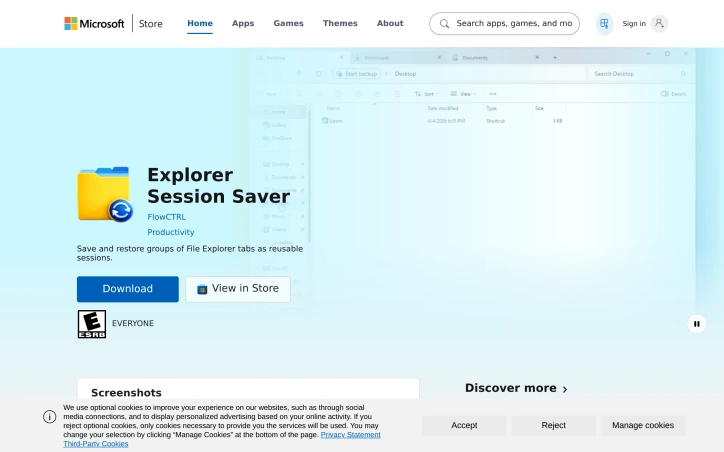
Windows users juggling multiple project folders and research sets know the friction of rebuilding the same File Explorer workspaces every time they start their day. Explorer Session Saver addresses this by capturing entire File Explorer configurations and restoring them on demand, eliminating the repetitive task of manually reopening tabs and navigating to the same directories. The tool works within Windows 11's native Explorer tabs, treating the entire window state as a snapshot. Users name and save their current workspace, then restore it later with a single action from any of three entry points: the ESS Manager interface, the system tray, or the command line. This multi-path access acknowledges that users work differently—some prefer GUI interfaces while others benefit from automation through scripting. What distinguishes Explorer Session Saver is its deliberate simplicity. Rather than attempting to be a comprehensive productivity suite, it solves one specific friction point in the daily workflow. The decision to operate as a local utility rather than a cloud-based service means workspace data stays on the user's machine and restoration happens instantly without network latency. For professionals working with sensitive files or restrictive internet conditions, this local-first architecture is a practical advantage. The free distribution model removes barriers to adoption, making it accessible to individual developers, researchers, and knowledge workers who manage complex folder hierarchies. The Windows 11 focus reflects platform-specific design rather than attempting cross-platform compatibility, suggesting the developer understood where the actual pain point lives. The application assumes users have established workspace patterns—it works best for those with consistent session layouts rather than those opening different folders each day. It targets the developer who returns to the same project folders, the researcher maintaining consistent research datasets, the analyst with a standard folder layout. For this audience, the ability to restore entire workspaces in seconds transforms a daily five-minute overhead into a one-click operation. The command-line access point opens possibilities for scripting and automation, though basic manual restoration through the GUI or system tray covers the primary use case. Explorer Session Saver delivers functional value without unnecessary complexity or monetization friction.

App-switcher
F
FlowCTRL

Windows users juggling multiple project folders and research sets know the friction of rebuilding the same File Explorer workspaces every time they start their day. Explorer Session Saver addresses this by capturing entire File Explorer configurations and restoring them on demand, eliminating the repetitive task of manually reopening tabs and navigating to the same directories. The tool works within Windows 11's native Explorer tabs, treating the entire window state as a snapshot. Users name and save their current workspace, then restore it later with a single action from any of three entry points: the ESS Manager interface, the system tray, or the command line. This multi-path access acknowledges that users work differently—some prefer GUI interfaces while others benefit from automation through scripting. What distinguishes Explorer Session Saver is its deliberate simplicity. Rather than attempting to be a comprehensive productivity suite, it solves one specific friction point in the daily workflow. The decision to operate as a local utility rather than a cloud-based service means workspace data stays on the user's machine and restoration happens instantly without network latency. For professionals working with sensitive files or restrictive internet conditions, this local-first architecture is a practical advantage. The free distribution model removes barriers to adoption, making it accessible to individual developers, researchers, and knowledge workers who manage complex folder hierarchies. The Windows 11 focus reflects platform-specific design rather than attempting cross-platform compatibility, suggesting the developer understood where the actual pain point lives. The application assumes users have established workspace patterns—it works best for those with consistent session layouts rather than those opening different folders each day. It targets the developer who returns to the same project folders, the researcher maintaining consistent research datasets, the analyst with a standard folder layout. For this audience, the ability to restore entire workspaces in seconds transforms a daily five-minute overhead into a one-click operation. The command-line access point opens possibilities for scripting and automation, though basic manual restoration through the GUI or system tray covers the primary use case. Explorer Session Saver delivers functional value without unnecessary complexity or monetization friction.

Explorer Session Saver preview

Key features

  • File Explorer Snapshots: Captures entire File Explorer window configurations including tabs and navigation states
  • Multi-Point Restoration: Restore saved workspaces via ESS Manager interface, system tray, or command line
See full listing
Omoide Kasane

Families facing bereavement often struggle to transform scattered photographs and fragmented memories into meaningful tributes. Omoide Kasane addresses this gap by automating the construction of memorial content without compromising dignity or accuracy. The service targets three distinct audiences: families seeking to preserve life stories and create keepsakes, funeral companies wanting to offer additional services to clients, and organizations like temples or life-history services supporting end-of-life reflection. It accomplishes this through a three-part workflow that inputs 5-20 family photographs and recalled moments, then outputs a corrected portrait photo, a written life narrative in natural Japanese, and a 2-3 minute memorial film suitable for viewing at funeral services or family gatherings. What distinguishes Omoide Kasane from superficial memorial tools is its deliberate ethical design. The service explicitly refuses to synthesize deceased individuals speaking, to invent biographical details, or to claim reproduction of personality. Instead, it positions AI as a compositional assistant—handling photo enhancement, structural organization, and text generation—while reserving human judgment for fact verification, name confirmation, tone refinement, and final approval. This split reflects a mature understanding of where automation adds value without displacing the decision-making authority of those who actually knew the deceased. The privacy approach mirrors this philosophy. The public-facing demo processes all data locally within the browser, transmitting nothing to external servers. This design choice simultaneously addresses technical security concerns and demonstrates respect for the sensitivity of memorial materials. The workflow itself moves methodically through collection, drafting, and finalization. Families provide photographs and narrative fragments in their own words. The system generates a photo edit and text draft. Reviewers then approve or adjust details—names, dates, voice—before receiving the finished outputs. This iterative review cycle, mandatory before any sharing, prevents both the hollow templating common in memorial services and the jarring authenticity problems of purely automated solutions. Omoide Kasane operates under pilot pricing frameworks (9,800 yen for self-directed families, 19,800 yen with staff verification), framed explicitly as exploratory rather than final. The service remains in prototype stage, with browser-based demos available for local testing. The core insight driving the product—that memory work requires both technological assistance and human authority—positions it thoughtfully within a grief-aware market segment where efficiency alone would feel disrespectful.


Family-care
O
Omoide Kasane

Families facing bereavement often struggle to transform scattered photographs and fragmented memories into meaningful tributes. Omoide Kasane addresses this gap by automating the construction of memorial content without compromising dignity or accuracy. The service targets three distinct audiences: families seeking to preserve life stories and create keepsakes, funeral companies wanting to offer additional services to clients, and organizations like temples or life-history services supporting end-of-life reflection. It accomplishes this through a three-part workflow that inputs 5-20 family photographs and recalled moments, then outputs a corrected portrait photo, a written life narrative in natural Japanese, and a 2-3 minute memorial film suitable for viewing at funeral services or family gatherings. What distinguishes Omoide Kasane from superficial memorial tools is its deliberate ethical design. The service explicitly refuses to synthesize deceased individuals speaking, to invent biographical details, or to claim reproduction of personality. Instead, it positions AI as a compositional assistant—handling photo enhancement, structural organization, and text generation—while reserving human judgment for fact verification, name confirmation, tone refinement, and final approval. This split reflects a mature understanding of where automation adds value without displacing the decision-making authority of those who actually knew the deceased. The privacy approach mirrors this philosophy. The public-facing demo processes all data locally within the browser, transmitting nothing to external servers. This design choice simultaneously addresses technical security concerns and demonstrates respect for the sensitivity of memorial materials. The workflow itself moves methodically through collection, drafting, and finalization. Families provide photographs and narrative fragments in their own words. The system generates a photo edit and text draft. Reviewers then approve or adjust details—names, dates, voice—before receiving the finished outputs. This iterative review cycle, mandatory before any sharing, prevents both the hollow templating common in memorial services and the jarring authenticity problems of purely automated solutions. Omoide Kasane operates under pilot pricing frameworks (9,800 yen for self-directed families, 19,800 yen with staff verification), framed explicitly as exploratory rather than final. The service remains in prototype stage, with browser-based demos available for local testing. The core insight driving the product—that memory work requires both technological assistance and human authority—positions it thoughtfully within a grief-aware market segment where efficiency alone would feel disrespectful.

Omoide Kasane preview

Key features

  • Portrait Photo Correction: Generates corrected portrait photos from submitted family photographs
  • Life Narrative Generation: Creates written life narratives in natural Japanese from recalled moments
See full listing
Open source alternatives tools

Finding the right open source software can be frustrating when most recommendation sites are cluttered with sponsored listings and marketing noise. Open Source Alternative Tools takes a different approach by curating a focused directory of 100 lightweight alternatives to commercial software, organized around practical use cases rather than brand names. The platform addresses a real problem: popular software often becomes heavier and more intrusive over time, while costs steadily increase. Users deal with unwanted tracking, unnecessary features, subscription escalations, and bloated updates that consume resources without adding value. Open Source Alternative Tools helps people escape this cycle by providing a structured way to discover lighter, more privacy-respecting alternatives. What distinguishes this directory is its commitment to objectivity and transparency. Each tool listing includes three verification layers: a privacy check, a license check, and a human verdict. The directory explicitly rejects pay-to-rank listings, which removes financial incentives from the curation process. Tools are organized into ten focused categories spanning Browsers, Communication, Office & Notes, Design & Creative, Media, Productivity, Developer Tools, Privacy & Security, Operating Systems, and Cloud & Self-hosting. The interface recognizes that users don't necessarily know the name of their replacement software—they know what they're trying to replace. The search function works in both directions: you can search for a specific tool, or you can input the commercial software you currently use and receive open source alternatives. This decision-first approach, combined with clear explanations of tradeoffs, sets it apart from generic recommendation lists. Each tool receives comparable treatment through five decision signals per listing, allowing users to evaluate alternatives against consistent criteria rather than inconsistent reviews. The site positions itself as written for general users first, rather than assuming technical expertise. The business model remains implicit in the content provided. The absence of subscription mentions or advertising suggests a clean, user-focused approach to discovery, though the specific sustainability model isn't detailed. For users fatigued by the endless cycle of expensive, resource-hungry software, this directory offers a structured exit path rather than random searching through GitHub repositories.

Ab-testing-tools
K
Kent Kan

Finding the right open source software can be frustrating when most recommendation sites are cluttered with sponsored listings and marketing noise. Open Source Alternative Tools takes a different approach by curating a focused directory of 100 lightweight alternatives to commercial software, organized around practical use cases rather than brand names. The platform addresses a real problem: popular software often becomes heavier and more intrusive over time, while costs steadily increase. Users deal with unwanted tracking, unnecessary features, subscription escalations, and bloated updates that consume resources without adding value. Open Source Alternative Tools helps people escape this cycle by providing a structured way to discover lighter, more privacy-respecting alternatives. What distinguishes this directory is its commitment to objectivity and transparency. Each tool listing includes three verification layers: a privacy check, a license check, and a human verdict. The directory explicitly rejects pay-to-rank listings, which removes financial incentives from the curation process. Tools are organized into ten focused categories spanning Browsers, Communication, Office & Notes, Design & Creative, Media, Productivity, Developer Tools, Privacy & Security, Operating Systems, and Cloud & Self-hosting. The interface recognizes that users don't necessarily know the name of their replacement software—they know what they're trying to replace. The search function works in both directions: you can search for a specific tool, or you can input the commercial software you currently use and receive open source alternatives. This decision-first approach, combined with clear explanations of tradeoffs, sets it apart from generic recommendation lists. Each tool receives comparable treatment through five decision signals per listing, allowing users to evaluate alternatives against consistent criteria rather than inconsistent reviews. The site positions itself as written for general users first, rather than assuming technical expertise. The business model remains implicit in the content provided. The absence of subscription mentions or advertising suggests a clean, user-focused approach to discovery, though the specific sustainability model isn't detailed. For users fatigued by the endless cycle of expensive, resource-hungry software, this directory offers a structured exit path rather than random searching through GitHub repositories.

Open source alternatives tools preview

Key features

  • Curated Directory: 100 lightweight open source alternatives organized by practical use case rather than brand name
  • Verification Layers: Privacy check, license check, and human verdict for each tool listing
See full listing
A

Creating video from audio content has long required either filming new footage or hiring expensive video editors to pair visuals with sound. AudioVideo addresses this gap by automating the conversion of podcasts, voice recordings, music, and narration into finished video using AI that responds to the audio itself. The platform targets creators working across multiple mediums: podcasters seeking to repurpose episodes as video content, musicians looking to visualize their tracks, educational content producers, storytellers, faceless creators who intentionally avoid on-camera appearance, and marketing teams needing rapid video production. Developers also gain access through a dedicated API. The browser-based interface keeps friction low, requiring only an audio file, an optional prompt to guide the visual direction, and optionally reference images to influence style. The system then generates video without requiring users to film anything new. What distinguishes AudioVideo from simple slideshow generators is its audio-aware approach, where the AI responds rhythmically and thematically to the sound itself rather than treating audio and visuals as separate elements. The visual direction library demonstrates meaningful range. Examples span podcast hosting scenarios with choreographed camera movements, documentary-style B-roll narratives with character acting, narrated stories showing emotional arcs, music performances with dynamic outfits and poses, mood-driven sequences, fast-paced advertising transitions, and commercial product landing pages. These examples illustrate both the technical capability to handle varied genres and the platform's ability to interpret complex directorial instructions from text prompts alone. Control extends across multiple dimensions. Users set video duration and output format, preview results before finalizing, and download finished files. The system tracks generation tasks, suggesting workflow management features for batch processing. Resolution options include both standard horizontal and vertical formats, addressing needs for social media, streaming platforms, and other distribution channels. The API integration pathway positions AudioVideo not just as a direct-to-creator tool but also as an underlying service for other applications, revealing ambitions beyond standalone use. This indicates recognition that the core technology holds value in compound workflows. Notably absent from the public-facing information is any mention of pricing, subscription tiers, or free trial offerings, making it impossible to assess the cost barrier to entry or business model from available materials.

Ai-generative-media
好李

Creating video from audio content has long required either filming new footage or hiring expensive video editors to pair visuals with sound. AudioVideo addresses this gap by automating the conversion of podcasts, voice recordings, music, and narration into finished video using AI that responds to the audio itself. The platform targets creators working across multiple mediums: podcasters seeking to repurpose episodes as video content, musicians looking to visualize their tracks, educational content producers, storytellers, faceless creators who intentionally avoid on-camera appearance, and marketing teams needing rapid video production. Developers also gain access through a dedicated API. The browser-based interface keeps friction low, requiring only an audio file, an optional prompt to guide the visual direction, and optionally reference images to influence style. The system then generates video without requiring users to film anything new. What distinguishes AudioVideo from simple slideshow generators is its audio-aware approach, where the AI responds rhythmically and thematically to the sound itself rather than treating audio and visuals as separate elements. The visual direction library demonstrates meaningful range. Examples span podcast hosting scenarios with choreographed camera movements, documentary-style B-roll narratives with character acting, narrated stories showing emotional arcs, music performances with dynamic outfits and poses, mood-driven sequences, fast-paced advertising transitions, and commercial product landing pages. These examples illustrate both the technical capability to handle varied genres and the platform's ability to interpret complex directorial instructions from text prompts alone. Control extends across multiple dimensions. Users set video duration and output format, preview results before finalizing, and download finished files. The system tracks generation tasks, suggesting workflow management features for batch processing. Resolution options include both standard horizontal and vertical formats, addressing needs for social media, streaming platforms, and other distribution channels. The API integration pathway positions AudioVideo not just as a direct-to-creator tool but also as an underlying service for other applications, revealing ambitions beyond standalone use. This indicates recognition that the core technology holds value in compound workflows. Notably absent from the public-facing information is any mention of pricing, subscription tiers, or free trial offerings, making it impossible to assess the cost barrier to entry or business model from available materials.

AudioVideo preview
A

Key features

  • AI Audio-to-Video Conversion: Automatically transforms podcasts, voice recordings, music, and narration into finished videos that respond to audio content.
  • Low-Friction Browser Interface: Requires only an audio file, optional visual direction prompt, and reference images to generate video.
See full listing
F

Creators navigating generative video and image tools often struggle with consistency—maintaining character likenesses, product appearances, or brand aesthetics across multiple outputs. Flux Lora addresses this gap by offering a specialized browser-based platform for exploring and building with Flux LoRA (Low-Rank Adaptation) workflows, targeting both content creators and developers who need fine-tuned control over model outputs. The platform positions itself as an independent alternative to general-purpose AI studios, focused specifically on LoRA discovery, model training, and guided customization. The current site provides an AI Studio paired with a public gallery of example compositions demonstrating the range of achievable outputs across video generation, motion replication, character-consistent sequences, and style adaptation—spanning documentary storytelling, fashion, and e-commerce use cases. Each example includes detailed prompts that reference multiple input modalities: images for visual consistency, videos for motion patterns, and audio for narrative grounding. What distinguishes Flux Lora is its emphasis on reference-based generation. Rather than prompt-only workflows, users compose requests by combining images, video clips, and audio tracks as creative anchors. A fashion example instructs the model to reference specific facial features while applying outfits from separate reference images. A narrative example layers video audio, multiple still images, and storytelling guidance together. This compositional approach appeals to creators seeking production-quality consistency and developers building customer-facing applications. The roadmap promises deeper LoRA capabilities: dedicated model discovery, prompt-based image generation, consistent character and product tools, and guided fine-tuning workflows. The platform operates on a credit-based access model and exposes workflows through an API for developers. Flux Lora fills a specific niche: the intersection of customizable AI generation and creator needs for visual coherence. The reference-based composition model offers a more structured approach to creative control than free-form prompting alone. As a developing platform with roadmap features still in planning, users should view the current AI Studio as a capability preview rather than the complete offering described in the roadmap ahead.


Ai-generative-media
好李

Creators navigating generative video and image tools often struggle with consistency—maintaining character likenesses, product appearances, or brand aesthetics across multiple outputs. Flux Lora addresses this gap by offering a specialized browser-based platform for exploring and building with Flux LoRA (Low-Rank Adaptation) workflows, targeting both content creators and developers who need fine-tuned control over model outputs. The platform positions itself as an independent alternative to general-purpose AI studios, focused specifically on LoRA discovery, model training, and guided customization. The current site provides an AI Studio paired with a public gallery of example compositions demonstrating the range of achievable outputs across video generation, motion replication, character-consistent sequences, and style adaptation—spanning documentary storytelling, fashion, and e-commerce use cases. Each example includes detailed prompts that reference multiple input modalities: images for visual consistency, videos for motion patterns, and audio for narrative grounding. What distinguishes Flux Lora is its emphasis on reference-based generation. Rather than prompt-only workflows, users compose requests by combining images, video clips, and audio tracks as creative anchors. A fashion example instructs the model to reference specific facial features while applying outfits from separate reference images. A narrative example layers video audio, multiple still images, and storytelling guidance together. This compositional approach appeals to creators seeking production-quality consistency and developers building customer-facing applications. The roadmap promises deeper LoRA capabilities: dedicated model discovery, prompt-based image generation, consistent character and product tools, and guided fine-tuning workflows. The platform operates on a credit-based access model and exposes workflows through an API for developers. Flux Lora fills a specific niche: the intersection of customizable AI generation and creator needs for visual coherence. The reference-based composition model offers a more structured approach to creative control than free-form prompting alone. As a developing platform with roadmap features still in planning, users should view the current AI Studio as a capability preview rather than the complete offering described in the roadmap ahead.

Flux Lora preview
F

Key features

  • LoRA Workflow Builder: Specialized browser-based platform for exploring and building with Flux LoRA
  • Reference-Based Composition: Combine images, video clips, and audio tracks as creative anchors for AI generation
See full listing
HavenTools

Developers spending hours tracking down the right utility tool for quick data transformations now have a consolidated alternative. HavenTools consolidates dozens of commonly-needed utilities into a single browser-based platform, eliminating the friction of finding specialized tools scattered across the internet. The core value proposition centers on privacy and convenience. Every operation processes entirely within the user's browser, with no data transmitted to servers or requiring account creation. This architectural choice addresses a legitimate concern in developer workflows: the hesitation to upload sensitive configuration files, API responses, or internal data to unfamiliar online services, even nominally reputable ones. By running computationally in the browser itself rather than on remote infrastructure, HavenTools removes that friction point for routine tasks. The feature breadth is substantial. The platform spans JSON processing including format validation, schema generation, and RFC-standard operations like JSON Pointer evaluation and JSON Patch generation. PDF capabilities handle merging, splitting, extraction, and rotation. Image tools cover compression, resizing, conversion, and color extraction. CSS generation tools produce production-ready output for gradients, shadows, flexbox layouts, transforms, and border-radius specifications. Beyond these categories, the platform includes utilities for GraphQL query building and formatting, HTTP request construction and inspection, XML validation and XPath testing, URL query string encoding, and SQL IN clause generation. The breadth suggests the creator identified common repetitive tasks in development workflows and built targeted solutions for each. The positioning emphasizes eliminating friction from everyday development activities. Rather than marketing as a comprehensive platform, it positions individual tools as replacements for fragmentary web searches. Each utility handles a specific transformation or validation task without the overhead of authentication, file upload dialogs, or waiting for server-side processing. The business model centers on free access, with no mention of premium tiers, paywalls, or subscription options in available materials. This positions HavenTools against both free tools scattered across the web and paid SaaS utilities, betting that consolidated access and privacy-first architecture create sufficient value that users won't seek alternatives. The execution appears focused on completeness within chosen categories rather than attempting total tool coverage. The JSON and developer-centric tools are particularly comprehensive, while file manipulation and visual generators fill practical secondary needs. This narrower scope potentially makes the platform more coherent than attempting to be everything.


Code-editors
H
HavenTools

Developers spending hours tracking down the right utility tool for quick data transformations now have a consolidated alternative. HavenTools consolidates dozens of commonly-needed utilities into a single browser-based platform, eliminating the friction of finding specialized tools scattered across the internet. The core value proposition centers on privacy and convenience. Every operation processes entirely within the user's browser, with no data transmitted to servers or requiring account creation. This architectural choice addresses a legitimate concern in developer workflows: the hesitation to upload sensitive configuration files, API responses, or internal data to unfamiliar online services, even nominally reputable ones. By running computationally in the browser itself rather than on remote infrastructure, HavenTools removes that friction point for routine tasks. The feature breadth is substantial. The platform spans JSON processing including format validation, schema generation, and RFC-standard operations like JSON Pointer evaluation and JSON Patch generation. PDF capabilities handle merging, splitting, extraction, and rotation. Image tools cover compression, resizing, conversion, and color extraction. CSS generation tools produce production-ready output for gradients, shadows, flexbox layouts, transforms, and border-radius specifications. Beyond these categories, the platform includes utilities for GraphQL query building and formatting, HTTP request construction and inspection, XML validation and XPath testing, URL query string encoding, and SQL IN clause generation. The breadth suggests the creator identified common repetitive tasks in development workflows and built targeted solutions for each. The positioning emphasizes eliminating friction from everyday development activities. Rather than marketing as a comprehensive platform, it positions individual tools as replacements for fragmentary web searches. Each utility handles a specific transformation or validation task without the overhead of authentication, file upload dialogs, or waiting for server-side processing. The business model centers on free access, with no mention of premium tiers, paywalls, or subscription options in available materials. This positions HavenTools against both free tools scattered across the web and paid SaaS utilities, betting that consolidated access and privacy-first architecture create sufficient value that users won't seek alternatives. The execution appears focused on completeness within chosen categories rather than attempting total tool coverage. The JSON and developer-centric tools are particularly comprehensive, while file manipulation and visual generators fill practical secondary needs. This narrower scope potentially makes the platform more coherent than attempting to be everything.

HavenTools preview

Key features

  • Browser-Based Processing: All operations run locally in your browser with no server transmission
  • JSON Tools Suite: Includes format validation, schema generation, JSON Pointer evaluation, and JSON Patch generation
See full listing
TryKlingAI

Organizing fragmented video generation capabilities into a single workspace, this third-party platform addresses a genuine friction point for creators producing AI videos at scale. TryKlingAI bundles Kling 3.0, motion control, lip sync, and API access into one interface, targeting creators and developers who want centralized access to modern video generation features without juggling multiple tools or dashboards. The platform stands out by consolidating capabilities that would otherwise require separate workflows. Motion control, lip sync, and image-to-video generation sit alongside API access for developers, making it useful for both hands-on creators building individual videos and teams scaling production programmatically. Task history and credit estimates provide the operational transparency often missing from direct AI service access, letting users know exactly how many credits each video consumed and enabling more accurate project budgeting. The showcase examples reveal thoughtful feature positioning beyond marketing copy. The demonstrations span realistic workflows: product advertising with motion replication, documentary-style storytelling with character animation, fashion lookbooks cycling through outfits, and video extension for repurposing existing content. These are templates showing how the platform's capabilities translate into actual creative work rather than abstract technical examples. The ability to reference images and videos as control inputs—mirroring camera movements, replicating facial expressions, extending scenes—positions motion control as a creative tool for controlling narrative elements. The API access deserves particular mention for developers. Rather than reverse-engineering unofficial integrations, developers get first-class access to video generation capabilities, lowering the barrier to building video-as-a-service applications or automation pipelines on top of Kling. Notable gaps emerge in the public information. No pricing model, usage limits, or credit system details appear in the available materials. Understanding the cost structure relative to direct Kling access would be essential for evaluating whether the centralized interface justifies any premium. The platform occupies an ambiguous position as a third-party wrapper, raising legitimate questions about long-term viability if the underlying Kling service changes or Kling develops its own consolidated interface. TryKlingAI successfully consolidates scattered capabilities into a coherent product with thoughtful workflow examples. However, transparency around pricing and clarification of its relationship to Kling's official offerings would significantly strengthen the value proposition for serious adopters considering production commitments.


Ai-generative-media
好李

Organizing fragmented video generation capabilities into a single workspace, this third-party platform addresses a genuine friction point for creators producing AI videos at scale. TryKlingAI bundles Kling 3.0, motion control, lip sync, and API access into one interface, targeting creators and developers who want centralized access to modern video generation features without juggling multiple tools or dashboards. The platform stands out by consolidating capabilities that would otherwise require separate workflows. Motion control, lip sync, and image-to-video generation sit alongside API access for developers, making it useful for both hands-on creators building individual videos and teams scaling production programmatically. Task history and credit estimates provide the operational transparency often missing from direct AI service access, letting users know exactly how many credits each video consumed and enabling more accurate project budgeting. The showcase examples reveal thoughtful feature positioning beyond marketing copy. The demonstrations span realistic workflows: product advertising with motion replication, documentary-style storytelling with character animation, fashion lookbooks cycling through outfits, and video extension for repurposing existing content. These are templates showing how the platform's capabilities translate into actual creative work rather than abstract technical examples. The ability to reference images and videos as control inputs—mirroring camera movements, replicating facial expressions, extending scenes—positions motion control as a creative tool for controlling narrative elements. The API access deserves particular mention for developers. Rather than reverse-engineering unofficial integrations, developers get first-class access to video generation capabilities, lowering the barrier to building video-as-a-service applications or automation pipelines on top of Kling. Notable gaps emerge in the public information. No pricing model, usage limits, or credit system details appear in the available materials. Understanding the cost structure relative to direct Kling access would be essential for evaluating whether the centralized interface justifies any premium. The platform occupies an ambiguous position as a third-party wrapper, raising legitimate questions about long-term viability if the underlying Kling service changes or Kling develops its own consolidated interface. TryKlingAI successfully consolidates scattered capabilities into a coherent product with thoughtful workflow examples. However, transparency around pricing and clarification of its relationship to Kling's official offerings would significantly strengthen the value proposition for serious adopters considering production commitments.

TryKlingAI preview

Key features

  • Consolidated Video Generation: Bundles Kling 3.0, motion control, lip sync, and API access into a single workspace.
  • Motion Control Tools: Users can reference images and videos as control inputs to mirror camera movements and replicate expressions.
See full listing
ToolTrim

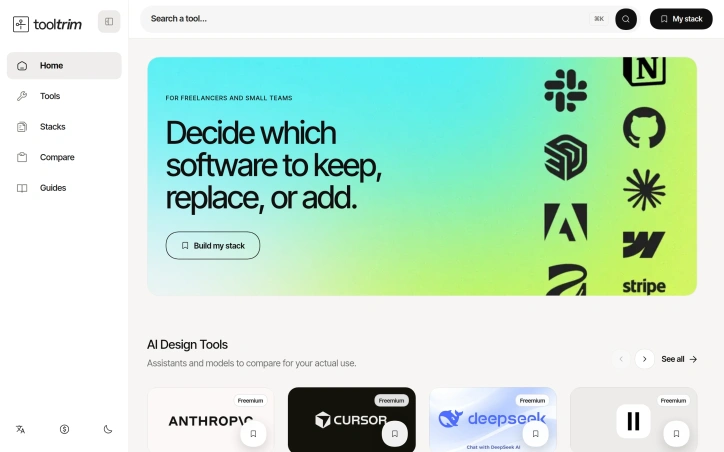
Choosing a tech stack can feel paralyzing. With hundreds of software options available, each claiming superiority, and budgets that don't stretch infinitely, freelancers and small teams often find themselves trapped between decision paralysis and the fear of overspending on tools they'll never fully use. ToolTrim tackles this exact problem by organizing the chaotic landscape of software into a searchable, categorized directory with editorial guidance. The product's core strength lies in its practical approach to stack building. Rather than overwhelming users with unfiltered tool lists, ToolTrim emphasizes workflow-based organization. The catalog branches into intuitive categories—Content Creation with 172 tools, No-Code & Web with 130 tools, Communication with 54 tools—each designed to help users quickly locate relevant options for their specific needs. The platform highlights free and freemium tools, acknowledging the budget constraints that define small-team workflows. What distinguishes ToolTrim from a simple tool directory is its editorial curation. Featured tool selections, a New Additions section tracking recent catalog entries, and a Works with integration view help users understand not just what tools exist, but how they fit into broader ecosystems. The platform goes further by offering pre-built curated stacks tailored to specific roles: freelance developer stacks, designer stacks, even interior designer stacks. This removes guesswork from the decision-making process and provides immediate, role-specific starting points rather than forcing users to navigate a sprawling catalog from scratch. The automation section indicates the platform recognizes that stack decisions aren't just about individual tools but about workflow efficiency. By showcasing tools that connect and streamline repetitive tasks, ToolTrim positions itself as concerned with the full picture of how software choices compound across a user's daily work. The navigation includes language localization and dark mode, suggesting attention to user experience details that matter for professionals working long hours across different environments. No pricing information is disclosed for ToolTrim itself, only for the third-party tools within the catalog. For freelancers and small teams drowning in tool options, ToolTrim offers a straightforward solution: a thoughtfully organized directory with enough curation to guide decisions without the paralysis of limitless choice.
Business-intelligence-software
M
Michael bloch

Choosing a tech stack can feel paralyzing. With hundreds of software options available, each claiming superiority, and budgets that don't stretch infinitely, freelancers and small teams often find themselves trapped between decision paralysis and the fear of overspending on tools they'll never fully use. ToolTrim tackles this exact problem by organizing the chaotic landscape of software into a searchable, categorized directory with editorial guidance. The product's core strength lies in its practical approach to stack building. Rather than overwhelming users with unfiltered tool lists, ToolTrim emphasizes workflow-based organization. The catalog branches into intuitive categories—Content Creation with 172 tools, No-Code & Web with 130 tools, Communication with 54 tools—each designed to help users quickly locate relevant options for their specific needs. The platform highlights free and freemium tools, acknowledging the budget constraints that define small-team workflows. What distinguishes ToolTrim from a simple tool directory is its editorial curation. Featured tool selections, a New Additions section tracking recent catalog entries, and a Works with integration view help users understand not just what tools exist, but how they fit into broader ecosystems. The platform goes further by offering pre-built curated stacks tailored to specific roles: freelance developer stacks, designer stacks, even interior designer stacks. This removes guesswork from the decision-making process and provides immediate, role-specific starting points rather than forcing users to navigate a sprawling catalog from scratch. The automation section indicates the platform recognizes that stack decisions aren't just about individual tools but about workflow efficiency. By showcasing tools that connect and streamline repetitive tasks, ToolTrim positions itself as concerned with the full picture of how software choices compound across a user's daily work. The navigation includes language localization and dark mode, suggesting attention to user experience details that matter for professionals working long hours across different environments. No pricing information is disclosed for ToolTrim itself, only for the third-party tools within the catalog. For freelancers and small teams drowning in tool options, ToolTrim offers a straightforward solution: a thoughtfully organized directory with enough curation to guide decisions without the paralysis of limitless choice.

ToolTrim preview

Key features

  • Searchable Tool Directory: Hundreds of software options organized into categorized sections for quick discovery.
  • Workflow-Based Organization: Tools are arranged by workflow type such as Content Creation, No-Code & Web, and Communication.
See full listing
J

Getting multilingual products to market typically requires developers to coordinate with localization teams, manage files across multiple languages and directories, and orchestrate translation work that often repeats when content changes. JsonTranslate addresses this friction by building a workspace specifically designed around incremental translation workflows rather than treating localization as a generic text translation problem. The platform accepts JSON, Markdown, and TXT files and preserves the structural elements that matter to developers—keys, nested paths, and directory hierarchies. What distinguishes it from broader translation tools is the emphasis on change-based workflows. Using Git-diff-like detection, JsonTranslate translates only newly added or modified content in incremental modes, avoiding the overhead and cost of re-translating unchanged material. This applies across single files, entire files, or full projects, giving teams granular control over translation scope. Project-level organization sets this apart further. Rather than a single text box, JsonTranslate maps source directories, target directories, and locale conventions together. It automatically generates corresponding locale files after translation and supports common patterns like locale folders, module-based organization, and locale-suffixed filenames. Teams can import or export full projects and download results with directory structure intact, streamlining integration back into version control. The interface combines file management, source content, translation results, and settings in a unified responsive studio. Source files appear in a left pane while translated output displays across tabs for quick comparison between languages. A task center handles batch jobs and tracks progress for project-scale workflows, while a CLI maintains synchronization between the hosted workspace and local repositories. Language coverage spans 20+ common languages by default, with the option to extend to 100+ for markets and long-tail localization. The product balances flexibility through two implementation models: a hosted service or bring-your-own-key options that let teams integrate their own translation models and cost strategies. Available on a freemium basis, JsonTranslate targets developers, product teams, and dedicated localization specialists who need translation workflows that treat source structure and selective translation as first-class concerns rather than afterthoughts.

Engineering-development
D
dx p

Getting multilingual products to market typically requires developers to coordinate with localization teams, manage files across multiple languages and directories, and orchestrate translation work that often repeats when content changes. JsonTranslate addresses this friction by building a workspace specifically designed around incremental translation workflows rather than treating localization as a generic text translation problem. The platform accepts JSON, Markdown, and TXT files and preserves the structural elements that matter to developers—keys, nested paths, and directory hierarchies. What distinguishes it from broader translation tools is the emphasis on change-based workflows. Using Git-diff-like detection, JsonTranslate translates only newly added or modified content in incremental modes, avoiding the overhead and cost of re-translating unchanged material. This applies across single files, entire files, or full projects, giving teams granular control over translation scope. Project-level organization sets this apart further. Rather than a single text box, JsonTranslate maps source directories, target directories, and locale conventions together. It automatically generates corresponding locale files after translation and supports common patterns like locale folders, module-based organization, and locale-suffixed filenames. Teams can import or export full projects and download results with directory structure intact, streamlining integration back into version control. The interface combines file management, source content, translation results, and settings in a unified responsive studio. Source files appear in a left pane while translated output displays across tabs for quick comparison between languages. A task center handles batch jobs and tracks progress for project-scale workflows, while a CLI maintains synchronization between the hosted workspace and local repositories. Language coverage spans 20+ common languages by default, with the option to extend to 100+ for markets and long-tail localization. The product balances flexibility through two implementation models: a hosted service or bring-your-own-key options that let teams integrate their own translation models and cost strategies. Available on a freemium basis, JsonTranslate targets developers, product teams, and dedicated localization specialists who need translation workflows that treat source structure and selective translation as first-class concerns rather than afterthoughts.

JsonTranslate preview
J

Key features

  • Incremental Translation: Translates only newly added or modified content using Git-diff-like detection, avoiding unnecessary re-translation costs.
  • Multi-Format Support: Accepts JSON, Markdown, and TXT files while preserving structural elements like keys and nested paths.
See full listing
Z

Online image generation typically requires either expensive local hardware or confusing, feature-bloated platforms. Z Image Turbo addresses this by offering a streamlined browser-based generator focused on the specific visual assets creators actually need: product photography, promotional posters, editorial portraits, social media content, and illustrations. The target audience includes small business owners managing ecommerce catalogs, marketing teams producing campaign materials, and independent creators who need polished visuals without technical friction or the time investment of learning complex software. The product distinguishes itself through deliberate simplification. Rather than overwhelming users with dozens of parameters, it presents practical templates organized by actual use case. A user looking to generate a product hero image gets a pre-written prompt structure optimized for that purpose. The same principle applies to categories like "Chinese Promotional Poster" or "Vertical Social Campaign," each with suggested aspect ratios and compositional guidance baked in. This workflow-first approach sidesteps the common problem of users staring at a blank text box unsure where to begin. Several design choices stand out. The platform supports bilingual content creation, particularly useful for teams producing materials in English and Chinese. The ability to save prompts, seeds, and settings for reuse addresses a real workflow need: creators often want to regenerate variations on a successful visual or maintain consistency across batches. Flexible aspect ratios accommodate different output requirements without forcing users into a square-only cage. The reference gallery demonstrates practical output across multiple categories, showing product photography that looks commercially viable rather than obviously AI-generated, editorial portraits with believable lighting, and illustrations with environmental detail. The generator operates entirely in-browser, eliminating the setup barrier that deters many potential users from local tools. This also means no GPU investment required on the creator's end. The platform offers free trial credits to test the service before commitment, lowering the barrier to initial experimentation. The positioning as a fast, focused alternative to both desktop GPU tools and sprawling web-based platforms should resonate with pragmatic creators who want generation speed without the learning curve. Whether the image quality and consistency of results justify regular use will determine whether this captures meaningful market share, but the product design itself reflects genuine thinking about how creators actually work.


Ai-generative-media
好李

Online image generation typically requires either expensive local hardware or confusing, feature-bloated platforms. Z Image Turbo addresses this by offering a streamlined browser-based generator focused on the specific visual assets creators actually need: product photography, promotional posters, editorial portraits, social media content, and illustrations. The target audience includes small business owners managing ecommerce catalogs, marketing teams producing campaign materials, and independent creators who need polished visuals without technical friction or the time investment of learning complex software. The product distinguishes itself through deliberate simplification. Rather than overwhelming users with dozens of parameters, it presents practical templates organized by actual use case. A user looking to generate a product hero image gets a pre-written prompt structure optimized for that purpose. The same principle applies to categories like "Chinese Promotional Poster" or "Vertical Social Campaign," each with suggested aspect ratios and compositional guidance baked in. This workflow-first approach sidesteps the common problem of users staring at a blank text box unsure where to begin. Several design choices stand out. The platform supports bilingual content creation, particularly useful for teams producing materials in English and Chinese. The ability to save prompts, seeds, and settings for reuse addresses a real workflow need: creators often want to regenerate variations on a successful visual or maintain consistency across batches. Flexible aspect ratios accommodate different output requirements without forcing users into a square-only cage. The reference gallery demonstrates practical output across multiple categories, showing product photography that looks commercially viable rather than obviously AI-generated, editorial portraits with believable lighting, and illustrations with environmental detail. The generator operates entirely in-browser, eliminating the setup barrier that deters many potential users from local tools. This also means no GPU investment required on the creator's end. The platform offers free trial credits to test the service before commitment, lowering the barrier to initial experimentation. The positioning as a fast, focused alternative to both desktop GPU tools and sprawling web-based platforms should resonate with pragmatic creators who want generation speed without the learning curve. Whether the image quality and consistency of results justify regular use will determine whether this captures meaningful market share, but the product design itself reflects genuine thinking about how creators actually work.

Z Image Turbo preview
Z

Key features

  • Use-Case Templates: Pre-written prompt structures optimized for specific content types like product photography, promotional posters, and editorial portraits.
  • Bilingual Content Creation: Support for both English and Chinese content creation for international marketing teams.
See full listing
Explainer Video

Automating the tedious work of video production, this AI-powered tool tackles a genuine pain point for anyone trying to communicate complex ideas visually without video editing expertise or budget constraints. Creators, marketers, educators, and product teams can now convert raw material—a topic description, script, URL, or PDF—into a complete animated explainer video, handling everything from script generation and storyboarding through voiceover production and synchronized captions. The product's core strength lies in its scaffolded workflow. Rather than dumping an AI-generated video on users, it places a review step between input and output, letting creators approve and refine the storyboard before rendering. This human-in-the-loop approach addresses a real problem with fully automated video generation: the output often misses nuance or requires rework. By letting users course-correct early, the tool respects both their creative vision and their time. The visual flexibility stands out as well. The platform offers five distinct aesthetic directions—motion, illustration, infographic, character, and product visuals—letting users match the style to their content. The showcase examples demonstrate genuine variation in tone and execution, from upbeat lifestyle sequences to polished product demos and character-driven narratives. This breadth matters because an explainer video for financial software demands a different visual language than one for fashion or entertainment. Technical depth complements the accessibility. Beyond the web interface, the platform includes API access for developers and teams running high-volume generation workflows. This dual approach positions it as both a tool for individuals experimenting with explainer video creation and an infrastructure component for larger operations. The export flexibility—supporting 16:9, 9:16, and 1:1 aspect ratios—acknowledges that explainer videos now need to work across desktop, mobile, and social platforms. Multilingual voiceover generation and synchronized captions extend the appeal beyond English-speaking markets, a thoughtful inclusion that many simpler tools overlook. The ability to add background music rounds out the production value without requiring external audio editing. The presentation focuses heavily on creative capabilities and visual examples but notably omits pricing information, making it difficult to assess whether the tool competes on cost efficiency or positions itself as a premium solution. For anyone regularly producing educational or promotional content, the time savings alone justify investigation, particularly given how much of the heavy lifting—script writing, visual composition, voiceover production—typically falls on human creators. The tool doesn't eliminate creative decision-making; it eliminates the mechanical work that usually precedes it.

Ai-generative-media
好李

Automating the tedious work of video production, this AI-powered tool tackles a genuine pain point for anyone trying to communicate complex ideas visually without video editing expertise or budget constraints. Creators, marketers, educators, and product teams can now convert raw material—a topic description, script, URL, or PDF—into a complete animated explainer video, handling everything from script generation and storyboarding through voiceover production and synchronized captions. The product's core strength lies in its scaffolded workflow. Rather than dumping an AI-generated video on users, it places a review step between input and output, letting creators approve and refine the storyboard before rendering. This human-in-the-loop approach addresses a real problem with fully automated video generation: the output often misses nuance or requires rework. By letting users course-correct early, the tool respects both their creative vision and their time. The visual flexibility stands out as well. The platform offers five distinct aesthetic directions—motion, illustration, infographic, character, and product visuals—letting users match the style to their content. The showcase examples demonstrate genuine variation in tone and execution, from upbeat lifestyle sequences to polished product demos and character-driven narratives. This breadth matters because an explainer video for financial software demands a different visual language than one for fashion or entertainment. Technical depth complements the accessibility. Beyond the web interface, the platform includes API access for developers and teams running high-volume generation workflows. This dual approach positions it as both a tool for individuals experimenting with explainer video creation and an infrastructure component for larger operations. The export flexibility—supporting 16:9, 9:16, and 1:1 aspect ratios—acknowledges that explainer videos now need to work across desktop, mobile, and social platforms. Multilingual voiceover generation and synchronized captions extend the appeal beyond English-speaking markets, a thoughtful inclusion that many simpler tools overlook. The ability to add background music rounds out the production value without requiring external audio editing. The presentation focuses heavily on creative capabilities and visual examples but notably omits pricing information, making it difficult to assess whether the tool competes on cost efficiency or positions itself as a premium solution. For anyone regularly producing educational or promotional content, the time savings alone justify investigation, particularly given how much of the heavy lifting—script writing, visual composition, voiceover production—typically falls on human creators. The tool doesn't eliminate creative decision-making; it eliminates the mechanical work that usually precedes it.

Explainer Video preview

Key features

  • Script Generation: Converts raw material like topic descriptions, scripts, URLs, or PDFs into complete animated explainer videos.
  • Human-in-the-Loop Workflow: Includes a review step to let creators approve and refine storyboards before rendering.
See full listing
G

Browser-based video generation has become more accessible with FSG AI, a third-party platform that wraps Grok Imagine technology for creators, marketers, designers, and developers. The service addresses a fundamental content production challenge: generating short AI videos without requiring specialized equipment, expensive production crews, or extensive technical expertise. The platform operates through a straightforward web interface where users describe videos through text prompts or animate existing images. The system produces synchronized video and audio output, with customization options for aspect ratio, resolution, video duration, and creative mode. Users begin with free credits to test the workflow before committing additional resources. What distinguishes FSG AI from simpler video generators is the evident sophistication of its demonstrated outputs. The gallery examples reveal capabilities well beyond basic video synthesis. Complex camera choreography appears across multiple demos, including push, pull, pan, and tilt movements applied to subjects. The platform executes multi-character scenarios with nuanced storytelling and object interaction, such as a character experiencing guilt and exchanging items with another actor. Documentary-style narratives, fashion sequences with multiple outfit changes, lifestyle videos, and branded advertising scenarios all demonstrate that the system responds to relatively detailed directorial instructions rather than simply animating static images. FSG AI operates on a dual-business model. For individual creators and teams, it provides a consumer-facing workspace with free starter credits. For developers and organizations, it offers an API that integrates Grok Imagine capabilities into custom applications, SaaS products, internal tools, and automated workflows. This developer-tier access positions the platform beyond a simple creative tool, targeting institutional adoption within product ecosystems and content pipelines. A clarification worth noting appears in the founder's description: FSG AI remains independent and unaffiliated with xAI or X Corp, despite leveraging their Grok Imagine technology. This distinction carries weight for users evaluating long-term reliability and understanding the relationship between platform provider and underlying model owner. The most significant gap in available information concerns pricing structure beyond the mention of free credits. Potential users must visit the platform directly to understand costs for sustained or high-volume usage. For teams seeking cost-effective video generation without specialized production infrastructure, the combination of free trials, web-based accessibility, and demonstrated output quality makes FSG AI a candidate worth testing.


Ai-generative-media
D
dx p

Browser-based video generation has become more accessible with FSG AI, a third-party platform that wraps Grok Imagine technology for creators, marketers, designers, and developers. The service addresses a fundamental content production challenge: generating short AI videos without requiring specialized equipment, expensive production crews, or extensive technical expertise. The platform operates through a straightforward web interface where users describe videos through text prompts or animate existing images. The system produces synchronized video and audio output, with customization options for aspect ratio, resolution, video duration, and creative mode. Users begin with free credits to test the workflow before committing additional resources. What distinguishes FSG AI from simpler video generators is the evident sophistication of its demonstrated outputs. The gallery examples reveal capabilities well beyond basic video synthesis. Complex camera choreography appears across multiple demos, including push, pull, pan, and tilt movements applied to subjects. The platform executes multi-character scenarios with nuanced storytelling and object interaction, such as a character experiencing guilt and exchanging items with another actor. Documentary-style narratives, fashion sequences with multiple outfit changes, lifestyle videos, and branded advertising scenarios all demonstrate that the system responds to relatively detailed directorial instructions rather than simply animating static images. FSG AI operates on a dual-business model. For individual creators and teams, it provides a consumer-facing workspace with free starter credits. For developers and organizations, it offers an API that integrates Grok Imagine capabilities into custom applications, SaaS products, internal tools, and automated workflows. This developer-tier access positions the platform beyond a simple creative tool, targeting institutional adoption within product ecosystems and content pipelines. A clarification worth noting appears in the founder's description: FSG AI remains independent and unaffiliated with xAI or X Corp, despite leveraging their Grok Imagine technology. This distinction carries weight for users evaluating long-term reliability and understanding the relationship between platform provider and underlying model owner. The most significant gap in available information concerns pricing structure beyond the mention of free credits. Potential users must visit the platform directly to understand costs for sustained or high-volume usage. For teams seeking cost-effective video generation without specialized production infrastructure, the combination of free trials, web-based accessibility, and demonstrated output quality makes FSG AI a candidate worth testing.

Grok Imagine Free generator - FSG AI preview
G

Key features

  • Text-to-Video Generation: Users create videos by describing scenarios through text prompts or animating existing images
  • Advanced Camera Choreography: Supports complex camera movements including push, pull, pan, and tilt applied to subjects
See full listing
ConnectMachine

Professionals who network actively know the problem well: you exchange contact information with dozens of people, take notes frantically during conversations, and within weeks, you've forgotten why that particular connection mattered. ConnectMachine addresses this friction by building a digital business card system designed around memory and context rather than just contact exchange. The product sits at the intersection of three common workplace problems. First, it replaces the logistical hassle of physical cards with digital alternatives that recipients access by scanning a QR code or clicking a share link, requiring no app download on their end. Second, it automates the drudgery of manual data entry by using computer vision to scan physical business cards and extract contact information instantly. Third, and most distinctively, it adds AI-powered note-taking and optional conversation recording directly to contacts, turning the address book into something closer to a lightweight CRM indexed by human relationships rather than just names and numbers. What stands out is the control layer built into card sharing. Rather than maintaining a single digital identity, users create context-specific cards and choose precisely which details appear on each one. This granularity appeals to professionals who network across very different audiences—a consultant might share different information with a client versus an investor versus a peer at a conference. The AI Concierge feature pushes further into automation, offering integration with calendars and contact lists to handle scheduling and search queries conversationally. For team use, ConnectMachine adds centralized billing, seat management, and analytics alongside the individual premium features. The company's traction metrics warrant attention. With 22,000 users across 91 countries and a 4.7-star rating, the product has cleared the threshold of demonstrated demand. The claim that 15,000 smart cards are shared monthly suggests meaningful engagement, not just installations. The team also cites shipping 26 features in two weeks based on user feedback, indicating a product development pace and responsiveness to the market. Pricing aligns with freemium SaaS norms. The free tier provides essential functionality, while the $5.99 monthly individual plan unlocks unlimited card scans, CRM integration, and the AI features. Teams pay the same per-seat rate with added administrative oversight. The structure removes friction for single users while offering path-to-revenue through both individual upgrades and team licensing. The product addresses a real inefficiency in how professionals manage relationships, and its feature set—combining card exchange, memory augmentation, and workflow automation—is cohesive rather than scattered. Whether it becomes a networking essential depends on execution and whether teams adopt it as standard infrastructure rather than individual tools.


Professional-networking-platforms
C
Connect Machine

Professionals who network actively know the problem well: you exchange contact information with dozens of people, take notes frantically during conversations, and within weeks, you've forgotten why that particular connection mattered. ConnectMachine addresses this friction by building a digital business card system designed around memory and context rather than just contact exchange. The product sits at the intersection of three common workplace problems. First, it replaces the logistical hassle of physical cards with digital alternatives that recipients access by scanning a QR code or clicking a share link, requiring no app download on their end. Second, it automates the drudgery of manual data entry by using computer vision to scan physical business cards and extract contact information instantly. Third, and most distinctively, it adds AI-powered note-taking and optional conversation recording directly to contacts, turning the address book into something closer to a lightweight CRM indexed by human relationships rather than just names and numbers. What stands out is the control layer built into card sharing. Rather than maintaining a single digital identity, users create context-specific cards and choose precisely which details appear on each one. This granularity appeals to professionals who network across very different audiences—a consultant might share different information with a client versus an investor versus a peer at a conference. The AI Concierge feature pushes further into automation, offering integration with calendars and contact lists to handle scheduling and search queries conversationally. For team use, ConnectMachine adds centralized billing, seat management, and analytics alongside the individual premium features. The company's traction metrics warrant attention. With 22,000 users across 91 countries and a 4.7-star rating, the product has cleared the threshold of demonstrated demand. The claim that 15,000 smart cards are shared monthly suggests meaningful engagement, not just installations. The team also cites shipping 26 features in two weeks based on user feedback, indicating a product development pace and responsiveness to the market. Pricing aligns with freemium SaaS norms. The free tier provides essential functionality, while the $5.99 monthly individual plan unlocks unlimited card scans, CRM integration, and the AI features. Teams pay the same per-seat rate with added administrative oversight. The structure removes friction for single users while offering path-to-revenue through both individual upgrades and team licensing. The product addresses a real inefficiency in how professionals manage relationships, and its feature set—combining card exchange, memory augmentation, and workflow automation—is cohesive rather than scattered. Whether it becomes a networking essential depends on execution and whether teams adopt it as standard infrastructure rather than individual tools.

ConnectMachine preview

Key features

  • Digital Card Sharing: Professionals share contact information via QR codes or links without requiring recipients to download an app.
  • Card Scanning: Computer vision technology extracts contact information from physical business cards instantly.
See full listing
Meowdoku

Logic puzzle enthusiasts tired of endless Sudoku variations have found a worthy alternative in this cat-themed deduction game. The product addresses a genuine gap in the puzzle market: the demand for fresh logic challenges that maintain the satisfaction of pure deduction without demanding pen-and-paper play or complex software installations. The core mechanic combines three familiar puzzle principles into something cohesive. Players place exactly one cat in every row, column, and colored region while enforcing a no-touching constraint—cats cannot sit adjacent to each other, even diagonally. Unlike many logic puzzles that force guessing when logic stalls, every puzzle here guarantees a single solution reachable through deduction alone. This elimination of guesswork distinguishes it from more forgiving puzzle games and appeals to purists who want intellectual rigor alongside entertainment. What sets the product apart is its accessibility layer. It requires no account, no installation, and no payment—simply load the browser and start playing immediately. The hand-drawn art style presents cats as charming visual anchors rather than generic grid symbols, making puzzle-solving feel less clinical and more playful. The three-fish-cracker lives system adds gentle pressure without harsh penalties, while the aggressive use of the no-touching rule creates natural cascades of deduction that make progress feel inevitable rather than arbitrary. The controls distill puzzle interaction to essential gestures: tap to mark empty squares with an X, double-tap to place a cat, and tap again to remove it. This simplicity reduces friction between intention and execution. The game generates a live board on page load and begins the puzzle the moment you interact with it, eliminating startup friction that plagues many similar offerings. The product also extends beyond browser play. Free mobile applications for iOS and Android allow players to maintain solving streaks offline and play during commutes. This multi-platform availability transforms the experience from a casual browser time-waster into a genuine substitute for traditional puzzle books. The no-cost model combined with zero friction to entry positions this squarely in the accessible puzzle category, competing against free Sudoku apps and newspaper logic puzzles rather than premium puzzle software. For logic enthusiasts seeking something beyond Sudoku or Queens that respects their deductive reasoning, this fills a concrete need.


Logic puzzle enthusiasts tired of endless Sudoku variations have found a worthy alternative in this cat-themed deduction game. The product addresses a genuine gap in the puzzle market: the demand for fresh logic challenges that maintain the satisfaction of pure deduction without demanding pen-and-paper play or complex software installations. The core mechanic combines three familiar puzzle principles into something cohesive. Players place exactly one cat in every row, column, and colored region while enforcing a no-touching constraint—cats cannot sit adjacent to each other, even diagonally. Unlike many logic puzzles that force guessing when logic stalls, every puzzle here guarantees a single solution reachable through deduction alone. This elimination of guesswork distinguishes it from more forgiving puzzle games and appeals to purists who want intellectual rigor alongside entertainment. What sets the product apart is its accessibility layer. It requires no account, no installation, and no payment—simply load the browser and start playing immediately. The hand-drawn art style presents cats as charming visual anchors rather than generic grid symbols, making puzzle-solving feel less clinical and more playful. The three-fish-cracker lives system adds gentle pressure without harsh penalties, while the aggressive use of the no-touching rule creates natural cascades of deduction that make progress feel inevitable rather than arbitrary. The controls distill puzzle interaction to essential gestures: tap to mark empty squares with an X, double-tap to place a cat, and tap again to remove it. This simplicity reduces friction between intention and execution. The game generates a live board on page load and begins the puzzle the moment you interact with it, eliminating startup friction that plagues many similar offerings. The product also extends beyond browser play. Free mobile applications for iOS and Android allow players to maintain solving streaks offline and play during commutes. This multi-platform availability transforms the experience from a casual browser time-waster into a genuine substitute for traditional puzzle books. The no-cost model combined with zero friction to entry positions this squarely in the accessible puzzle category, competing against free Sudoku apps and newspaper logic puzzles rather than premium puzzle software. For logic enthusiasts seeking something beyond Sudoku or Queens that respects their deductive reasoning, this fills a concrete need.

Meowdoku preview

Key features

  • Cat-Themed Logic: Players place exactly one cat in every row, column, and colored region with a no-touching constraint.
  • Pure Deduction Puzzles: Every puzzle guarantees a single solution reachable through logical deduction alone without requiring guessing.
See full listing
Krillion Infinite

Word games traditionally test how much you know. Krillion Infinite inverts that formula, rewarding players not for recalling correct answers but for finding answers that few others think to type. The game serves a specific audience: people fatigued by vocabulary-based competition who seek a daily mental challenge centered on originality and lateral thinking. The core mechanic sets it apart instantly. Each day at UTC midnight, Krillion presents the same seven prompts to its entire player base. Answer "Cheddar" to "name a cheese" and you score 10 points—a correct answer worth almost nothing. Answer "Taleggio" and you earn 85 points, reflecting that fewer players reached the same conclusion. The spread between common and uncommon correct answers drives the entire game. A player's first dive often yields 70 points from seven correct answers simply because all seven were the answers everyone gives. A complete round takes four minutes. Each prompt appears with a 25-second countdown, creating pressure that prevents overthinking while allowing educated guesses. Missing a prompt doesn't end the round—it merely consumes time, making strategic guessing valid play. The game accepts spelling variations, accent marks, doubled letters, and British-American spelling differences, prioritizing what a player conceived over execution under pressure. The experience requires no installation, no account, and no payment. There is no advertising. Players receive one free dive per day, and practice prompts cost nothing. Results are shareable via emoji strips and depth scores, encouraging community discussion without built-in social infrastructure. What elevates Krillion beyond novelty is the consistency of the central idea. The reverse-scoring mechanic isn't a gimmick layered onto word-game conventions—it is the entire foundation. Every design choice follows from it: the global simultaneity ensures everyone plays from the same answer pool, the timer prevents endless deliberation, the loose matching shifts the challenge from execution to conception. The strategy guidance acknowledges the emotional weight of low opening scores by reframing them as a solvable problem requiring habit change rather than more knowledge. The product succeeds because it asks a genuinely harder question than traditional word games. It doesn't ask what you know. It asks what you thought of.


Word games traditionally test how much you know. Krillion Infinite inverts that formula, rewarding players not for recalling correct answers but for finding answers that few others think to type. The game serves a specific audience: people fatigued by vocabulary-based competition who seek a daily mental challenge centered on originality and lateral thinking. The core mechanic sets it apart instantly. Each day at UTC midnight, Krillion presents the same seven prompts to its entire player base. Answer "Cheddar" to "name a cheese" and you score 10 points—a correct answer worth almost nothing. Answer "Taleggio" and you earn 85 points, reflecting that fewer players reached the same conclusion. The spread between common and uncommon correct answers drives the entire game. A player's first dive often yields 70 points from seven correct answers simply because all seven were the answers everyone gives. A complete round takes four minutes. Each prompt appears with a 25-second countdown, creating pressure that prevents overthinking while allowing educated guesses. Missing a prompt doesn't end the round—it merely consumes time, making strategic guessing valid play. The game accepts spelling variations, accent marks, doubled letters, and British-American spelling differences, prioritizing what a player conceived over execution under pressure. The experience requires no installation, no account, and no payment. There is no advertising. Players receive one free dive per day, and practice prompts cost nothing. Results are shareable via emoji strips and depth scores, encouraging community discussion without built-in social infrastructure. What elevates Krillion beyond novelty is the consistency of the central idea. The reverse-scoring mechanic isn't a gimmick layered onto word-game conventions—it is the entire foundation. Every design choice follows from it: the global simultaneity ensures everyone plays from the same answer pool, the timer prevents endless deliberation, the loose matching shifts the challenge from execution to conception. The strategy guidance acknowledges the emotional weight of low opening scores by reframing them as a solvable problem requiring habit change rather than more knowledge. The product succeeds because it asks a genuinely harder question than traditional word games. It doesn't ask what you know. It asks what you thought of.

Krillion Infinite preview

Key features

  • Reverse Scoring System: Earn more points for finding answers that fewer players think of
  • Global Daily Prompts: All players answer the same seven prompts each day at UTC midnight
See full listing
PixelBoost AI
PixelBoost AI 🔥 Trending

Automated photo enhancement has typically demanded either technical prowess or a willingness to accept mediocre results. PixelBoost AI addresses this friction by offering one-click image restoration for anyone who has accumulated a backlog of disappointing photographs—blurry snapshots, noisy phone photos, faded scans, pixelated screenshots, or time-worn family prints that deserve better. The product operates on a no-configuration philosophy. Users upload an image and receive an enhanced version back within seconds, with no sliders to adjust, presets to choose, or settings to learn. The underlying engine runs three automatic processing passes: a sharpness recovery stage that retrieves lost detail without introducing halos or grain, a noise reduction pass that eliminates compression artifacts and grain while preserving edges and texture, and a color correction phase that fixes white balance and lifts contrast. This pipeline targets the most common photo problems directly—the grainy ISO-boosted shot, the over-compressed JPEG, the severely faded original, the slightly out-of-focus moment. What distinguishes PixelBoost from similar tools is both simplicity and breadth. The service handles restoration work that typically appeals to a specific use case: scanned family photos, old wedding albums, water-damaged prints. It also processes contemporary problems like camera grain and export compression artifacts. The implementation supports drag-and-drop uploads, accepts PNG, JPG, and WebP files up to 24MB, and requires no account creation or payment information. The product operates entirely at no cost. No freemium upsell, no trial period, no signup requirement. A batch enhancement feature is available for processing multiple photos, though the content provided does not detail whether this remains free or introduces limitations. The service has accumulated ratings on mainstream review platforms—4.8 stars on G2, 4.9 on Product Hunt, and 4.5 on Trustpilot—suggesting user satisfaction has reached a measurable baseline. The core limitation remains one that affects most automated enhancement tools: severe blur or very poor image quality presents a ceiling. PixelBoost can lift mild to moderate focus issues but makes no claim to recover substantially out-of-focus shots. For everyday photo maintenance—clarifying smartphone images, restoring inherited prints, cleaning up screenshots and recordings—it removes a significant friction point. The ability to process these photos without opening design software or learning enhancement techniques addresses a real gap between photo quality standards and actual user capabilities.

Photo-editing
Z
Zaid Bin Javed

Automated photo enhancement has typically demanded either technical prowess or a willingness to accept mediocre results. PixelBoost AI addresses this friction by offering one-click image restoration for anyone who has accumulated a backlog of disappointing photographs—blurry snapshots, noisy phone photos, faded scans, pixelated screenshots, or time-worn family prints that deserve better. The product operates on a no-configuration philosophy. Users upload an image and receive an enhanced version back within seconds, with no sliders to adjust, presets to choose, or settings to learn. The underlying engine runs three automatic processing passes: a sharpness recovery stage that retrieves lost detail without introducing halos or grain, a noise reduction pass that eliminates compression artifacts and grain while preserving edges and texture, and a color correction phase that fixes white balance and lifts contrast. This pipeline targets the most common photo problems directly—the grainy ISO-boosted shot, the over-compressed JPEG, the severely faded original, the slightly out-of-focus moment. What distinguishes PixelBoost from similar tools is both simplicity and breadth. The service handles restoration work that typically appeals to a specific use case: scanned family photos, old wedding albums, water-damaged prints. It also processes contemporary problems like camera grain and export compression artifacts. The implementation supports drag-and-drop uploads, accepts PNG, JPG, and WebP files up to 24MB, and requires no account creation or payment information. The product operates entirely at no cost. No freemium upsell, no trial period, no signup requirement. A batch enhancement feature is available for processing multiple photos, though the content provided does not detail whether this remains free or introduces limitations. The service has accumulated ratings on mainstream review platforms—4.8 stars on G2, 4.9 on Product Hunt, and 4.5 on Trustpilot—suggesting user satisfaction has reached a measurable baseline. The core limitation remains one that affects most automated enhancement tools: severe blur or very poor image quality presents a ceiling. PixelBoost can lift mild to moderate focus issues but makes no claim to recover substantially out-of-focus shots. For everyday photo maintenance—clarifying smartphone images, restoring inherited prints, cleaning up screenshots and recordings—it removes a significant friction point. The ability to process these photos without opening design software or learning enhancement techniques addresses a real gap between photo quality standards and actual user capabilities.

PixelBoost AI preview

Key features

  • One-Click Restoration: Enhances photos with a single click without any configuration or settings
  • Automatic Three-Stage Pipeline: Sharpness recovery, noise reduction, and color correction process images automatically
See full listing
R

Accessibility sits at the core of what ReelMuse does: democratizing professional-grade video and image production through an all-in-one AI platform. The service targets creators of all skill levels, from casual content makers to aspiring producers, eliminating the technical expertise traditionally required to produce polished multimedia content. The platform consolidates several AI-powered creative tools under one roof. Users can generate original videos from scratch, produce high-quality images, and integrate AI-generated audio without specialized technical knowledge. The tool palette includes face-swap functionality and lip-sync capabilities, allowing creators to explore effects typically reserved for advanced editing software. These features signal a focus on trendy, shareable content formats that perform well on social media platforms. What distinguishes ReelMuse in a crowded AI creative tools space is its positioning as a comprehensive ecosystem rather than a point solution. The company has invested heavily in building a partner network, with verified listings across 22 different startup directories and AI tool aggregators. This breadth of third-party verification suggests institutional confidence in the platform. The company reports reaching over 50,000 active creators, indicating meaningful adoption. The partners page reveals deliberate strategy around link equity and domain authority, specifically mentioning dofollow backlinks and quick review cycles for partner exchanges. This demonstrates the company understands SEO fundamentals and is building visibility through quality partnerships rather than paid advertising alone. The curated nature of their partner list, emphasizing platforms serving AI enthusiasts and productivity-focused users, indicates targeted positioning toward creator communities. ReelMuse occupies interesting ground between consumer-friendly video editing tools and professional creative suites. The feature set prioritizes fast, template-based content creation focused on speed and shareability over cinematic sophistication. No pricing information is publicly disclosed. The aggregation strategy across directories and the emphasis on creator reach demonstrate that ReelMuse is betting on network effects and organic discovery. The company has built a foundation of accessible tooling and a thoughtful partner ecosystem, positioning themselves for growth in the rapidly expanding AI video generation category.


Ai-generative-media
Q
q q

Accessibility sits at the core of what ReelMuse does: democratizing professional-grade video and image production through an all-in-one AI platform. The service targets creators of all skill levels, from casual content makers to aspiring producers, eliminating the technical expertise traditionally required to produce polished multimedia content. The platform consolidates several AI-powered creative tools under one roof. Users can generate original videos from scratch, produce high-quality images, and integrate AI-generated audio without specialized technical knowledge. The tool palette includes face-swap functionality and lip-sync capabilities, allowing creators to explore effects typically reserved for advanced editing software. These features signal a focus on trendy, shareable content formats that perform well on social media platforms. What distinguishes ReelMuse in a crowded AI creative tools space is its positioning as a comprehensive ecosystem rather than a point solution. The company has invested heavily in building a partner network, with verified listings across 22 different startup directories and AI tool aggregators. This breadth of third-party verification suggests institutional confidence in the platform. The company reports reaching over 50,000 active creators, indicating meaningful adoption. The partners page reveals deliberate strategy around link equity and domain authority, specifically mentioning dofollow backlinks and quick review cycles for partner exchanges. This demonstrates the company understands SEO fundamentals and is building visibility through quality partnerships rather than paid advertising alone. The curated nature of their partner list, emphasizing platforms serving AI enthusiasts and productivity-focused users, indicates targeted positioning toward creator communities. ReelMuse occupies interesting ground between consumer-friendly video editing tools and professional creative suites. The feature set prioritizes fast, template-based content creation focused on speed and shareability over cinematic sophistication. No pricing information is publicly disclosed. The aggregation strategy across directories and the emphasis on creator reach demonstrate that ReelMuse is betting on network effects and organic discovery. The company has built a foundation of accessible tooling and a thoughtful partner ecosystem, positioning themselves for growth in the rapidly expanding AI video generation category.

ReelMuse preview
R

Key features

  • Video Generation: Create original videos from scratch using AI technology
  • Image Production: Generate high-quality images without specialized technical knowledge
See full listing
FinConv

Automating the extraction of bank transaction data from PDFs addresses a genuine friction point for accountants, bookkeepers, and anyone managing business finances. FinConv tackles this by accepting PDF statements—along with scanned images and JPG/PNG photos—and transforming them into structured spreadsheets ready for analysis or import into accounting software. The product's core strength lies in its low barrier to entry. There's no software to install, no complex setup, and initial access requires no account creation. Users can upload a file, preview the extracted data immediately, then decide whether to sign in before downloading. This frictionless preview mechanism signals confidence in accuracy and removes the anxiety of committing to a conversion blind. The platform promises to read dates, descriptions, debits, credits, and running balances—the fundamental columns any accountant needs—and presents them in a clean table format. FinConv's feature set is deliberately broad in format support. Beyond standard PDFs, it handles scanned statements and password-protected files up to 50MB, eliminating the preparatory step of unlocking and re-saving documents before conversion. The export options span Excel, CSV, and JSON, catering to different workflows: Excel for spreadsheet manipulation, CSV for raw data entry into accounting systems, and JSON for developers integrating the output into applications or scripts. Credit card statements receive the same treatment as bank statements, extending utility across financial document types. The privacy stance warrants attention. The company is explicit that uploaded files aren't stored on its servers—data is sent only to an AI provider for extraction. For users handling financial documents containing sensitive account information, this claim of non-persistence is a significant differentiator in a space where data handling practices are often opaque. The business model remains straightforward. FinConv operates under a free beta with free sign-in gated to downloads, suggesting monetization will arrive once the service moves beyond beta testing. This approach buys credibility while the product proves its accuracy and reliability. The product doesn't reinvent the wheel—PDF-to-spreadsheet conversion has existed for years—but it narrows the focus to bank statements specifically and wraps the solution in a modern, user-friendly interface. For the intended audience, that combination of focused scope and accessible design likely translates to genuine time savings over manual entry or wrestling with generic conversion tools.

Accounting-software
X
xi jin

Automating the extraction of bank transaction data from PDFs addresses a genuine friction point for accountants, bookkeepers, and anyone managing business finances. FinConv tackles this by accepting PDF statements—along with scanned images and JPG/PNG photos—and transforming them into structured spreadsheets ready for analysis or import into accounting software. The product's core strength lies in its low barrier to entry. There's no software to install, no complex setup, and initial access requires no account creation. Users can upload a file, preview the extracted data immediately, then decide whether to sign in before downloading. This frictionless preview mechanism signals confidence in accuracy and removes the anxiety of committing to a conversion blind. The platform promises to read dates, descriptions, debits, credits, and running balances—the fundamental columns any accountant needs—and presents them in a clean table format. FinConv's feature set is deliberately broad in format support. Beyond standard PDFs, it handles scanned statements and password-protected files up to 50MB, eliminating the preparatory step of unlocking and re-saving documents before conversion. The export options span Excel, CSV, and JSON, catering to different workflows: Excel for spreadsheet manipulation, CSV for raw data entry into accounting systems, and JSON for developers integrating the output into applications or scripts. Credit card statements receive the same treatment as bank statements, extending utility across financial document types. The privacy stance warrants attention. The company is explicit that uploaded files aren't stored on its servers—data is sent only to an AI provider for extraction. For users handling financial documents containing sensitive account information, this claim of non-persistence is a significant differentiator in a space where data handling practices are often opaque. The business model remains straightforward. FinConv operates under a free beta with free sign-in gated to downloads, suggesting monetization will arrive once the service moves beyond beta testing. This approach buys credibility while the product proves its accuracy and reliability. The product doesn't reinvent the wheel—PDF-to-spreadsheet conversion has existed for years—but it narrows the focus to bank statements specifically and wraps the solution in a modern, user-friendly interface. For the intended audience, that combination of focused scope and accessible design likely translates to genuine time savings over manual entry or wrestling with generic conversion tools.

FinConv preview

Key features

  • PDF to Spreadsheet: Converts bank transaction PDFs into structured spreadsheets ready for analysis or import
  • No Account Preview: Users can upload and preview extracted data without account creation before downloading
See full listing
Spassword

In an increasingly crowded password manager market, this zero-knowledge Chrome extension positions itself around a core privacy promise: the company behind it cannot access user passwords, period. By executing all encryption and decryption operations on the user's device rather than on servers, Spassword ensures that the backend infrastructure stores only encrypted data. This architectural approach appeals to users who prioritize cryptographic guarantees over convenience and who have grown skeptical of centralized password vaults. The product targets privacy-conscious individuals and those who prefer browser-based solutions over standalone applications or cloud-dependent services. By leveraging Cloudflare infrastructure, the service promises reliable storage while maintaining the zero-knowledge property that defines its value proposition. This combination addresses a specific market gap: users who want password management without trusting a third party with their actual credentials. The feature set covers essential password manager needs. Users can autofill passwords into web forms, generate new passwords, and synchronize credentials across multiple devices. The extension also supports storing reminders and related tasks, positioning itself as a feature-complete alternative to mainstream competitors rather than a bare-bones security tool. What distinguishes Spassword is its deliberate architectural choice to make password decryption client-side only. This means the company literally cannot comply with requests to reveal user passwords, whether from law enforcement, corporate data requests, or internal security breaches. In an era of repeated data breaches affecting major password managers, this zero-knowledge guarantee represents meaningful technical differentiation. The reliance on Cloudflare also signals infrastructure choices aligned with the privacy positioning. The product operates as a Chrome extension, which limits its addressable market compared to cross-platform competitors but allows for tighter browser integration and faster adoption cycles. The decision to focus on a single browser environment rather than supporting multiple platforms represents a deliberate scope choice that prioritizes depth over breadth. For users evaluating password managers, Spassword presents a clear trade-off: zero-knowledge assurance and client-side encryption in exchange for a narrower platform footprint and less mature ecosystem compared to established players. The value proposition hinges entirely on whether the zero-knowledge architecture matters to the user and whether the feature set meets their actual needs.


Password-managers
J
Jackson

In an increasingly crowded password manager market, this zero-knowledge Chrome extension positions itself around a core privacy promise: the company behind it cannot access user passwords, period. By executing all encryption and decryption operations on the user's device rather than on servers, Spassword ensures that the backend infrastructure stores only encrypted data. This architectural approach appeals to users who prioritize cryptographic guarantees over convenience and who have grown skeptical of centralized password vaults. The product targets privacy-conscious individuals and those who prefer browser-based solutions over standalone applications or cloud-dependent services. By leveraging Cloudflare infrastructure, the service promises reliable storage while maintaining the zero-knowledge property that defines its value proposition. This combination addresses a specific market gap: users who want password management without trusting a third party with their actual credentials. The feature set covers essential password manager needs. Users can autofill passwords into web forms, generate new passwords, and synchronize credentials across multiple devices. The extension also supports storing reminders and related tasks, positioning itself as a feature-complete alternative to mainstream competitors rather than a bare-bones security tool. What distinguishes Spassword is its deliberate architectural choice to make password decryption client-side only. This means the company literally cannot comply with requests to reveal user passwords, whether from law enforcement, corporate data requests, or internal security breaches. In an era of repeated data breaches affecting major password managers, this zero-knowledge guarantee represents meaningful technical differentiation. The reliance on Cloudflare also signals infrastructure choices aligned with the privacy positioning. The product operates as a Chrome extension, which limits its addressable market compared to cross-platform competitors but allows for tighter browser integration and faster adoption cycles. The decision to focus on a single browser environment rather than supporting multiple platforms represents a deliberate scope choice that prioritizes depth over breadth. For users evaluating password managers, Spassword presents a clear trade-off: zero-knowledge assurance and client-side encryption in exchange for a narrower platform footprint and less mature ecosystem compared to established players. The value proposition hinges entirely on whether the zero-knowledge architecture matters to the user and whether the feature set meets their actual needs.

Spassword preview

Key features

  • Zero-Knowledge Architecture: All encryption and decryption operations execute on your device, never on company servers
  • Client-Side Encryption: Backend stores only encrypted data that the company cannot decrypt or access
See full listing
SkipPlay

YouTube's pervasive advertising ecosystem has long frustrated viewers who simply want uninterrupted content consumption. SkipPlay directly addresses this frustration by offering an ad-light alternative that requires no account creation or browser extensions for basic use. The core value proposition centers on simplicity and accessibility. Users paste any YouTube link into the web player or, for enhanced functionality, integrate the Chrome extension and watch without commercial interruptions. The extension further automates sponsor skipping through SponsorBlock integration, a community-driven database that identifies and removes sponsored segments, intros, and subscription reminders from videos. This appeals strongly to viewers who consume substantial video content and grow weary of both platform-inserted ads and creator-embedded sponsor interruptions. What distinguishes SkipPlay from competing solutions involves its layered approach to functionality and device coverage. The free web player works seamlessly across desktop, mobile, and smart TV browsers without requiring installation or authentication, significantly lowering barriers to entry. Mobile users gain background audio playback, a feature enabling listening with the screen locked or while using other applications—functionality that YouTube Premium typically reserves for paying subscribers. For power users seeking additional features, the platform includes a DJ Dual Mixer Deck for mixing tracks side-by-side and offers optional cloud synchronization that persists playlists, favorites, and viewing progress across devices. The business model reveals deliberate positioning within the ad-blocking market. The free web player remains entirely free, monetizing through an optional $9 lifetime extension that enables one-click playback directly from YouTube and automatically skips ads on the native platform itself. This pricing sits significantly below YouTube Premium's $15.99 monthly subscription, positioning SkipPlay as a permanent alternative to recurring fees. The feature comparison presented prominently on the site directly acknowledges YouTube Premium, suggesting confidence in competitive positioning. Beyond standard ad removal, SkipPlay differentiates through SponsorBlock integration and free mobile background play—capabilities that even YouTube Premium and traditional ad-blockers do not consistently deliver. SkipPlay targets viewers frustrated by YouTube's aggressive monetization rather than those seeking premium content access or exclusive features. Its design emphasis on reducing friction through simple URL pasting and one-click extension deployment reveals focus on a specific, well-defined pain point. For viewers averse to advertising and subscription costs, the combination of free web access and affordable permanent licensing presents a genuine alternative to traditional premium models.

YouTube's pervasive advertising ecosystem has long frustrated viewers who simply want uninterrupted content consumption. SkipPlay directly addresses this frustration by offering an ad-light alternative that requires no account creation or browser extensions for basic use. The core value proposition centers on simplicity and accessibility. Users paste any YouTube link into the web player or, for enhanced functionality, integrate the Chrome extension and watch without commercial interruptions. The extension further automates sponsor skipping through SponsorBlock integration, a community-driven database that identifies and removes sponsored segments, intros, and subscription reminders from videos. This appeals strongly to viewers who consume substantial video content and grow weary of both platform-inserted ads and creator-embedded sponsor interruptions. What distinguishes SkipPlay from competing solutions involves its layered approach to functionality and device coverage. The free web player works seamlessly across desktop, mobile, and smart TV browsers without requiring installation or authentication, significantly lowering barriers to entry. Mobile users gain background audio playback, a feature enabling listening with the screen locked or while using other applications—functionality that YouTube Premium typically reserves for paying subscribers. For power users seeking additional features, the platform includes a DJ Dual Mixer Deck for mixing tracks side-by-side and offers optional cloud synchronization that persists playlists, favorites, and viewing progress across devices. The business model reveals deliberate positioning within the ad-blocking market. The free web player remains entirely free, monetizing through an optional $9 lifetime extension that enables one-click playback directly from YouTube and automatically skips ads on the native platform itself. This pricing sits significantly below YouTube Premium's $15.99 monthly subscription, positioning SkipPlay as a permanent alternative to recurring fees. The feature comparison presented prominently on the site directly acknowledges YouTube Premium, suggesting confidence in competitive positioning. Beyond standard ad removal, SkipPlay differentiates through SponsorBlock integration and free mobile background play—capabilities that even YouTube Premium and traditional ad-blockers do not consistently deliver. SkipPlay targets viewers frustrated by YouTube's aggressive monetization rather than those seeking premium content access or exclusive features. Its design emphasis on reducing friction through simple URL pasting and one-click extension deployment reveals focus on a specific, well-defined pain point. For viewers averse to advertising and subscription costs, the combination of free web access and affordable permanent licensing presents a genuine alternative to traditional premium models.

SkipPlay preview

Key features

  • Ad-Free Web Player: Works on desktop, mobile, and smart TV browsers without installation or authentication.
  • SponsorBlock Integration: Automatically removes sponsored segments, intros, and subscription reminders from videos.
See full listing