Write plain text files
I write almost everything important in my life: thoughts, plans, notes, diaries, correspondence, code, articles, and entire books.
They are my extended memory — my noted self — my organized thoughts. I refer to them often. I search them, update them, and learn from them. I convert them into HTML to make websites, or LaTeX to make books.
My written words are my most precious asset. They are also a history of my life. That’s why I only use plain text files. They are the most reliable, flexible, and long-lasting option. Here’s why.
PORTABLE
I’ve brought my text files with me since 1990, from Mac to Windows to Linux to BSD, from PCs to laptops to tablets to Android to iOS to a tiny device the size of my thumb, and back again.
Every device, including ones long gone, and ones not invented yet, can read and edit plain text. Whether future virtual reality, or a chip you can implant in your earlobe, plain text will be there. Will Microsoft Word? Evernote? Notion? Maybe. Maybe not.
But plain text? Always. Everywhere.
UN-COMMERCIAL
Every few years a new company says you should use their special format. You have to pay them a monthly fee to use it — or keep all of your documents in their care. They offer some convenience or features, but at the cost of flexibility, portability, and independence.
When you store your writing in one company’s unique format, then you need that program to access it. Then the economy takes a turn, they go out of business, and your work is trapped in an unusable format.
You will outlive these companies. Your writing should outlive you. Depending on companies is not an option.
Plain text is un-commercial. It removes you from the world of subscriptions and hype. There will always be plenty of free, non-commercial software in the public domain for reading and editing text files.
OFFLINE
There are places and times when you can’t get online. Don’t depend on any tool that needs an internet connection.
There are great benefits to being intentionally offline and unreachable, to focus. It’s a super productivity boost. You need to be able to write, and have access to all your writing, during these times.
NO DEPENDENCIES
If you rely on Word, Evernote or Notion, for example, then you can’t work unless you have Word, Evernote, or Notion. You are helpless without them. You are dependent.
People tell me about more tools I could use in addition to my text files. But I don’t need or want anything else. Plain text files and a basic text editor are enough. This is everything you need for great thinking and writing. (A paper notebook and pencil are enough, too.)
If you only use plain text, you can work on any device, forever. The less you depend on, the better. Peace and focus come when you stop looking for more.
EASIEST TO CONVERT
Plain text can be converted into anything else.
HTML, Markdown, JSON, LaTeX, and many other standard formats, are just plain text. I’ve written four books and four hundred blog posts in plain text.
You can make your own personal formats in your plain text files. Maybe in each diary entry, the first two lines are like:
date: 2022-02-28
tags: where-to-live, kids, dog, anxious
Then it’s easy to use any little scripting language like Ruby, Python, or JavaScript to grab the date and tags, and use them for categorizing, sorting, renaming, archiving, or exporting.
Or if you don’t want to do it yourself, then it’s easy to find someone who can. Anyone who’s been programming for more than a week should be able to do it easily.
NEED HIERARCHY?
Use directories — also known as folders. These are also good for keeping your text together with other files like images and audio.
Documents/
Documents/Diary/
Documents/Diary/2022/
Documents/Diary/2022/2022-02-28.txt
Documents/Thoughts/
Documents/Thoughts/WhereToLive/
Documents/Thoughts/WhereToLive/2019-06-30.txt
Documents/Thoughts/WhereToLive/2020-01-18.txt
Documents/Ideas/
Documents/Ideas/MusicalChairs.txt
Documents/Ideas/NewHouse/
Documents/Ideas/NewHouse/Design/
Documents/Ideas/NewHouse/Design/entryway.jpg
Documents/Ideas/NewHouse/Design/roof.jpg
Documents/Ideas/NewHouse/Architect/
Documents/Ideas/NewHouse/Architect/JM_Lim.txt
Documents/Ideas/NewHouse/Architect/TPS_Inc.txt
NEED VISUALS OR GRAPHICS?
Need visual mind-mapping with circles and lines? Maybe you do. But maybe you don’t. Maybe it’s just another distraction, focusing on the tools instead of your thinking.
I love that plain text files have no formatting to tinker with. A tab key, SHIFT KEY, and vertical line breaks can go a long way, keeping you writing instead of formatting.
If you really need graphics, do your drawing using something else. Digital drawing into SVG files. Paper drawing, scanned into JPGs. Formats that aren’t owned by any company. Formats that will outlast you.
Keep your graphics files alongside your text files. But keep your text as plain text.
CONCLUSION
Reliable, flexible, portable, independent, and long-lasting. Plain text files will be readable by future generations, hundreds of years from now.
I especially enjoy the tranquility of their offline, non-commercial nature. They’re quiet. They’re focused. (As I aim to be.)

Everyone, check out the comments at Hacker News, about this post for some more tips on this subject.
news.ycombinator.com/item?id=30521545
Also “The Case Against Everything Buckets” here:
web.archive.org/web/20211227173721/https://www.al3x.net/blog/2009/01/31/the-case-against-everything-buckets
— Derek
What I find really hard is being able to track and retain my thoughts and writing in a way without losing it. I have over time resorted to saving as unformatted drafts on the website or as password protected posts.
Not to mention years of uncategorised folders and files everywhere. I need help to regain sanity.
100% agree, i also use almost exclusively plain text files except when writing essays and stuff like that for the uni
Great post. I use WorkFlowy (which backs up my WF data to one gigantic text file in case WF ever goes away) and Ulysses (and I write to markdown files in external folders instead of using their proprietary format and folder structure) and this gives me a great blend of nice features and ability to search without sacrificing the portability and endurance of plain text.
I've been doing the same for years! I log my work meetings, one file per year. Notes, even links! I can search by date, name, word... Ctrl-F (or Command-F) for Macs. It's great, and simple! Fully agree. I've been using .md (markdown) files lately as they're text-readable and for some editors give you a Markdown-formatted view. Sometimes a great solution (ex. a text file) is good enough! Great post.
If you ever find yourself wanting to add a bit more structure to your files without too much cost to plain-text usability, you might find GNU's `recutils` and its respective file format of interest!
Bravo. Amen. Hallelujah.
I hate to say it, but I make a living converting documents from one proprietary system to another. So, while I agree with you. I’m also grateful to have work :)
Neat!
Food for thought. Thanks
I like to hand write lots of thoughts and things. Thus I use an iPad and pencil now. The beauty of the note taking app I use is that it can convert handwritings to plain text. Thus it's like the best of both worlds. Or I can type in plain text.
I used many note taking tools in the past, but for the past few years, I've also switched to text files.
A few tips:
- Use a version control system like git to sync your notes to the cloud and keep track of every version. I've got a single repo called notes with a backup copy on GitHub.
- Can use a text editor like Sublime Text in full screen mode to allow a distraction free mode when writing. No toolbars, scrollbars, status bars. Just the text and your cursor. If you're on a Mac, you can have a 2nd desktop and use the 4-finger swipe to go to your notes whenever you want.
100% agreed!
Hi Derek,
Have you seen the note application / personal knowledge management system called Obsidian? obsidian.md
From what I can see, it keeps to all of your preferred characteristics, is free (sync and publish function are paid), and let's you create and visually see links and relationships between your notes.
It uses Markdown, so I non-proprietary format, which is what attracted me in the first place.
I receive no financial or other benefit from recommending Obsidian, but have been using it for a while, think it's great and would suit your needs.
Totally! Indestructable, portable. Conceptually, "Bare Trees"... (Fleetwood Mac)... kinda, right?
Could not agree more about using plain text files. Personally, I prefer plain text files using ReSTructuredText. I combine that with Sphinx, Docutils and sometimes some LaTex compilation to output the results into whatever format best suits the occasion and audience. Really glad to see someone else with the same thought process. Kudos as always Derek!
Not something I can pass up on commenting about.
Big open-source advocate and had my own open-source project for a decade. Contribute and support to others.
Plain text all the way, I have years of files and thousands of pages and people marvel how I can always find something they cannot. (lots of techie notes and reference data)
I use emacs and org mode. (I know.....not going to evangelize) but even if emacs ever goes away (and it's been around for 40+ years) I can open any file with a text editor, vi, vscode, whatever and its readable and intact.
emacs has a bad rap for being hard (use Doom or spacemacs to soften the intro) or simply use VIM or neovim, notepad, obsidian, whatever. Its durable and readable across all platforms...
Totally agree. :)
Good Stuff Bro!
Perfect timing. I have a ton of notes that I am converting BACK to text, but I am also looking at the images I shoot with my Nikon all the time. THOUSANDS AND THOUSANDS of images. I am paying for the convenience of being able to "edit anywhere" on my Mac, on my iPad, on my phone if I wanted.
I caught myself placing limits on that art the other day. I only get so much storage with that company, I have to upload AND THEN WAIT for everything to finish. Half the time the app is crashing. I pay for the service, but know last year they lost many files with some kind of incident. PLUS - I want to get out more, I want to edit in a cabin and wifi might not be an option. I need and owe my images the respect of taking back ownership.
Well said.
It is like you made poetry or a word painting
out such an every day thing.
Sign of a true artist I suppose.
How do i start using plain text? Beginner guide will be great. Thanks
"Just the text Ma'am" - saying from 1980's...
"Practice Safe Hex" was another.
CSV's? just amazing for database portability.
So yea - I kinda reject the whole "Man-Bun, Java Jockey, Pitiful Python Pirate stuff...
Give me plain text.
I have a program the does autorouting (Specctra - the old Copper and Chyan). Uses Plaintext to input all the parameters necessary to rout a PC Board - how eve complex and with whatever prerouting/copper pours/pad geometry etc... the most common output file for actually fabricating a PCB is gerber - yep, plain text.
In the CNC machines I have - yep Plain text G code. 3D printers kinda got the same format tho they lack the backplotting tools of mor3e mature CNC
But regardless - plain text.
So here we are. Stuff that is the electrical and mechanical is created by machines using plain text.
So most good coders - Vi/EMACS and GCC. All plain text.
IC design? VHDL/VERILOG - yep plain text.
Huh - amazing all the complex shit runs in plain text but all the aforementioned whiz bang man bun BS requires some funky proprietary environment to be able to use.
I started with PC's back when they came out - 1982. Did some of the first CGA adapters for them.
We just keep getting more and more abstracted from what really matters.
Actual info is what counts.
Sorry - I'll stop the rant now
www.ajawamnet.com
It totally make sense, I had not thought about it so profoundly... I write notes and information in plain text since decades and I remember ath the end of the century I wrote HTML personal websites on the notebook in MS Windows. Nowadays, just .txt, no tags, no organized, just the title of the file allows me to identify the content (shame on me, since I once knew HTML I should be able to do some programming today).
Many years back I told my older brother (at the time he was late thirties) about putting a CV/resume in plain text format. He is not a techie but he loved the idea. It was fun to try and format the text "nicely" too.
I also like to write things up in plain text and keep several levels of todotxt files plus a markdown scratchpad. My text editor of choice is vim, but I do use a plain-text wiki called Zim from time to time too.
Looking forward to any more tech blog entries you add, Derek. I've been wanting to rave about how much I've enjoyed learning some Python / Python modules for data wrangling purposes.
Great post! I've been following this advise for quite some time, writing in Markdown format to easily convert it to HTML. I also use Git for version control: if it works for code (which is basically text) it also works for any text document.
I wonder if using RTF is good enough?
HTML is better for that same purpose — Derek
AsciiDoc is a pretty nice format, it looks almost like some ad-hoc thing you would invent yourself but can be converted into various other formats for presentation if you want to.
I chose a similar approach when doing genealogy research. I found an open source project that has a free-to-use desktop software that can export to a universally accepted format. I don't pay for a subscription-based SaaS and I have more compatibility. FYI I am talking about Gramps.
Brilliant, Derek. First of many stupid questions I have: How do you open and edit plain text files on an iPhone?
I'm with Chris up above. I know how to create plain text files on my computer but I actually don't know what to use on my phone. I would LOVE to have one place on my phone for all notes as I've got things scattered everywhere.
Agreed. I use Word and Google Docs for work, but when it comes time to jot down quotes and notes to myself, I use Simplenote. For secrets, I use 750words. It's a relief to have no formatting options. (Simplenote supports Markup, but I don't use it).
Excellent point, Derek. I went almost 100% text-based a few years ago.
For editing on your phone, you can sync via Dropbox or similar and use apps like iWriter on the iPhone to edit plain text files.
Hi Derek,
I think someone else mentioned this, but Obsidian is a great program for managing txt files. It basically gets set up in some directory and helps you manage/organize your text files. It also handles the tagging aspect for you.
Everything gets stored on your computer.
Thanks for the great posts, as always!
It's true... changing formats, computers, systems, etc... technology keeps changing constantly but the final interface remains the end user...
Perhaps archeologists in the future will struggle to make sense of why our civilization went from prolific writings to nothing as the vast majority of the information being created nowadays is being made and stored electronically... and very few systems are even close to archival quality... so all or at least most will be lost.
Great Stuff Derek! What are your thought on this? Proceeds are helping the homeless!
http://youtube.com/watch?v=yDW1xOFbjeQ
http://KingsXecutioner.com
facebook.com/KingsXecutioner-102985178278216
I totally agree. Beside the StandardNotes app I also use mostly text files together with SVG for graphics. I can easily search in them with tools like grep or with simple scripts, I can change them via scripts automatically dependent on specific circumstances (for example I have a txt file for my diary where the current date and a preformatted block of text is automatically added at the end every day at 00:01 by a cronjob) and you can read them even with the oldest device you can find. In worst case even the file system must not be supported by the reading device as long as you use a simple FS that allows you to assemble the files from the raw data and your device allows reading data directly block by block from disks.
And for the question about how to open them on an iPhone: Upload them to any webspace and open them with a browser or use apps like Pythonista to open them.
I love this, so much, but will echo the previous comments that you should look at Obsidian, I found it late last year and it is really, really great.
I had a harsh reminder that I need to start doing this recently when I lost hundreds of work-related notes after the note-taking app I used stopped working and the devs stopped supporting it, my data just vanished into thin air.
I'd be interested to know how you are converting your txt notes into HTML? I've been using markdown a lot recently and that is very easy to convert.
I only use Word. One of problems is that when the file is over 1000 pages, it takes long time to open it. I am considering to use text file from now on. Thank you for the post, it comes to me at the right time.
I break your rules a bit. I prefer to write in Markdown in Joplin and sync it among my devices via Dropbox. My journal--that I've been keeping since 1991, is currently in Pages (in iCloud). But, all that aside, I admire the sentiment and the minimalist aesthetic. Thanks for another thought-provoking piece.
Sorry to say many of these comments are in tech-talk and I only speak English. So, How does one start a Plain Text document? I do stuff in Word. I don't know where to start on this suggestion of yours, Derek!
I too use .txt for my writing. I suspect that a lot of guys who learned to code web pages or otherwise back in the late 90's developed this habit. Sometimes I fall for the siren song of Rich Text (.rtf) like Pip mentioned. The minimal formatting is helpful. For instance auto wrapping paragraphs instead of a single line that requires me to scroll sideways on my PC. But .rtf is proprietary and owned by Microsoft, so I just use notepad++ instead which keeps me in the .txt ecosystem.
Sometimes I do research and wish to save all the helpful links. Using just 5 simple html commands I can make my document even more useful:
––>
––>
––>
This link takes you to whatever––>
––>
The commands broke the comment. They are: Paragraph, Break, Bold, Hypertext link, & Image src.
We have a lot in common....
We both like tech, RSS feeds, plaintext and OpenBSD. Furthermore I
really appreciate you don't use marketing tracking with your
hyperlinks in the email you send out, that's a wonderful thing, IMHO.
To answer a question above: Get started by opening a text editor and writing. On Windows, Notepad is built-in. On Mac, TextEdit. On Linux, Nano, Vim, Emacs. There are others that can be installed on all of these systems.
And to answer another question: No, RTF is not good enough. Try opening an RTF file in your system's text editor (see the previous paragraph). Though technically text, the markup cannot be easily parsed by humans and looks good only in a word processor or RTF-compatible text editor (which TextEdit on Mac is, actually). It is a proprietary format developed by Microsoft and not all versions of it are easily read by all word processors.
Great article. I love plain text.
I'll also throw in my hat in support of obsidian.md having been a game changer for me last year, but generally curious Derek if you've tried any of the new wave of PKM/notetaking tools in its class, specifically the ones that keep your data free (obsidian, roam, logseq, remnote, ...)
Yep. I also use Siri iPhone notes to write rough drafts and then email the text to myself to edit on desktop. It is helpful also for emails that require complex replies. Draft on a walk and edit at home or office. Text can of course be edited for later versions years later!
Never even thought about it but you sold me. Im mostly recording music like your
writing words. Wonder if there is a recording program for music that would be like plain text.
Garage Band maybe, Pro Tools no way. Do you know of any?
Thanks Derek.
Great question! Anyone know an answer? My naïve idea is keeping everything - even all tracks - in normalized WAV files that all start at the same time, so they can be fed into any simple multitrack audio program. — Derek
Plain text has never failed so far.
Plain text. Absolutely. Also, MP3 is still going from '92!
A few comments:
1) I absolutely agree that plain text is the safest place to put your thoughts for the future.
2) Folder structure is your friend.
3) In plain text files one can use one of many programming tools to search an entire tree -- for example Komodo Light or Visual Studio Code.
4) I use Everything (from voidtools) -- by being a little more verbose and descriptive in my file names I can use "Everything" to find files. I can even locate a pdf files that I generated sometime in 2019 -- even though I have completely forgotten the name.
5) Another thing to be wary of is companies that insist through secrecy or insistence that that your files be in the cloud. Text files will never have that problem. At least that is my prediction.
6) Again thank you Derek for your great blogs
Occasionally, I use a plain text editor to take quick notes. But then I copy them into a main file, Microsoft Word or Scrivener. I would have used a deep and wide directory tree, a la Derek, for organizing my notes, but I don't know the commands for searching and combining small text files.
Questions:
What are the advantages of using Notepad++?
How to learn Notepad++?
Are the notes created in Notepad++ compatible with the regular text files?
Thanks!
excellent blog. what do you do for spell check? :X
Most text editors have a spell check feature built-in. — Derek
No Moleskins for you, huh? Yeah, I got thoughts all over the place; Moleskins, notepads, Notes on various devices that I don't know if transferred over, Evernote (the latest one). Thank you for this useful post - always to the point and succinct.
Kyle
Yes; Markdown and Markdown Plus can be very useful with text files.
I like the idea of using text files; if one is stuck with a, say, .doc or docx (Word) file, at least they can be opened (in macOS) using Numbers, and even TextEdit, although some formatting will be lost (more so in TextEdit). Then you can save as text if you're after just the text.
Scott (2022-03-01) # I don't understand how text files relate to your Nikon work; do you mean editing metadata?
Thank you for this Derek! A nice push that's been on my mind lately ;)
Every saint has a bee in his halo. (Elbert Hubbard)
Another obsidian.md shiller - It's killer app is auto-updating backlinks, and allowing embedded notes. It also has a growing ecosystem of plugins for things like adding templates, rendering diagrams with mermaid.js or Excalidraw, aggregating todos, working with markdown table, etc etc.
Another cool trick is embedding Google sheets in iframes in Obsidian.
It also has all the must-haves like VIM key-bindings, syntax highlighting, ability to paste images/screen grabs.
You read my recent thoughts with this one; thanks for the great insight as always, Derek.
Thank you for this. I needed to read it today. I’m becoming disenchanted with fancy apps and proprietary formats. The ol’ plain/rich text editor is seeing a lot of action this year!
Tried the plain text thing but it only worked on my laptop yet I did most writing on my phone.
As such I use Google Keep and Telegram as personal knowledge management systems.
Google Keep works both online and offline and syncs across devices. It has a simple note format and hashtags for internal linking.
Telegram is a powerhouse where one could create a new channel for each topic/project and dump everything there then clean up the content over time editing and evolving it.
Totally agree. I use a few different text editors depending on whether I am home or mobile, but text files are easy to open anywhere. They are fast to search and good text editors just get out of your way when you're writing. Even if I have to format something into a Word doc or other form later I will usually write my drafts in plain text.
Obsidian ! Md files are basically text files, so same portability, but with the advantage of using built in functions like search, links to other notes, and tags. Beautiful to use too!
I do the same, and it all worked fine for about 30 years. In recent years though, different editors started messing with accents and umlauts (I write in German and Italian) as they struggle to discern between the old ISO 8859-1/CP-1252 files and newer UTF-8 with and without BOM. The result is tons of "replacement characters" (and loss of umlauts and accents). Sometimes you find out years later, and you don't even remember what tool caused the loss, or you have to seek back in time to find the last version with the correct characters, and then merge changes. The code to discern between UTF-8 and 8-bit encoding boils down to a few reliable conditional tests, but apparently it's too much to ask?
In addition to plain text files for note-taking, I use Git repositories together with GitHub to version control and "cloud sync" my data :)
I generally use a lot of coding languages by mixing them. Some examples of what could I use are Markdown (most of the time), LaTex, HTML, XML, JSON, YAML, SQL, JSX, Python, and some random UTF-8 scrawls.
Hi Friends! Sadly, I have almost no idea what you guys are talking about. I use Word docs for writing and have a zillion emails backing them up as attachments. What is the best way to start or source or book to learn this? I'm almost embarrassed to ask, but I just did! Where to BEGIN? Thank you.
Go into “Applications” or “Utilities” on your computer, and look for “Note Pad” or “Simple Text” or some built-in program with a name like that. — Derek
Hi Derek,
Seems you've reinvented a limited version of emacs orgmode orgmode.org/ If you're not familiar you may want to take a look for further inspiration.
Plain text accounting is a game changer for anyone that wants to track their finances.
Another vote for Obsidian for creating, editing and managing text files. If Obsidian ever goes away, you still have a folder holding all your text files to use with whatever comes next.
If you locate the Obsidian folder on a cloud drive, e.g. iCloud, you can access and edit the files on your phone or mobile devices. If you're uncomfortable leaving files in the cloud, you can make periodic backups to a local drive.
By the way, Obsidian is free.
What do you do for spelling and grammar checking? Do you copy into a word processor and return the text back?
I don't do these things. But most text editors have this capability. No need to switch to a big word processor. — Derek
So great! Thank you for taking the time to share. Already down with this idea from my older iMacs but now I see I'm not alone.
I agree with most of these points as well.
But I also use Obsidian as another user mentioned. A free software that has many of the same benefits as using plain text documents but easier to view and search. Obsidian uses markdown .md format but I would imagine converting those to .txt must be possible.
The reason why I always come back to this blog is every time I read it, I feel like a zen nature boy. No fluffy. No B.S. Purely golden nuggets pulled out from your mind, Derek.
Thank you for sharing your thoughts on writing on plain text files. Your words on it are like music to ears. :)
you might like Obsidian then. It only deals in plain ( markdown ) text files. And you can sync with the cloud or say github.
obsidian.md/
I've used text files ever since I lost power for a day. I could not access Notion or Google Drive. All of my work was in Clouds. That day I realized I never wanted any tool to ever fail me again.
Text files were the answer. Easy, simple, accessible, portable. They do the job every time.
Great idea! I’ve used text files mostly for stripping formatting out of other formats or as an extended clipboard. I’ve been thinking about ditching Evernote recently and this gives me some direction. Thanks!
Agree!
Also, Obsidian is amazing. Check it out.
I like using Notes on my Mac, last year I learned to touch type and I can journal faster and easier than I did before. I'm finding Notes a great tool for referring to thoughts and ideas, and also where my life was at the time. I will look into text files, I do use Text Edit on my Mac quite a lot in which I can write in plain text.
I still love using a pen but that's more for sketching and graphics.
Came here to say a few words but seems everyone has beat me to it already. Notepad++, using HTML, etc etc.
Also if you do use proprietary file extensions, you'll be generally safe even if the software itself disappears. Worst case is you'll lose your formatting but your actual text will still be there.
1) I first write in the Traditional Way - Paper & Pen
2) Then I convert them into a Post in FB or WhatsApp
3) Once People really love it, I just make a plain text document using Apple Pages
4) Finally I publish my stuff as a Free eBook using the facilities of Apple Pages.
You’ve really made me think… as usual thank you. I use Workflowy and Apple notes and have been trying to learn Notion… maybe I’d be better off learning something else. Thanks for getting me thinking!
RE: You can make your own personal formats in your plain text files. Maybe in each diary entry, the first two lines are like:
date: 2022-02-28
tags: where-to-live, kids, dog, anxious
HI Derek,
Valuable information here, thanks,
I hope text files can withstand the end of the world.
Ukraine on Fire - 2016 Oliver Stone Documentary
www.youtube.com/watch?v=pKcmNGvaDUs
This could be the end of the world.
There's nothing we can do about it either. But at least you'll know the facts of why it happened.
Wish us all the best, and that cooler heads prevail.
Coco
I am a firm believer in using plain text files. A matter of fact, I write and publish my e-books in plain text.
Yeah I know, the e-books do not have any fancy font formatting and such, but the thing is; is that they're totally future proof. Text files are king when it comes to digital written information. You can be that in a few years or so, the current proprietary file formats that we use today will have gone by the wayside to only be replaced by yet another fancy file format scheme and so on. Just think of all those Kindle books that will be lost in a few years or so because Kindle will have upgraded its reader application and will not be able to view those older Kindle books. That means a huge waste of money on all those books you had bought, but if they were in plain text, then you wouldn't have that problem now would you? Of course not.
I have a book that I am selling entitled, A Plain Defense For Plain text, and it is just $2.99. If you want a copy, please send me an email and I will send you the order link for you to order the book. The book itself is in plain text format. The email address for you to order the book is here below.
dbrwn@aol.com
The book has case studies of people who use plain text on a daily basis, and it is a good reference tool to see why plain text is so valuable even today. So yes, I am all about plain text and I always will be because it is so portable, universal and easy to handle. It just works!
Despite being a tool that is proprietary and dependent on the work of other companies, I use Obsidian. The way I see it is that without I wouldn’t be able to write as much as I currently do, so it’s a worthy trade-off and my files are in a readable format. Ironically for something that helps you connect things, search is subpar in several places. It might be remedied with a plug-in or the terminal.
If you want something simpler, open source, and more secure than you could ask for, Standard Notes the way to go. You can use VIM mode in the Code Editor.
I use and subscribe to both (and like 20 other apps).
A few years ago I converted my journal to text files, one per day, named e.g. 2022-03-01.
That was a few years ago. Pretty sure I got the idea from one of your earlier articles. Thanks for the inpsiration!
Tip: scroll through past entries easily with the open source file manager called "ranger". Especially if you're a vi/vim/neovim person.
Excellent read Derek and thank you. I had not given this very much thought. I'm wondering how I could mass convert all my word files to plain text.
As for recording, I work almost exclusively with wav files because in that sense I'm very aware that programs come and go and those files to particular DAWs are unreadable in other programs. Since I work with so many people who use Pro Tools our universal language is the .wav file for sure.
Good to hear from you old friend. Hope all is well!
Agree in principle. A plain text editor isn't the best experience though
I use Joplin purely because it's nice to have the visual formatting
Everything is formatted with Markdown, saved locally in a SQL database. Worst case scenario if Joplin failed to open I could fairly easily access and export everything I've written
@Sonya Heller
For converting Word to text, if you're comfortable writing scripts, check out "pandoc" open source software.
There are also websites that will do it for free. But personally I'd pass on that for privacy reasons.
or mebe you *DO!*
"some connection, at least in some people, between high visual talents and various forms of learning difficulties"
(Quoted From: In the mind's eye: visual thinkers, gifted people with dyslexia and other learning difficulties, computer images and the ironies of creativity /Thomas G. West)
without re-reading my dissertation from ~01 (1st open in ~21 years!!)
the hazy recall of:
"some dyslexia caused by the predominance of a visual thinking style"
(no quotations or liabilities accepted, i really should be doing something else @ 05:30H!)
+ the HORRORS of big text piles for some folks!!!!!!!
as good as encrypted. blessings to you if this statement is alien
and you do not understand. Others will struggle with this TLTR.
"
Digital drawing into SVG files. Paper drawing, scanned into JPGs.
Formats that aren’t owned by any company. Formats that will outlast you.
"
CRUNCH ALL OF YOUR TEXT FILLES DOWN TO BITMAP.
(aka loose editing capabilities) _did you just shudder?_
anyone got a Vector Art suggestion that fits with DS's
positive outlook on text files and futureproofing??
almost there; wanting to add another string to this brilliant bow.
cheers! jon
:-j
Great reflection and thank you very much for the examples.
After different attempts over the last decades, I shifted all my notes, thoughts, ideas into Notes app (iOS, macOS).
I use mostly text.
And basic format. Bold, titles. This makes scanning text and scrolling through sections way much easier than just relying on remembering keywords to search.
I love this formatting because it’s basic and I don’t spend time with the layout, just on writing.
What makes this set-up very practical is that I can write in one device and the content is automatically synced to the other devices. Before this, I have to email things, got things repeated or wasn’t sure where was the last version.
Now, with shared folders and #tags, I can even share content with others or even between my personal laptop and the work laptop.
This synchronicity makes my day.
Then I got an iPad with a pencil.
This brought the writing to another level. Because it helps me to reflect on ideas by expressing the concepts visually. I realised it also helps my recalling what I wrote or helps me think about things in a different way. And I wouldn’t want to have to look at a folder to find the drawing.
There is a huge dependency on apple.
I’d need to extract / export the content in some way if I change to another systems.
But this support has make my life so much easier to focus on what I write.
I’ve tried many other tools, and keep trying once in a while, still the fact that notes is mostly text and basic formatting without complex ways to file content, it has remained the winner.
spent months making notes into Efficient Diary until i had to reinstall Windows, and then was never able to retrieve my work again, so that was the end of that. back to text files.
cheers Derek, good looking at your simple html like that, and you gave great advice for a simple way to set up blog without wordpress etc.
maybe follow up today's post with a refresher on that for everyone ?
Great thoughts as usual Derek. The greatest wisdom
in the world is just text with vivid stories. Great wisdom, good advice and a way of life has always existed on simple text - no graphics, no fancy fonts, no bolds or italics. Thank you for helping me to reflect.
YES! I use this all the time! Text edit on MacOS set to plain text by default. That's where all thought end up! No BS, no cost and very portable!!
Thanks for sharing and reaffirming!!
Love the perspective and agree with it, except on one point. Your most precious asset isn't what you write, but "time" itself. ;-) It's the one thing you cannot make more of!
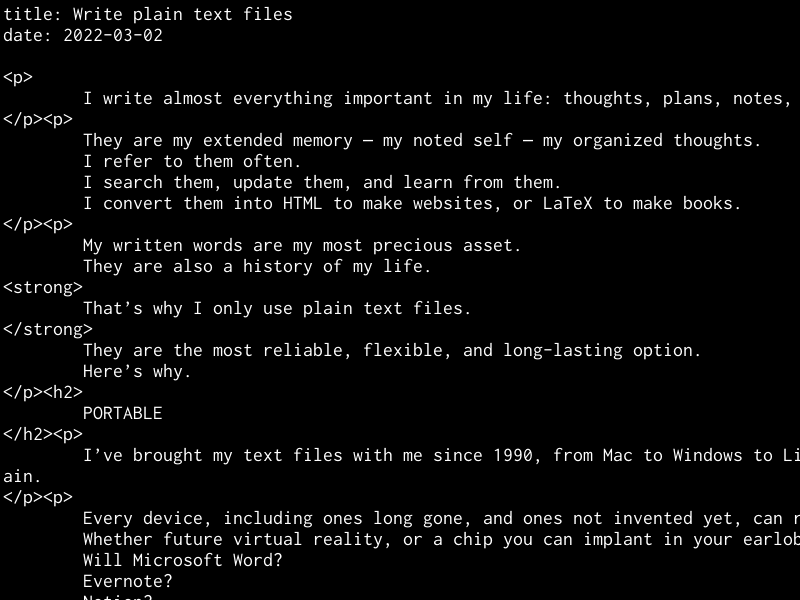
Why do you format your HTML (as in the screenshot) that way?
For translation by my">inchword.com/">my translation app. Lines intented with a tab are meant for translation. I'll explain more in a future post. — Derek
Markdown in Obsidian.md is my preference. Love the ability to organise all my ideas in the same way that my brain does!
I believe there is a case for using tools like Obsidian and Figma to elevate our ability to connect the dots and push creativity.
Very much related to this, I recommend "Thinking on Paper", a thinking tactic by Jean Moroney.
In plain text, in any text editor, or literally on paper, record your thoughts in full sentences. This can be a game changer.
www.thinkingdirections.com/the-one-minute-rule-for-thinking-on-paper/
This is so good regardin plain txt - zettelkasten.de/the-archive/
One could make the same argument for paper and pencil which will survive an EMP or clay tablets (there still digging up 6,000 years after they were written) or petroglyphs that are many times older than that.
In the end, you have to have some sort of faith that the technology you settle on will provide the longevity of access you need to your information.
For me, the primary value of a text-based system is the recovery of all the time you would have lost to a learning curve, putzing around, punding, or scope creep that can then be applied to actually use your information in a more productive manner.
Thanks Derek. I started using VSC with Foam (Markdown) - a free alternative to Roam, and back folders up in private GitHub repositories. foambubble.github.io/foam/ - it's the Zettelkasten method.
Hei,
This is a nice article and honestly. I like to write markdown because of portability and because it has a standard, but even if I have a reader who parses markdown language or not I still read easily.
Even in my blog, I use markdown whyboobo.com/, because doesn't stick me to a certain platform.
Cheers!
I totally agree. I do the same on an app called Focus Writer. So good!
Thank you for articulating exactly why I don't buy into any text or notes or whatever processor! Been an avid plain text lover myself since forever.
On our company's blog softkube.com/blog we use markdown to write the drafts of our posts and then transform to HTML manually and publish.
Currently planning to automate with github.com/getzola/zola a static site generator that will take markdown files as input and generate a static website and it uses kinda the same meta data format you suggest here in your post.
Amazing! Thanks again!
Hi Derek,
Another great article: thanks for sharing.
I too have been using plain text files for many years -- for broadly similar reasons. Plain text is like having a car with no customisations done to it: no colour, no styling. So when you do need those options, with plain text, everything is so much easier: you just import into the program of choice and everything just works (usually).
However often, plain text file format alone can be good enough when you want to focus on thoughts, thinking, creativity. Why: with plain text, there's no distractions, it's just you and the screen. Eyes, brain, fingers, words, all work together to help us create something from nothing.
You can even add plain text placeholders if you want to add graphics later, and to minimise 'unscripted pauses' that may get in the way of your thought streams.
What's even better, is that today, if necessary or if preferred, we can just use voice and free or low cost dictation software to record thoughts to screen and save in plain text file format.
Though sometimes, the big challenge is storage, organisation, and retrieval. Though of course a great Search tool can help with this.
Love this post! I am a big fan of plain old Notepad when I am in a Windows environment … I use it to convert almost everything I grab from the web into plain text. I deviate from your advice though on my Apple devices … I love how Notes syncs everything for me, so that is my guilty pleasure even though it violates the idea of not being dependent on Apple!
The tree remains even when the leaves of today have blown away.
Text files over proprietary just makes sense.
I love this post! Thanks very much, Derek.
Inspired by your Thoughts Journal idea, I have started to use plain text files for my journaling needs. It's the best decision ever! I could just open up a text file and start typing without much thought.
Hi Derek,
A well organised person like yourself would be expected to do this but in reality how many really do. Everything important I value is stored for referrence and filed. That;s the way I've always worked. I agree with everything you said and I take note of a lot of your logic.
Thank you for sharing your thoughts.
Derek, thank you for this. I didn't think that plain text was so useful because I didn't know you could wrap, change margins and font size.. I learnt that today after your article, wow!!
How do we convert word document into plain text? I am a hoarder of stuff I find on the website, but into Word.
Also, what else do you have in your overall hierarchy- how do you sort business/family/personal/other files?
Brilliant! I have always thought (worried) about this, when the obvious, counterintuitive solution was right in front. Thanks, buddy.
Fully agree with this. I recently shifted all my notes to markdown format.
Similar in flexibility to txt files but with the added benefit of formatting as well as being able to use Obsidian on top of the files to link notes together
Nothing beats the simplicity of plain text, I still use it somehow for quick note-taking during online meeting/webinars, then copy-pasted to Joplin. I can't remember markdown format even if I try, and I really enjoy having my notes being synced so I can access from laptop and phone anytime, both offline and online. I need help from app to do that, Joplin works best for me by far. As always, thanks for sharing your thoughts.
Hi,
I use Zim for all my personnal writings. Blog posts, notes, novells and the like.
All is stored in text files with pics nearby.
Its interface shows the page (file) tree on the left. I have the Best of both worlds : text files and a quite simple gui.
Since it's text files, a simple editor suffices when I'm not home with only my usb key.
Another +1 for Obsidion
I have integrated Obsidion with my GitHub, so every time I write a note, I push the update as a code to my private GitHub repo. Although I have my Obsidion vault in Google drive, GitHub provides two advantages:
1) Alternate back-up of my notes
2) Portability - I have downloaded the GitHub app and can read my notes on any device, anywhere.
Derek and everyone, yes, plain text files = minimalism
Interesting post! I started learning how to program in Java about 4 months ago. Honestly shocked that this is something I can do and understand. I'm living in Act II in this drama we call life. (I'm almost 48!) Your interview with Tim Ferriss inspired me. I think EVERYONE should learn a little coding, even if it's just one of those free "Hour of Coding" classes online. Yesterday, I created a random number generator that can be used in place of a 6-sided dice. Kid's stuff, really, but I sure felt amazed and thrilled when the program worked! Take Care and keep sharing your posts. I enjoy reading them.
100% agree with this one, Dereck.
I've been using plaintext to keep my meeting minutes at work and there is something liberating about it.
Another point that I love about plaintext: good old trusty notepad is probably the fastest app to load on a Windows computer (at least that has been my personal experience) so it is extremely easy to just press windows + "no" + enter and start typing right away
I write all my files in bits.
Great article. Also, if you need your text file to be a bit more secure/private, you can always encrypt them when using vim ( -x flag )..and I don't think vim will go away anytime soon! Good stuff.
I'm currently using markdown files with Roam research. I wont lie, I'm a bit worried that it isn't 100% future proof but it is basic enough that I can migrate in extremis.
Hi Derek, loved to know that you do that. I am not so organized like you but I have my main material all published in books, articles and printed in paper for my archives.
And now I am printing my photo archives and notes too. I printed the list of my contacts in social medias too.
Thank you dear for sharing. Much love , Anaya.
Great blog post. I pick-up emacs recently. Org mode for Emacs is definitely one of the features I'll explore more after I'm familiar with emacs environment.
Thanks again for sharing. :)
Same experience here. The only thing I’d add - and others have implied - is search-ability. Pick whatever tool you’d like. I prefer grep, but someone less technical can use their OS search bar. Interoperability really is a dream.
LOVE IT!
Here's my little ode to text files from a blog post of my own a dozen years ago:
When we write stuff in plaintext format, our lives are be better for it.
We can use plain ol’ text on any platform, any device, at any point in time. There is nothing to convert, and nothing to format. Nothing will ever be more portable or searchable or translatable or ultimately useful. We can copy and paste it to and from anything (social media, websites, forms, emails, code, text messages on your phone, etc.) without any extra work or workarounds or errors to fix. It just works, and anything else is ultimately more work.
Text is Distractionless
I’ve learned to love the act of creative writing in plain text. It’s ideal for creating drafts and initial planning for pretty much anything. I can’t get caught up in anything but the words themselves, and I simply produce a greater volume of words and higher quality of language at a faster pace in text format than any other. Scripts start here, lists start here, even blog posts like this one start in a text file.
Text is Clear
As a consultant, I always provide deliverables in plaintext format whenever possible, because the work then speaks for itself. Yes, we can make things flashy and pretty, but wouldn’t you rather make them clear and useful, and be done with it? Have you ever done any project anywhere that has their formatting templates built out correctly and rolled out consistently across the organization? You could learn their way of working around this gap, you could try and fix the gap yourself, or you can just ignore the gap and deliver plain text. Your mileage may vary, but I’m usually thanked for it. Text files take up an infinitesimal amount of space compared to ANY other document format. I made the two simple files in the header image to illustrate my point. That’s a ratio of 461,538 to 1 — without even needing any compression. Fairly convincing, yes?
Text is Flexible
What is easiest to translate? Text.
What is quickest to search using the default search built into your computer? Text.
What converts into any other written format easier than every other written format? Text.
What can you export every other written format to? Text(.CSV and .TAB are really just text, y’know).
What is best for users to read comfortably and adjust easily for their optimum vision? Text.
What is best for those with disabilities of any sort? Text.
What can you hand to a coder and a salesperson and CEO and customer and know they can read and understand it? Ahem, yes. You get the idea.
Text alone endures
I’ll bet you that in a generation or two, few will even remember what a .DOCX or .OPD file is or what it is for (remember .WPD, .HWP, .SXW? I thought not…). And you can’t open those in the ubiquitous text editor, or if you do it’s all gobbledegook. .TXT will work anywhere now and in the future just as well as it did on a monochrome screen in 70s. You will always have it, it will never go bad.
There’s an old Chinese proverb…
Even the strongest memory is not so strong as faded ink.
Very true. And now I’d like to extend it with my own, new proverb…
Even the best of formats is not so strong as plain text.
…Yeah, okay. Maybe my proverb could still use a little help. Guess I’ll just work on that in my text file.
Nicely said. Remind me this one I used some years ago as source ideas to my personal organization (he says Windows but most of it is similar everywhere):
plaintext-productivity.net/
Great article!
I can’t see a way to do threaded replies, so this is for @Barry in [comment #50](sive.rs/plaintext#comment-76902)
You could have a look at live-coding environments such as [Sonic Pi](sonic-pi.net) or [Orca](100r.co/site/orca.html). These are text-based musical creation environments. But digital music notation will probably never be as portable as text files because (like code) they depend on an interpreter. The closest equivalent is probably reducing finished musical pieces down to its components in standardized formats (MIDI, WAV & CV).
Orca in particular is interesting as the developers are very oriented around minimalism and open-source. They’ve recently developed a cross-platform assembly language called UXN that works on Linux, Mac, Windows, Android, iOS, web, BSS and even Plan9. They’ve ported most of their open source tools to it, including Orca. It’s an interesting experiment in long-term thinking about the other major form of digital expression (code). As of now, most coding platforms experience digital rot quite quickly. Code that compiled 10 years ago likely won’t today, and most certainly code doesn’t port across OS platforms without significant effort. So they decided to do the porting work just once (porting the UXN virtual machine that runs the assembly code). It’s a very minimalist take, suitable for Pi’s and the like. Very interesting.
Thanks for this!
As a long-time Evernote user, I love this challenge to my reliance on that company to essentially "store my thoughts and ideas" long-term.
At the very least this article has led me to data-dump my Evernote account to a text file, and I'll give thought to de-coupling myself from these convenience tools.
Links to lots of resources along these lines - plaintextproject.online/
KISS philosophy
Love it
Regarding music in plain text: there is ABC notation.
abcnotation.com/
For those who would love to write scripts for TV and movies, there is a variant of markdown called "fountain."
fountain.io/
How does Unicode figure in to your plain text thinking? Little-endian vs big-endian, BOM, u16, u32, character sets, etc.?
I completely agree. The benefits are numerous and the price is right.
I started keeping text files on my employers mainframe in 1979. I still have a lot of them - everything was in caps.
Sold! Totally agree! But imagine being a complete idiot about this: HOW do I start writing only in plain text, not in Google Docs, not in Word, not on 750words.com, etc.?
Is there a similar universal, platform-independent format for spreadsheets?
Is it .csv?
Thanks for great advice Derek!
--- Robert Higgins
Hi Derek and thanks for your insights which always seem to point to simplicity as the ultimate sophistication. Love this idea, but was wondering if visually (like in your screenshot) seeing thousands of files and directories doesn't feel somewhat overwheming, simply for the high numbers involved, or if maybe instead it gives an overall sense of orderliness which makes it manageable? Thanks! :)
Sounds extremely interesting. Thanks again..
I've been using DokuWiki for years precisely because it stores content in directories of text files. There is wiki markup in there, but that's also just text.
The best thing about plain text is that git is optomised for it.
It also sits along side and does not alter the files.
You can track changes and versions of you documents without resorting to multiple copies.
I've been using Scrivener for years to write books, blog posts, and other forms of writing. I know I'll probably outlast these, and it's a pain to always rely on app updates, but I love the simplicity these apps bring. And I can always export them as plain text if I want. Great post as food for thought.
Or, I could just type away on my Hermes 3000, or write everything down on a Foolscap pad..
I enjoyed the read! Yes, universal formats are tried and true. Corporations will try to sell you on the latest and greatest, but often times, you simply don't need it. And when this happens, all it does is create clutter. And the clutter certainly is preventing progress from happening.
Use the right tool for the job.
Might store in plain text, might not.
Cries of "Don't Trust Big Software!" are becoming tired.
@Robert Higgins
.CSV (and I think the tab separated value format) does indeed import into and export out of many spreadsheets, but I believe you're only getting the raw data of rows and columns.
I've read of OpenDocument Spreadsheet Format (ODS), but have no experience with it.
www.loc.gov/preservation/digital/formats/fdd/fdd000439.shtml
support.microsoft.com/en-us/office/differences-between-the-opendocument-spreadsheet-ods-format-and-the-excel-for-windows-xlsx-format-3db958c8-e0ac-49a5-9965-2c2f8afbd960
Funny thing, I've been using plain text exclusively since I first read your recommendation for pre saving a bio on CD Baby with text edit, and not just relying on the site to save it. I use it for everything, including my own password system, and my creative writing and poems...
org-mode is my plain text format of choice. It handles outlining, journaling, todos and task management, tagging, linking, calendaring and more, all in a human readable markup. I highly recommend checking it out.
While you are at it check out braintool.org - its a browser extension I wrote to merge my plain text notes with notes and links captured while bookmarking browser tabs.
I use text files a lot for pretty much the same reasons, though I occasionally use Word for longer form writing and sometimes I write in email (Thunderbird) if I want extra features like rich text, auto backups, and the easy ability to start writing on one device and finish on another without using separate cloud storage service Dropbox. And I often write on paper first because it helps me get past writer's block more easily for some reason.
Although the .doc and .docx formats may become obsolete eventually, I doubt it'll happen quickly enough to create problems for me.
That said, I too avoid relying on proprietary cloud-based apps if I can help it, and I when I do, it's only for thoughts and ideas I can afford to lose.
I also write in plain text for note taking.
I usually just run `$ vim my_markdown_note_directory`, search and edit my notes.
And I create an alias `note` in `.zshrc` for that. (This is another benefit of plain text configuration on Mac/Linux/Unix).
I also see what @ZZ mentioned above. I figure out a solution using Emacs + Org-Roam + Org-Roam-UI. I've been using this setup for a few weeks, and feel I can better track and organize my thoughts now. (I use Emacs for this Zettelkasten-wise note-taking only, so Emacs "becomes easier to learn.)
> "What I find really hard is being able to track and retain my thoughts and writing in a way without losing it."
As for file or directory tracking, I'm using Hook by hookproductivity.com. But this app is not open source.
Love it Derek!
What top level directories do you use?
Do things get promoted from thoughts to ideas to projects?
true: most new technology are actually time sucks, because one need to update, maintain, etc etc.
just focus on whats really crucial to your life, and use tools that do their job but don't need much attention for themselves.
Jumping in after only having read half (of the 159!) comments so far:
Hell, yeah to plain text.
I have been using Workflowy for a decade or so, and am now starting to use Logseq, which is akin to Obsidian, with different strengths and weaknesses (in fact, lots of people seem to be using both, since they can work with the same files and file structures without messing each other up).
I used to make my living writing tools to convert between markup languages (LaTeX to Interleaf, and the like), so non-plain-text formats make me growl.
Ok, I'm all for plain text and do the majority of my own writing in text editors. But this bit...
"Or if you don’t want to do it yourself, then it’s easy to find someone who can. Anyone who’s been programming for more than a week should be able to do it easily."
Setting aside the question of how many coders would welcome this kind of request from a random acquaintance...
I'm teaching 50 university students to code right now, students in their first week with zero experience. At least half are like, "wait! what's an array again?"
I am constantly telling people programming is easier than they think. But the idea of assigning my students to build a custom file parsing and sorting interface in their second week, and expecting them to accomplish such a task "easily," is so cruelly unrealistic it's comical.
I was amused reading this because everyone starts out with our usual Derek worship (hey I'm a huge fan too!) yes yes yes you're so right Derek for a few sentences then all the BUTS start shakin and basically refute the original thesis of the topic. But I use xyz and RiboflavinX (enter your favorite not quite plain text application / format here) to make the (no longer) plain text easier to deal with, completely ignoring the premise that nothing last forever except (in some way) plain text. Too funny! ;-)
I love Roam Research. It has a lot of these features you mentioned but perhaps allows for too much research and less focused on output
Love the idea. Currently use Bear notes. Is there a way to link notes using plain text? For example, in Bear and many other apps you use [[this syntax]] to link to another note and the app creates a link.
Thought provoking as always. Thanks, Derek.
I was considering Notion, your points around openness are valid. I currently use Google Workspace for task lists, calendar, email and docs.
Directory structures have become tricky for me in the past; do I put this file in X or Y or create Z for it? Maybe it's time to revisit with some clear structure, at least for my personal stuff.
Tools like syncthing.net make moving files between devices simple enough.
I learn amazing things from you -
Stuff I didn't know were available - or even existed.
I can't thank you enough for all you share.
Amazing Wonders to You,
-g-
This is certainly giving me a lot to think about. Thank you, Derek! And thank you to everyone’s responses.
This is very cool advice! I certainly would keep in mind of it. All the best regards! Gong
169 comments tl;dr but tonight I was adding a note to Google Keep and I thought about this post. Yeah, yeah, plain text is portable. But I don't allow myself to be so constrained. I call my system SaNE, which stands for Simply a Neat Environment. It is plain text at its core. Emacs is my shell. Neat as in tidy and neat as in cool.
Here's my org-mode outline. I started it 11 years ago. Blew the dust off it today. Needs more work.
* [SANE=Simply A Neat Environment] qqsane
work tips: a [p10n=presentation]
** flesh out the following and integrate into outline below
*** use strong encryption
- diceware.com
- GPG
- shred(1)
*** back up files
*** track time in a spreadsheet
*** use a notes file
*** use a CLI file
*** use a factoids file
*** use a scratchpad file
*** use meaningful subjects, including tags, in email
*** use a good email client
*** use a good Web browser
*** use a good IM client
*** use the "Getting Things Done" (GTD) system
*** archive files once a year
** intro
I will demonstrate my system, which is implemented with open source tools (Ubuntu, Thunderbird, Firefox, Pidgin, Open Office, GNU Emacs). I made up "SANE" as a catchy acronym for it, which stands for "Simply A Neat Environment." The session will be interactive — attendees will be encouraged to critique the system and to compare and contrast it with their own way of doing things.
*** been perfecting for years
**** lobbied for 3 weeks when I started my job out of college to custominze Gosling's emacs in 1984
**** ergokeys
*** based on GTD, but much more nuts & bolts; choose what will work for you
*** kudos to org-mode for giving me the final piece that convinced me to write this p10n
*** Also kudos to Git. Linus is the GOAT. He invented Got after he invented Linux.
** ~/emacs/ergokeys.el
*** bookmarks
*** execute commands as part of a process instead of writing scripts with complex logic
*** logical lines vs. physical lines: grid-like navigation
*** /more/
** GTD / 43 folders
*** Outlook - I have been assimilated; using this as an ice breaker to speak the language of the typical knowledge worker
**** triage
**** Act today
**** Inbox, Unread
**** Unread Mail
**** Inbox
**** using flags
**** using categories
**** using keywords (both common and unique) in subject lines, including editing messages others have sent for better filing
***** Outlook searches subject lines extremely fast; makes for versatile search folders
***** easy issue IDs for unique tracking (e.g. swmfg-, admin-) - sub-minute resolution effectively guarantees unique IDs
***** general purpose tags, e.g. tbc000
**** using search folders to take advantage of keywords in subject lines
**** folders: very broad definitions (e.g. orders vs. everything else); archive by year; cache
**** Delete Eventually
***** safer than Recycle Bin; save RB for *real* trash
***** storage is cheap
***** delete from oldest to newest in theory, but I avoid doing it for years at a time
*** org-mode rocks!
**** love structured editing - good use of color coding
**** organized my notes
**** organized my January, 2012 projects (MITEC, annual letter, this p10n)
**** trivial to integrate with the way I use Evernote (EN)
*** ~/emacs/my-gtd.el
**** ~/year/12/records/cmds.p
**** ~/year/12/records/notes.txt
**** ~/records/factoids.p
**** ~/vzdor/scratchpad
**** ~/records/scratchpad.txt
** ($f8p#Backup procedure)
** ($f8p#encryption|TXTcryptJ)
** time tracking
*** spiral notebook
**** practice cursive writing to exercise fine brain's motor skills
**** "the longer you sit, the sooner you die"
**** time to the minute
**** lesson learned photographing each completed page and storing in EN: never referred back to it
*** ~/year/11/records/times
** archive files once a year
** mysms - trail of notes I send my family (deprecated - use Google Voice and Google Takeout)
** list-matching-lines demo
(list-matching-lines "my mistake")
(list-matching-lines "grr\\|d'oh\\|duh")
(list-matching-lines "p/n")
(list-matching-lines "SW Mfg")
(list-matching-lines "RD= rocks")
(list-matching-lines "bose")
(list-matching-lines "is down")
(list-matching-lines "CPL_Opts")
(list-matching-lines "SW_inventory")
(list-matching-lines "W2603A")
(list-matching-lines "11285")
** ergo stretches
Also, I did search and no one mentioned Bit Literacy: Productivity in the Age of Information and E-mail Overload by Mark Hurst. Read it! It's a classic.
What's your naming convention?
Wise words. I lost years of blogging when Google+ pulled the plug.
I do the same.
And for graphics, I try to keep it to text too.
Mainly using monodraw.helftone.com/
But I’m sure there are other tools like this one.
My single tool is a homemade tiny wiki, lambdatank, usable from any web browser and storing pages as text files. Instead of Markdown I structure pages using a homemade language, lambdatalk, a dialect of lambda-calculus, inspired by Lisp, a single syntax built on HTML, CSS, JAVASCRIPT, DOM, ... With which I can boldify "Hello World" writing {b Hello World}, I can compute the diagonal of a square rectangle writing {sqrt {+ {* 3 3} {* 4 4}}}, create functions, draw graphics, play with the Mandelbrot set, as it can be seen here: http://lambdaway.free.fr
So I totally agree with you, and my datas will be free forever.
Alain Marty
I use Google Docs in a Google Workspace account. I have versions going back to when I created the document, great search, the ability to covert to seven different formats including plain test and I never worry about losing anything.
I tried this for a while, but found not being able to hyperlink, bold, underline or italics a real drawback. Especially the hyperlinking. Maybe you could do a follow-up article addressing this.
I'm also very curious to know if you write you blog posts in plain text, raw-coding the HTML. I've been switching to raw-coding my sites and abandoning Wordpress for similar reasons you cited above.
That said, when it comes to novel writing, Scrivener has been such a valuable tool, I'm don't mind being chained to the company.
Where are you safely and securely storing all of these text files?
As I've moved from computer to computer and platform to platform -- and have had hard drives die as well -- having access to this written "legacy of words" is critical.
The main reason I use Google Drive is so I can access my work without having to remember to put it on a thumb drive.
Would love to read your take on that side of working with text files.
Each operating system has a method for creating encrypted drives or partitions. On Mac I create an encrypted DMG file, then open it with a password when using it, and eject when done. On OpenBSD and Linux I do full-disk encryption both for my computer and each USB backup. — Derek
Text docs are great and I find that I naturally go to them for making quick notes, drafting text etc. However, due to the nature of my work, I often want to capture images etc directly into my notes (such as a graph with notes about it) and the simple notepad does not support that. Do other proponents of text docs have any recommendations for this?
You know, it is totally amazing that everybody and their uncle is programmed to use Microsoft Word and such. We're all taught that Word is supposedly the standard for text production and such. We email people DOCX files, and DOC files without a thought, not thinking that at some point in the future those files will no longer be accessible.
Plain text just works no matter what operating system and computing platform you're on. It is robust, reliable, and it doesn't crash. Not only this, but text files can't contain viruses. Word files can contain macro viruses and such. Although I don't like Microsoft Word myself, if you use it, make sure that you always make a plain text backup copy of whatever it is that you write in Word so that if for any reason Microsoft Word decides to crash, you will at least have your plain text version of your document to fall back on.
You should really get in the habit of using plain text because it is so much simpler and easier. Sure, it doesn't have all that fancy formatting, but it does contain the information that you want it to contain and that's the most important thing.
If you would like to know more about plain text, then you should get my book entitled, A Plain Defense For Plain Text. It contains more than enough information to convince you to use plain text. Not nly that, but it also comes with a couple of bonuses too such as a guide for markdown, and a huge collection of plain text editors.
The book along with the bonuses is just $2.99, and you can order it by sending me an email to the address here below. Just put in the subject line "I am Interested in A Plain Defense For Plain Text"
dbrwn@aol.com
Once you begin to use plain text, you will definitely be thanking all those who have directed you to it because as you will soon see, plain text is really the most portable and easiest file format for digital written communication to use.
I'm surprised to not see tiddlywiki.com/ show up amongst the comments so far. It allows users to create a wiki in a single html file. It's got fast search functionality, smart tagging capabilities, and a deep range of macros you can run on your data to present it in any way you like.
Here's an example of someone using it for a huge Zettelkasten: zettelkasten.sorenbjornstad.com/
It's flexible enough to perform many different functions on my website, from blog to portfolio to public notes system: thannymack.com/
And of course, everything is written in plain text and can be exported in the unlikely event that html files are no longer readable by computers.
I used a long abandoned project (AFAIK), WikidPad.
I mastered the features…. Made myself my own awesome little wiki that’s searchable…. But I’ve lost entries b/c hiccups here and there with the database.
Now I need to go back and transfer these notes manually.
Was thinking about MS Onenote….but this article has me thinking again.
This was my policy for many years, and my first text files date back to 1983 (BBC Micro, RML 380Z, Tandy 100). However, I did switch a few years ago to Apple Notes. Anything can happen, of course, but there is always going to be a conversion solution in the incredibly unlikely event that Apple disappears.
I also use Scrivener, but that is just a database of RTF files, and you can access them directly.
So for me, I'm taking perhaps 0.0001% risk to have a lot of convenience, which is a balance which works for me.
I love this idea - and used to do something very similar before jumping to online formats (Google Keep, nowadays).
How do you keep one copy? Is the master copy on your phone, for example, and you just make manual backups to computer?
Thank you for suggesting that I try SVG files for vector graphics. I had been wondering how to update my wall chart, "Systems Biology of Human Aging
Network Model", which I created in AppleWorks-Draw, which is no longer supported in newer MacOS. legendarypharma.com/chartbg.html
Several people have asked how to convert stuff written in a MS Word file into a plain text file. I do it simply by "copy" and "paste". It has the added advantage of causing me to pause, re-read, and maybe edit or leave out extraneous words.
LOL just as I am reconciling tons of writing from too many sources (html - doc - open office - rtf - notes - I am dumping everything in TextEdit for now. I have to reformat the formatting and sometimes try to insert some breathing space between the on top of each other sentences.. Lest I go nuts. Hurray for .txt!
I've got text files from years ago too. Decades even.
Unfortunately some of them are on 5.25 inch floppies or zip disks (remember those?) and I no longer have a functioning device that can read them.
I did transfer some of the files to 3.5 inch floppies years ago, but I used DoubleSpace (another trip down memory lane!) to format the floppies and I no longer use the DOS or Windows operating system required to uncompress them. Oops.
So, while the plaintext file format is still usable, the underlying *physical layer* might not be. Something to think about if you're concerned about obsolescence.
You are not multi-device user? Never write on a phone or second computer? Just store on an encrypted HD?
I'm starting to suspect that this article is about more than file formats... ;)
are you aware of the lindy effect? en.wikipedia.org/wiki/Lindy_effect
it's pretty much what you describe. I try to apply it everywhere in my life.
you dont really need an app to track your weight or your habits, just use a piece of paper.
can't leak your info with the world and can't be down or out of business
Very interesting article, thanks. I use Evernote but am convinced by your arguments. Please can I get some advice on using Plain Text on my phone and pc? Thanks in advance.
This looks useful - www.howtogeek.com/465420/what-is-plain-text/. I should have searched first - excuse full of covid…
Does anyone use “iA writer”?
Funny seeing all these people suggest Obsidian. Did you not read the same post I did? Markdown, while a good format, is not plaintext. Obsidian has a development team that can dissolve at any time. .txt does not.
I am thinking about converting from Evernote to plain text. The search on Android is so handy though - how would you replicate this with plain text?
Have you ever heard of Obsidian? It's a note taking program that writes in plain text. The cool thing about it is that you can link your notes with other notes, similar to a Wikipedia page. It allows for natural flow of thought going from one idea to another, versus each note being completely isolated and just being put into a single category/folder.
Basically, it's like a digital version of the zettelkasten system. It's super practical for actually remembering the things we learn and write about, because we're always writing new notes and linking ideas to one another until your entire knowledgebase is vast and interconnected.
Congratulations and thank you for a great blog post, which was valuable for me since I want to write my own book using Markdown. I would really appreciate if anyone could recommend any tools or technologies that I can use. Especially any tool that I can use for drawing nice diagrams. Thank you also for all the valuable info shared in the comments.
Great post, Derek. There are plenty of easy apps, etc to work with on a Mac/PC, but how are you handling a .txt workflow on a mobile/tablet?
Hi Derek, it's Ki. Just came out of 2+ years of digital hibernation, had an inkling you would have answers for me and my current life conundrums. :D
And there, it appeared:
"Peace and focus come when you stop looking for more."
Thank you.
Hello Derek,
Yes totally agree. I am almost there as I am using Zettlr www.zettlr.com/.
It is md yes, but locally and readable with any text editor.
As it is open source I do not count it as a commercial solution.
I would transform files easily.
I am building by second brain as the Zettlekasten movement states it.
I think this system ticks almost all the points in the post.
Many thanks
I write everything down with a pen and a piece of paper.......I've lost things using Microsoft. With paper.....I know I've got it.
I have been using Flashnote of Sofyvoile.com
All in plain text. I use it also to get plain text out of MsWord documents by simple copy paste! Strips all formatting!
How do you handle tables of data? csv files?
I was coming to post about Obsidian but I won't add anything. Others have already stated enought.
saeculara, markdown is text, it can be opened in any text editor, and the light markup it contains does not make the text illegible. Modern tools like Obsidian embed links (pointers to other text files) as well. This means your collection of text files is rich in connectivity, whether Obsidian survives or not. As long as Notepad, Emacs, or Vim are around your content is safe and legible in markdown.
"Don't depend on any tool that needs an internet connection"
I agree, but it's becoming harder to do that. You used to be able to insert a physical disc/cd into a computer and have a program on your completely offline computer. Now you are expected to be "always online" so that you can rent programs. Whenever I ask people how to have a computer offline like the old days, people just shrug, or they start talking to me about virtual machines and stuff that is complicated. I guess not many people care about having an offline device anymore.
Thaneal's (#180) mention of TiddlyWiki needs a note of support. Do try any of the three o his links there to see its (TW's) expression. Did he mention "free", no corporate handles, a supportive community, where TW's founding light says he built it to free non-programmers from a dependency on commercial tools.
In full disclosure, I also write with emacs, vim, and even good ole' ed.
Brilliant! Wish I had thought of this myself years ago! File convertion is always a hustle, creating it in ”raw” gives you all the tools to bring it into….whatever format it can be used in. Love it! Thanks for bringing me back to the source!
Finally got round to reading the article, Derek. Useful. Most of my songs are written on a piece of paper with a pen or in a notebook then later typed into an .odt and saved in a directory. I think I wrote my "The Squits Family" books by typing into a .doc and saving as I worked through my hand-written structure of 30-odd chapters.
You're so right: deliberately zone out of being on-line. I've left Facebook and reckon saved myself shed-load of wasted hours.
Best wishes John (Wiltshire, UK)
Starting to use txt files after this, was looking for a better format than Word or Google Docs. Thanks for this.
100% I use iA Writer – for over a decade now … I think over the years they added some features and integrations … but I still love it for the initial purpose it was created … just a beautiful completely uncluttered writing environment with a great font (nitti) and no further disctractions. I think they actually invented „focus mode“ that later was also adopted by word. Lately I started toying around with roam … but I am not sure yet where it‘s going …
I've just started writing plain text files, mainly using the Notepad app which comes with Windows, partly inspired by reading this post, and partly getting annoyed with using Google Docs and Microsoft Word. I'm currently testing the Notepad app out with taking notes, and so far, so good. I like how it has no distractions, and that I can just focus on what matters the most: the act of writing, instead of having to deal with spellcheck, and countless other things. It's a bit like having a digital typewriter, and I like that the .txt format isn't owned by anyone or any company, so that I can get up and use those files on different pieces of software if I wanted to.
What about pdfs? If I have a document like a bill or a contract or something like that, would it be better to save the pdf or a photo of it as a jpeg?
Hey Derek,
Thanks for this post and all the other great content.
How do you handle linking between multiple files and cross references?
Thanks
I don't. I've never felt the need for that. — Derek
Now when it comes to digital publishing, I believe that every e-book should at least have a plain text version. Why? Well think about it for a moment. Like I had mentioned in a previous comment, Kindle will someday update their software and file format and when they do, then that would mean that the older books that were written in Kindle's prior format will no longer be readable.
However, if those books were also in plain text format, then they could still be read on any device in the future. I honestly believe that all book publishing companies such as Amazon Kindle and such should offer a plain text version of their books so that people with print disabilities and those who don't want to deal with proprietary file formats can still read the books without having to worry about loading the books into a proprietary program just to read them like you do with all of the book publishing company's books.
Plain text is really the best publishing file format simply because it is totally accessible and universal, and it is far more portable even than PDF documents are because even with PDF files, you still need a proprietary reader just to view them in. You can't use just any old program to view them. That is the case with all proprietary file formats. They all need their proprietary programs to ether view or edit them whereas plain text doesn't need any specialized programs to read or edit them.
They can be read and edited inside any program that is able to open them, and that includes a whole lot of text editors and word processors. Plain text isn't tied to just one particular program. This is why plain text should have been labeled as an e-book standard because it is so ubiquitous. Plain text just simply works and it will outlast every single written file format that has been produced, or will ever be produced in the future.
So in reality, all the money and programming that was spent on creating that new file format will just go to waste because at some point in the future, that file format will be pushed aside to make room for yet another file format scheme.
Active Noise Cancellation and the ability to write in plain text are the two best things that have happened to me in the last two years. I write in MD. I use the Obsidian editor. Basically, I have : Local files on my hard disk and on Icloud. Plain text, no proprietary format. MD for maximum portability. Minimal formatting and no distractions is a must for me. It's like being a member of a very private club.
Hi Derek! I agree with all your points, and I have been a "plaintext purist" with an identical approach as you for about a decade. I would also add the ability to use your preferred editor (e.g. neovim) over the built-in text editor of a notes app, is a great plus.
I also noticed your "see no need for linking between content" comment somewhere here, and i read the linked "everything buckets" article. (it makes some good points, and some poor ones IMHO).
Here's some issues I found with the purist way:
1) I could often not commit to a single consistent hierarchy. many pieces of content could be "approached from multiple directions". In particular I would often discuss the same, or similar topics with different people or in different meetings at different times. Defining a data model for this was very painful and involved a lot of scripting for custom "views", symlink maintenance, etc. Sometimes content _within_ files would deserved linking, which i had no solution for.
2) I love the idea that I have separate notes for separate projects, separate out work topics from personal matters, etc., yet i want to define tasks (todo's) along with the notes about the project notes, but i also wanted centralized overviews of all my pending tasks.
3) Realistically, rich media goes alongside text (e.g. when working on blog posts, making notes on places or excercises, and i also have a need for making notes/comments when processing reports or contracts that are pdf are doc files.
I recenctly stumbled upon Logseq and it solves these issues. I recommend you give it a good look. The desktop app is open source, and everything is still defined within local plaintext markdown (and org mode) files. They add some commercialization on top (like encrypted cloud sync), which you can ignore.
You can define (multiple) hierachies as needed, link information and use queries to generate overaching views, extracting snippets matching certain tags or content. I didn't think I would use this all that much, but it feels liberating.
You can embed media, make highlights inside pdfs, link to them and comment on them, and do the same for kindle books. Sure you can do the same with other tools, but having it all in one place does streamline things quite a bit. It also makes it easy to embed youtube videos and annotate certain timepoints. This means I can learn better and faster.
The main downsides I see:
1) I can still edit the same files with vim, but it's a "disjoint" experience
2) logseq may be open source, but that doesn't mean i fully trust it yet, that the project will live on, or that there won't be at least a bit of migration work if the project does die (it may be based on plaintext markdown, but "adds features on top")
Dieter
Quiet and focused. Love it.
Hi Derek,
May I Know what server side technologies do you use for this comment section?
-Hein
A Ruby script using the PostgreSQL listen function, so when a new comment is added to the database, it outputs updated static HTML. — Derek
I personally have an objection, that is, I can consider not using folders and using big ass text.
I have more than a few thousand lines of logs, and they work very well. The ram of modern computers is very big.
When I realized note taking is note writing, I started thinking of iA Writer which is plain text. Even though sometimes I always switched back to Evernote and Apple Notes to have a look (I do admit I still don't want to give up visual and text together), I have stronger and stronger urge to go back to plain text. The bigger problem than the possibilities of companies' shutting down is that their app experiences can be so scary that the bugs can be so annoying or making you lose your valuable records.
Since using iA Writer which has some additional features, I started developing my own formats other than markdown: symbols in Japanese keyboard are sometimes useful.
Most importantly when I write I am talking to myself. When I am talking to myself I am structuring my thoughts so that I can figure out what to do next. This is what writing can benefit me compared to just thinking (you can easily develop unnecessary negative thoughts without writing), and this is what most note taking apps have already replaced this most important feature with many seemingly useful/convenient features.
Hardwares are much more powerful but softwares still suck. Developers just want us to spend more time on their apps but not allow us to deep think. At the end I wanna share this article: Brilliant Hardware in the Valley of the Software Slump (craigmod.com/essays/software_slump/)
Single File, seems a compact solution, similar to sqlite minus proprietary.
Hi, Derek! Great reflection.
What do you think about textfiles using markdown format? I think it's the reliable evolution of plaintext and it preserves all the advantages you listed above. I want to hear your thoughts about it.
Thank you!
Absolutely agree. .txt or .md, there’s a poetic quality to these files, stripped from eye candy where form follows function. Simple is beautiful.
I LOVE text files as well, for every single personal use-case I have for notes.
I tried a lot of products, and text files are just so much better at the end. Put them in a Git repo, or a sync service like Google Drive/Dropbox, and you have cross device syncing easy-peezy.
I wrote about the format I use for my work/project oriented notes in www.lambrospetrou.com/articles/the-worklog-format-1/.
My current setup is basically a private Git repository, VSCode, and Markdown files. Any supporting content like PDFs, images, zip archives, referenced by the notes are also in the repository and I just use their relative path in the notes.
Work.txt & Life.txt. That's it.
Totally agree. What works for me best is markdown. I therefore use
[zettlr](www.zettlr.com), a markdown editor which converts .md
to .html, .pdf or slide decks when needed.
That is what i been doing.
Plain text is not only a taking notes stragedy, but also a reflextion of life style.
My current blog uses a PHP program and of course the data storage is all using TXT storage. Articles and comments are stored using TXT, which I feel is cool.
I'm now getting ready to separate the front and back end, still using TXT storage, but of course it's not live yet.
QQ.MD currently uses txt storage.
I wish there was an online blogging format in plain text with an allowance for search crawlers. Come true, wish.
Have you seen or used obsidian? It's an open source app that reads and saves everything in plain text files and folders.
Hee Derek,
Where do you store these plain text files? Do you have some kind of backup/recovery strategy? And what about sensitive material? Do you use some kind of encryption? Has it been a consideration? Do you trust third parties with this data in plain text?
Best regards,
David
The Netherlands
My hard drive is encrypted, and I save them in regular directories as shown here. I back them up to other encrypted computers and drives that I own or rent around the world. No third parties get the plain text. — Derek
I agree with your sentiment. I went all in on Org mode recently and havent looked back.
I would have bought a Remarkable tablet - a lovely piece of technology for digitising handwriting - until I discovered it’s a platform that does not support plain text. How could they do that?!
Excellent!
Thanks
I just came across this post, and am actively looking for a tool for note taking that is not Evernote. It irritates me, takes forever to load and I pay for it. This seems like a great option. The one question I have though, is how can I make my notes visible across devices? I use a laptop and an iPad and need to see them in both spots. Is there a good way to do that? Thanks
Try some of the other mentioned in the comments here, like obsidian.md/ or syncthing.net/ — Derek
Great approach! You need search? Use grep. It will work fine
Hi Derek,
I recently found your "Tech Independence" guide and inspired by it. I'm currently use Joplin as a second brain. Tiago Forte's "Second Brain" system fits well, but now I'm considering your txt approach, since it's universal. Even Joplin limits export formats. Question is, how do you edit txt in ios? And how to setup so that I can edit my txt from multiple device? A feature like Joplin/Evernote.
Hey,
This is the solution I’m using to write plain text across devices.
A git repository on a server that is accessible on my devices.
For iOS, I’m using an app called Working Copy to do git pull/push and to edit could be many apps like Obsidian or Textastic (my choice).
Hope to help other with this solution
Cheers,
Alex
Have you tried org mode?
Plain page with black lines
Try plaintext email messages ...
Hi Derek,
I came across the OKF-project on GitHub and could not help myself from laughing on your behalf for getting this right from the very beginning ;)
github.com/GoogleCloudPlatform/knowledge-catalog/blob/main/okf/SPEC.md