Summary: in this tutorial, you will learn how to use the JavaScript Array map() method to create a new array by applying a function to every element in the original array.
Introduction to JavaScript Array map() method #
The JavaScript Array map() method creates a new array that includes the results by applying a function to every element in the original array.
Here’s the syntax of the map() method:
map(callbackFn, thisArg);In this syntax:
callbackFnis a function that themap()method will call for each element in the calling array. Themap()method will add the result of thecallbackFnfunction to the resulting array.thisArgis the value used asthisinside thecallbackFn.
The callbackFn() function has the following form:
function callbackFn(currentElement, index, array) {
// ...
}The callbackFn() function takes three arguments:
currentElementis the current element of the array that is being processed.indexis the index of thecurrentElement-
arrayis the array object being traversed.
The currentElement is required while the index and array are optional.
If you pass the thisArg to the map() method, you can reference the thisArg inside the callbackFn() function using the this keyword.
Note that the map() method does not change the elements in the original array. Instead, it creates a new array of all elements transformed by the callback function.
JavaScript map() method examples #
Let’s take some examples of using the map() method.
1) Basic JavaScript Array map() method example #
The following example takes an array of numbers, multiplies each by 2, and then logs the resulting array in the console:
const numbers = [1, 2, 3];
const results = numbers.map((n) => n * 2);
console.log({ results });Output
{ results: [ 2, 4, 6 ] }How it works.
First, define an array of numbers including 1, 2, and 3:
const numbers = [1, 2, 3];Second, call the map() method on the numbers array. The map() method takes a function n => n * 2, applies it to each number in the numbers array by multiplying each by 2, and includes the result in the results array:
const results = numbers.map((n) => n * 2);Third, display the results array in the console:
console.log({ results });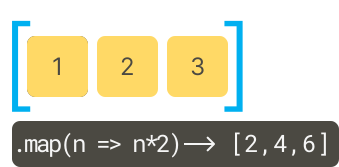
2) Using Array map() method to generate HTML elements #
We’ll create a page like the following by using the map() method to generate HTML dynamically:
Step 1. Create an HTML page index.html:
<!DOCTYPE html>
<html lang="en">
<head>
<meta charset="UTF-8" />
<meta name="viewport" content="width=device-width, initial-scale=1.0" />
<title>JavaScript map() Demo</title>
<link rel="stylesheet" href="style.css" />
<script src="app.js" defer></script>
</head>
<body>
<div class="root">
<h1>Goals 🤩</h1>
<div class="goals"></div>
</div>
</body>
</html>The index.html links to the style.css and app.js files.
Step 2. Create a style.css file:
style.css file
* {
margin: 0;
padding: 0;
box-sizing: border-box;
}
body {
font-family: system-ui, -apple-system, BlinkMacSystemFont, 'Segoe UI', Roboto,
Oxygen, Ubuntu, Cantarell, 'Open Sans', 'Helvetica Neue', sans-serif;
font-size: 1rem;
line-height: 1.5;
min-height: 100vh;
display: grid;
place-items: center;
background-color: #fff;
}
h1 {
text-align: center;
font-weight: 500;
margin-bottom: 1rem;
font-size: 2rem;
}
.root {
margin: 0 auto;
max-width: 450px;
border: solid 1px #ccc;
padding: 1rem;
border-radius: 0.5rem;
background-color: #fff;
box-shadow: rgba(0, 0, 0, 0.18) 0px 2px 4px;
}
.goal {
display: flex;
align-items: center;
justify-content: space-between;
gap: 1rem;
margin-bottom: 1rem;
}
.goal__name {
font-size: 1.2rem;
}
.goal__date {
font-size: 0.8rem;
}Step 3. Create an app.js file with the following code:
const goals = [
{
name: 'Learn HTML',
date: '2025-06-01',
},
{
name: 'Learn CSS',
date: '2025-07-01',
},
{
name: 'Learn JavaScript',
date: '2025-08-01',
},
];
const renderGoal = (goal) => {
return `
<div class="goal">
<p class="goal__name">🎯 ${goal.name}</p>
<span class="goal__date">📆 ${new Date(
goal.date
).toLocaleDateString()}</span>
</div>
`;
};
const goalsEl = document.querySelector('.goals');
goalsEl.innerHTML = goals.map(renderGoal).join('');How it works.
First, define a goals array that stores a list of goal objects. Each goal object has two properties name and date:
const goals = [
{
name: 'Learn HTML',
date: '2025-06-01',
},
{
name: 'Learn CSS',
date: '2025-07-01',
},
{
name: 'Learn JavaScript',
date: '2024-08-01',
},
];Second, define a renderGoal() function that renders a goal into a piece of HTML:
const renderGoal = (goal) => {
return `
<div class="goal">
<p class="goal__name">🎯 ${goal.name}</p>
<span class="goal__date">📆 ${new Date(
goal.date
).toLocaleDateString()}</span>
</div>
`;
};Third, select the goals element using the querySelector() method:
const goalsEl = document.querySelector('.goals');Third, generate an array of HTML snippets using the map() method, join the HTML snippets using the join() method, and assign the HTML string to the innerHTML property of the goalsEl element:
goalsEl.innerHTML = goals.map(renderGoal).join('');Summary #
- Use the
map()method to create a new array that includes elements by applying a provided function on every element in the calling array.
Thank you for your feedback!
