Summary: in this tutorial, you’ll learn about PL/pgSQL blocks, how to create and execute some blocks.
Overview of a PL/pgSQL Block #
PL/pgSQL is a blocked structure programming language. PL/pgSQL organizes code into blocks.
Here’s the syntax of a block:
[ <<label>> ]
[ DECLARE
declarations ]
BEGIN
statements
END [ label ];A block has two main sections:
- Declaration: The declaration section is optional. It is where you declare variables, constants, and cursors.
- Body: The body section is required. It is where you put the logic of the block, such as SQL statements.
A block may include an optional label appearing at the beginning and end. The label is necessary only when you use statements like the EXIT statement or to qualify the variable names declared in the block.
PL/pgSQL Block Example #
The following example shows how to create a block that displays a message "Hello, World":
DO
$$
BEGIN
RAISE NOTICE '%', 'Hello, World';
END;
$$;Output
NOTICE: Hello, WorldHow it works:
- The
DOstatement executes the PL/pgSQL block. - We use the PL/pgSQL block as a dollar-quoted string constant, which starts with
$$and ends with$$. This helps avoid escaping quotations and special characters in the PL/pgSQL code. - A block starts with the
BEGINkeyword and ends with the keywordEND. Note thatBEGINdoesn’t mean start a transaction.
The RAISE NOTICE statement displays a notice when you execute the block:
RAISE NOTICE '%', 'Hello, World';The RAISE NOTICE statement starts with a placeholder %, followed by a comma, and the value for that placeholder. The block does not include a declaration section in this example.
Executing the Block in psql #
First, connect to PostgreSQL using the psql tool:
psql -U postgresThe psql tool will prompt you to enter the password for the postgres user:
Password for user postgres:You must enter a valid password and press the Enter (or Return) key.
Second, copy the PL/pgSQL code above and paste it into the psql tool:
postgres=# DO
postgres-# $$
postgres$# BEGIN
postgres$# RAISE NOTICE '%', 'Hello, World';
postgres$# END;
postgres$# $$;
NOTICE: Hello, World
DOOutput
NOTICE: Hello, World
DOExecuting the PL/pgSQL Block Using pgAdmin 4 #
First, launch the pgAdmin4 tool and open the inventory database.
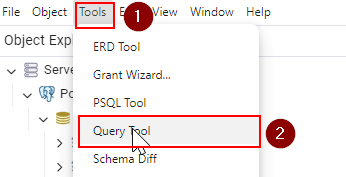
Second, open the query tool by following the menu path Tools > Query tool:
Third, copy and paste the PL/pgSQL block into the query tool:
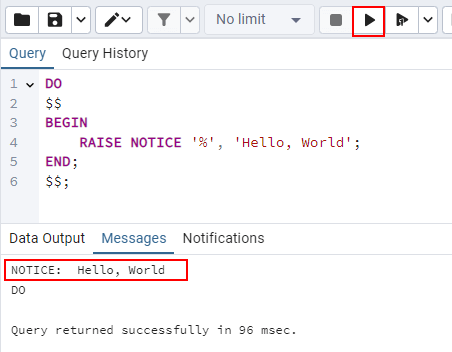
Finally, click the Execute Script button (or press the F5 keyboard shortcut).
PL/pgSQL Block with Declaration Example #
The following example shows how to define a block with a declaration section.
DO
$$
DECLARE
name VARCHAR = 'Joe';
BEGIN
RAISE NOTICE 'Hello %', name;
END;
$$;Output
NOTICE: Hello JoeIn this example, we add the declaration section and declare a variable name with VARCHAR type and value 'Joe':
DECLARE
name VARCHAR = 'Joe';To declare a variable, you provide the name, data type, and initial value:
name VARCHAR = 'Joe';We substitute the name variable with the placeholder % in the 'Hello %' string in the RAISE NOTICE statement:
RAISE NOTICE 'Hello %', name;The output will be like this:
NOTICE: Hello JoePL/pgSQL Subblocks #
In PL/pgSQL, blocks can be nested within the body of other blocks. Blocks nested inside other blocks are called subblocks. Blocks that contain nested blocks are called outer blocks:
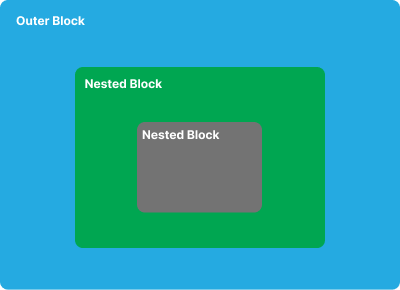
Block nesting allows you to organize the blocks into smaller, more manageable trunks. For example:
DO
$$
DECLARE
total_quantity INT = 0;
BEGIN
DECLARE
safety_stock INT = 10;
on_hand_qty INT = 100;
BEGIN
total_quantity = safety_stock + on_hand_qty;
END;
RAISE NOTICE 'The total quantity is %', total_quantity;
END;
$$;Output
NOTICE: The total quantity is 110How it works:
In the main block, we declare and initialize total_quantity to 0:
DECLARE
total_quantity INT = 0;In the subblock, we declare and initialize safety_stock to 10 and on_hand_qty to 100:
DECLARE
safety_stock INT = 10;
on_hand_qty INT = 100;Additionally, we calculate the total quantity by adding safety_stock and on_hand_qty and assigning the result to total_quantity:
total_quantity = safety_stock + on_hand_qty;After the subblock, we display the total quantity in the main block:
RAISE NOTICE 'The total quantity is %', total_quantity;Summary #
- PL/pgSQL is a blocked structure programming language.
- A block includes two main sections: declaration and body.
- The declaration section is optional, while the body section is required.
- Blocks can be nested within the body section of other blocks.
Quiz #
PL/pgSQL Blocks
Thank you for your feedback!
