Summary: In this tutorial, you’ll learn about PL/pgSQL variables and how to declare, assign, and use variables.
Overview of PL/pgSQL Variables #
In PL/pgSQL, variables are identifiers with immediate values of various SQL types such as integer, varchar, and boolean.
Before using variables, you must declare them in the declaration section of the block.
Declaring a Variable #
Here’s the syntax for declaring a variable:
variable_name data_type [=initial_value];In this syntax:
- First, provide a variable nam
variable_name. - Second, specify the data type of value that the variable will hold. The
data_typecan be any SQL’s data type likeINT,DECIMAL,VARCHAR, andTEXT. - Third, assign an optional initial value to the variable. The variable will use
NULLby default if you don’t assign an initial value.
Besides the assignment operator, you can use the := operator to assign an initial value to a variable:
variable_name data_type [:=initial_value];The following declares a variable called total_quantity with the type INT and initial value 0 in the declaration section and displays its value in the body section:
DO
$$
DECLARE
total_quantity INT = 0;
BEGIN
RAISE NOTICE 'Total quantity %', total_quantity;
END;
$$;Output:
NOTICE: Total quantity 0Besides the = and := operators, you can use the DEFAULT keyword to specify an initial value of a variable:
DECLARE
variable_name data_type DEFAULT initial_value;For example:
DECLARE
total_quantity INT DEFAULT 0;After initialization, you can use the variable in the later initialization within the same block. For example:
DECLARE
min_shipping_cost DEC = 5;
net_price DEC = min_shipping_cost;In this declaration, the initial value of the net_price is the value of the min_shipping_cost variable.
Assigning a Value to a Variable #
To assign a value to a variable, you can use the assignment operator:
variable_name = value;Or you can use the := operator:
variable_name := value;For example, the following shows how to assign 10 to the total_quantity variable:
DO
$$
DECLARE
total_quantity INT = 0;
BEGIN
total_quantity = 10;
RAISE NOTICE 'Total quantity %', total_quantity;
END;
$$;Output:
NOTICE: Total quantity 10Variable Scopes #
The scope of a variable specifies where in the code you can reference it.
In PL/pgSQL, the scope of a variable is within the block and nested blocks of the block where you declare it:
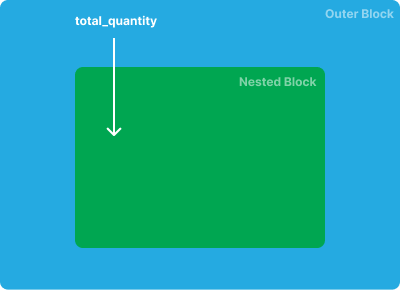
For example:
DO
$$
DECLARE
total_quantity INT = 0;
BEGIN
total_quantity = 10;
DECLARE
safety_stock INT = 10;
on_hand_qty INT = 200;
BEGIN
total_quantity := safety_stock + on_hand_qty;
END;
RAISE NOTICE 'Total quantity %', total_quantity;
END;
$$;In this example, we declare a variable total_quantity in the outer block:
DECLARE
total_quantity INT = 0;Therefore, we can access it in the nested block:
total_quantity := safety_stock + on_hand_qty;In the subblock, we declare two variables, safety_stock and on_hand_qty:
DECLARE
safety_stock INT = 10;
on_hand_qty INT = 200;They can only be accessed within the subblock. If you attempt to access them from the outer block, you’ll get an error:
DO
$$
DECLARE
total_quantity INT = 0;
BEGIN
total_quantity = 10;
DECLARE
safety_stock INT = 10;
on_hand_qty INT = 200;
BEGIN
total_quantity := safety_stock + on_hand_qty;
END;
RAISE NOTICE 'Total quantity %', total_quantity;
RAISE NOTICE 'safety_stock %, on-hand quantity %', safety_stock, on_hand_qty; -- error
END;
$$;PL/pgSQL allows different variables declared in the outer and subblock to share the same names. However, it is not a good practice to do so.
If this is the case, the variable in the subblock will hide the variable in the outer block. For example:
DO
$$
DECLARE
total_quantity INT = 10;
BEGIN
DECLARE
total_quantity INT = 20;
BEGIN
RAISE NOTICE 'Total quantity %', total_quantity; -- 20
END;
RAISE NOTICE 'Total quantity %', total_quantity; -- 10
END;
$$;Output:
NOTICE: Total quantity 20
NOTICE: Total quantity 10In this example, the nested block displays the value of the total_quantity declared in the nested block, and the outer block shows the value of the total_quantity declared in the outer block. In other words, the total_quantity variable in the nested block hides the total_quantity variable in the outer block.
To access the total_quantity variable in the outer block within the nested block, you need to use the block label:
DO
$$
<<main>>
DECLARE
total_quantity INT = 10;
BEGIN
DECLARE
total_quantity INT = 20;
BEGIN
RAISE NOTICE 'Total quantity %', total_quantity;
RAISE NOTICE 'Total quantity in the outer block %', main.total_quantity;
END;
END main;
$$;Output:
NOTICE: Total quantity 20
NOTICE: Total quantity in the outer block 10Constants #
Sometimes, you want to define variables whose values cannot be changed. To do that you can declare constants.
Here’s the syntax for declaring a constant:
constant_name CONSTANT data_type = initial_value;In this syntax:
- The
CONSTANTkeyword indicates that the value of theconstant_namecannot be changed after initialization. initial_valueis the constant value.
For example, in the following block, we declare a constant PI which is approximately 3.14:
DO
$$
DECLARE
pi CONSTANT DEC = 3.14;
v_radius DEC = 10;
v_area DEC;
BEGIN
v_area = pi * v_radius * v_radius;
RAISE NOTICE 'The area of a circle with the radius % is %', v_radius, v_area;
END;
$$;The block calculates the area of a circle with a radius of 10.
Output:
NOTICE: The area of a circle with the radius 10 is 314.00Summary #
- A variable is an identifier that holds an immediate value of any SQL type.
- Declare variables in the block’s declaration section.
- Scopes of variables are blocks where they are declared. Nested blocks can access variables declared in the outer block.
- Constants are variables whose values cannot change after initialization.
Quiz #
PL/pgSQL Variables
Thank you for your feedback!
