Summary: In this tutorial, you’ll learn how to use the PL/pgSQL FOR loop statement to iterate over a range of integers or rows of a result set.
Overview of PL/pgSQL FOR loop statement #
The FOR loop statement creates a loop that iterates over a range of integers or rows of a result set.
Here’s the basic syntax of the FOR loop statement that iterates over a range of integers from low to high:
<<label>>
FOR loop_counter IN low..high LOOP
statements;
END LOOP [label];In this syntax:
- The
FORstatement creates a loop counter variable (loop_counter) with the type integer. This variable can be accessed within theFORloop. - The
lowandhighcan be values or expressions that specify the lower and upper bounds of the integer range. TheFORevaluates these expressions once before starting the loop. Iflowis greater thanhigh, theFORloop does not execute its body and does not issue any error. - The
FORloop assignslowto theloop_countervariable and increments its value by one after each iteration until theloop_counterequalshigh.
Basic FOR Loop example #
The following example uses a FOR loop to show three numbers from 1 to 3 to the output:
CREATE OR REPLACE FUNCTION show_number_inc()
RETURNS VOID
AS
$$
BEGIN
FOR n IN 1..3 LOOP
RAISE NOTICE '%', n;
END LOOP;
END;
$$
LANGUAGE plpgsql;How the function works:
First, use n as the loop counter to iterate over three integers from 1 to 3:
FOR n IN 1..3 LOOPSecond, show a number using the RAISE NOTICE statement:
RAISE NOTICE '%', n;The function displays three numbers: 1, 2, and 3:
SELECT show_number_inc();Output:
NOTICE: 1
NOTICE: 2
NOTICE: 3Using REVERSE option #
If you use the REVERSE option, the FOR loop will decrement the loop counter after each iteration:
<<label>>
FOR loop_counter IN REVERSE high..low LOOP
statements;
END LOOP [label];Notice that the high and low are in reversed order.
For example, the following defines a function that uses the FOR loop to display three numbers from 3 to 1:
CREATE OR REPLACE FUNCTION show_number_dec()
RETURNS VOID
AS
$$
BEGIN
FOR n IN REVERSE 3..1 LOOP
RAISE NOTICE '%', n;
END LOOP;
END;
$$
LANGUAGE plpgsql;The following statement calls the show_number_dec() function to display three numbers, 3, 2, and 1:
SELECT show_number_dec();Output:
NOTICE: 3
NOTICE: 2
NOTICE: 1Customizing steps #
By default, the FOR loop increments or decrements the loop counter by one after each iteration.
If you want to change the step from 1 to another, you can use the BY option:
<<label>>
FOR loop_counter IN low..high [BY step] LOOP
statements;
END LOOP [label];<<label>>
FOR loop_counter IN REVERSE high..low [BY step] LOOP
statements;
END LOOP [label];For example, the following defines a function that uses the FOR loop to show the even numbers between 0 and 10:
CREATE OR REPLACE FUNCTION show_even_numbers()
RETURNS VOID
AS
$$
BEGIN
FOR n IN 0..10 BY 2 LOOP
RAISE NOTICE '%', n;
END LOOP;
END;
$$
LANGUAGE plpgsql;In this example, the show_even_numbers uses a FOR loop to iterate over even numbers from 0 to 10 with a step of 2 and RAISE NOTICE to print each even number.
The following statement calls the show_even_numbers() function:
SELECT show_even_numbers();Output:
NOTICE: 0
NOTICE: 2
NOTICE: 4
NOTICE: 6
NOTICE: 8
NOTICE: 10Looping over a result set #
To iterate over the rows of a result set, you use the following FOR loop statement:
[ <<label>> ]
FOR target IN query LOOP
-- process individual row
END LOOP [ label ];Suppose we have a products table:
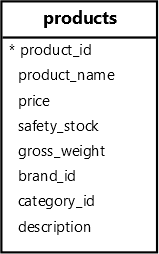
The following defines a function that displays the top N most expensive products from the products table using the FOR loop statement:
CREATE OR REPLACE FUNCTION top_n(n INT) RETURNS VOID
AS
$$
DECLARE
r record;
BEGIN
FOR r IN SELECT product_name, price
FROM products
ORDER BY price DESC
LIMIT n
LOOP
RAISE NOTICE '% - $%', r.product_name, r.price;
END LOOP;
END;
$$
LANGUAGE PLPGSQL;How it works.
First, declare a variable of the record type in the declaration section:
r record;The r is a variable of the record type. A record variable has no predefined structure. Instead, it inherits the structure of the row when the FOR statement assigns to it.
Second, use the FOR statement to iterate over rows returned by a query:
FOR r IN SELECT product_name, price
FROM products
ORDER BY price DESC
LIMIT nThe query returns the top n most expensive products.
Third, print the product name and price of the product in each iteration:
RAISE NOTICE '% - $%', r.product_name, r.price;The following statement calls the top_n() function to display the top 3 most expensive products:
SELECT top_n(3);Output:
NOTICE: Samsung QN900C Neo QLED - $2999.99
NOTICE: Sony Bravia XR A95K - $2499.99
NOTICE: LG G3 OLED - $2499.99Summary #
- Use the
FORloop statement to iterate over a range of integers or rows of a result set.
Quiz #
PL/pgSQL FOR Loop
Thank you for your feedback!
