Summary: in this tutorial, you’ll learn how to use the numpy mean() function to calculate the average of elements of an array.
Introduction to the NumPy mean() function #
The mean()mean()
numpy.mean(a, axis=None, dtype=None, out=None, keepdims=<no value>, *, where=<no value>)In this syntax:
ais an array that you want to calculate the average of elements.axisis the axis if specified will return the average of elements on that axis.
To understand more about other parameters and their usages, check out the numpy mean() function documentation.
NumPy mean() function examples #
Let’s take some examples of using the mean() function.
1) Using NumPy mean() function on 1-D array example #
The following example uses the mean() function to calculate the average of numbers in an array:
import numpy as np
a = np.array([1, 2, 3])
average = np.mean(a)
print(average)Output:
2.0How it works.
First, create an array that has three numbers:
a = np.array([1, 2, 3])Second, calculate the average of elements in the array a using the mean() function:
average = np.mean(a)Third, display the average:
print(average)The output is 2.0 because (1 + 2 + 3) / 3 = 2.0
2) Using NumPy mean() function on 2-D array example #
The following example uses the mean() function to calculate the average of elements on axis-0:
import numpy as np
a = np.array([
[1, 2, 3],
[4, 5, 6]
])
average = np.mean(a, axis=0)
print(average)Output:
[2.5 3.5 4.5]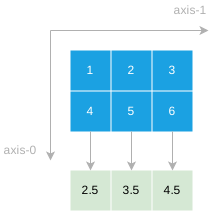
Summary #
- Use the numpy
mean()function to calculate the average of elements in an array.
Thank you for your feedback!
