
Summary: in this tutorial, you will learn how to use SQLite MIN function to get the minimum value in a set of values.
Introduction to SQLite MIN function #
The following illustrates the syntax of the SQLite MIN function:
MIN([ALL|DISTINCT] expression);The MIN function uses ALL by default. Similar to the MAX function, the MIN function ignores NULL values. Therefore, it returns the non-NULL minimum value in a set of values.
The expression can be a column or an expression that consists of columns and operators.
Note that the DISTINCT is not relevant to the MIN function.
If you use the SELECT statement with ORDER BY and WHERE clauses, the first minimum non-null value appears at the first row of the result set.
SELECT
column
FROM
table
WHERE
column IS NOT NULL
ORDER BY
column DESC;When does the MIN function return a NULL value? We’re glad that you asked.
The MIN function returns a NULL value if and only if there are only NULL values in the set.
SQLite MIN function examples #
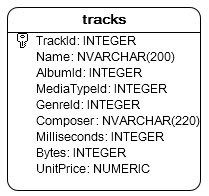
We will use the tracks table in the sample database for demonstrating the MIN function.
To get the shortest track, you use the MIN function as follows:
SELECT
min(Milliseconds)
FROM
tracks;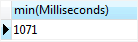
SQLite MIN function in a subquery #
To get the complete shortest track information, you need to use a subquery.
The outer query gets the complete information from the tracks table based on the milliseconds returned by the subquery that uses the MIN function.
See the following query.
SELECT
trackid,
name,
milliseconds
FROM
tracks
WHERE
milliseconds = (
SELECT
min(Milliseconds)
FROM
tracks
);SQLite MIN function with the GROUP BY clause example #
You can find the shortest track per album using the MIN function with GROUP BY clause. The GROUP BY clause groups a set of rows into groups. The MIN function finds the minimum value for each group.
The following statement illustrates the idea:
SELECT
albumid,
min(milliseconds)
FROM
tracks
GROUP BY
albumid;SQLite MIN function with the HAVING clause example #
You can use the HAVING clause to filter groups. For example, when combining with the MIN function, you can find the albums and their shortest tracks where the length of each shortest track is less than 10 seconds.
SELECT
albumid,
min(milliseconds)
FROM
tracks
GROUP BY
albumid
HAVING
MIN(milliseconds) < 10000;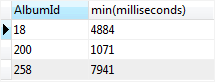
In this tutorial, you have learned how to use the SQLite MIN function to find the minimum value in a set of values.
Thank you for your feedback!
