New to Rust? Grab our free Rust for Beginners eBook Get it free →
Angular POST Request to PHP with HttpClient


An Angular POST request to PHP can reach the server while leaving the PHP $_POST array empty because Angular sends an object as JSON. The complete request was executed with Angular 22.1.0 and PHP 8.4.23, including the success response, invalid input, malformed JSON, and the browser form.
How the Angular and PHP request fits together
Angular HttpClient serializes the request object as JSON and sets the request content type. PHP reads those bytes from php://input, decodes them, validates each field, and returns JSON with an HTTP status that Angular can handle.
The cleanest setup keeps the built Angular app and the PHP endpoint on one origin.
That removes Cross-Origin Resource Sharing (CORS) from the first working example and leaves one boundary to debug at a time.
Register HttpClient in a standalone Angular app
Current standalone Angular applications register HttpClient with provideHttpClient in the application configuration. Angular documents HttpClient as the framework service for typed responses, error handling, interception, and test utilities in its HTTP client overview.
import { ApplicationConfig, provideBrowserGlobalErrorListeners, provideZonelessChangeDetection } from '@angular/core';
import { provideHttpClient } from '@angular/common/http';

export const appConfig: ApplicationConfig = {
  providers: [provideBrowserGlobalErrorListeners(), provideZonelessChangeDetection(), provideHttpClient()],
};
Register the provider once at bootstrap. Components and services can then obtain HttpClient through dependency injection.
Send a typed JSON body
The component below posts an email and password to the PHP endpoint.
The response type gives TypeScript a useful contract, while finalize clears the loading state on both success and failure.
import { Component, inject, signal } from '@angular/core';
import { FormsModule } from '@angular/forms';
import { HttpClient } from '@angular/common/http';
import { finalize } from 'rxjs';

type LoginResponse = {
  ok: boolean;
  message: string;
  email?: string;
};

@Component({
  selector: 'app-root',
  imports: [FormsModule],
  templateUrl: './app.html',
  styleUrl: './app.css',
})
export class App {
  private readonly http = inject(HttpClient);

  email = '[email protected]';
  password = 'demo-password';
  readonly sending = signal(false);
  readonly result = signal('');
  readonly isError = signal(false);

  submit(): void {
    this.sending.set(true);
    this.result.set('');
    this.isError.set(false);

    this.http
      .post<LoginResponse>('/api/login.php', {
        email: this.email,
        password: this.password,
      })
      .pipe(finalize(() => this.sending.set(false)))
      .subscribe({
        next: (response) => this.result.set(response.message),
        error: (error) => {
          this.isError.set(true);
          this.result.set(error.error?.message ?? 'The request failed.');
        },
      });
  }
}
HttpClient returns an Observable, so the request does not run until subscribe attaches. The next callback handles a 2xx response, while the error callback receives responses such as 400 or 422.
Connect the form
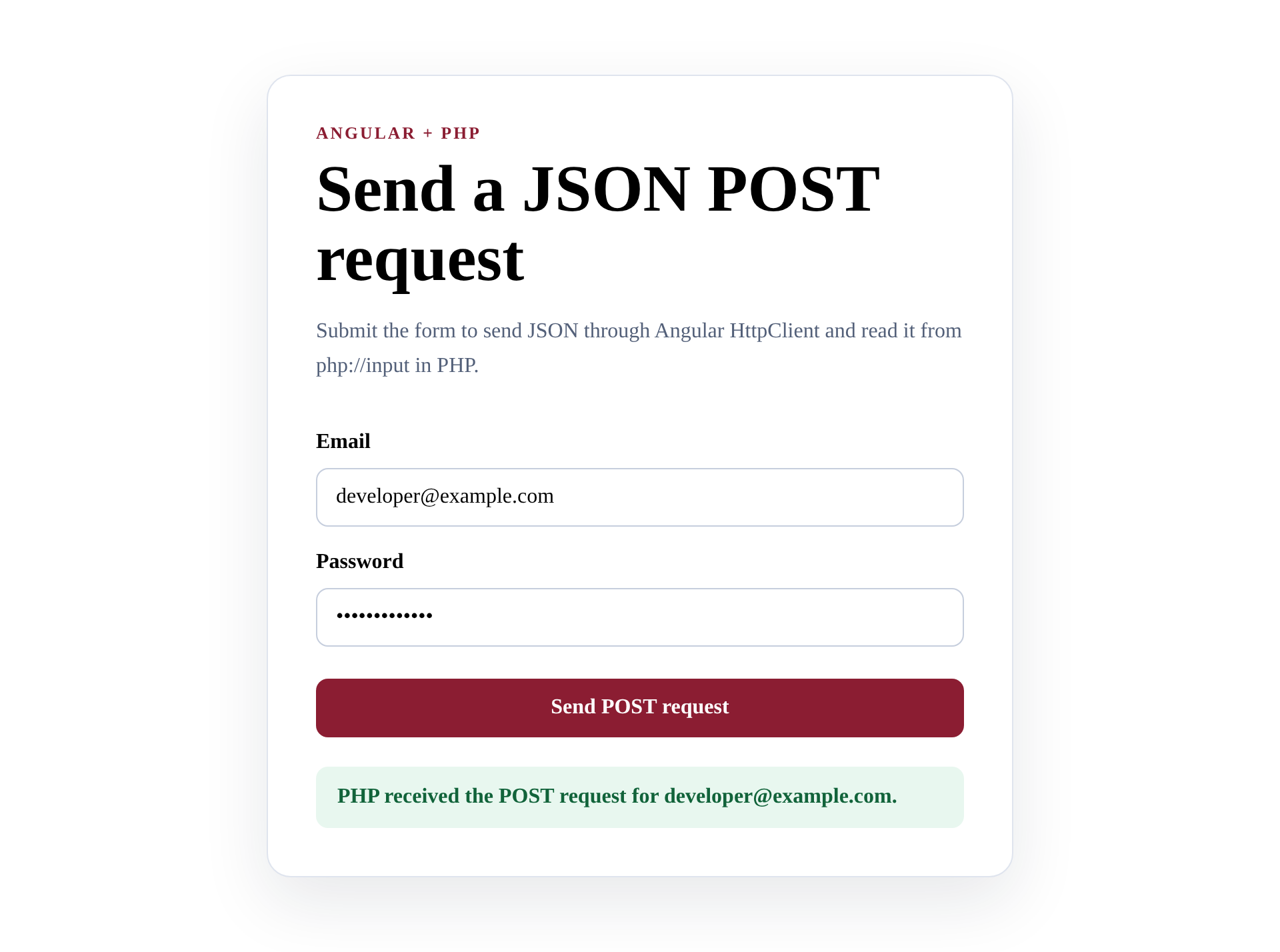
The template binds both fields with ngModel and submits through ngSubmit. The result uses an aria-live region so assistive technology can announce the server response.
<main class="shell">
  <section class="card">
    <p class="eyebrow">Angular + PHP</p>
    <h1>Send a JSON POST request</h1>
    <p class="intro">Submit the form to send JSON through Angular HttpClient and read it from php://input in PHP.</p>

    <form (ngSubmit)="submit()">
      <label for="email">Email</label>
      <input id="email" name="email" type="email" [(ngModel)]="email" required />

      <label for="password">Password</label>
      <input id="password" name="password" type="password" [(ngModel)]="password" required />

      <button type="submit" [disabled]="sending()">
        {{ sending() ? 'Sending…' : 'Send POST request' }}
      </button>
    </form>

    @if (result()) {
      <p class="result" [class.error]="isError()" aria-live="polite">{{ result() }}</p>
    }
  </section>
</main>
The button stays disabled during the request.
That small state guard prevents an accidental double submission while PHP is responding.
Read and validate the JSON body in PHP
PHP exposes the raw request body through the php://input read-only stream. The PHP stream documentation notes that the stream returns raw bytes, which is why $_POST is not the right source for an application/json request.
<?php
declare(strict_types=1);

header('Content-Type: application/json; charset=utf-8');

if ($_SERVER['REQUEST_METHOD'] !== 'POST') {
    http_response_code(405);
    header('Allow: POST');
    echo json_encode(['ok' => false, 'message' => 'Use a POST request.']);
    exit;
}

try {
    $body = json_decode(file_get_contents('php://input'), true, 512, JSON_THROW_ON_ERROR);
} catch (JsonException $error) {
    http_response_code(400);
    echo json_encode(['ok' => false, 'message' => 'The request body must contain valid JSON.']);
    exit;
}

$email = filter_var($body['email'] ?? '', FILTER_VALIDATE_EMAIL);
$password = $body['password'] ?? '';

if ($email === false || !is_string($password) || $password === '') {
    http_response_code(422);
    echo json_encode(['ok' => false, 'message' => 'Enter a valid email and a password.']);
    exit;
}

echo json_encode([
    'ok' => true,
    'message' => "PHP received the POST request for {$email}.",
    'email' => $email,
]);
JSON_THROW_ON_ERROR turns malformed JSON into a JsonException instead of leaving the code to inspect a vague null value. The endpoint then returns 400 for invalid JSON, 422 for invalid fields, 405 for the wrong method, and 200 after validation passes.
The response intentionally returns the email but never the password.
Authentication code should compare a submitted secret against a password hash and return a session or token, not reflect the secret to the browser.
Build and run the same-origin example
Create the application with the current Angular command-line interface (CLI), replace the generated component files with the code above, and add the PHP endpoint under the api directory.
npx @angular/cli new angular-php-demo --defaults --skip-git --style=css --routing=false --ssr=false --package-manager=npm
cd angular-php-demo
npm run build
mkdir -p dist/angular-php-demo/browser/api
cp api/login.php dist/angular-php-demo/browser/api/login.php
php -S 127.0.0.1:8765 -t dist/angular-php-demo/browser
Open http://127.0.0.1:8765 and submit the form. Both the page and /api/login.php use the same scheme, host, and port, so the browser does not run a CORS preflight.
You can test the PHP boundary without the browser by sending the same JSON body with curl.
curl -sS -X POST http://127.0.0.1:8765/api/login.php \
  -H 'Content-Type: application/json' \
  --data '{"email":"[email protected]","password":"demo-password"}'
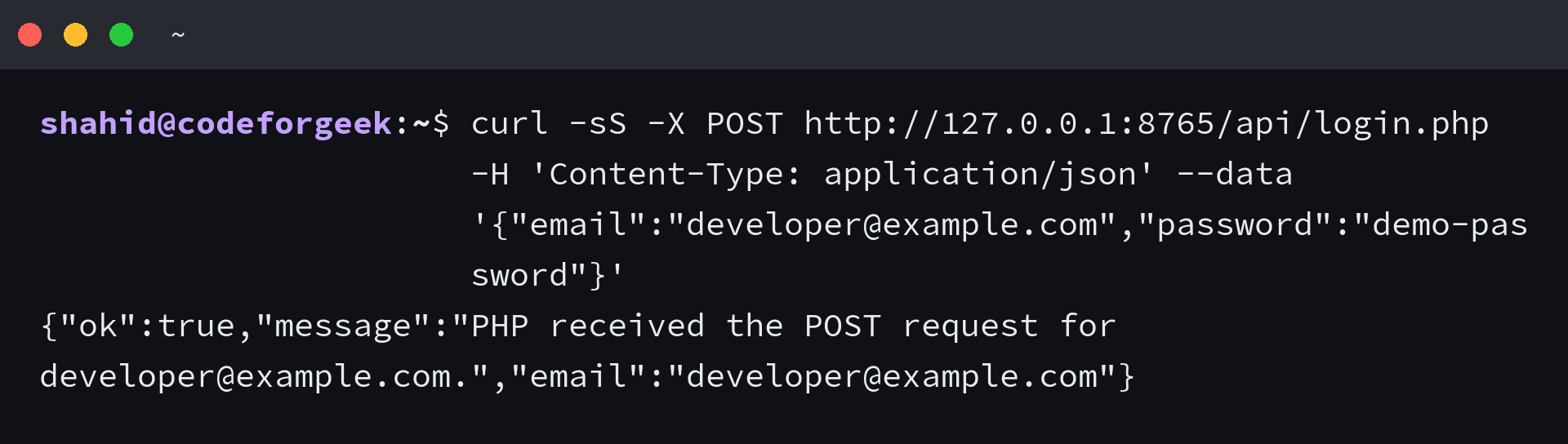
The successful response contains ok, message, and email fields. A malformed body returns 400, while an invalid email or empty password returns 422 with a message Angular can display.
Why $_POST is empty
PHP populates $_POST for form media types such as application/x-www-form-urlencoded and multipart/form-data. An Angular object passed to HttpClient.post becomes JSON, so the body belongs to php://input instead.
| Request body | Content type | Read it in PHP |
|---|---|---|
| JSON object | application/json | php://input plus json_decode |
| URL-encoded fields | application/x-www-form-urlencoded | $_POST |
| FormData with files | multipart/form-data with a browser boundary | $_POST and $_FILES |
Do not label JSON as application/x-www-form-urlencoded.
The header must describe the bytes you actually send, otherwise the PHP parser and the request body disagree.
Handle CORS only when the origins differ
An Angular development server on localhost:4200 and PHP on localhost:8765 are different origins because their ports differ. The browser may send an OPTIONS preflight before a JSON POST, and PHP must answer it with an allowed origin, headers, and methods.
<?php
declare(strict_types=1);

$allowedOrigin = 'http://localhost:4200';
$origin = $_SERVER['HTTP_ORIGIN'] ?? '';

if ($origin === $allowedOrigin) {
    header("Access-Control-Allow-Origin: {$allowedOrigin}");
    header('Vary: Origin');
    header('Access-Control-Allow-Headers: Content-Type');
    header('Access-Control-Allow-Methods: POST, OPTIONS');
}

if ($_SERVER['REQUEST_METHOD'] === 'OPTIONS') {
    http_response_code(204);
    exit;
}

require __DIR__ . '/login.php';
Use a known frontend origin instead of reflecting any Origin value. If the request includes cookies, do not combine credentials with a wildcard origin, and add the credential header only when your session design requires it.
CORS is a browser access control, not authentication.
The Mozilla CORS guide explains how simple requests, preflights, credentials, and response headers interact.
Do not mix AngularJS and modern Angular
AngularJS 1.x uses the older $http service, while current Angular uses HttpClient from @angular/common/http. If you maintain the older framework, use the AngularJS tutorial rather than copying the standalone application setup from this example.
For a broader look at request methods in Angular, the Angular HTTP calls walkthrough provides additional context. Check its module-based setup against your application’s bootstrap style before copying it into a standalone project.
Common failures and the boundary they expose
A status code and the browser network panel usually locate the broken layer faster than changing request headers at random.
| Symptom | Likely cause | Check |
|---|---|---|
| $_POST is empty | The body is JSON | Read php://input and decode JSON |
| 400 Bad Request | The body is malformed JSON | Inspect the request payload |
| 415 Unsupported Media Type | The server rejects the content type | Align the header and body format |
| 422 response | JSON parsed but field validation failed | Display the returned validation message |
| CORS error in the browser | Frontend and backend origins differ | Inspect the OPTIONS response and allow the exact origin |
| 200 response but Angular enters error | The response is not valid JSON | Return JSON and set the response content type |
Keep the server response body valid JSON even for errors. Angular can then use one response shape instead of parsing HTML error pages or PHP notices.
Security boundaries for a login-shaped form
The sample proves transport and validation, not user authentication. A production endpoint needs HTTPS, password_hash and password_verify, rate limiting, generic login failure messages, and a session or token policy.
- Never log or return submitted passwords.
- Validate authorization on the server even when Angular hides a control.
- Protect cookie-based state-changing requests against Cross-Site Request Forgery (CSRF).
- Restrict CORS to origins that should call the endpoint.
- Return generic authentication failures so account existence is not exposed.
Client-side validation improves feedback, but it is not a security boundary.
Requests can bypass the Angular form and call PHP directly.
Frequently asked questions
Why is $_POST empty when Angular sends a POST request?
Angular sends a JavaScript object as JSON. PHP does not populate $_POST for application/json, so read php://input and decode it with json_decode.
Does Angular HttpClient convert an object to JSON?
Yes. HttpClient serializes a plain object as JSON for the request body and expects JSON responses by default.
Do I need CORS for Angular and PHP?
Not when both are served from the same origin. You need CORS headers when the scheme, host, or port differs.
Should PHP return 200 for validation errors?
No. Return a status such as 400 for malformed JSON or 422 for fields that fail validation, then let Angular handle the error response.
Can I use this endpoint as a complete login system?
No. It demonstrates JSON transport and validation. Authentication also needs password hashing, session or token handling, HTTPS, rate limits, and request-forgery protection where applicable.
Start with the same-origin JSON path, confirm the PHP status and response body with curl, then connect the Angular form. Add CORS only after a separate frontend origin becomes necessary, and keep authentication work separate from the transport test.