Company News
Free Business Plan Upgrades for Open Source Maintainers
Open source maintainers are under more pressure than ever. We're raising our open source program from the Team plan to the Business plan, free.
Analyze coding (agent) CLI token usage and costs from local data.
npx ccusage@latest
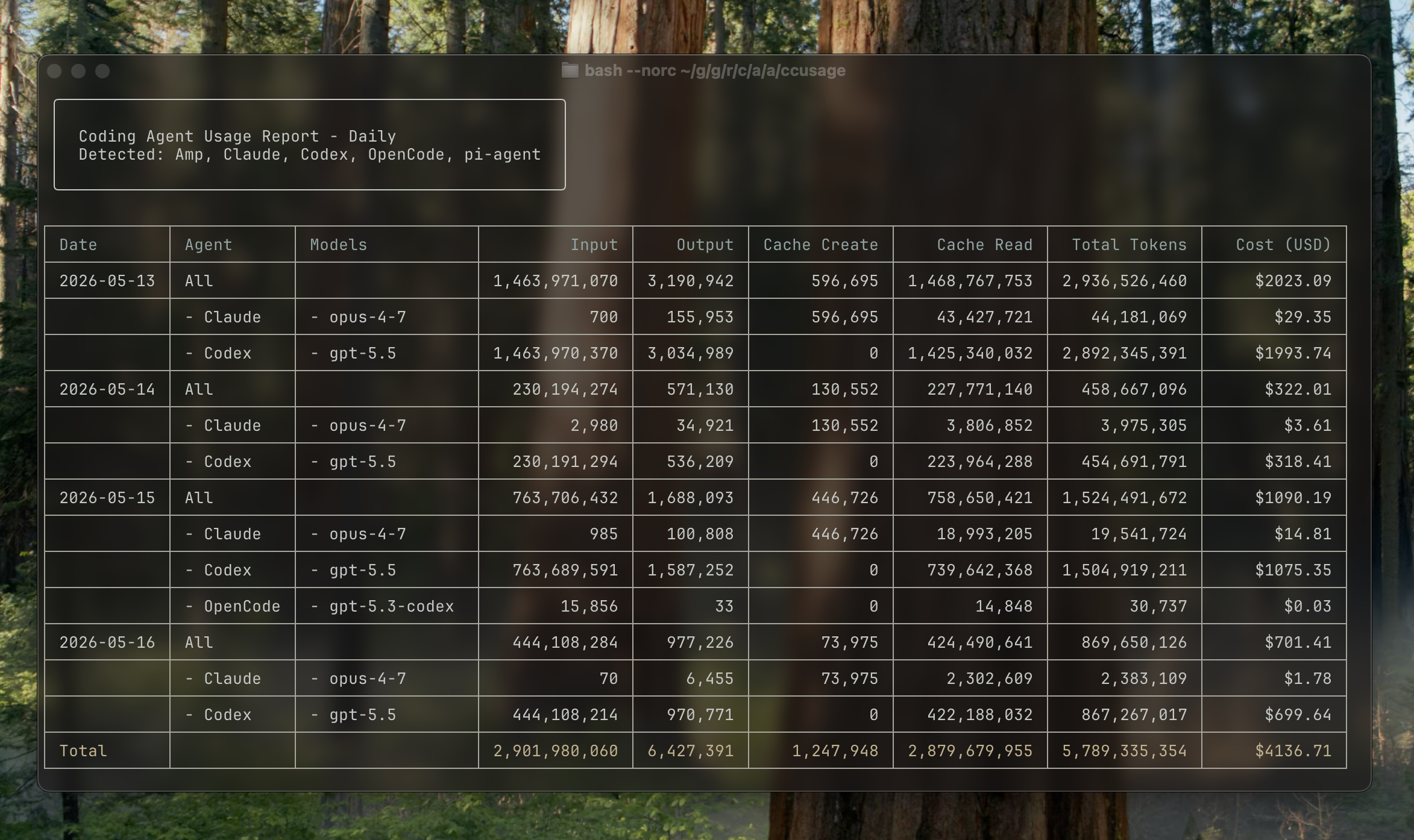
ccusage reads local usage data from coding agent CLIs and turns it into daily, weekly, monthly, and session reports.
| Source | Focused command example |
|---|---|
| Claude Code | ccusage claude daily |
| Codex | ccusage codex daily |
| OpenCode | ccusage opencode daily |
| Amp | ccusage amp daily |
| Droid | ccusage droid daily |
| Codebuff | ccusage codebuff daily |
| Hermes Agent | ccusage hermes daily |
| pi-agent | ccusage pi daily |
| Goose | ccusage goose daily |
| OpenClaw | ccusage openclaw daily |
| Kilo | ccusage kilo daily |
| Kimi | ccusage kimi daily |
| Qwen | ccusage qwen daily |
| GitHub Copilot CLI | ccusage copilot daily |
| Gemini CLI | ccusage gemini daily |
Use ccusage daily, ccusage weekly, ccusage monthly, or ccusage session to include every detected source in one report.
You can run ccusage directly without a global installation:
# npm
npx ccusage@latest
# Nix
nix run github:ccusage/ccusage -- daily
# Alternative package runners
bunx ccusage
pnpm dlx ccusage
pnpx ccusage
# PR preview builds
bunx -p https://pkg.pr.new/ccusage/ccusage@<pr-number> ccusage --offline
bunx caches the downloaded package, so repeated runs are faster after the first launch.
# Basic usage
bunx ccusage # Show all detected sources by day (default)
bunx ccusage daily # All detected sources by day
bunx ccusage weekly # All detected sources by week
bunx ccusage monthly # All detected sources by month
bunx ccusage session # All detected sources by session
bunx ccusage blocks # Claude Code 5-hour billing windows
bunx ccusage statusline # Claude Code status line for hooks (Beta)
# Source-focused reports and options
bunx ccusage claude daily --mode display
bunx ccusage codex daily --speed fast
bunx ccusage opencode weekly
bunx ccusage amp session
bunx ccusage droid daily
bunx ccusage codebuff daily
bunx ccusage hermes daily
bunx ccusage goose daily
bunx ccusage openclaw daily
bunx ccusage kilo daily
bunx ccusage kimi daily
bunx ccusage qwen daily
bunx ccusage copilot daily
bunx ccusage gemini daily
bunx ccusage pi daily --pi-path /path/to/sessions
bunx ccusage pi daily --pi-path /path/to/sessions,/archive/pi/sessions
# Explicit unified report
bunx ccusage daily --all
bunx ccusage daily --sections daily,monthly,session --json
bunx ccusage daily --by-agent --json
# Filters and options
bunx ccusage daily --since 2026-04-25 --until 2026-05-16
bunx ccusage daily --last 1 # Today
bunx ccusage weekly --last 1 # This week
bunx ccusage monthly --last 1 # This month
bunx ccusage daily --json # JSON output
bunx ccusage daily --no-cost # Hide cost columns and JSON cost fields
bunx ccusage daily --timezone UTC # Use UTC timezone
# Project analysis
bunx ccusage claude daily --instances # Group Claude Code by project/instance
bunx ccusage claude daily --project myproject # Filter to specific Claude project
bunx ccusage claude daily --instances --project myproject --json # Combined usage
# Compact mode for screenshots/sharing
bunx ccusage --compact # Force compact table mode
bunx ccusage monthly --compact # Compact monthly report
--breakdown flag--since and --until--last 1 on any daily, weekly, or monthly report--compact flag to force compact table layout, perfect for screenshots and sharing--json--no-cost--offlineccusage.json without rebuilding--instances and filter by specific projects--timezone optionFull documentation is available at ccusage.com
Contributor setup uses the Nix flake development environment with nix-direnv for pinned tools, and just for everyday development tasks. Install Nix with the nix-command and flakes experimental features enabled, then let nix-direnv load the dev shell automatically when you enter the directory:
# Clone the repository
git clone https://github.com/ccusage/ccusage.git
cd ccusage
# Allow direnv to load the Nix dev shell
direnv allow
The dev shell provides the pinned pnpm, Rust toolchain, GitHub CLI, git hooks, generated local agent skills, package tooling, and project utilities from flake.nix. Run pnpm install --frozen-lockfile only when a task needs workspace node_modules.
Run project tasks with just from inside the Nix environment (just --list shows every recipe):
just fmt
just test
just check
The flake exposes ccusage as the default package and app:
nix run github:ccusage/ccusage
nix run github:ccusage/ccusage -- codex daily --offline
nix build github:ccusage/ccusage
Nix builds embed the LiteLLM pricing file from the locked litellm flake input, so sandboxed builds do not fetch pricing at build time. To update the locked pricing snapshot:
Non-Nix Cargo builds read the same locked LiteLLM revision from flake.lock and fetch the pricing file from that revision at build time.
just update-litellm-pricing
The scheduled update pricing workflow runs the same update and validation, then opens a PR when the pricing snapshot changes.
FAQs
Analyze coding (agent) CLI token usage and costs from local data
The npm package ccusage receives a total of 74,846 weekly downloads. As such, ccusage popularity was classified as popular.
We found that ccusage demonstrated a healthy version release cadence and project activity because the last version was released less than a year ago. It has 1 open source maintainer collaborating on the project.
Did you know?

Socket for GitHub automatically highlights issues in each pull request and monitors the health of all your open source dependencies. Discover the contents of your packages and block harmful activity before you install or update your dependencies.

Company News
Open source maintainers are under more pressure than ever. We're raising our open source program from the Team plan to the Business plan, free.

Security News
The supply chain control that delays freshly published gems now covers lockfile generation and gem vendoring in Ruby projects.

Security News
During a UK cyber test, a Mythos 5 agent used sockpuppets, social engineering, and prompt injection to try to get a maintainer to merge malware.