🚀 Supercharge your YouTube channel's growth with AI.
Try YTGrowAI Freenp.where in Python: Find Indices and Replace Values with numpy.where()


Call np.where with only a condition and it answers with a tuple of index positions, not the values themselves. That shape catches you on the first line you print, and the trailing comma inside the parentheses is the clue to why. With numpy.where(), a missing reading can become zero if you choose the wrong fallback, so keep the condition separate from the replacement policy.
How np.where chooses between indices and values
Start with synthetic sensor readings, including one missing measurement represented by NaN. Run the snippets in order in a Python session with NumPy installed and use the commented output to check each result.
import numpy as np
readings = np.array([12.0, 41.5, 8.25, 55.0, 41.5, np.nan])
high = readings > 40
print(readings)
print(high)

# Captured output
# [12.   41.5   8.25 55.   41.5    nan]
# [False  True False  True  True False]
Comparing the array with 40 creates a boolean mask with True or False for each reading.
The missing measurement produces False here, which only means it didn’t satisfy this comparison.
print(np.where(high))
print(np.where(high, readings, 0.0))

# Captured output
# (array([1, 3, 4]),)
# [ 0.  41.5  0.  55.  41.5  0. ]
Passing that mask alone requests positions, counted from zero. Adding readings and 0.0 requests a replacement array instead.
The tuple contains positions 1, 3 and 4, whereas the replacement has six elements. Its final zero erased the missing reading.
flags = np.where(high, 1, 0)
print(flags)
print(flags.dtype)
print(readings)

# Captured output
# [0 1 0 1 1 0]
# int64
# [12.   41.5   8.25 55.   41.5    nan]
Choose integer alternatives when you need flags rather than measurements. Both alternatives determine the output dtype independently of the array that produced the mask. The NumPy reference requires both replacement arguments together.
Find matching indices in one or two dimensions
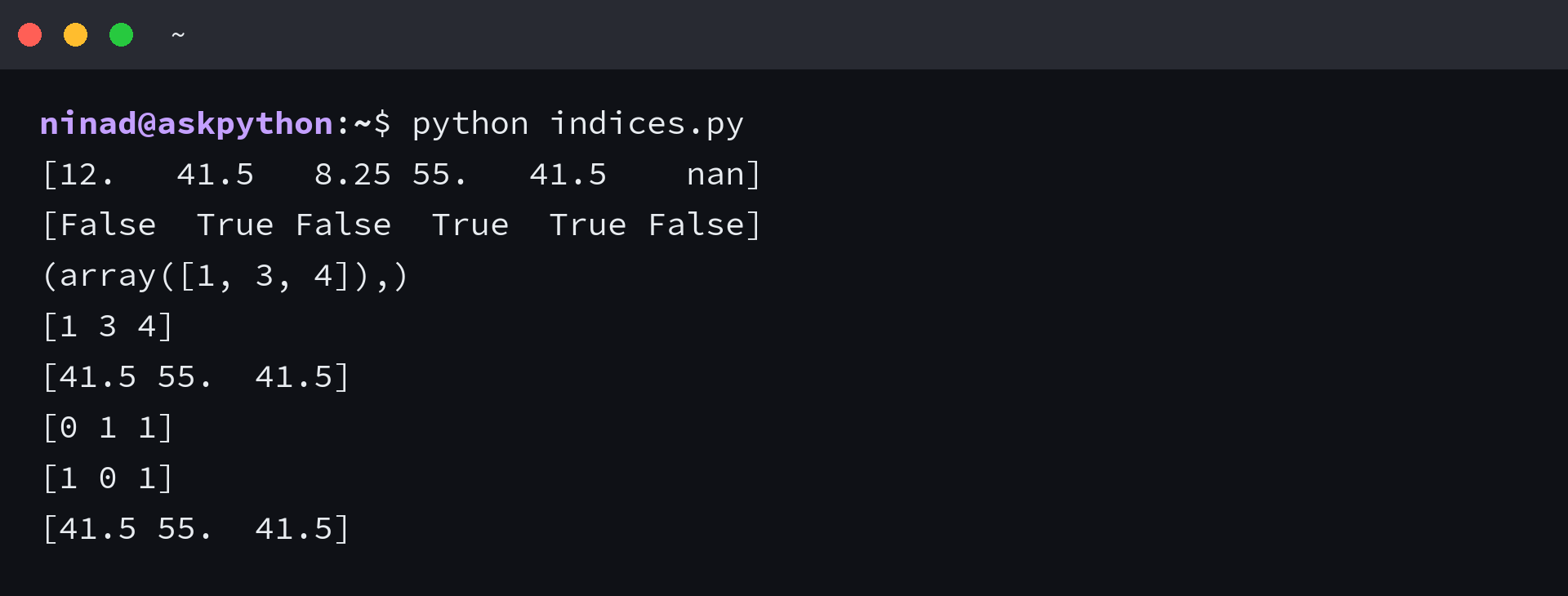
The trailing comma describes a tuple containing one index array. Keep that tuple when retrieving matching values, because NumPy accepts it directly as an index.
indices = np.where(high)
print(indices)
print(indices[0])
print(readings[indices])

# Captured output
# (array([1, 3, 4]),)
# [1 3 4]
# [41.5 55.  41.5]
Extracting indices[0] gives the plain position array for this one-dimensional input.
The repeated 41.5 survives twice because each matching position is retained.
grid = readings.reshape(2, 3)
rows, columns = np.where(grid > 40)
print(rows)
print(columns)
print(grid[rows, columns])

# Captured output
# [0 1 1]
# [1 0 1]
# [41.5 55.  41.5]
Reshaping the readings into two rows changes how positions are described. A match now needs both a row and a column, so unpack the result into two equal-length arrays.
Pair entries by position across those arrays: (0, 1), (1, 0) and (1, 1).
missing = np.where(readings > 100)
print(missing)
print(readings[missing])
print(high.nonzero())

# Captured output
# (array([], dtype=int64),)
# []
# (array([1, 3, 4]),)
A search can succeed without finding matches. Raising the threshold above every reading returns an empty index array inside the same tuple structure. The final nonzero() call returns the same positions, and NumPy recommends it for subclasses because one-argument where converts its condition with asarray.
Replace values with np.where and broadcasting
Replacement arguments describe alternatives at each output position. A scalar such as 0.5 supplies the same candidate everywhere.
replacement = np.where(high, 0.5, 0)
print(replacement)
print(replacement.dtype)

# Captured output
# [0.  0.5 0.  0.5 0.5 0. ]
# float64
The result is float64 because the alternatives include a floating-point value.
Changing the condition changes which elements you select. It doesn’t make different positions store different numeric dtypes.
fallback = np.array([10., 11., 12., 13., 14., 15.])
print(np.where(high, fallback, readings))

# Captured output
# [12.   11.    8.25 13.   14.     nan]
When replacements depend on position, pass one candidate per reading. Here fallback supplies the candidate at each matching position.
Positions 1, 3 and 4 become 11, 13 and 14. The missing measurement survives because its condition is False.
per_column = np.array([10., 20., 30.])
print(np.where(grid > 40, per_column, grid))
print(grid.shape, per_column.shape)

# Captured output
# [[12.   20.    8.25]
#  [10.   20.     nan]]
# (2, 3) (3,)
For the reshaped grid, one replacement row can apply to both rows. Broadcasting aligns dimensions from the right, requiring matching sizes or a size of one. The length-three array therefore aligns with the three columns, while a length-two array would need reshaping to express per-row logic.
numpy where multiple conditions with &, | and ~
Combine array comparisons with & for elementwise AND, | for OR and ~ to invert a mask. Parenthesize each comparison first, because Python gives bitwise operators higher precedence than comparisons.
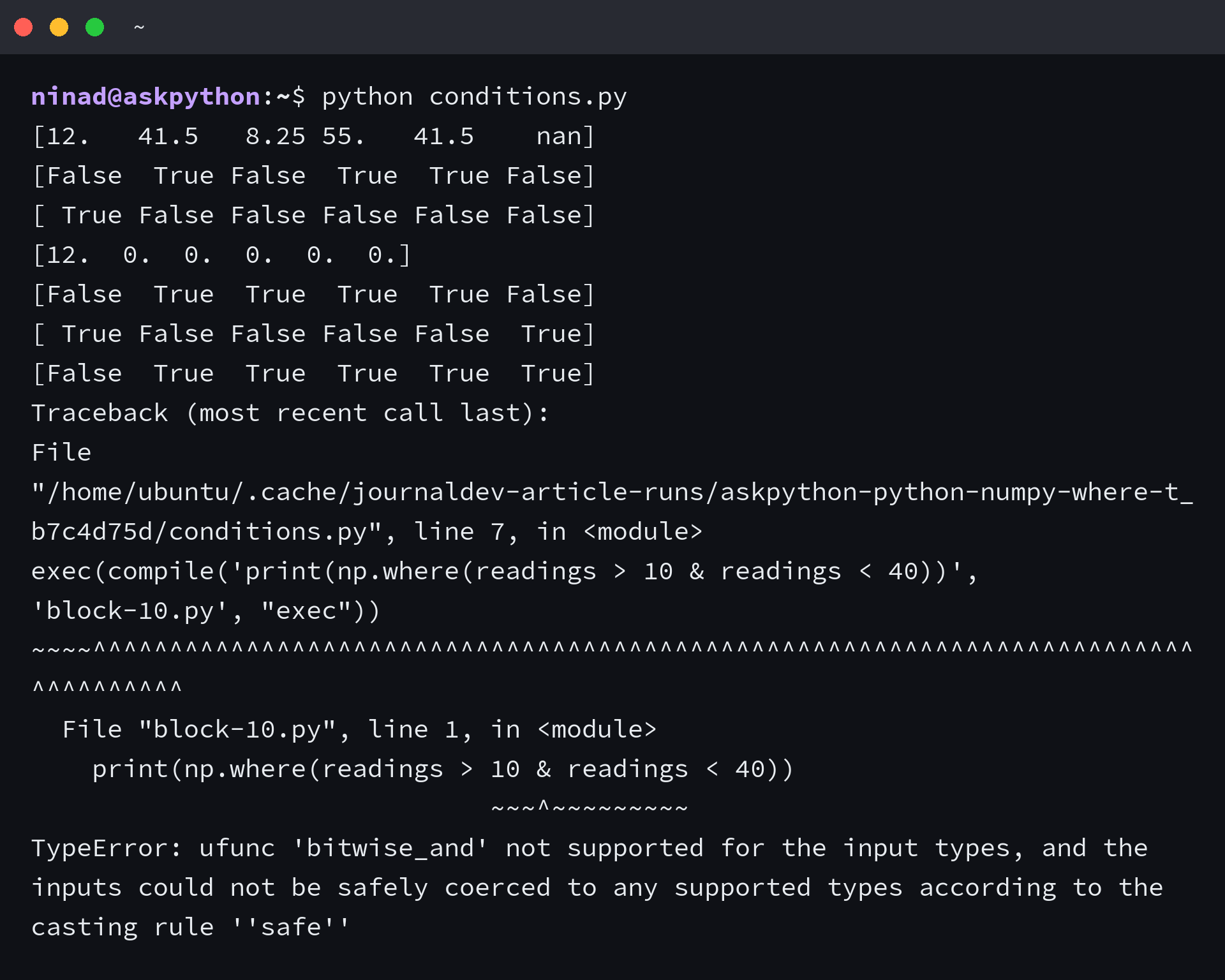
print(np.where(readings > 10 & readings < 40))

# Captured exception (final traceback line)
# TypeError: ufunc 'bitwise_and' not supported for the input types, and the inputs could not be safely coerced to any supported types according to the casting rule ''safe''
This expression fails before np.where receives a condition. Python attempts 10 & readings first, which fails because a bare integer cannot combine bitwise with a float array.
Put each comparison in parentheses to create boolean arrays before applying &. The inclusive bounds below accept 10 through 40.
within = (readings >= 10) & (readings <= 40)
print(within)
print(np.where(within, readings, 0.0))

# Captured output
# [ True False False False False False]
# [12.  0.  0.  0.  0.  0.]
Only 12.0 satisfies both comparisons in this sample.
Python’s and and or instead ask for a single truth value, which is ambiguous for an array.
outside = (readings < 10) | (readings > 40)
print(outside)
print(~outside)
print(~within)

# Captured output
# [False  True  True  True  True False]
# [ True False False False False  True]
# [False  True  True  True  True  True]
Use | to flag readings below the lower bound or above the upper bound. NaN satisfies neither comparison, so explicitly include a missing-value check when defining acceptable sensor data.
Flag and clean bad sensor readings
For this synthetic sensor, accept only finite readings between 10 and 40 inclusive. Combine the out-of-range comparisons with an inverted isfinite() check.
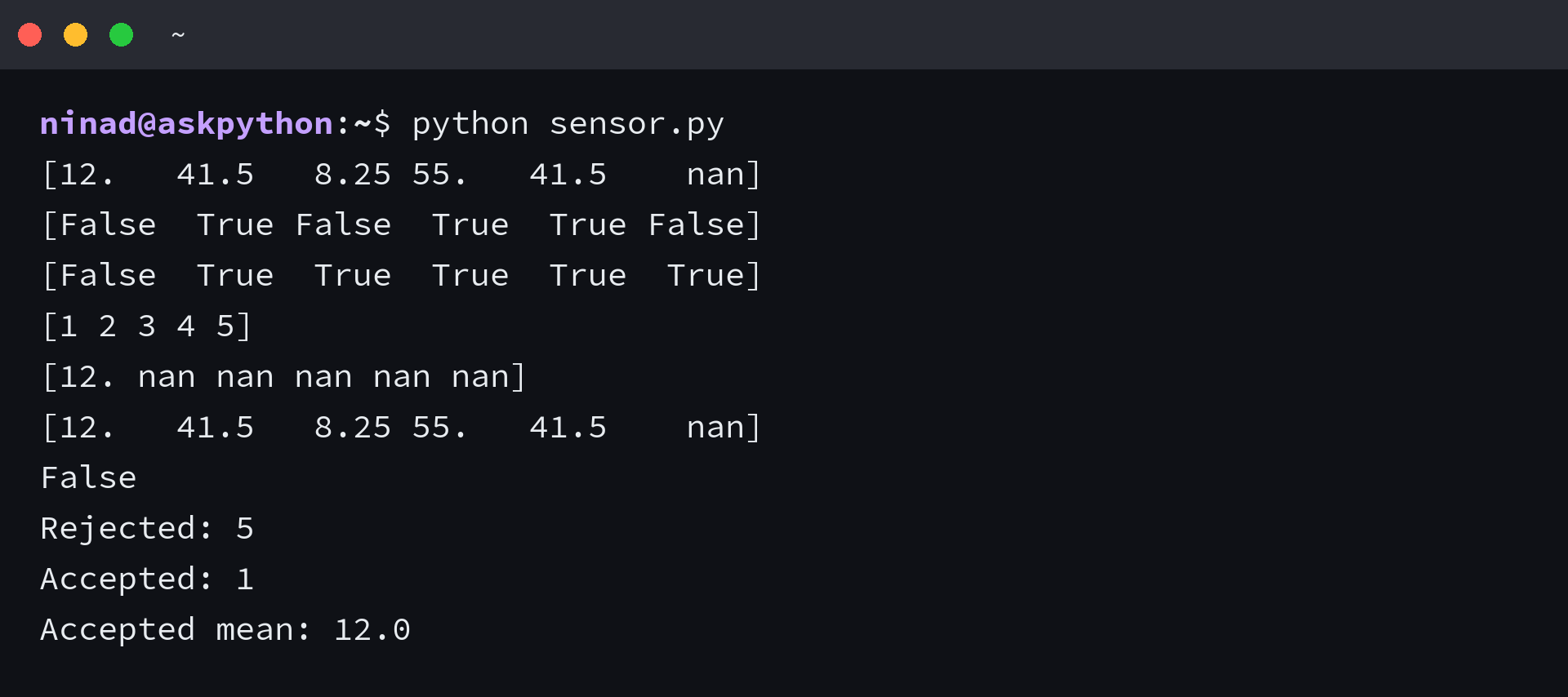
bad = ~np.isfinite(readings) | (readings < 10) | (readings > 40)
print(bad)
print(np.where(bad)[0])

# Captured output
# [False  True  True  True  True  True]
# [1 2 3 4 5]
The resulting bad mask marks five positions, including the missing measurement.
Keeping that mask lets you report rejection counts after replacements make different failures look identical.
cleaned = np.where(bad, np.nan, readings)
print(cleaned)
print(readings)
print(np.shares_memory(cleaned, readings))

# Captured output
# [12. nan nan nan nan nan]
# [12.   41.5   8.25 55.   41.5    nan]
# False
Replace rejected readings with NaN when later calculations should exclude them. A zero would count as a measurement in an ordinary mean.
The cleaned array keeps its length and preserves 12.0 as its only accepted reading. The memory-sharing check is False, so edits to the cleaned array leave the original buffer alone.
print("Rejected:", np.count_nonzero(bad))
print("Accepted:", np.count_nonzero(~bad))
print("Accepted mean:", np.nanmean(cleaned))

# Captured output
# Rejected: 5
# Accepted: 1
# Accepted mean: 12.0
Count rejections from bad and acceptances from its inverse, then average with nanmean(). The accepted mean is 12.0, but it represents only one retained measurement.
Handle dtype changes, NaN and eager evaluation
An integer array cannot store NaN, so introducing it as a replacement changes the output dtype. This integer variant shows that the result type depends on the alternatives, not only the source.
integer_readings = np.array([12, 42, 8, 55])
result = np.where(integer_readings > 40, np.nan, integer_readings)
print(integer_readings.dtype, result.dtype)
print(result)

# Captured output
# int64 float64
# [12. nan  8. nan]
Dtype promotion doesn’t correct an incomplete validity rule, so keep the full sensor mask.
Testing equality with np.nan never locates the missing entry. Use isnan() for NaN specifically, or isfinite() when infinities must also fail.
print(readings == np.nan)
print(np.isnan(readings))
print(np.where(np.isnan(readings), -1.0, readings))

# Captured output
# [False False False False False False]
# [False False False False False  True]
# [12.   41.5   8.25 55.   41.5  -1.  ]
Only the final position matches isnan(). The NaN explanation for NumPy and pandas covers missing-value checks across arrays and tables.
Both value expressions are evaluated before selection, so a condition cannot protect a division from zero. Raising floating-point errors makes the failure visible.
denominators = np.array([2.0, 0.0, np.nan])
with np.errstate(divide="raise", invalid="raise"):
    try:
        print(np.where(denominators != 0, 1 / denominators, 0.0))
    except FloatingPointError as error:
        print(type(error).__name__ + ":", error)
safe = np.zeros_like(denominators)
np.divide(1.0, denominators, out=safe,
          where=np.isfinite(denominators) & (denominators != 0))
print(safe)

# Captured output
# FloatingPointError: divide by zero encountered in divide
# [0.5 0.  0. ]
The safe alternative uses np.divide with an initialized output array. Its where argument skips excluded positions, leaving defined zeros there.
Choose np.select, nested calls or boolean indexing
Use np.select when readings need more than two labels. Give it ordered conditions, matching choices and a default for positions matching nothing.
labels = np.select(
    [~np.isfinite(readings), readings < 10, readings > 40],
    ["missing", "low", "high"], default="ok"
)
print(labels)

# Captured output
# ['ok' 'high' 'low' 'high' 'high' 'missing']
Missing, low and high readings stay distinct instead of collapsing into NaN. When conditions overlap, the first matching condition wins.
Nested np.where calls express the same classification with binary choices. The outer call handles non-finite readings.
nested = np.where(~np.isfinite(readings), "missing",
                  np.where(readings < 10, "low",
                           np.where(readings > 40, "high", "ok")))
print(nested)
print(np.array_equal(labels, nested))

# Captured output
# ['ok' 'high' 'low' 'high' 'high' 'missing']
# True
The equality check confirms both versions agree here. Deeper nesting still evaluates every alternative and obscures branch order.
Boolean indexing fits a different requirement: retrieving only accepted readings, or mutating a copy through assignment as shown in the guide to copying a NumPy array.
accepted = readings[~bad]
editable = readings.copy()
editable[bad] = np.nan
print(accepted)
print(editable)
print(readings)

# Captured output
# [12.]
# [12. nan nan nan nan nan]
# [12.   41.5   8.25 55.   41.5    nan]
The accepted array has one element. The edited copy keeps six positions. Choose np.where for replacements, np.select for classifications and indexing for subsets or mutation.
Measure runtime and memory on the sensor array
Small arrays don’t establish batch behavior. Repeat the sample to create 600,000 readings outside the timed functions, so both implementations receive identical data.
large = np.tile(readings, 100_000)
print("Elements:", large.size)
print("Input bytes:", large.nbytes)
print("Boolean-mask bytes:", (large > 40).nbytes)

# Captured output
# Elements: 600000
# Input bytes: 4800000
# Boolean-mask bytes: 600000
The input occupies 4,800,000 bytes and one boolean mask occupies 600,000 bytes. Those are buffer sizes. Peak process memory also includes temporaries and Python objects.
Time the complete cleanup with timeit, including mask construction and allocation. Taking the minimum of five repeats reduces interference from competing work on the machine, which matters because background load shifts single timings noticeably.
import timeit
import platform

def vectorized():
    invalid = ~np.isfinite(large) | (large < 10) | (large > 40)
    return np.where(invalid, np.nan, large)

def python_loop():
    return np.array([x if np.isfinite(x) and 10 <= x <= 40
                     else np.nan for x in large])

print("Python", platform.python_version(), "NumPy", np.__version__)
for name, function in [("np.where", vectorized), ("Python loop", python_loop)]:
    seconds = min(timeit.repeat(function, number=1, repeat=5))
    print(f"{name}: {seconds:.6f} seconds")

# Captured output
# Python 3.14.7 NumPy 2.5.3
# np.where: 0.001874 seconds
# Python loop: 0.626457 seconds
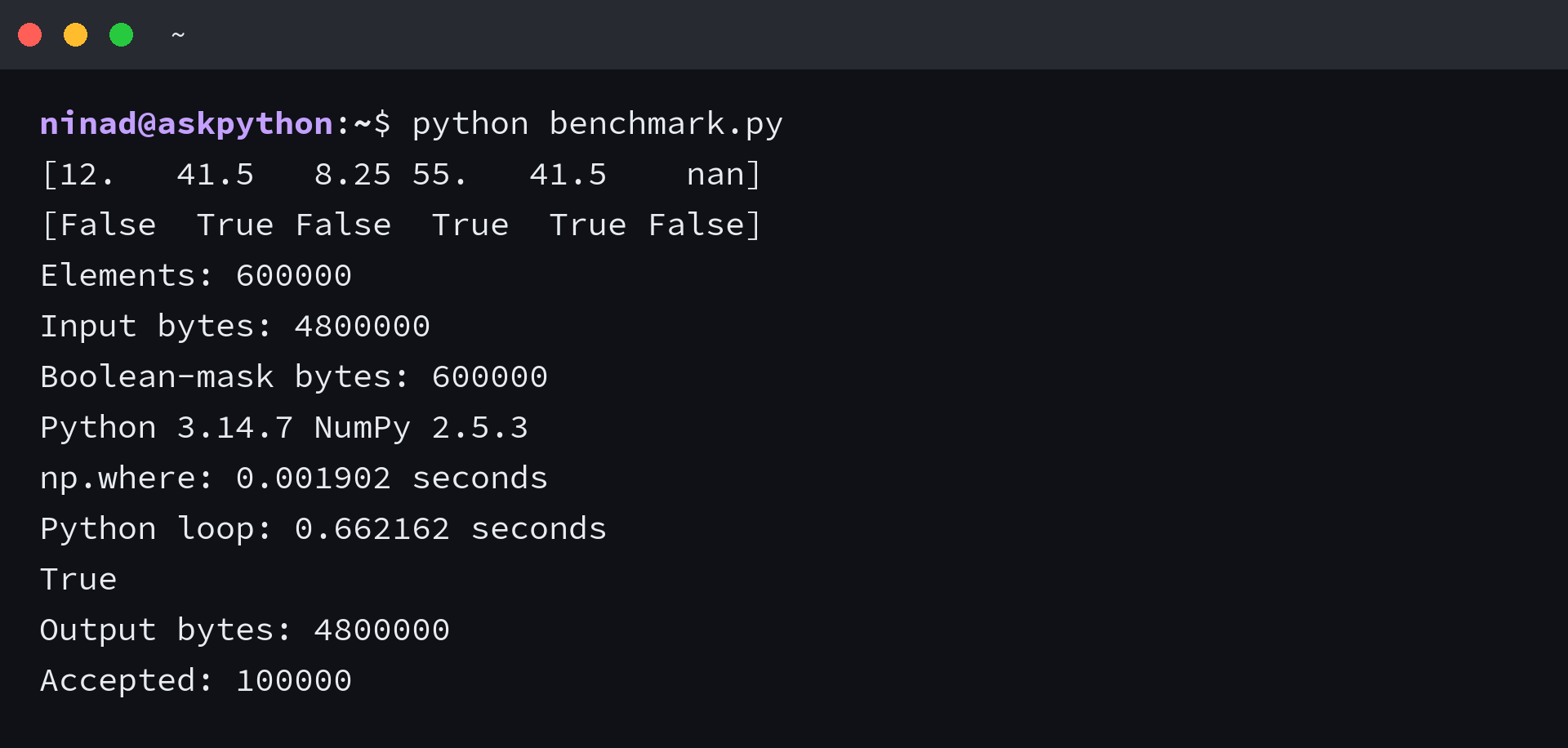
This run on Python 3.14.7 with NumPy 2.5.3 took 0.001874 seconds vectorized and 0.626457 seconds for the Python loop. Those numbers cover this repeated float64 workload on a Linux ARM64 server. Reruns differ slightly, and the screenshot shows a separate run of the same script.
Before trusting the comparison, verify identical values with NaNs treated as equal.
print(np.array_equal(vectorized(), python_loop(), equal_nan=True))
print("Output bytes:", vectorized().nbytes)
print("Accepted:", np.count_nonzero(np.isfinite(vectorized())))

# Captured output
# True
# Output bytes: 4800000
# Accepted: 100000
Equality is True and the result uses another 4,800,000 bytes. If your workload starts from a Python list, include conversion time in your own benchmark.
What does np.where return with one argument?
It returns a tuple of index arrays identifying the positions where the condition is true. To retrieve the matching values, use that tuple to index the original array, or use boolean indexing directly when you don’t need the positions separately.
Why does np.where return a tuple?
Each array in the tuple describes one input dimension, so a two-dimensional condition produces separate row and column arrays with corresponding entries. A one-dimensional condition still returns a tuple, which is why its printed result contains a trailing comma after the index array.
How do you use multiple conditions with np.where?
Parenthesize each comparison and combine the resulting boolean masks with & or |, using ~ when you need to invert a mask. For numerical data with missing entries, explicitly decide how to handle NaN because ordinary range comparisons return False at those positions.
Does np.where modify the original array?
The three-argument form returns a new array rather than assigning values into the input, so store its return value to use the replacement. If you intend to edit an existing array, boolean-index assignment makes that mutation explicit and follows the target array’s dtype constraints.
What should you use for more than two outcomes?
Use np.select with ordered conditions, corresponding choices and an explicit default value when you need several outcome categories. Put higher-priority conditions first because the first matching condition wins, and keep unsafe computations out of the choices because selection doesn’t defer their evaluation.