🚀 Supercharge your YouTube channel's growth with AI.
Try YTGrowAI FreePython String join() function


Every list of strings eventually needs to become one string, and the line that does it reads backwards. The separator calls the method while the list supplies the items, so a comma-joined row comes out as a one-liner once you know which side does the work.
I re-ran every snippet below on Python 3.11 and checked each result by hand, because the old version of this page showed a stale notebook traceback I no longer trusted. What follows is the method as it behaves today, including the two different errors it raises and the conversion that fixes both.
The one line that turns a list into a string
Python String objects carry a method named join, and its job is narrow. It takes an iterable of strings and glues them together with the string it was called on sitting between each pair.
The syntax puts the separator first, which means the receiver and the argument play opposite roles from what most beginners guess.
separator_string.join(iterable)
The standard library definition backs this arrangement, since the separator between elements is the string providing the method.
A concrete case makes the inversion stick. I ran one CSV-style row through join and split it straight back to prove the round trip, so nothing about this example is taken on faith.
row = ['Aarav', '28', 'Pune']
line = ','.join(row)
print(line)
print(line.split(','))
Aarav,28,Pune
['Aarav', '28', 'Pune']

What join needs from you
Two conditions have to hold before the call, and both sides of the dot are checked. The separator must be a string, and every item in the iterable must be a string too.
- A separator string, even an empty one, on the left of the dot
- An iterable of strings on the right, such as a list, tuple, or set
- A conversion step first when the items are numbers, bytes, or anything else
Everything below ran on Python 3.11.16 with only the standard library, so no install step stands between you and these examples. Anything version-sensitive is called out where it appears.
Joining everyday data
Most calls fall into five shapes, and each one teaches a different rule about the method. Work through them in order because the failure section later assumes you have seen all five.
Join a list with a comma
The comma-joined list is the call most readers came for. A list of strings plus a comma separator gives back one comma-separated string, with no loop and no trailing comma to trim.
inp_lst = ['10', '20', '30', '40']
res = '@@'.join(inp_lst)
print(res)
10@@20@@30@@40
Swap the separator for a comma and the same line builds CSV output. That single substitution covers file rows, log lines, and anywhere else a delimiter belongs.
Join tuples, sets, and plain strings
Tuples behave exactly like lists here because join accepts any iterable of strings, while sets add one honest catch about ordering that the next example handles.
print('**'.join(('10', '20', '30', '40')))
10**20**30**40
A plain string is also an iterable of strings, so joining one explodes it character by character. Both outputs below are the actual runs.
print('*'.join('JournalDev'))
print('#!'.join('PYTHON'))
J*o*u*r*n*a*l*D*e*v
P#!Y#!T#!H#!O#!N
Sets need one extra step. Joining one directly can print a different arrangement on another run because sets do not promise order, so sorting first gives the stable result tests and files need.
inp = {'30', '10', '40', '20'}
print('**'.join(sorted(inp)))
10**20**30**40
Join dictionary keys without touching values
Hand join a dictionary and it iterates the keys, because that is what iterating a dictionary yields. The values never enter the picture, whatever type they hold.
inp_dict = {'Python': '1', 'Java': '2', 'C++': '3'}
print('##'.join(inp_dict))
Python##Java##C++
Non-string values alongside string keys still join fine. I verified this directly, since the old page claimed it without showing the run.
Join numbers after converting them
Numbers refuse to join, so map them through str first. The map call returns an iterator of strings, which is exactly the shape join wants.
print(','.join(map(str, [1, 2, 3, 4])))
1,2,3,4
Join lazily with a generator
When the items need computing first, a generator expression feeds join without building a throwaway list. I squared a small range this way and the output below is the actual run.
print(','.join(str(x * x) for x in range(6)))
0,1,4,9,16,25
When join refuses
Two different mistakes produce two different TypeErrors, and I assumed they would share one message until the runs proved otherwise. Telling them apart saves concrete debugging time because each one points at a different side of the dot.
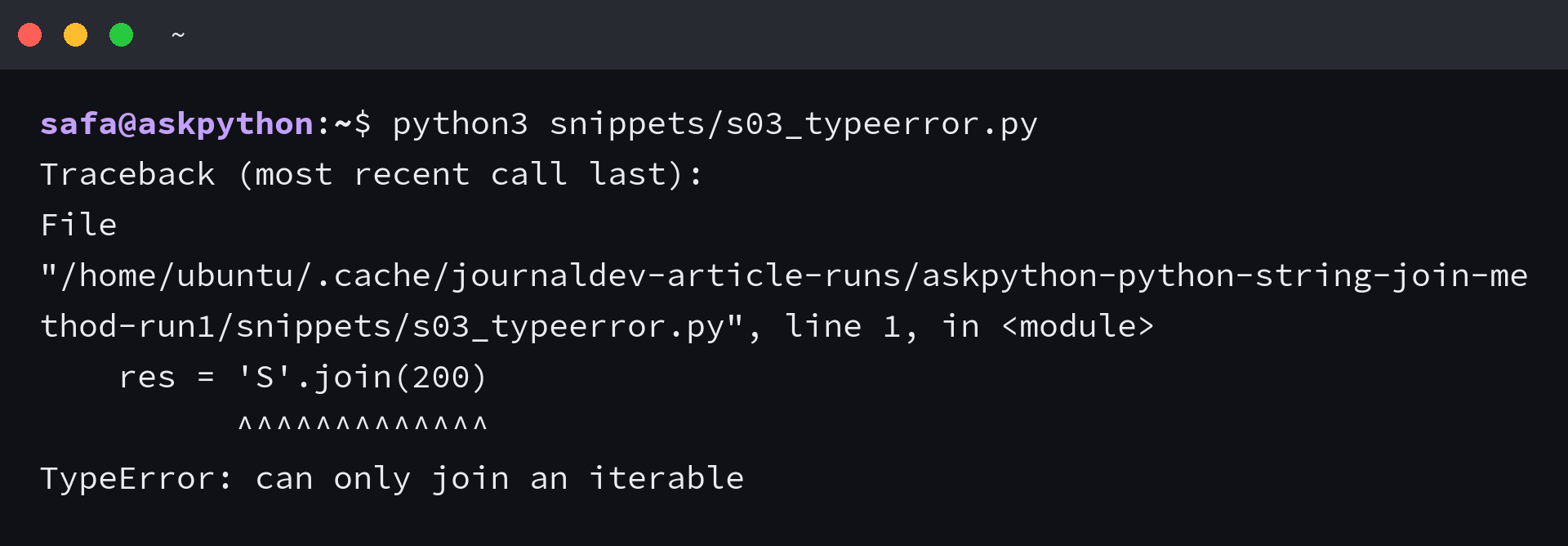
A non-iterable argument fails before any item is inspected. Passing the number 200 gives this traceback on current Python.
res = 'S'.join(200)
print(res)
Traceback (most recent call last):
  File "s03_typeerror.py", line 1, in <module>
    res = 'S'.join(200)
          ^^^^^^^^^^^^^
TypeError: can only join an iterable
A non-string item fails later, after iteration starts. Integer dictionary keys trigger the second message, which names the offending position.
print('##'.join({1: 'Python', 2: 'Java'}))
Traceback (most recent call last):
  File "s09_dict_int_keys.py", line 1, in <module>
    print('##'.join({1: 'Python', 2: 'Java'}))
          ^^^^^^^^^^^^^^^^^^^^^^^^^^^^^^^^^^^
TypeError: sequence item 0: expected str instance, int found
Bytes fail the same way, since the method rejects them alongside every other non-string type. The fix for all three cases is one conversion before the call.
print('##'.join(map(str, {1: 'Python', 2: 'Java'})))
1##2
Both errors and their fixes in one place for quick reference.
| Error message | What broke | Fix |
|---|---|---|
| can only join an iterable | The argument is not iterable at all | Pass a list or another iterable of strings |
| sequence item 0: expected str instance, int found | One item has the wrong type | Convert first with map(str, items) |
What you have now
You can turn any string iterable into one delimited string, convert what is not a string first, and read both TypeErrors at a glance. One decision rule remains, and it concerns the loop you might have written instead.
Repeated concatenation with plus in a loop rebuilds the string on every pass while join measures once and writes once. I timed both on 500 short strings and join finished in 0.012 seconds against 0.075 for the loop.
Two lookalikes deserve a last word. The os.path.join function builds file paths with the right separator for the machine, which is a different job from gluing text, and an empty separator simply concatenates with nothing between the items.
import os
print(os.path.join('data', 'out.csv'))
print(''.join(['a', 'b', 'c']))
data/out.csv
abc
Three rules carry the whole method. The separator calls the method, so the delimiter sits left of the dot, and every item must be a string, with map and str converting what is not.
Split with the same separator reverses the call exactly.
Frequently asked questions
Four follow-ups come up once the basics click. Each answer assumes the sections above.
How do I split the joined string back into a list?
Call split with the same separator you joined with. If you built the string with comma join, line.split(‘,’) returns the original list, and the round trip in this article proves it.
Should I use str.join or os.path.join for file paths?
Use os.path.join for file paths because it picks the separator for the operating system. str.join with a slash only looks right until the code runs on Windows.
What does an empty separator do?
An empty separator concatenates with nothing between the items, so empty-string join of a, b, c returns abc. It glues fragments with no delimiter.
Can I join numpy arrays or pandas columns the same way?
Not with the same semantics. pandas Series.str.join glues lists stored inside cells, while numpy char.join places the separator between the characters of each element rather than between elements. I verified both on numpy 2.4.6 and pandas 3.0.5, so treat them as separate tools with join in the name.