🚀 Supercharge your YouTube channel's growth with AI.
Try YTGrowAI FreePython sorted() to Sort Lists


“Sort a dictionary by value” can mean returning a list of pairs or building a new mapping, depending on what the next step needs. Pass a dictionary straight to sorted() and Python orders its keys, then returns those keys in a list.
In Python 3.14.7, I ran sorted() on numbers and tied dictionary records, then compared the returned values with their inputs. Each call returned a new list.
What sorted() returns from an iterable
The signature, sorted(iterable, key=None, reverse=False), accepts any iterable and returns a new list, leaving the source sequence available for later work.
Tuples, sets, and generators also produce lists. A string becomes a list of characters, and a generator is consumed while sorted() reads it.
The code and terminal capture show an ordered return value beside the source sequence it preserves.
numbers = [8, 3, 5, 3]
ordered = sorted(numbers)
print(ordered)
print(numbers)
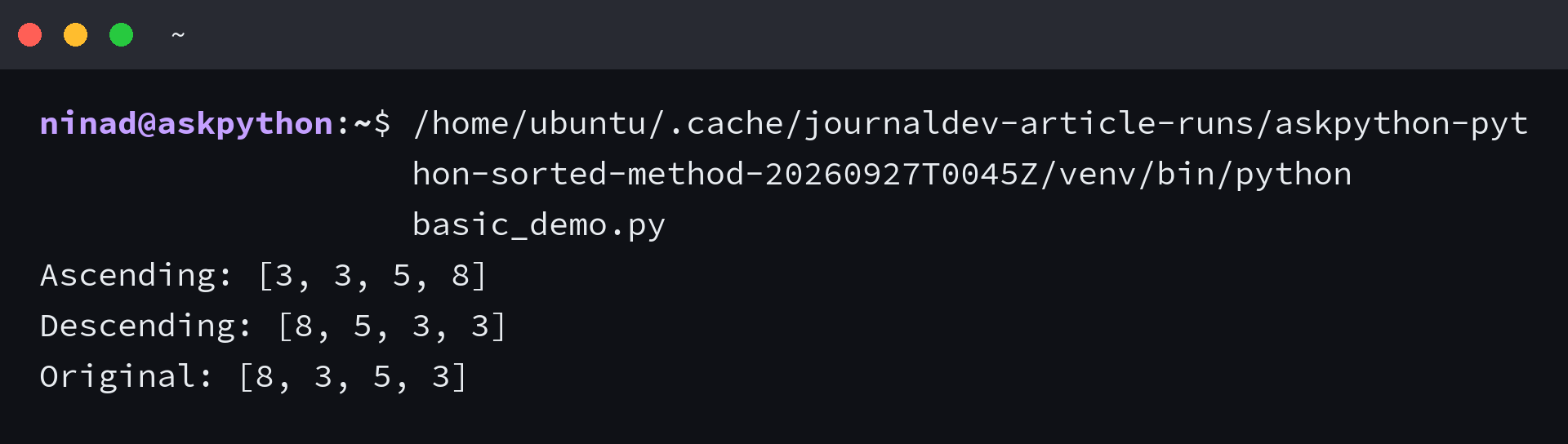
Python’s built-in function reference states that sorted() returns a list, and direct dictionary iteration supplies its keys to sort.
I tested list.sort() on a sample list and checked its mutation and return value. It changed the list and returned None.
The returned list is shallow, so its elements still refer to the original objects. If a sorted list contains dictionaries, changing a dictionary through one list changes that same record in the other list.
What your values need in common
Without a key function, Python compares elements directly, so choose values with compatible ordering such as numbers or strings.
With key=, Python compares returned values instead of displayed records, letting you sort dictionaries by a field while leaving their contents intact.
Strings sort lexicographically by their Unicode values, so uppercase and lowercase text can appear in separate groups. To ignore case, pass key=str.casefold. Locale-specific alphabetical rules need a locale-aware key such as locale.strxfrm.
Lexicographic order also compares digits as characters, so report10 can appear before report2. If those digits represent numbers, extract the numeric part in your key before sorting.
This short example compares case-folded text while returning the original strings.
labels = ["python", "Python", "PYTHON"]
print(sorted(labels, key=str.casefold))
The key changes how Python compares each item. The returned list keeps the original strings, and stable sorting preserves their order when the folded keys tie.
| Input | Choose | Result to expect |
|---|---|---|
| List of dictionaries | A field present on each record, or a fallback | Records in the selected field order |
| Dictionary mapping | Keys, values, or item pairs based on the next task | A list of the selected elements |
| Several sort fields | A tuple key or stable passes, with each direction decided | Records ordered by the fields you chose |
The Python Sorting HOWTO covers key functions, reverse order, stable ties, and sorting records through selected fields.
How to use Python sorted()
Use reverse to choose direction when the values already compare correctly. Add a key function when each element needs a separate comparison value.
Choose ascending or reverse order
Ascending order is the default. Set reverse=True when the highest values should come first. The argument changes the order of the result without changing the input iterable.
numbers = [8, 3, 5, 3]
print(sorted(numbers))
print(sorted(numbers, reverse=True))
Sort records with a key function
The key callable receives one element and returns the value Python compares. For dictionaries, operator.itemgetter() selects a field without repeating a lambda expression.
from operator import itemgetter

records = [
    {"name": "Mina", "team": "blue", "score": 84},
    {"name": "Ravi", "team": "red", "score": 91},
    {"name": "Jo", "team": "blue", "score": 84},
    {"name": "Bea", "team": "red", "score": 76},
]
by_score = sorted(records, key=itemgetter("score"))
print([(row["name"], row["score"]) for row in by_score])
A lambda keeps a one-field example beside the call. Use a named function when missing fields need special handling.
by_score = sorted(records, key=lambda row: row["score"])
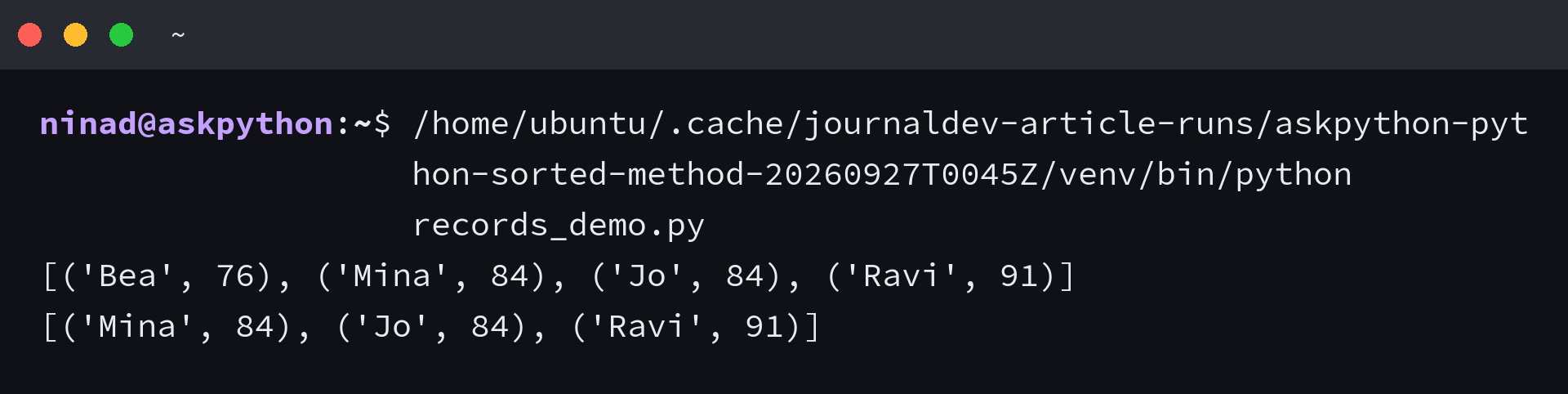
I checked the tie in ascending and descending results. Mina stays ahead of Jo because their scores are equal and Python preserves tie order even with reverse=True.
The Python HOWTO says the key callable runs once per element, so an expensive comparison value is calculated once instead of for every pairwise comparison.
Sort by several fields and keep ties stable
A tuple key handles fields that share the same direction. Python compares tuple items from left to right, so team decides first and score breaks a tie.
by_team_and_score = sorted(records, key=itemgetter("team", "score"))
For mixed directions, use stable passes from the least important field to the primary field. Sort by name first, then by score in reverse. Names keep their order among records with the same score.
by_name = sorted(records, key=itemgetter("name"))
by_score_desc = sorted(by_name, key=itemgetter("score"), reverse=True)
Sort dictionary items by value
Call .items() to sort key-value pairs together. The result is a list of pairs, and itemgetter(1) tells Python to compare each pair’s value.
from operator import itemgetter

scores = {"Mina": 84, "Ravi": 91, "Jo": 84}
print("Keys:", sorted(scores))
by_value = sorted(scores.items(), key=itemgetter(1))
print(by_value)
I compared sorted(scores) with the .items() version. The first returns keys in key order. The second orders name-score pairs by score, with Mina ahead of Jo because their scores tie.
If later code needs a dictionary, pass those pairs to dict(). Python 3.7 and later preserve insertion order, so the new dictionary iterates in the order the sorted pairs supplied.
When the names do not matter, sorted(scores.values()) returns values alone. Both values and item pairs can be sorted without changing the original mapping.
A dictionary keeps insertion order, not a live sorted order. Adding another key appends it at its insertion point. Keep the sorted pair list when each read needs sorted values.
When a sort key needs cleanup
A missing score field makes itemgetter raise KeyError, so use dict.get with a fallback to choose where those records belong.
def score_key(row):
    score = row.get("score")
    return (score is None, 0 if score is None else score)

optional_scores = [
    {"name": "Desk", "score": 80},
    {"name": "Lamp"},
    {"name": "Zero", "score": 0},
    {"name": "Chair", "score": 65},
]
ordered = sorted(optional_scores, key=score_key)
print([(row["name"], row.get("score")) for row in ordered])
- The first tuple value is False for a numeric score and True when the score is missing, which places missing scores last.
- The second value is numeric for scored rows. The fallback value keeps comparisons within the missing-score group valid.
- If “missing” means something other than None in your data, normalize that value in the key function before sorting.
I tested one row without a score and another with zero, and the key sorted zero first while sending the missing value last.
Python cannot compare an integer and a string directly, so sorted([3, “4”]) raises TypeError. Convert both values to the same meaningful type in the key function when the input is clean enough to parse.
Using int as the key compares numeric values while the result keeps its original strings. It raises ValueError if a string contains a currency symbol or other non-numeric text, so validate that field before sorting.
For numeric text, int supplies a common comparison key.
values = [3, "4"]
print(sorted(values, key=int))
Python guarantees that equal keys retain their relative input order, including with reverse=True. Earlier stable passes can therefore serve as tie-breakers.
Keep the source when both orders matter
When later work needs the original sequence, give the returned list a separate name. You can then produce more than one view from the same input without rebuilding or restoring it.
source = [8, 3, 5]
ascending = sorted(source)
descending = sorted(source, reverse=True)
Keep the list of pairs when order is the output you care about. Build a dictionary from those pairs only when the next step needs dictionary lookups.
Common questions about sorted()
Does sorted() change the original list?
No. sorted() returns a new list and leaves the input iterable unchanged. Use list.sort() when changing a list in place fits the task.
How do I sort a dictionary by value?
sorted(dictionary.items(), key=itemgetter(1)) returns a list of key-value pairs ordered by value.
How do I sort a list of dictionaries by one field?
Pass key=itemgetter(“score”) or a function that returns the field you want to compare. Every record needs that field unless your key function supplies a fallback.
Does sorted() keep equal items in order?
Yes. Python’s sort is stable, so elements with equal keys retain their original relative order. The guarantee also applies when reverse=True.