
Summary: in this tutorial, you will learn how to use the SQLite date() function to manipulate a date.
Introduction to SQLite date() function #
The date() function allows you to perform calculations on a date and returns the result in the format YYYY-MM-DD.
Here’s the syntax of the date() function:
DATE(time_value [, modifier, modifier,...])In this syntax:
time_valueis a string or a number that represents a time value. It is in the format'YYYY-MM-DD HH:MM:SS'orDDDDDDDDDD. For a complete list of formats, please reference datetime format table.modifieris used to transform the date value. The date() function can accept one or more modifiers. It applies the modifiers from left to right; therefore, the orders of modifiers will impact the result of the function. Here is the list of datetime modifiers.
The date() function returns the time_value after transformation as a string in the format 'YYYY-MM-DD'.
SQLite date() function examples #
Let’s take some examples of using the SQLite date() function.
1) Basic SQLite date() function examples #
The following example uses the date() function to return the current date:
SELECT date('now') date;Output:
date
----------
2024-04-12The following example uses the date() function to return the date of a datetime:
SELECT date('2024-04-12 14:30') date;Output:
date
----------
2024-04-12The following example uses the date() function to return the date of a time:
SELECT date('14:30:00') date;Output:
date
----------
2000-01-01If the time value has no date, the date() function always returns '2000-01-01'.
2) Getting the date from a Julian Day number #
The following example uses the date() function to return the date of a Julian Day number:
SELECT date(2460412.5) date;Output:
date
----------
2024-04-123) Adding/subtracting from a date #
The following example uses the modifier '-1 day' to subtract one day from a date:
SELECT date('2024-03-01', '-1 day') date;Output:
date
----------
2024-02-29The output indicates the date() function consider the the leap year in the calculation because it returns the correct date 2024-02-29 of the leap year.
The following example uses the modifier '+1 day' to add one day to a date:
SELECT date('2024-02-28', '+1 day') date;Output:
date
----------
2024-02-29Besides days, you can add/subtract months, years, hours, minutes, and seconds.
4) Using the date() function with multiple modifiers #
The following example shows how to use the date() function with multiple modifiers:
SELECT
date (
'2024-04-12',
'start of month',
'+1 month',
'-1 day'
) result;Output:
result
----------
2024-04-30In this example:
'2024-04-12'specifies the input date valueApril 12, 2024.-
start of month,+1 month, and-1 dayare the modifiers.
The function works as follows:
- First, apply the
start of monthmodifier to the dateApril 12, 2024so the result isApril 1, 2024. - Second, add one month to the
April 1, 2024using the+1 monthmodifier, which results in theMay 1, 2024. - Third, subtract one day from the
May 1, 2024, using the-1 daymodifier, which results inApril 30, 2024.
5) Using the date() function with table data #
We’ll use the invoices table from the sample database for the demonstration:
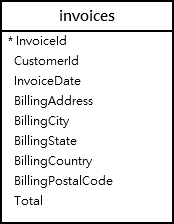
First, retrieve the invoice with the id 100 from the invoices table:
SELECT
InvoiceDate,
total,
BillingAddress,
BillingPostalCode,
BillingCountry
FROM
invoices
WHERE
InvoiceId = 100;Output:
InvoiceDate | Total | BillingAddress | BillingPostalCode | BillingCountry
--------------------+-------+----------------+-------------------+---------------
2010-03-12 00:00:00 | 3.96 | Klanova 9/506 | 14700 | Czech Republic
(1 row)The date in the invoice date has a time component. To remove the time, you can use the date() function.
Second, use the date() function to format the invoice dates from the InvoiceDate column in the invoices table:
SELECT
date(InvoiceDate) InvoiceDate,
total,
BillingAddress,
BillingPostalCode,
BillingCountry
FROM
invoices
WHERE
InvoiceId = 100;Output:
InvoiceDate | Total | BillingAddress | BillingPostalCode | BillingCountry
------------+-------+----------------+-------------------+---------------
2010-03-12 | 3.96 | Klanova 9/506 | 14700 | Czech RepublicSummary #
- Use the
date()function to convert a valid date or datetime into a date format'YYYY-MM-DD'.
Thank you for your feedback!
