Implement command bars as described in the spec. For example:

Initially it may seem that a Command Bar is just a row of buttons; however, there are certain expectations on height and spacing. More importantly, the logic can get complex once you consider the open/closed state capability as well as automatic dynamic overflow of items into the "secondary commands" menu (shown when "..." button is clicked).
Command bars will be used heavily in my project and so I've implemented a basic version as a starting point. I'll share a PR to see if it is an OK starting point. It does not have dynamic overflow, but instead provides either clipping, horizontal scrolling, or wrapping to handle overflow.
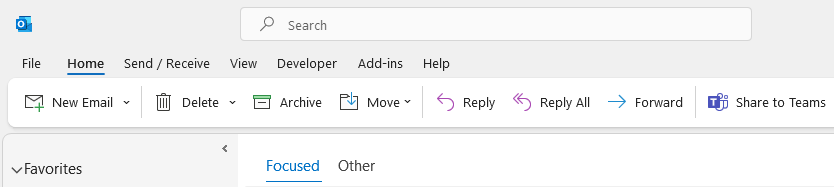
Also, it's not mentioned in the spec, but command bars are sometimes contained within a raised card. For example, the application-level command bar for desktop Microsoft Office apps looks like:
A CommandBarCard will be provided to standardize the look/feel for any "raised" command bars as well.


Implement command bars as described in the spec. For example:
Initially it may seem that a Command Bar is just a row of buttons; however, there are certain expectations on height and spacing. More importantly, the logic can get complex once you consider the open/closed state capability as well as automatic dynamic overflow of items into the "secondary commands" menu (shown when "..." button is clicked).
Command bars will be used heavily in my project and so I've implemented a basic version as a starting point. I'll share a PR to see if it is an OK starting point. It does not have dynamic overflow, but instead provides either clipping, horizontal scrolling, or wrapping to handle overflow.
Also, it's not mentioned in the spec, but command bars are sometimes contained within a raised card. For example, the application-level command bar for desktop Microsoft Office apps looks like:
A
CommandBarCardwill be provided to standardize the look/feel for any "raised" command bars as well.