- VSCode Version: 1.13.0
- OS Version: Windows 7, 10.
Steps to Reproduce:
- Go to "Control Panel\Appearance and Personalization\Display", set text size to "Medium - 125%"
- Set
"window.zoomLevel": 0, move the cursor around, observe it occasionally being twice as wide:
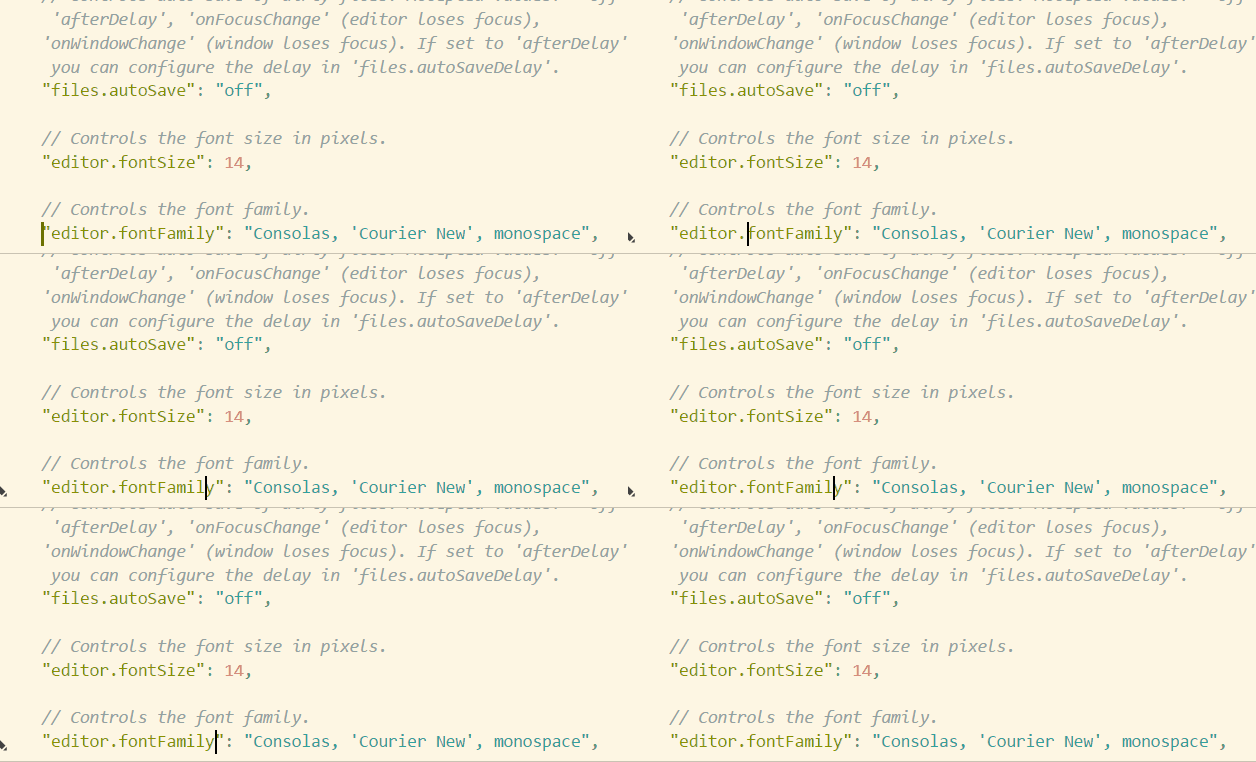
This is more or less a duplicate of #22904, except the workaround there was to not use window.zoomLevel at all, while in my case I'm not using it, it's Chromium deciding to respect the OS setting in a way that breaks vscode rendering if I understand it correctly.
Anyway, I want to add an actual work-around, two even.
-
Set window.zoomLevel to -1.25 -1.2239 (edit: see below comments, that was close enough though) , this will negate the OS setting.
The actual formula seems to be -(OS_zoom - 100) / 20: each negative point in zoomLevel decreases text size by 20%, in a sense of dividing text size by 1 + 0.2 * zoomLevel. So if we need to compensate for a 25% increase, we need -1.25 points, and for 50% it's -2.5 points. actually it's 1.2 raised to the power of zoomLevel, positive or negative.
-
Or if you'd prefer a larger UI instead, you can set zoomLevel to 1, this gives you 1.25 * 1.2 = 1.5 combined zoom factor, which apparently doesn't produce the same artifacts.


Steps to Reproduce:
"window.zoomLevel": 0, move the cursor around, observe it occasionally being twice as wide:This is more or less a duplicate of #22904, except the workaround there was to not use
window.zoomLevelat all, while in my case I'm not using it, it's Chromium deciding to respect the OS setting in a way that breaks vscode rendering if I understand it correctly.Anyway, I want to add an actual work-around, two even.
Set
window.zoomLevelto-1.25-1.2239 (edit: see below comments, that was close enough though) , this will negate the OS setting.The actual formula
seems to beactually it's 1.2 raised to the power of zoomLevel, positive or negative.-(OS_zoom - 100) / 20: each negative point in zoomLevel decreases text size by 20%, in a sense of dividing text size by1 + 0.2 * zoomLevel. So if we need to compensate for a 25% increase, we need -1.25 points, and for 50% it's -2.5 points.Or if you'd prefer a larger UI instead, you can set zoomLevel to 1, this gives you
1.25 * 1.2 = 1.5combined zoom factor, which apparently doesn't produce the same artifacts.