24
 Apr 13, 2017
— https://sf.gl/1438
Apr 13, 2017
— https://sf.gl/1438
How to use Apple’s SF Mono font in your editor
At WWDC 2016, Apple unveiled a brand new font which was called San Francisco. The font went on to become the default font in macOS and iOS, replacing Helvetica (which replaced Lucida Sans). On watchOS, a special Compact variant of San Francisco, was used.
Later, Apple introduced yet another variant, a monospaced variant, which I think simply looks fantastic – especially on a high-resolution display like the MacBook. It has gone and replaced my previous favourite monospace font, Anonymous Pro.

Weirdly enough, the fonts are not available for selection in macOS, you just can't use San Francisco for editing a document in Pages, for example.
Currently, though, the standard and Compact versions of San Francisco is available on Apple's developer portal, but unfortunately the monospaced version is not.
Fortunately, if you have macOS Sierra, the version is included inside the Terminal.app in macOS.
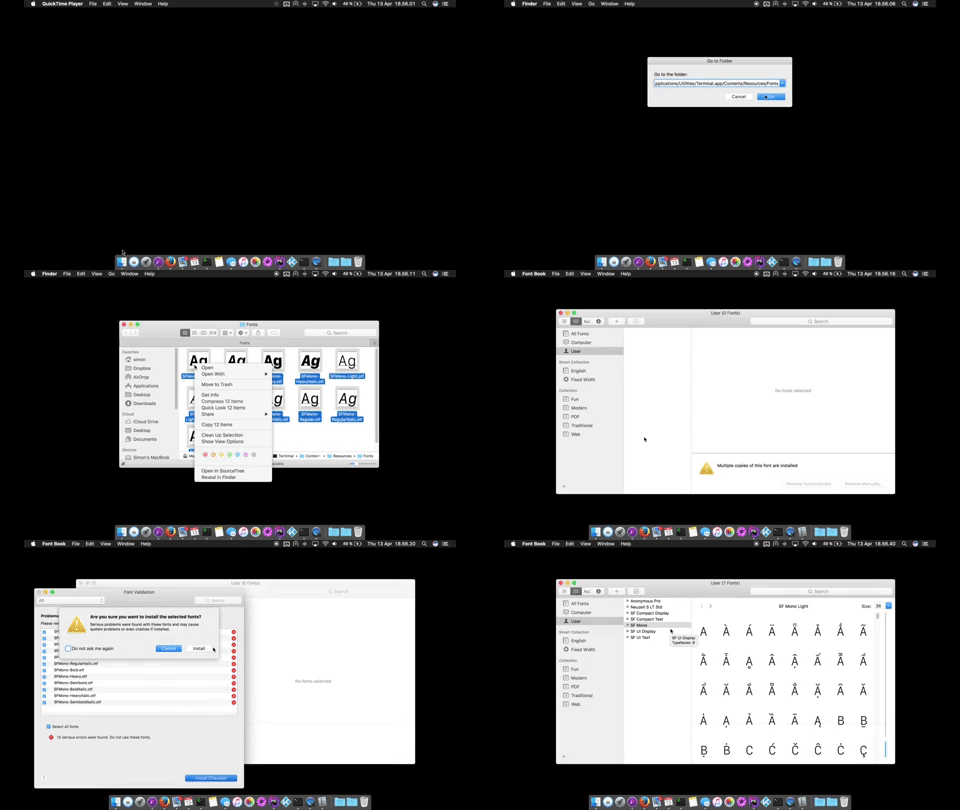
Here's how you extract the font from Terminal.app and install it on your computer so you can use it in your text editor, for example:
- Go to Terminal.app's resources folder:
- Right click the Finder icon in the Dock
- Click 'Go to Folder...'
- Enter this path: /Applications/Utilities/Terminal.app/Contents/Resources/Fonts
- Click Go
- You'll see a list of fonts in the folder.
- Select all of the fonts in the folder.
- Right click on them and click 'Open'
- A window will pop-up previewing the font. Click Install Font.
- You'll perhaps get a window that says there's problems with the fonts. I did too.
- Go ahead and click 'Select all fonts'
- Click 'Install Checked'
- You'll get another dialog
- Click 'Install'
- Font Book will show the new font as installed. You'll now be able to select the SF Mono font in your editor. ?
Here's a GIF of the whole process:

Jul 8, 2017 at 15:46
Thanks Simon! I found SF Mono in my Terminal this morning, liked it, and your tutorial helped me to use it in MacVim. Appreciate it.
Jul 28, 2017 at 2:53
Wow, thanks!
Aug 8, 2017 at 7:21
Thanks man, you helped me lots
Aug 8, 2017 at 11:13
You are the man!
Aug 11, 2017 at 5:37
Thank you so much!
Sep 5, 2017 at 15:04
Thanks a lot!
Oct 21, 2017 at 11:42
Note that on High Sierra 10.13 (and possibly other versions) you get “serious error” if you try to install the fonts directly from this folder. Copy the fonts to your desktop first and install from there.
Oct 21, 2017 at 11:54
`cp /Applications/Utilities/Terminal.app/Contents/Resources/Fonts/* ~/Library/Fonts`
Done! :)
Oct 24, 2017 at 11:58
Thanks for the tip. The SF fonts are designed for on-screen viewing so Apple hid them from you in any application where you could possibly print a document in the SF font.
Nov 4, 2017 at 9:51
Thanks man, I wanted this for Android Studio. That Menlo font is too fat.
Dec 5, 2017 at 18:02
I did the steps exactly as described, but at the end the fonts just don’t appear in the font book (or anywhere else)
Dec 5, 2017 at 18:47
P.S. It works when installing from another folder, like sushpa user described.
Jan 11, 2018 at 1:03
Upon installing the font, does it work with Microsoft Word for Mac 2016?
Jan 11, 2018 at 9:40
Hi Bruce,
I can confirm it works with Word for Mac.
Simon
Mar 2, 2018 at 10:10
Good job!
May 19, 2018 at 21:13
Worked great.
I used this reference for changing for Sublime Text 3 default font:
https://www.sublimetext.com/docs/3/font.html
May 29, 2018 at 21:03
[…] to manually install it in order to get it for all other apps. Thank you so much, Simon, for sharing a blog about how to do this. Basically, it’s very easy to install it all over the […]
Jun 4, 2018 at 14:35
What is that Activity Monitor-style terminal process you’re running in the first image?
Jun 4, 2018 at 15:45
That’s
htop:)Jul 25, 2018 at 23:42
Thank you!
Nice font, may replace my long-time favorite, Menlo.
Jun 23, 2019 at 23:40
Thanks!!! This was very helpful.
Apr 13, 2021 at 20:59
I have a question is that how to change the fonts style in Linux I newly used Linux but I don’t know how to change the fonts style in Linux
Aug 10, 2021 at 14:47
Howdy everyone!
This is a great sharing about Apple’s SF Mono font with our editor!
Good luck!
Sep 24, 2024 at 6:51
Hemant Kumar